Blue Green and Canary Deployment Monitoring: Decide When to Roll Back
5% of traffic is on the new version and error rates look a little higher is that a real problem or just noise from a small sample? Learn how to build canary and blue green monitoring that answers that question with data, not a guess under pressure.
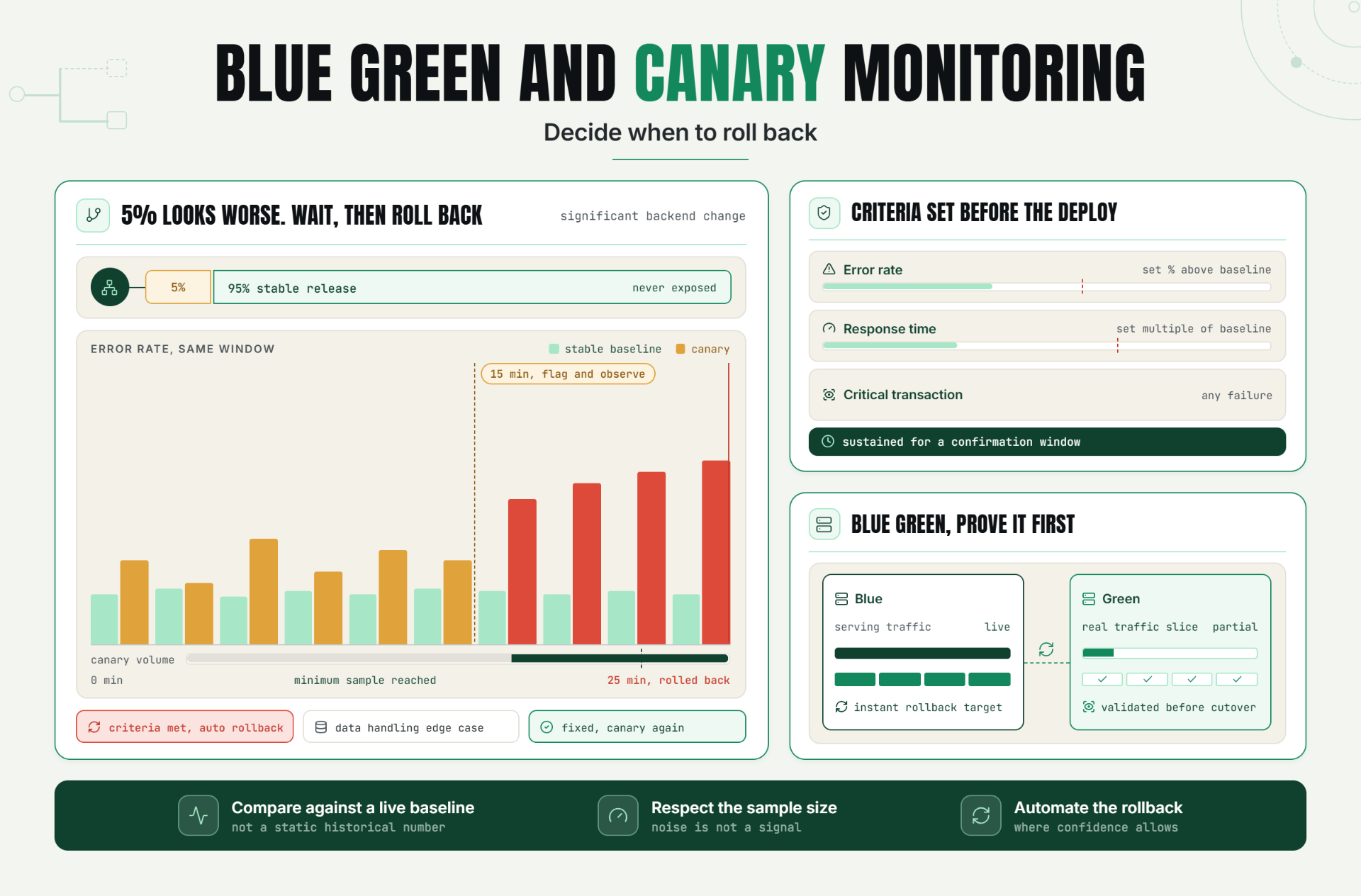
Five percent of your traffic is now hitting the new version. Error rates on that slice look a little higher than the baseline, but not dramatically so. Is this the canary telling you something real, or is this just noise from a small sample size? Whoever's on call has about ten minutes to decide correctly, and the entire point of the deployment strategy was to make that decision safer, not harder.
Canary deployment monitoring and blue green deployment strategies both exist to reduce the blast radius of a bad release. But the safety they provide is only as good as the monitoring watching them, and specifically only as good as the criteria someone defined in advance for what counts as "bad enough to roll back."
Why Canary Deployment Monitoring Matters to Reliability and Customer Experience
Canary and blue green deployments are both designed around the same core idea: don't expose all your users to a new release at once. A canary release sends a small percentage of traffic to the new version while the majority continues on the stable one, allowing real production signals to surface before a full rollout. Blue green deployment keeps two complete, parallel environments and switches traffic between them, allowing a near instant rollback if the new environment shows problems.
Both strategies meaningfully reduce risk compared to a single, all at once release but only if the monitoring watching the canary or the new environment is sensitive enough to catch a real problem in a small sample, and specific enough to distinguish an actual regression from ordinary statistical noise. Release health monitoring built around these deployment patterns has to answer a genuinely harder question than standard uptime monitoring: not just "is this healthy," but "is this small, early slice of traffic showing something the rest of my users are about to experience too."
The Operational Risk of Weak Canary and Blue Green Monitoring
Teams running these deployment strategies without sufficiently rigorous monitoring tend to run into a specific, recurring set of problems:
- Small sample sizes make normal variation look alarming, or real problems look like noise. A canary receiving a small percentage of traffic will naturally show more volatile metrics than the full production baseline, and without accounting for this, teams either panic over statistical noise or dismiss a genuine signal as "probably nothing."
- Vague rollback criteria lead to slow, inconsistent decisions. Without specific, predefined thresholds, a rollback decision becomes a judgment call made under time pressure, often by whoever happens to be on call, with no consistent standard applied across different releases.
- Canary monitoring frequently checks the wrong things. Overall error rate and response time are useful, but they can miss a regression specific to a particular user segment, region, or use case that happens to be underrepresented in the canary's traffic slice.
- Blue-green environments aren't always validated as thoroughly as the traffic serving environment. It's easy to assume the new environment is production ready simply because it passed pre deployment tests, without confirming it behaves correctly under a genuine slice of real traffic before a full cutover.
The cost of weak monitoring here isn't just a bad release slipping through it's the erosion of trust in the deployment strategy itself. If canary releases regularly fail to catch real problems, or regularly generate false alarms, teams stop trusting the process and either skip it under time pressure or ignore its signals when they matter most.
How Canary Deployment Monitoring Works: Key Signals, Thresholds, and Diagnosis
Canary Metrics That Actually Matter
Effective canary metrics compare the canary's behavior directly against the stable baseline running simultaneously, rather than against a static historical number. This comparison approach accounts for anything affecting both versions equally, such as a broader traffic spike, and isolates what's actually different about the new version specifically.
Key metrics worth this direct comparison include error rate, response time, and success rate on critical transactions, measured on the canary slice and the stable baseline at the same time, over the same window.
Statistical Confidence and Sample Size
Because a canary typically receives a smaller fraction of overall traffic, its metrics will naturally show more volatility than the full production baseline. A meaningful canary deployment monitoring setup accounts for this by either requiring a minimum sample size before drawing conclusions, or using comparison methods that account for the smaller sample's inherent noisiness, rather than applying the same fixed threshold used for full scale, high volume monitoring.
Blue Green Deployment Checks
Blue green deployment checks focus on validating the new environment under real, or near real, conditions before it fully takes over serving traffic. This typically includes running the new environment against a portion of live traffic (if the infrastructure supports partial routing) or a thorough synthetic validation suite that closely mirrors real user behavior, confirming health before the traffic switch rather than discovering problems immediately after.
Setting Rollback Criteria
Rollback criteria should be specific, measurable, and agreed upon before the deployment begins, not decided in the moment. Useful criteria typically include: error rate exceeding a defined percentage above the stable baseline, response time exceeding a defined multiple of baseline, or any failure in a designated critical transaction check, sustained for a minimum confirmation window to rule out a brief, non representative blip.
Diagnosis: Is the Canary Actually Showing a Real Problem?
The core diagnostic question is whether the canary's deviation is statistically meaningful and specific to the new version, or explainable by normal variation and small sample size. Comparing the canary directly against the simultaneously running stable baseline, rather than a historical average, is the clearest way to isolate whether something is genuinely different about the new release itself.
A Practical Production Scenario
A platform team runs a canary release for a significant backend change, routing 5% of traffic to the new version while the remaining 95% continues on the stable release. Fifteen minutes in, the canary's error rate looks noticeably higher than the stable baseline but the canary's total request volume is small enough that this could plausibly be a handful of unrelated errors rather than a genuine pattern.
Because the team's canary monitoring is configured with a minimum sample size requirement before triggering an alert, and compares the canary directly against the simultaneously running stable baseline rather than a static historical number, the system holds off on an automatic rollback recommendation, instead flagging the trend for continued observation.
Ten more minutes of traffic confirm the pattern: the canary's error rate remains consistently and significantly elevated relative to the stable baseline, now with enough volume to rule out random noise. The predefined rollback criteria are met, and the release is automatically rolled back before the change ever reaches the remaining 95% of traffic. The specific bug a data handling edge case introduced in the new version is identified and fixed before a second, corrected release goes through the same canary process.
Recommended Monitor Setup
- Compare canary metrics directly against a simultaneously running stable baseline, not a static historical number.
- Require a minimum sample size or confirmation window before treating a canary deviation as a real signal, to avoid reacting to small sample noise.
- Define specific, measurable rollback criteria before the deployment begins, covering error rate, response time, and critical transaction success.
- Validate blue green environments against real or near real traffic conditions before the full cutover, not just pre deployment synthetic tests.
- Monitor canary metrics broken down by relevant segments (region, user type) where feasible, not just as one combined aggregate.
Best Practices for Canary and Blue Green Deployment Monitoring
Always Compare Against a Simultaneous Baseline
Comparing the canary or new environment against what the stable version is doing at the exact same time isolates the effect of the new release from anything else happening across the broader system.
Account for Sample Size Before Reacting
A canary's smaller traffic volume means its metrics will naturally be noisier. Build this into your monitoring logic explicitly, rather than applying full scale thresholds to a fraction scale sample.
Define Rollback Criteria Before the Deployment, Not During It
Specific, agreed upon thresholds remove ambiguity and delay from a rollback decision, which matters most exactly when time pressure is highest.
Validate Critical Transactions on the Canary Specifically
General error rate and response time are useful, but confirming that core business critical flows work correctly on the new version specifically catches regressions that broader metrics might miss.
Test Blue Green Environments Under Real Conditions Before Full Cutover
Pre deployment synthetic testing is valuable, but validating the new environment against genuine live traffic, even a small portion, catches issues that synthetic tests alone often miss.
Automate the Rollback Decision Where Confidence Allows
For well understood, clearly defined criteria, automating the rollback decision removes human hesitation and delay from the highest pressure moment of the release process.
Common Mistakes in Canary and Blue Green Deployment Monitoring
Mistake 1: Comparing Canary Metrics Against a Static Historical Baseline
Why it happens: a fixed historical number is simpler to configure than a live, simultaneous comparison.
What to do instead: compare the canary directly against the stable version running at the same time, isolating what's actually different about the new release.
Mistake 2: Ignoring Sample Size When Evaluating Canary Metrics
Why it happens: it's tempting to react immediately to any deviation without considering whether the sample is large enough to be meaningful.
What to do instead: require a minimum sample size or confirmation window before treating a canary signal as conclusive, to avoid both false alarms and premature dismissal of real problems.
Mistake 3: Deciding Rollback Criteria During the Deployment Itself
Why it happens: it feels natural to assess the situation once real data starts coming in.
What to do instead: agree on specific, measurable rollback criteria before the deployment begins, so a real incident doesn't turn into a debate under time pressure.
Mistake 4: Only Monitoring Aggregate Metrics on the Canary
Why it happens: a single combined view is simpler to build and watch than segmented metrics.
What to do instead: break down canary metrics by relevant segments where feasible, since a regression affecting a specific region or user type can be diluted into invisibility in an aggregate view.
Mistake 5: Assuming a Blue Green Environment Is Ready Because It Passed Pre Deployment Tests
Why it happens: pre deployment testing feels like sufficient validation on its own.
What to do instead: validate the new environment against real or near real traffic conditions before the full cutover, since synthetic tests alone often miss issues that only appear under genuine production load.
Mistake 6: Treating Every Canary Deviation With the Same Urgency
Why it happens: without differentiated criteria, every metric change can look equally alarming.
What to do instead: define tiered response criteria, distinguishing between deviations worth continued observation and those that meet the actual predefined threshold for an immediate rollback.
Start Making Rollback Decisions With Real Data, Not Guesswork
A canary or blue green deployment strategy only reduces risk if the monitoring behind it is sensitive enough to catch a real problem in a small sample, and specific enough to avoid mistaking noise for a genuine signal.
Start a 30 day Statixoup beta and configure release health monitoring built around clear, predefined criteria for your canary and blue green deployments. The next rollback decision won't have to be a ten-minute guess under pressure.