"But It Works On My Connection": The Dual Stack Blind Spot in IPv6 Monitoring
Your monitor checks IPv4 and calls it done but a growing share of your traffic connects over IPv6. Learn how dual stack blind spots form and how to monitor both properly.
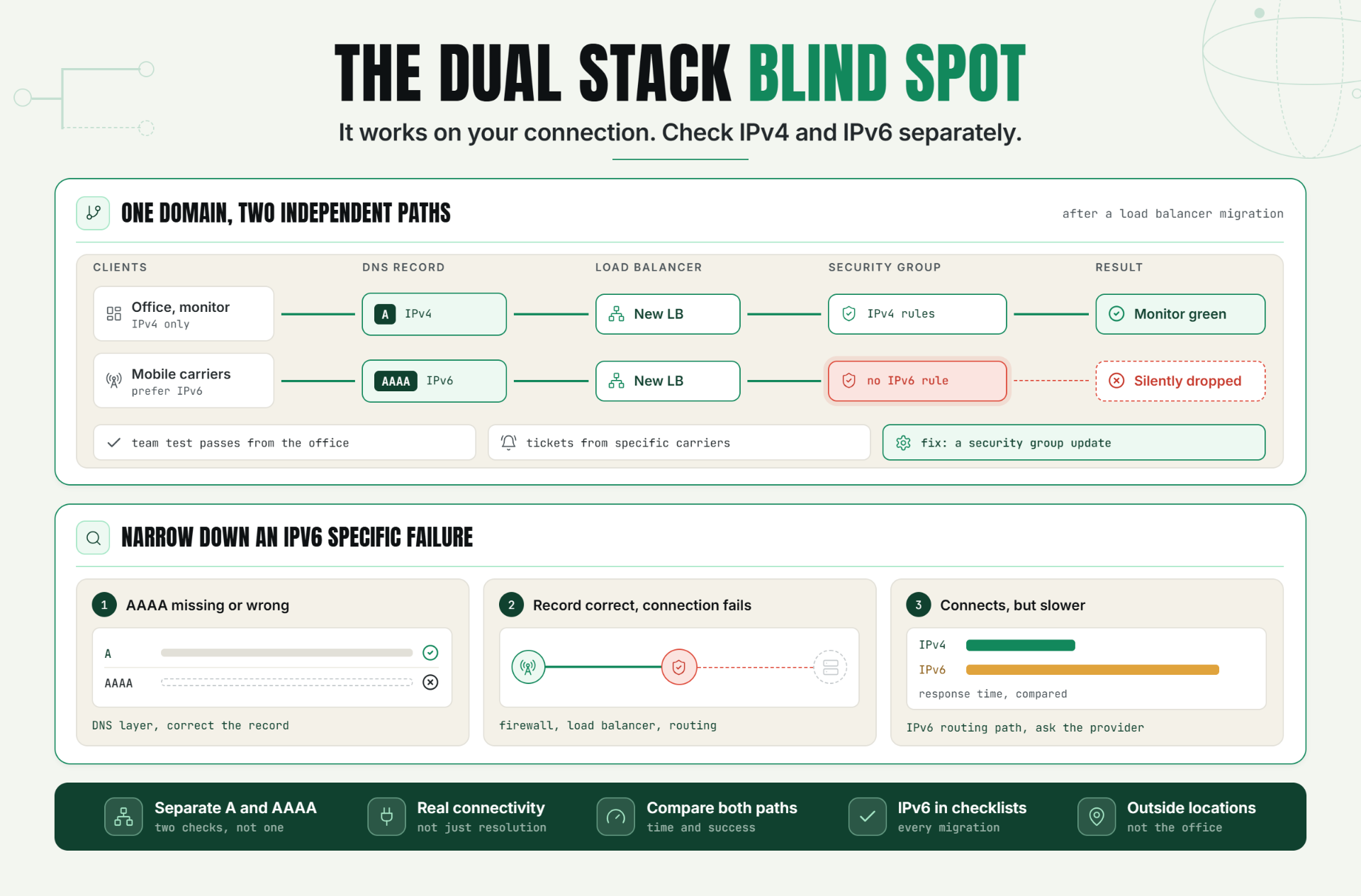
Your monitoring dashboard is green. Your team can reach the site fine. And yet a meaningful slice of your visitors often the exact ones on newer mobile carriers and modern ISPs are hitting a connection that quietly fails, because your monitoring only ever checked one of the two addresses your domain actually resolves to.
This is the dual stack blind spot, and it's less an edge case than most teams assume: mobile carrier networks in particular have pushed IPv6 adoption hard for years, which means a "works for me" test from a typical office or home broadband connection tells you almost nothing about what a large chunk of your mobile traffic is actually experiencing.
Myth vs. Reality: What Most Teams Believe About IPv4/IPv6
Myth: "If our A record works, our AAAA record works too."
Reality: These are two completely independent DNS records, served by potentially different infrastructure paths, and there's no guarantee that fixing or maintaining one automatically keeps the other correct. An AAAA record check is a separate task from checking your A record, not a redundant one.
Myth: "IPv6 is still early, so it doesn't really matter yet."
Reality: Mobile carrier networks have driven substantial IPv6 adoption for years in many regions, meaning a meaningful share of mobile visitors may already be connecting over IPv6 by default, whether or not your team has actively thought about it.
Myth: "If the site loads for our team, dual stack must be fine."
Reality: Office and home broadband connections are disproportionately likely to still default to IPv4, which means your internal team is often the worst possible sample for judging real world IPv4 vs IPv6 availability.
Myth: "Our CDN or hosting provider handles this automatically."
Reality: Many providers do support dual stack out of the box, but "supported" and "correctly configured and monitored" are different things a misconfigured AAAA record, a firewall rule that only accounts for IPv4, or a load balancer with incomplete IPv6 support can all break IPv6 reachability while IPv4 keeps working perfectly.
Why This Matters More Than It Used To
Dual stack means your domain publishes both an A record (IPv4 address) and an AAAA record (IPv6 address), and a visitor's device and network decide which one to actually use generally preferring IPv6 when it's available and working correctly. This is meant to be a seamless transition mechanism, and for the most part, it is.
The problem is what happens when it isn't seamless: a client that prefers IPv6, encounters a broken or misconfigured IPv6 path, and doesn't always fall back to IPv4 cleanly or quickly. Depending on the client's specific implementation, this can range from a slower connection (falling back after a timeout) to an outright failure to connect at all. Either way, the visitor's experience depends entirely on the health of a network path your monitoring may never actually be checking.
Network reachability isn't a single, binary property anymore it's a property of a specific protocol version, and needs to be verified as such.
The Operational Risk of Single Stack Monitoring
Most monitoring setups default to checking IPv4 exclusively, for reasons that made sense historically and simply never got revisited:
- Monitoring tools and scripts often default to IPv4 unless explicitly configured otherwise. A monitor that "just works" out of the box is frequently only checking one of your two actual paths.
- Internal testing rarely surfaces the gap. Office networks, VPNs, and many home ISPs still default to or exclusively use IPv4, meaning a team's own manual checks are structurally unlikely to catch an IPv6 specific failure.
- A broken AAAA record doesn't necessarily break the domain for everyone just for an unpredictable, often invisible subset. This is precisely the kind of partial, hard to notice failure that erodes trust and conversions slowly rather than triggering an obvious, all hands incident.
- IPv6 specific misconfigurations are genuinely different from IPv4 ones. A firewall rule, a load balancer health check, or a security group written with only IPv4 in mind can silently fail to cover IPv6 traffic at all, even when every IPv4 focused check passes cleanly.
Without checks covering both protocol versions independently, teams typically don't discover an IPv6 specific outage through their own monitoring at all they discover it through a support ticket from a specific mobile carrier's users, or not at all, with the cost showing up only as an unexplained, hard to trace conversion gap on certain networks.
How Dual Stack Monitoring Actually Works
Checking Both Records Independently
Dual stack monitoring starts with treating the A and AAAA records as two separate things to verify, not one combined "DNS is fine" check. This means confirming both records exist, both resolve to the correct, current addresses, and both are actually reachable not just present in DNS.
Testing Actual Connectivity, Not Just DNS Resolution
A correct AAAA record doesn't guarantee a working IPv6 path. IPv6 connectivity needs to be tested end-to-end: can a client actually establish a connection over IPv6 and receive a valid response, not just resolve the hostname to an IPv6 address.
Comparing Behavior Across Both Protocols
The most valuable signal in dual stack monitoring is often the comparison between the two: is response time and success rate roughly equivalent across IPv4 and IPv6, or is one meaningfully worse? A significant divergence IPv6 succeeding but consistently slower, or failing outright while IPv4 works fine is the clearest sign something in your IPv6 specific infrastructure path needs attention.
Key Signals to Track
| Signal | What It Catches |
|---|---|
| AAAA record presence and correctness | Missing or misconfigured IPv6 DNS record |
| IPv6 connection success rate | Whether IPv6 clients can actually reach your infrastructure |
| IPv6 vs IPv4 response time comparison | A degraded or misconfigured IPv6 specific path |
| IPv6 vs IPv4 success rate comparison | A firewall, load balancer, or security rule missing IPv6 coverage |
| Consistency across multiple check locations | Whether an IPv6 issue is global or tied to specific network paths |
Diagnosis: Narrowing Down an IPv6 Specific Failure
- AAAA record missing or incorrect → the issue is at the DNS layer; verify and correct the record itself.
- AAAA record correct, but connection fails → the issue is likely in network level configuration: firewall rules, load balancer settings, or routing that wasn't updated to account for IPv6 traffic.
- Connection succeeds but is meaningfully slower than IPv4 → often points to a less optimized or less tested IPv6 specific routing path, worth investigating with your hosting or network provider.
A Practical Production Scenario
A SaaS company migrates to a new load balancer as part of a broader infrastructure upgrade. The migration checklist thoroughly covers IPv4 configuration health checks, security groups, routing rules and the team verifies everything works correctly from their office network, which exclusively uses IPv4.
Within days, a small but consistent stream of support tickets starts arriving, disproportionately from mobile users on a specific set of carriers, describing intermittent connection failures the internal team can't reproduce. Standard IPv4 based uptime monitoring shows a perfectly healthy service throughout.
Adding a dedicated IPv6 connectivity check reveals the actual issue immediately: the new load balancer's security group was configured with IPv4 only rules, and the AAAA record still pointed to it, meaning any client connecting over IPv6 was being silently dropped. IPv4 traffic never noticed a thing. The fix is a straightforward security group update but it went undetected for as long as it did purely because no check was independently verifying the IPv6 path.
Recommended Monitor Setup
- Monitor both A and AAAA records independently, confirming both exist and resolve to the correct, current values.
- Test actual end-to-end connectivity over both IPv4 and IPv6, not just DNS resolution.
- Compare response time and success rate between the two protocols as an ongoing signal, not just a one time check.
- Include IPv6 specific coverage explicitly in any infrastructure migration or configuration change checklist.
- Check from multiple locations and networks, since IPv6 path quality can vary more than IPv4's more mature routing infrastructure.
Best Practices for IPv6 and Dual Stack Monitoring
Monitor A and AAAA records as two separate, independent checks. Treating DNS health as a single combined signal hides exactly the kind of one record broken, one record fine scenario that causes real, if partial, outages.
Test real connectivity, not just DNS resolution. A correct AAAA record with a broken network path behind it still results in a failed connection for real IPv6 clients verify the full path, not just the DNS layer.
Compare IPv4 and IPv6 performance as an ongoing practice. A meaningful, sustained divergence between the two is often the earliest available signal of an emerging IPv6-specific problem.
Add explicit IPv6 verification to every infrastructure change checklist. Migrations, new load balancers, firewall updates, and security group changes should all be checked for IPv6 coverage specifically, not assumed to be handled by whatever IPv4 configuration was verified.
Don't rely on internal team testing to catch IPv6 issues. Office networks, VPNs, and many home connections are more likely than average to default to or exclusively use IPv4, making internal spot checks a poor substitute for dedicated dual stack monitoring.
Check from multiple external locations. IPv6 routing infrastructure, while mature, can still vary more in quality and reachability across different networks and regions than IPv4's longer established paths.
Common Mistakes
Assuming a working IPv4 setup guarantees a working IPv6 setup. These are independent configurations at the DNS, firewall, and load balancer levels, and one working correctly says nothing about the other.
Only testing from internal networks that default to IPv4. This is one of the most common reasons IPv6 issues go undetected internally for so long the people testing are structurally unlikely to be using the affected path.
Treating DNS resolution as proof of connectivity. A correct AAAA record confirms DNS is configured properly; it says nothing about whether an actual connection over IPv6 will succeed.
Leaving IPv6 out of infrastructure change checklists. Migrations and configuration updates that thoroughly cover IPv4 can leave IPv6 completely unaddressed, simply because nobody explicitly included it in the review.
Not comparing IPv4 and IPv6 performance directly. Without an explicit comparison, a degraded IPv6 path can persist for a long time, since it never shows up as an outright, easily noticed failure on its own.
Assuming IPv6 traffic volume is too small to matter. Mobile carrier adoption in many regions means the affected share of traffic can be considerably larger than teams assume without checking their actual numbers.
Start Monitoring Both Sides of Dual Stack
A green uptime dashboard checking only IPv4 tells you half the story, at best. Real availability means confirming both protocol paths independently, since a working A record says nothing about the health of your AAAA record, and vice versa.
Start a30 day Statixoup beta and configure monitoring across both IPv4 and IPv6 paths for your critical domains. The next dual stack blind spot won't get to hide behind a monitor that only ever checked one side.