API Monitoring Guide: What to Check Beyond a 200 OK Response
Learn why successful API responses are not always healthy API responses. Discover how API monitoring helps validate endpoint availability, response content, latency, dependencies, and business-critical functionality beyond a simple 200 OK status code.
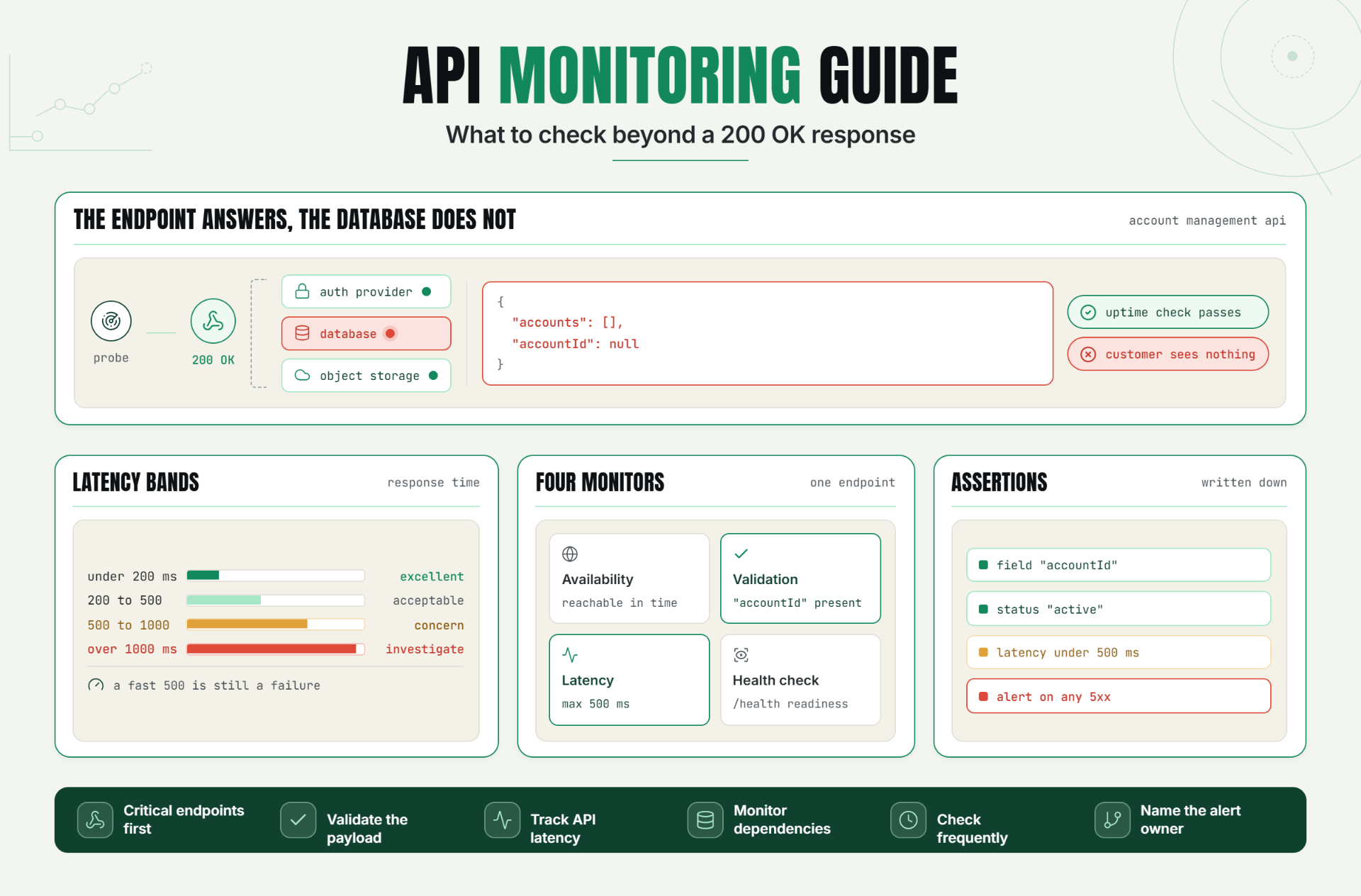
Modern applications depend on APIs for authentication, payments, product catalogs, notifications, integrations, and countless other business-critical functions. When an API fails, users often experience errors long before engineering teams become aware of the issue.
Unfortunately, many organizations rely on basic status code checks and assume an API is healthy whenever it returns a successful response.
In reality, a response can return successfully while delivering incorrect data, incomplete payloads, slow performance, or application-level errors.
API monitoring helps teams move beyond simple availability checks by validating endpoint functionality, response accuracy, performance, and overall reliability.
The Operational Risks Teams Face Without Effective API Monitoring
APIs frequently serve as the backbone of digital products. When they fail, customers may encounter login issues, checkout failures, broken integrations, or missing data.
Without effective API monitoring, teams risk:
- Undetected endpoint failures.
- Slow incident response.
- Increased downtime.
- Broken customer experiences.
- Missed SLA commitments.
- Revenue-impacting outages.
- Dependency-related failures.
Simply checking whether an API responds is often insufficient for maintaining reliable services.
How API Monitoring Works
What Is API Monitoring?
API monitoring continuously evaluates API availability, performance, response accuracy, and overall health.
Unlike basic uptime monitoring, API monitoring validates whether endpoints behave correctly under real-world conditions.
Availability Monitoring
The most basic form of monitoring confirms whether an endpoint is reachable.
Example endpoint:GET /api/statusAvailability monitoring verifies that the endpoint responds within an expected timeframe.
Response Validation
A successful response does not always indicate success.
An endpoint may return200 OK while delivering incomplete or incorrect data. Response validation checks whether expected values, fields, or content are present.
Expected JSON field:"status":"healthy"API Latency Monitoring
Performance issues can affect users even when endpoints remain available.
Latency monitoring tracks response times and identifies degradation before users complain.
| Latency | Impact |
|---|---|
| Less than 200 ms | Excellent |
| 200 - 500 ms | Acceptable |
| 500 - 1000 ms | Potential concern |
| More than 1000 ms | Requires investigation |
API Health Checks
Many systems expose dedicated health endpoints.
Example:/healthHealth checks provide insight into application readiness and dependency status.
Dependency Monitoring
Most APIs rely on external services.
Dependencies may include:
- Databases
- Authentication providers
- Payment gateways
- Cloud storage services
- Third-party APIs
Monitoring should account for dependency failures as well as endpoint availability.
Key Signals to Monitor
- Availability
- HTTP status codes
- Response validation
- Response times
- Error rates
- Dependency health
- Authentication success rates
A Realistic Production Scenario and Recommended Monitor Setup
Imagine a SaaS platform that provides customer account management through APIs.
The Problem
The endpoint returns200 OK but database connectivity fails internally. Instead of returning account data, the API responds with empty results.
Basic uptime monitoring reports success because the endpoint remains available.
Customers, however, cannot access their account information.
Recommended Monitor Configuration
| Monitor Type | Purpose |
|---|---|
| Availability Monitor | Verify endpoint accessibility |
| Response Validation Monitor | Verify expected payload fields |
| Latency Monitor | Track performance degradation |
| Health Check Monitor | Monitor service readiness |
Example Validation Rules
- Expected field: "accountId"
- Expected status: "active"
- Maximum latency: 500ms
- Alert on: 5xx responses
Best Practices: Coverage, Check Frequency, Validation, Ownership, and Escalation
1. Monitor Critical Endpoints
Prioritize endpoints that directly affect customers and revenue.
2. Validate Response Content
Verify payload correctness, not just availability.
3. Track API Latency
Slow APIs can be just as harmful as unavailable APIs.
4. Monitor Dependencies
Include database and third-party service health checks.
5. Use Frequent Checks
Short intervals reduce mean time to detect incidents.
6. Define Alert Ownership
Every monitor should have a responsible team.
7. Review Monitoring Coverage Regularly
Update monitoring as services evolve.
Common Mistakes: Weak Checks, Noisy Alerts, Missing Dependencies, and Poor Routing
Mistake 1: Monitoring Only Status Codes
Better approach: Validate response content and business logic.
Mistake 2: Ignoring Latency
Better approach: Monitor response-time thresholds.
Mistake 3: Skipping Dependency Monitoring
Better approach: Monitor databases and third-party services.
Mistake 4: Monitoring Only One Endpoint
Better approach: Monitor multiple critical workflows.
Mistake 5: Poor Alert Routing
Better approach: Ensure incidents reach the correct teams quickly.
Reliable APIs Require More Than Availability Checks
Effective API monitoring goes beyond confirming whether an endpoint responds.
By validating response content, monitoring latency, tracking dependencies, and checking business-critical workflows, teams gain deeper visibility into API health and reliability.
The first step is identifying your most important endpoints and implementing validation alongside availability monitoring.
Start Monitoring Your APIs With Confidence
Ready to move beyond simple status code checks?
Start your 30-day Statixoup trial and configure your first API monitor.
Validate endpoint responses, track API latency, and detect issues before customers experience disruptions.

