Browser Monitoring with Playwright: A Practical Guide to Production User Journeys
Learn how Playwright browser monitoring helps teams validate real user journeys in production. Discover how to monitor login flows, checkout processes, JavaScript functionality, and customer-critical workflows before users encounter problems.
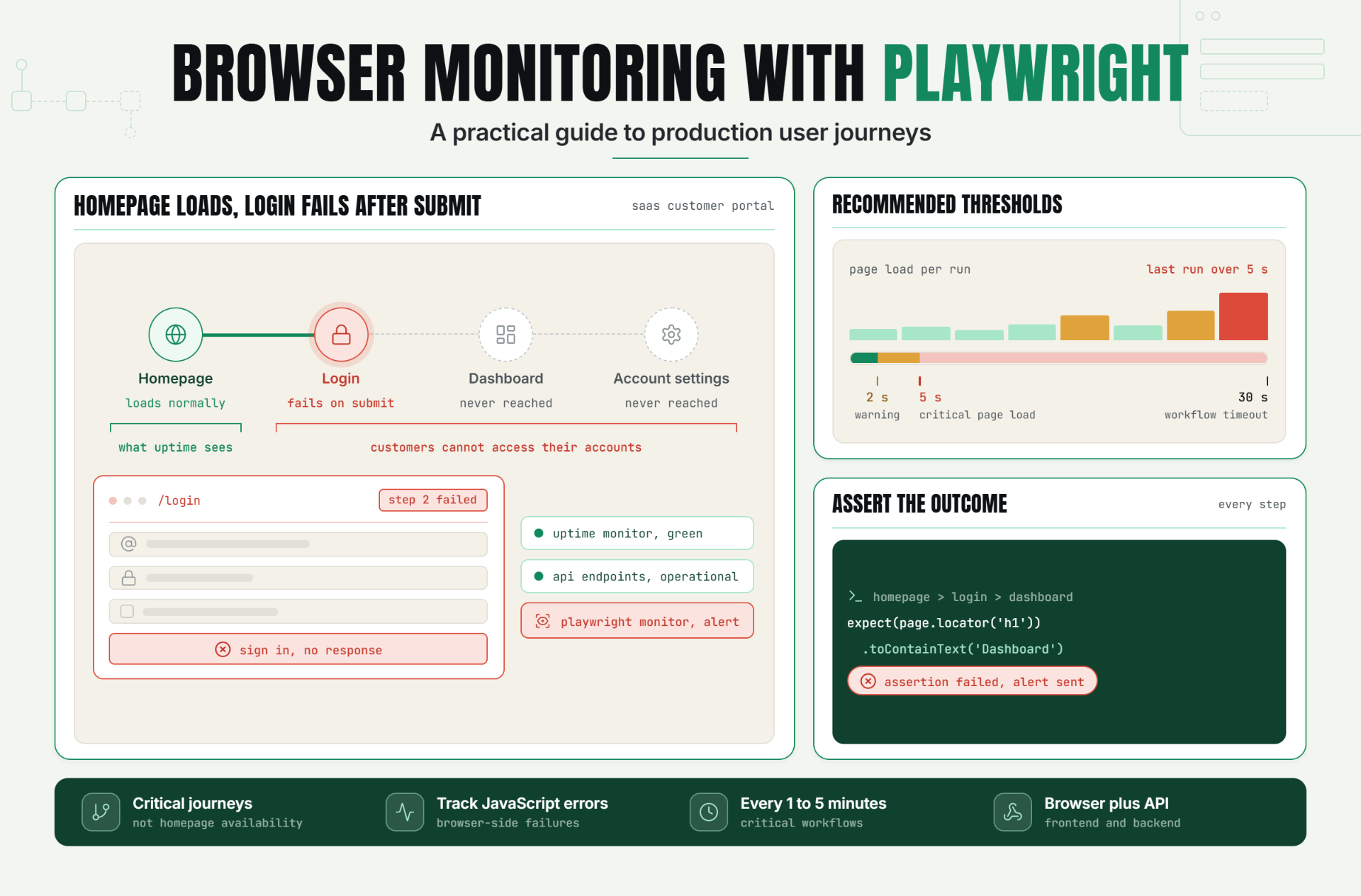
Modern web applications rely heavily on JavaScript, dynamic user interfaces, APIs, authentication systems, and third-party integrations. While traditional uptime monitoring can verify that a webpage responds successfully, it cannot confirm whether customers can actually complete important tasks.
A website may return a successful response while users encounter broken login forms, failed checkout processes, JavaScript errors, or non-functional application features.
Playwright browser monitoring helps teams proactively validate real user journeys by automating browser interactions and continuously testing critical workflows in production.
Instead of waiting for customers to report issues, organizations can detect failures before they impact revenue, customer satisfaction, and operational reliability.
The Operational Risks Teams Face Without Effective Playwright Browser Monitoring
Many monitoring strategies focus on uptime, API availability, and infrastructure health. While these checks are valuable, they often miss frontend failures that directly affect customer experience.
Without Playwright browser monitoring, organizations risk:
- Broken login workflows.
- Failed registration processes.
- Checkout and payment issues.
- JavaScript rendering errors.
- Frontend deployment problems.
- Authentication failures.
- Customer-reported incidents.
Many of these failures occur while uptime checks continue reporting healthy systems.
The result is delayed incident detection, lost revenue, and poor customer experiences.
How Playwright Browser Monitoring Works, Key Signals, Thresholds, and Diagnosis
What Is Playwright Browser Monitoring?
Playwright browser monitoring uses automated browser scripts to simulate real user interactions and validate application functionality in production environments.
Instead of checking whether a page simply loads, Playwright verifies that users can successfully complete important tasks.
How Playwright Monitoring Works
A Playwright monitor launches a browser and executes predefined actions.
Common actions include:
- Opening web pages.
- Logging into applications.
- Submitting forms.
- Navigating dashboards.
- Completing purchases.
- Creating records.
- Validating application content.
If any step fails, the monitor records the failure and generates alerts.
Playwright Synthetic Monitoring
Playwright is widely used for synthetic monitoring because it supports modern browsers and provides reliable automation for complex workflows.
Example user journey:Login > Dashboard > Create Report > Download PDFThe monitor validates every step of the workflow and confirms successful completion.
JavaScript Website Monitoring
Many frontend failures originate from JavaScript issues that traditional monitoring tools cannot detect.
Playwright monitoring can identify:
- Client-side rendering failures.
- JavaScript exceptions.
- Broken UI components.
- Missing page elements.
- Frontend performance issues.
Response Validation and Assertions
Playwright monitors validate application behavior using assertions.
Example assertion:expect(page.locator('h1')).toContainText('Dashboard')Assertions verify that expected content appears and workflows complete successfully.
Key Signals to Monitor
| Signal | Purpose |
|---|---|
| Journey Success Rate | Validate workflows |
| Page Load Time | Track performance |
| Step Completion | Identify failures |
| JavaScript Errors | Detect frontend issues |
| Authentication Success | Validate login flows |
| Transaction Completion | Measure business reliability |
Recommended Thresholds
- Warning page load: 2 seconds
- Critical page load: 5 seconds
- Workflow timeout: 30 seconds
A Realistic Production Scenario and Recommended Monitor Setup
Scenario: SaaS Customer Portal
A SaaS company releases a frontend update affecting customer authentication.
The homepage continues loading normally, and API endpoints remain operational.
However, customers cannot access their accounts because the login form fails after submission.
The Business Impact
- Support ticket spikes.
- Lost productivity.
- Customer frustration.
- Reduced customer trust.
Recommended Monitor Setup
| Monitor Type | Purpose |
|---|---|
| Uptime Monitor | Verify website availability |
| API Monitor | Validate backend services |
| Playwright Browser Monitor | Validate user workflows |
| Performance Monitor | Track frontend speed |
| Error Monitoring | Detect JavaScript failures |
Example Workflow
Journey:Homepage > Login > Dashboard > Account SettingsIf any step fails, the monitor immediately generates an alert.
Best Practices: Coverage, Check Frequency, Validation, Ownership, and Escalation
1. Monitor Critical Customer Journeys
Focus on workflows that directly affect customer experience and revenue.
2. Use Assertions Extensively
Validate content, navigation, and business outcomes.
3. Monitor JavaScript Functionality
Ensure frontend behavior is functioning correctly.
4. Combine Browser and API Monitoring
Gain visibility across both frontend and backend systems.
5. Run Frequent Checks
Critical workflows should generally run every 1-5 minutes.
6. Define Ownership
Assign responsibility for monitor maintenance and alert response.
7. Create Escalation Procedures
Ensure workflow failures reach the appropriate teams quickly.
Common Mistakes: Weak Checks, Noisy Alerts, Missing Dependencies, and Poor Routing
Mistake 1: Monitoring Only Homepage Availability
Better approach: Monitor complete customer journeys.
Mistake 2: Using Too Few Assertions
Better approach: Validate critical application behavior.
Mistake 3: Ignoring JavaScript Errors
Better approach: Track browser-side failures.
Mistake 4: Running Checks Too Infrequently
Better approach: Monitor continuously throughout the day.
Mistake 5: Monitoring Non-Critical Workflows Only
Better approach: Prioritize customer-facing journeys.
Reliable Applications Require Browser-Level Validation
Playwright browser monitoring helps teams move beyond simple uptime checks and validate the workflows customers actually use.
By continuously testing user journeys, monitoring JavaScript functionality, and validating business outcomes, organizations can identify issues before customers encounter them.
The first step is identifying critical user flows and implementing Playwright monitors that continuously validate those experiences.
Start Monitoring User Journeys with Playwright
Ready to detect workflow failures before they impact customers?
Start your 30-day Statixoup trial and configure your first Playwright browser monitor.
Validate customer journeys, monitor frontend functionality, and receive alerts before issues affect your users.

