"Cron Job Failed but No Error Was Logged": A Troubleshooting Playbook
Learn why a cron job can fail without logging an error, what to check, and how to catch silent failures before they cause real damage. Practical examples, best practices, and FAQs included.
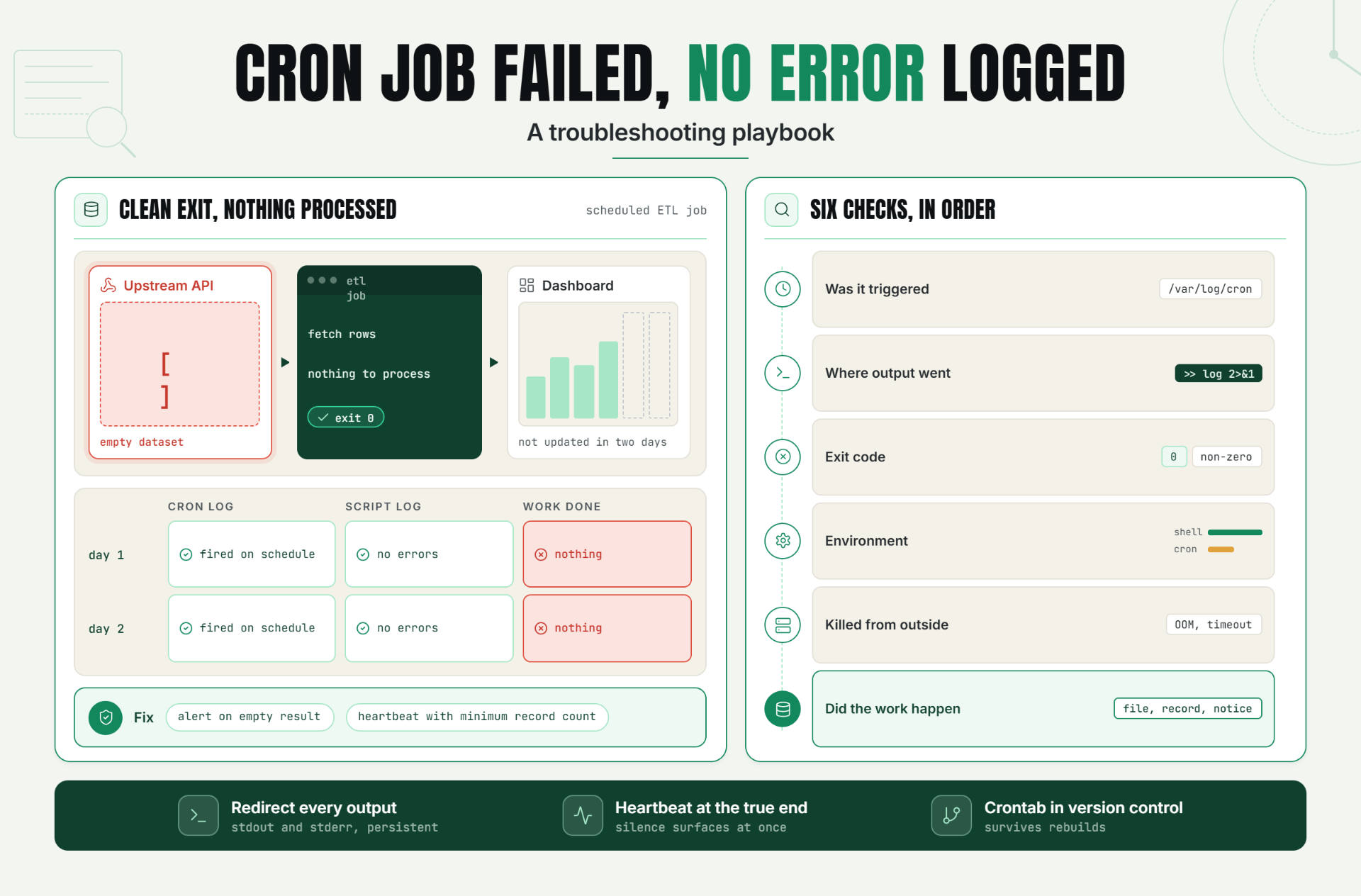
Nobody gets paged when a cron job fails silently. There's no crash, no stack trace, no request that comes back with a status code. There's just a log file that looks completely normal, sitting next to a task that never actually happened.
A cron job failed situation without a logged error is one of the more disorienting problems in operations, precisely because the usual instinct check the logs comes up empty. The absence of an error in your logs is not the same thing as the absence of a failure. Cron runs in an environment stripped of almost everything your interactive shell normally provides, and it has no built in mechanism to loudly announce when something goes wrong unless you specifically configured one to.
Why a Silent Cron Failure Matters to Reliability and Customer Experience
Scheduled jobs are frequently responsible for things customers never see directly until they go wrong backups, billing syncs, data exports, report generation. When one of these fails silently, there's no broken page and no error a customer runs into directly. The failure shows up later, indirectly, as a missing backup when it's needed, an unsynced invoice, or a report that quietly stopped updating days ago.
This delay is what makes a silent cron failure more costly than a typical application error. A web request that fails gets noticed almost immediately, by a user or by monitoring. A cron job that fails silently can sit undiscovered for days or weeks, with the actual cost compounding the entire time nobody knows it happened.
The Operational Risk of a Cron Job That Fails Without a Trace
Cron failures without a logged error aren't rare because teams are careless they're common because there are several genuinely distinct ways a job can die without producing a normal error trail.
- The job never got triggered at all. A typo in crontab syntax that cron silently ignores, the cron daemon restarting at the wrong moment, or a deployment overwriting the crontab file can all mean the job was simply never attempted.
- The script ran, but its output went nowhere. Cron only captures stdout and stderr if you've explicitly redirected them somewhere persistent. A script can throw a specific, useful error internally, and that error can vanish entirely because nothing was capturing it.
- The environment under cron was different from your interactive shell. Cron typically runs with a minimal PATH and no shell profile loaded, which means a script that works perfectly when run manually can fail specifically and only under cron.
- The process was killed from outside the script. An out of memory killer, a container timeout, or an unrelated system event can terminate a job mid execution without the script itself ever logging a failure.
- The script exited cleanly without actually doing its job. A data condition the script didn't anticipate an empty input, an API returning nothing can cause it to complete without error while accomplishing nothing.
Without a systematic way to check each of these, teams typically end up reproducing the failure by trial and error, often losing significant time before finding the actual cause time during which, in many cases, the underlying problem is still ongoing.
How to Diagnose a Silent Cron Failure: Signals and Checks
Confirm the Job Was Actually Triggered
Check your system's cron log (/var/log/syslog, /var/log/cron, or the equivalent for your system) for an entry at the exact expected time. If there's no entry at all, the scheduler never fired the job, and the investigation shifts to why a crontab syntax issue, a daemon restart, or a lost configuration after a migration.
Check Where Output Actually Went
Verify your crontab entry explicitly redirects output somewhere persistent, such as >> /path/to/log 2>&1. If it doesn't, any error the script produced may simply have nowhere to land, effectively disappearing the moment it occurred.
Check the Exit Code, Not Just the Output
Run the exact command cron uses, manually, and check the exit code immediately afterward. A non zero exit code confirms a real failure even when the output itself looks clean or unremarkable.
Check for Environment Differences
Cron's execution environment is typically much more minimal than your interactive shell's. Comparing environment variables between the two or temporarily logging the environment from inside the script often reveals a dependency or variable the script assumed would be present.
Check for External Process Termination
Look for out of memory killer activity, container or process manager logs showing a forced termination, or a runtime that's been creeping upward before this failure, suggesting the job was heading toward a timeout.
Check Whether the Job Actually Accomplished Its Purpose
A clean exit code doesn't confirm meaningful work happened. Directly verify the expected outcome a file that should exist, a database record that should be created, a notification that should have sent rather than trusting the exit code alone.
Key Signals Table
| Check | What It Reveals |
|---|---|
| Cron log entry at expected time | Whether the job was triggered at all |
| Output redirection in crontab entry | Whether errors have anywhere to actually be logged |
| Manual run's exit code | Whether a real failure occurred, regardless of log output |
| Environment comparison (cron vs. interactive shell) | Whether a missing variable or PATH difference caused the failure |
| System/process logs around the failure window | Whether the process was killed externally |
| Actual expected outcome (file, record, notification) | Whether the job did real work, not just exited cleanly |
A Practical Production Scenario
A data engineering team notices a scheduled ETL job hasn't updated a downstream dashboard in two days. The cron log shows the job fired on schedule both mornings, ruling out a scheduling issue immediately. The script's log file shows it completed and exited normally both times, with no errors and a clean exit.
Running the exact script manually reproduces nothing unusual at first. Digging further into the actual data the job pulls from, the team finds the real cause: an upstream API started returning an empty dataset two days ago, due to an unrelated change on the provider's side. The script's error handling treated an empty result as "nothing to process" rather than a condition worth flagging, so it exited cleanly having genuinely done nothing, twice in a row.
The immediate fix is a code change: treat an unexpectedly empty result as a condition worth alerting on, not silently accepting. The longer term fix is adding a heartbeat check that also validates a minimum expected record count was actually processed, not just that the script ran and exited normally.
Recommended Monitor Setup
- Explicitly redirect stdout and stderr for every cron job to a persistent, checkable location.
- Add a heartbeat check-in at the true end of successful execution, so a silent failure surfaces immediately rather than through a downstream symptom.
- Validate meaningful outcomes for critical jobs, not just exit codes, especially where an unexpected empty result could be silently accepted as success.
- Keep crontab configuration in version controlled infrastructure code, so it survives migrations and server rebuilds.
- Test scripts under cron's actual minimal environment during development, not just an interactive shell, to catch environment-dependent failures before they reach production.
Best Practices for Preventing Silent Cron Failures
Always Redirect Output Somewhere Persistent
Never leave a crontab entry with no output redirection. An error with nowhere to go is functionally the same as no error occurring at all, from a diagnostic standpoint.
Test Under Cron's Actual Environment, Not Just Your Shell
A quick environment stripped test during development catches environment dependent failures before they ever reach production, where they're far more expensive to diagnose.
Add Heartbeat Monitoring to Anything That Matters
This is the most reliable defense against exactly the failure mode this guide covers. It catches the next silent failure regardless of which of the underlying causes is behind it.
Validate Meaningful Outcomes, Not Just Exit Codes
For any job whose purpose is to produce something specific, explicitly check that the thing exists, rather than trusting a clean exit code alone.
Keep Scheduling Configuration in Version Control
A crontab entry that only exists on one server's local configuration is easily lost during a migration or rebuild, exactly the kind of failure that leaves no trace to investigate.
Log Enough Detail to Diagnose Without Reproducing the Failure
If the only way to understand a failure is to catch it happening live again, every future incident becomes a fire drill instead of a quick log review.
Common Mistakes That Make This Harder to Debug
Mistake 1: Leaving Cron Output Completely Unredirected
Why it happens: it's easy to overlook during initial setup, especially for a job that seems to work fine at first.
What to do instead: explicitly redirect stdout and stderr to a persistent log location for every cron job, without exception.
Mistake 2: Assuming a Clean Exit Code Means the Job Did Its Job
Why it happens: exit code 0 feels like sufficient confirmation on its own.
What to do instead: validate the actual expected outcome directly, since a clean exit only confirms the script didn't crash.
Mistake 3: Only Testing Scripts in an Interactive Shell
Why it happens: it's the natural way to develop and test a script before scheduling it.
What to do instead: test under cron's actual minimal environment as well, to catch environment-dependent failures before deployment.
Mistake 4: Not Logging Enough Detail to Reconstruct What Happened
Why it happens: minimal logging feels sufficient until something actually goes wrong.
What to do instead: log enough detail at each major step that a future failure can be diagnosed from the logs alone, without needing to reproduce it live.
Mistake 5: Skipping Heartbeat Monitoring Because "It Hasn't Failed Before"
Why it happens: a job with a clean track record doesn't feel like a priority for additional monitoring.
What to do instead: recognize that a job that has never silently failed yet is not the same as a job that never will, and add heartbeat monitoring proactively.
Mistake 6: Fixing the Immediate Cause Without Addressing the Detection Gap
Why it happens: once the specific bug is found and fixed, it's tempting to consider the issue closed.
What to do instead: add monitoring alongside the fix, since resolving this specific failure doesn't prevent a different silent failure from taking just as long to notice in the future.
Stop Debugging This Manually
Reconstructing what happened after a silent cron failure costs real time, every single time it happens. The better version of this story is one where you never have to.
Start a 30 day Statixoup trialand set up heartbeat alerting for your scheduled jobs, so the next silent failure surfaces the moment it happens, not during the next manual investigation.