Cron Job Monitoring: How Heartbeat Checks Catch Silent Failures
Learn how cron job monitoring works, what to monitor, and how to avoid common mistakes. See practical examples, best practices, FAQs, and clear next steps.
Nobody gets paged when a cron job doesn't run. There's no error, no crash, no request that fails with a status code. There's just nothing. A backup that should have happened at 2 a.m. simply didn't, and the first anyone learns about it is three weeks later, trying to restore from a backup that isn't there.
Cron job monitoring exists to catch exactly this kind of failure. Most monitoring is built around a simple idea: something happens, and you check whether it happened correctly. A missed cron job breaks that assumption entirely the failure isn't an event to catch, it's an event's total absence, and absence doesn't trigger anything on its own unless you're specifically watching for it.
Why Cron Job Monitoring Matters to Reliability and Customer Experience
A web request either succeeds or fails, and either way, something happens that a monitor can observe a response, a status code, a log entry. A cron job that fails to run at all produces none of that. It's not an error. It's a silence that looks exactly like every other quiet, uneventful moment when nothing was scheduled to happen anyway.
This matters for customer experience because scheduled jobs are frequently responsible for things customers never see directly until they go wrong backups, billing syncs, data exports, report generation. A missed run doesn't show up as a broken page. It shows up days or weeks later as a missing backup when it's needed, an unsynced invoice, or a report nobody realizes stopped generating.
The Operational Risk of Leaving Cron Jobs Unmonitored
Cron failures aren't rare because teams are careless they're common because the failure modes are genuinely invisible from most standard monitoring setups.
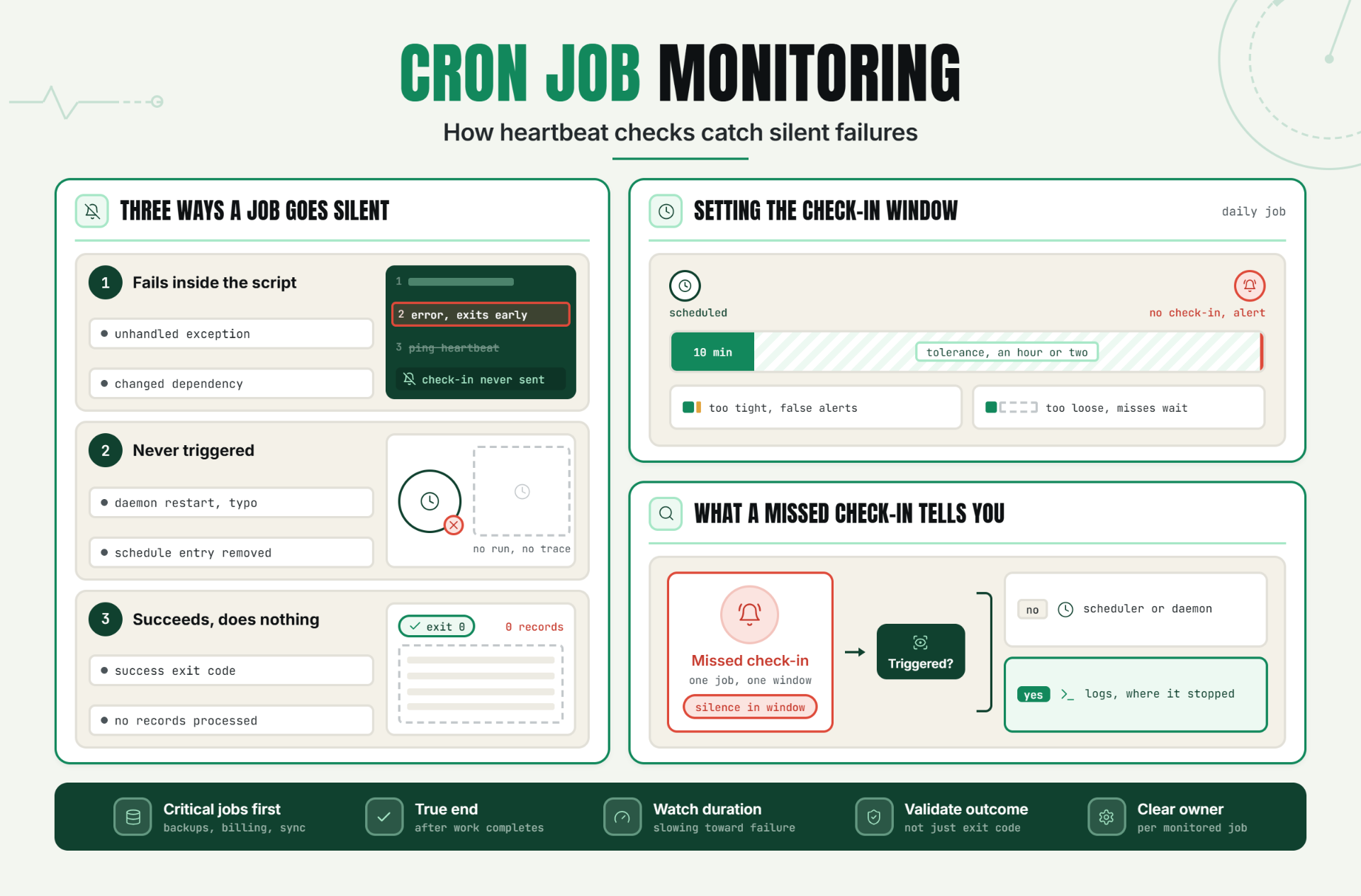
- The job can fail silently inside the script itself. An unhandled exception, a dependency that changed behavior, or a data condition nobody anticipated can cause a script to error out partway through, without that failure ever reaching any external system that would notice.
- The job can simply never be triggered. A cron daemon restart, a configuration typo, or a deployment that accidentally removed the schedule entry can mean the job was never even attempted, which leaves even less of a trace than a job that ran and failed.
- The job can "succeed" while doing the wrong thing, or nothing at all. A script that exits with a success code after silently failing to process any records looks, from the outside, exactly like a script that processed everything correctly.
- Traditional monitoring has nothing to check. There's no URL to ping and no process actively running most of the time. The gap between runs is the normal state, which makes it structurally difficult to notice when that gap becomes permanent.
Without dedicated monitoring in place, teams typically discover a missed job the same way they discover most silent failures: downstream. A report that should have generated didn't. A backup that should exist doesn't when it's needed. A data sync quietly stops for days or weeks, only noticed when someone finally cross references two systems that have drifted apart.
How Cron Job Monitoring Works: Key Signals, Thresholds, and Diagnosis
The Core Mechanism: Heartbeat Monitoring
Heartbeat monitoring flips the usual monitoring model on its head. Instead of actively checking whether a job succeeded by inspecting its output, the job itself is made responsible for "checking in" sending a small signal, like a simple HTTP request, to a monitoring service every time it completes successfully. The monitor then watches for the absence of that expected signal, rather than watching for an explicit error.
This pattern is sometimes called a dead man's switch, borrowing its name from an old mechanical safety concept: a switch that must be actively held or reset by a person to keep a system running, so that if the person becomes incapacitated and lets go, the switch triggers automatically precisely because nothing happened when something should have.
Setting Up the Check In
A typical implementation adds one line at the very end of a cron job's script, after it has completed its actual work successfully, sending a request to a monitoring endpoint. If the script fails or exits early due to an error, that final line never executes, and the check in never happens which is exactly the behavior wanted: silence on failure, a signal on success.
Key Signals to Track
| Signal | What It Catches |
|---|---|
| Missing check in within expected window | Job didn't run at all, or crashed before completing |
| Check in arrives late, consistently | Job is running slower over time, may be heading toward a timeout failure |
| Check in arrives, but with an unexpected duration reported | Job completed but took unusually long, worth investigating even without an outright failure |
| Check in frequency doesn't match expected schedule | Job may be running more or less often than intended, sometimes due to a scheduling misconfiguration |
| Job reports success but downstream data doesn't reflect it | A "successful" run that didn't actually do meaningful work, requiring outcome validation |
Setting Thresholds
The expected check in window should be wider than the job's typical runtime, to tolerate normal variance without triggering false alerts, but tight enough that a genuine miss is caught quickly. A job that runs daily and typically completes in ten minutes might reasonably have its window set to alert if no check in arrives within an hour or two of its scheduled time, rather than exactly at the expected minute.
Diagnosis: What a Missed Check In Actually Tells You
A missing check in narrows the investigation immediately to a specific window of time and a specific job, which is far better than discovering a problem days later with no timestamp to start from. From there, the diagnostic path is usually: check whether the job was triggered at all (a scheduler or cron daemon issue), and if it was triggered, check the job's own logs for where execution actually stopped (a script level failure).
A Practical Production Scenario
A SaaS company runs a nightly job that generates usage reports and syncs billing data to their payment processor. It's been running reliably for over a year, with nobody paying it much active attention, since it simply works.
A routine server migration moves the job to new infrastructure. The migration checklist covers the application and database, but the cron schedule itself configured directly on the old server rather than in version controlled infrastructure code never gets recreated on the new one. The job simply stops existing.
Nothing about this looks like an outage. The application works fine. The website is up. Three weeks later, a customer disputes a charge, and the team discovers the billing sync hasn't run since the migration, with three weeks of billing data never synced, discovered only because a customer happened to notice a discrepancy.
With heartbeat monitoring in place, even a simple check expecting a daily check in, this would have surfaced within 24 hours of the missed migration step, not three weeks later through a customer complaint.
Recommended Monitor Setup
- Add a heartbeat check in to the end of every critical scheduled job, triggered only after the job's core work completes successfully.
- Set the expected check in window slightly wider than the job's normal runtime, to avoid false alerts from ordinary variance, but tight enough to catch a genuine miss quickly.
- Monitor check in duration and timing trends, not just presence or absence, to catch a job that's gradually slowing toward a future failure.
- Validate meaningful outcomes for critical jobs, like confirming records were actually processed, not just that the script exited successfully.
- Keep scheduling configuration in version controlled infrastructure code wherever possible, so a migration or server change can't silently drop a job.
Best Practices for Cron Job Monitoring
Add a Heartbeat to Every Job Whose Absence Would Actually Matter
Not every scheduled task needs this level of scrutiny, but anything tied to backups, billing, data sync, or customer facing reports absolutely does.
Place the Check In at the True End of Successful Execution
A check-in sent at the beginning of a job only confirms it started, not that it finished, which misses exactly the failure mode this kind of monitoring is meant to catch.
Set the Expected Window With Enough Tolerance for Normal Variance
Too tight, and ordinary runtime fluctuation triggers false alerts. Too loose, and a real failure sits unnoticed for longer than necessary.
Validate Outcomes, Not Just Execution, for Critical Jobs
A script that exits successfully without actually accomplishing its purpose is a different failure than a crash, and worth checking for separately.
Keep Job Scheduling Configuration in Version Control
A cron entry that only exists on a server's local configuration, outside infrastructure code, is one migration or server rebuild away from silently disappearing.
Assign Clear Ownership for Every Monitored Job
When a heartbeat alert fires, someone specific needs to know it's their job to investigate. An alert with no clear owner tends to get acknowledged and then forgotten.
Common Mistakes in Cron Job Monitoring
Mistake 1: Assuming "No Errors in the Logs" Means the Job Ran Successfully
Why it happens: it's easy to check logs for errors without considering that no logs at all might be the actual problem.
What to do instead: recognize that if a job never ran, there are no error logs to check in the first place, and build monitoring that doesn't rely on log presence alone.
Mistake 2: Only Checking Job Output After Something Else Already Went Wrong
Why it happens: without dedicated monitoring, a downstream symptom is often the first real signal a team gets.
What to do instead: implement heartbeat monitoring so the failure surfaces at the time it happens, not through a delayed downstream complaint.
Mistake 3: Setting the Check In Window Too Tight
Why it happens: it feels safer to alert on the smallest possible deviation.
What to do instead: allow enough tolerance for normal runtime variance to avoid the same alert fatigue problem that affects any overly noisy monitoring system.
Mistake 4: Storing Cron Configuration Outside of Version-Controlled Infrastructure
Why it happens: a quick manual cron entry is often faster to set up than formalizing it in infrastructure code.
What to do instead: treat scheduling configuration the same as any other critical infrastructure setting, tracked in version control so it survives migrations and rebuilds.
Mistake 5: Not Validating That a Job Actually Accomplished Its Purpose
Why it happens: a successful exit code feels like sufficient confirmation on its own.
What to do instead: validate the actual outcome for anything business-critical, since a successful exit doesn't guarantee meaningful work happened.
Mistake 6: Treating Every Scheduled Job With the Same Level of Monitoring Rigor
Why it happens: applying uniform monitoring feels simpler than deciding which jobs matter most.
What to do instead: prioritize heartbeat monitoring for jobs tied to backups, billing, or data sync, where a silent failure carries the highest cost.
Start Catching the Jobs That Didn't Run
A cron job that fails to run doesn't announce itself. It just quietly doesn't happen, and the cost of that silence compounds for every day it goes unnoticed.
Start a 30 day Statixoup trial and configure heartbeat monitoring for your critical scheduled and background jobs. The next missed run won't wait three weeks to surface you'll know within the hour.