Domain Expiry Monitoring: Never Miss a Renewal Again
Learn how domain expiry monitoring works, what to monitor, and how to avoid common mistakes. See practical examples, best practices, FAQs, and clear next steps.
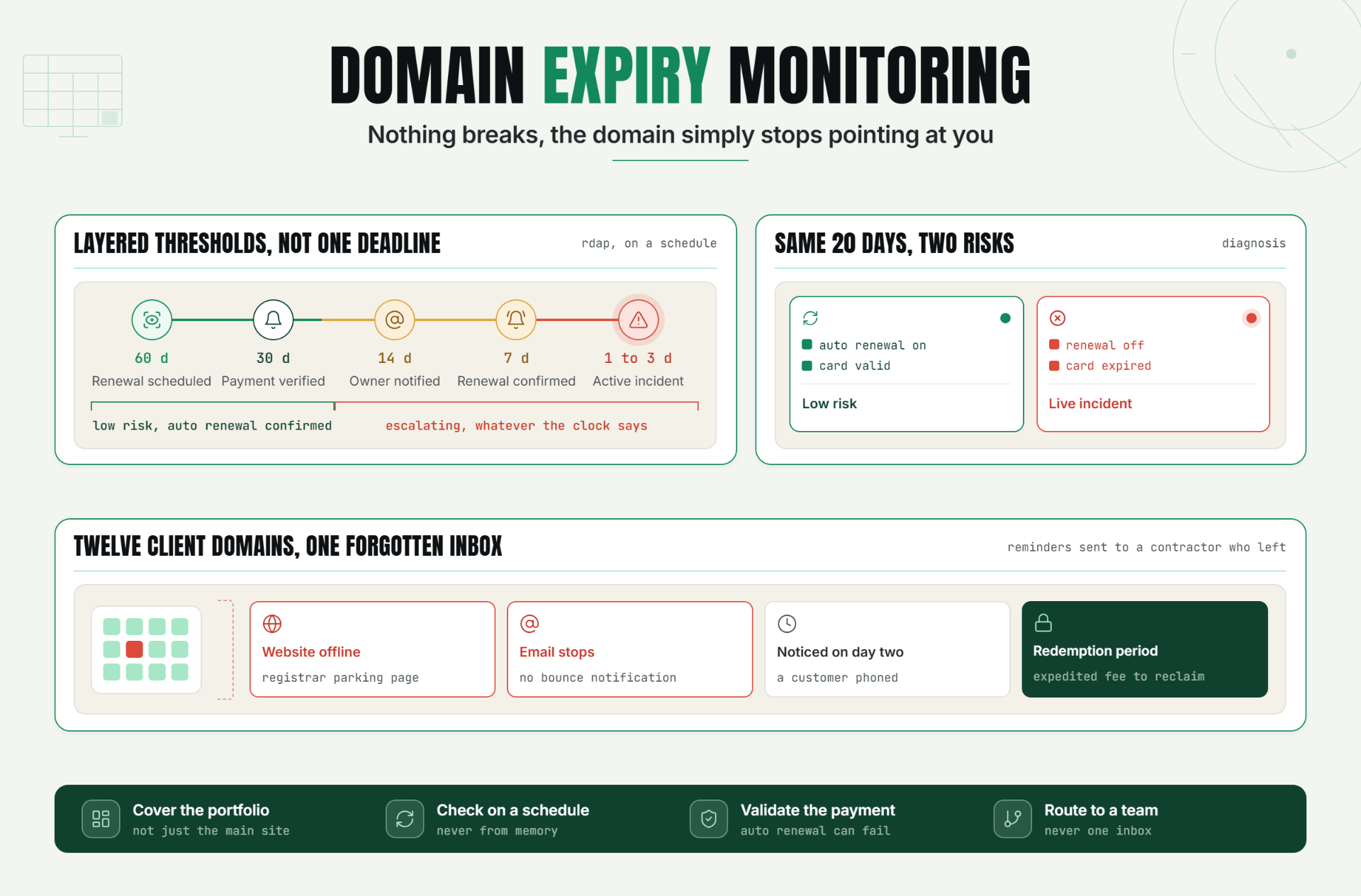
Why Domain Expiry Monitoring Matters to Reliability and Customer Experience
A domain expiring is unlike almost any other production incident, because nothing about your infrastructure actually breaks. Your server keeps running, your application keeps deploying, your database keeps responding and none of it matters, because the domain pointing to all of it no longer resolves to you.
This is what makes domain expiration so disruptive relative to how preventable it is. Unlike a server crash or a code regression, an expiring domain is scheduled well in advance and entirely predictable the date is public, published in WHOIS/RDAP records the moment the domain was registered. There's no ambiguity about when the risk arrives. The failure isn't technical; it's a missed reminder, a lapsed payment method, or a renewal email that landed in the wrong inbox.
The stakes extend past the website itself. A website domain monitoring gap doesn't just take a homepage offline it can break every email address on that domain, invalidate every subdomain and integration built on top of it, and in the worst cases, leave the domain open to being registered by someone else the moment it lapses.
The Operational Risks Teams Face Without Domain Expiry Monitoring
Domain expiry is unusual among outages: it's rarely caused by a technical failure and almost always caused by a process gap. A few patterns show up repeatedly in teams without dedicated monitoring:
- The renewal reminder went to one inbox, and that person left. Registrar emails typically go to whoever set up the account originally, not necessarily whoever owns the domain today.
- Auto-renewal was on, but the card on file was expired. Auto renewal only works until the payment method behind it fails silently.
- The domain was registered by an agency or contractor years ago, and internal teams don't actually have visibility into when it renews, or who's responsible for it.
- Nobody is tracking the domain at the portfolio level. A company with dozens of domains main site, regional sites, campaign domains, defensive registrations has no single view of which one expires next.
Without a domain renewal alert system independent of the registrar's own reminders, the first real signal is often a customer complaint, a bounced email, or discovering the domain now redirects to a parking page. At that point, the fix is no longer "renew before the deadline" it becomes an emergency recovery, and if the domain has already lapsed past the registrar's grace period, recovery may not be possible at all.
How Domain Expiry Monitoring Works: Key Signals, Thresholds, and Diagnosis
What Domain Expiry Monitoring Actually Checks
At its core, domain expiry monitoring queries a domain's registration record on a schedule and tracks the expiration date returned. Historically this meant parsing WHOIS output; increasingly it means querying RDAP (Registration Data Access Protocol), the structured, machine readable successor to WHOIS that most registries are migrating to. Either way, the goal is the same: get an authoritative, up to date expiration date without relying on a human remembering to check a registrar dashboard.
Key Signals to Track
- Days remaining until expiration the core signal, checked against a set of escalating thresholds rather than a single deadline.
- Auto-renewal status whether the registrar reports auto-renewal as active, since a domain "expiring soon" with auto renewal confirmed on is a very different risk level than one without it.
- Registrar lock status whether the domain is locked against unauthorized transfer, a separate but related risk to expiry.
- Registration status codes RDAP and WHOIS responses include status codes (e.g., a domain entering a redemption or pending delete period) that indicate exactly where a lapsed domain is in the expiration process.
- Ownership/contact record changes an unexpected change in registrant or admin contact details can itself be an early warning sign, separate from the expiration date.
Setting Thresholds for Expiry Checks
A single "30 days before expiry" alert is not enough for something with this much downstream impact. Layered thresholds give a team multiple chances to catch it:
| Days Until Expiry | Signal | Recommended Action |
|---|---|---|
| 60 days | Early warning | Confirm renewal is scheduled or auto-renewal is active |
| 30 days | Standard alert | Verify payment method on file is valid |
| 14 days | Escalation | Notify domain owner directly, not just the registrar contact |
| 7 days | Urgent | Manually confirm renewal has processed |
| 1–3 days | Critical | Treat as an active incident if unrenewed |
Diagnosis: Is This a Real Risk or a False Alarm?
Not every "expiring soon" alert is equally urgent. The diagnostic question is: is auto renewal confirmed active with a valid payment method, or is the domain actually unrenewed with no safety net behind it? A domain 20 days from expiry with confirmed auto renewal and a valid card is low risk. A domain 20 days from expiry with auto renewal disabled or enabled against an expired card is a live, escalating incident regardless of how much time is technically left on the clock.
A Practical Production Scenario
Consider an illustrative example.
A marketing agency manages twelve client domains. One client's domain was registered three years earlier by a contractor who has since left the company, and the renewal reminders have been going to that contractor's now-inactive email address the entire time.
The domain lapses on a Tuesday. The website goes down, but more urgently, the client's entire email system sales inbox, support inbox, internal team accounts stops receiving mail immediately, with no bounce notification to alert anyone that mail is failing. Nobody notices until a customer calls asking why their support tickets have gone unanswered for two days.
The agency scrambles to renew the domain, but discovers it's now in a "redemption period" the registrar's post expiry grace window and reclaiming it requires an expedited redemption fee far higher than a normal renewal, on top of two days of lost email and a website that showed a registrar parking page to every visitor and search engine crawler during the outage.
Recommended Monitor Setup
- Query expiration date and registration status for every domain in the portfolio on a recurring schedule, not just when someone remembers to check.
- Set layered alert thresholds (60/30/14/7/1 days), not a single deadline reminder.
- Confirm auto renewal status and treat "auto renewal off" as a standing risk flag, independent of days remaining.
- Route alerts to a role or team distribution list, never a single named individual's inbox.
- Track every domain in a portfolio from one dashboard, so no domain depends on someone remembering it exists.
Best Practices for Domain Expiry Monitoring
Cover the Full Portfolio, Not Just the Primary Domain
Main site, regional domains, campaign landing pages, and defensive registrations of misspelled or alternate TLD variants are all equally capable of lapsing. A monitoring setup that only watches the primary domain misses most of the actual portfolio risk.
Check on a Recurring Schedule, Not Ad Hoc
Expiration dates don't change unexpectedly, but confirming them shouldn't depend on someone remembering to log into a registrar. A daily or weekly automated check removes the dependency on memory entirely.
Validate Auto Renewal and Payment Method, Not Just the Date
A domain "renewing automatically" is only protective if the payment method behind it is actually valid. Treat auto renewal status as its own signal worth checking, not an assumption.
Assign Clear Ownership Per Domain
Every domain should have a named owner or team, not just a registrar account. When ownership is ambiguous, alerts tend to land nowhere useful.
Escalate to People, Not Just Inboxes
A single reminder email is one point of failure. Route alerts to a distribution list or ticketing system, and escalate urgency as the deadline approaches rather than sending one flat notice.
Common Mistakes in Domain Expiry Monitoring
Mistake 1: Relying Only on the Registrar's Reminder Emails
Why it happens: it feels like the registrar already has this covered, so a separate check seems redundant.
What to do instead: treat registrar reminders as a backup, not the primary system they can go to outdated contacts or spam filters with no second layer of defense.
Mistake 2: Assuming Auto Renewal Means the Risk Is Handled
Why it happens: "auto renewal: on" looks like a solved problem in a registrar dashboard.
What to do instead: verify the payment method behind auto renewal is current, since a declined card silently disables the protection without any visible warning.
Mistake 3: Tracking Only the Primary Domain
Why it happens: the main website is the visible priority, so secondary and campaign domains get overlooked.
What to do instead: monitor every domain in the portfolio, since email, subdomains, and campaigns depend on domains that are easy to forget exist.
Mistake 4: Sending a Single Alert Instead of Escalating Thresholds
Why it happens: one "30 days left" email feels sufficient at the time it's set up.
What to do instead: use layered thresholds that increase in urgency as the deadline approaches, so a missed early alert isn't the only chance to act.
Mistake 5: Routing Alerts to One Person Instead of a Team
Why it happens: domains are often registered by a single individual who becomes the default contact indefinitely.
What to do instead: route alerts to a role based distribution list or ticketing system so responsibility doesn't disappear when one person changes roles or leaves.
Start Protecting Your Domain Automatically
Domain expiry is one of the few outages that's entirely predictable and almost always preventable the date is public the moment a domain is registered. The gap is never the deadline itself; it's a missed reminder, a lapsed card, or an alert that had nowhere useful to land.
Start a 7 day Statixoup trial and configure domain expiry monitoring across your full portfolio, with layered alerts routed to the right people so the next renewal deadline gets caught by a monitor, not by a customer.