HTTP Status Codes for Uptime Monitoring: Which Responses Should Trigger an Alert?
HTTP status codes should trigger uptime monitoring alerts and which can be safely ignored. Learn how to monitor 2xx, 3xx, 4xx, and 5xx responses, reduce false positives, and improve website and API reliability.
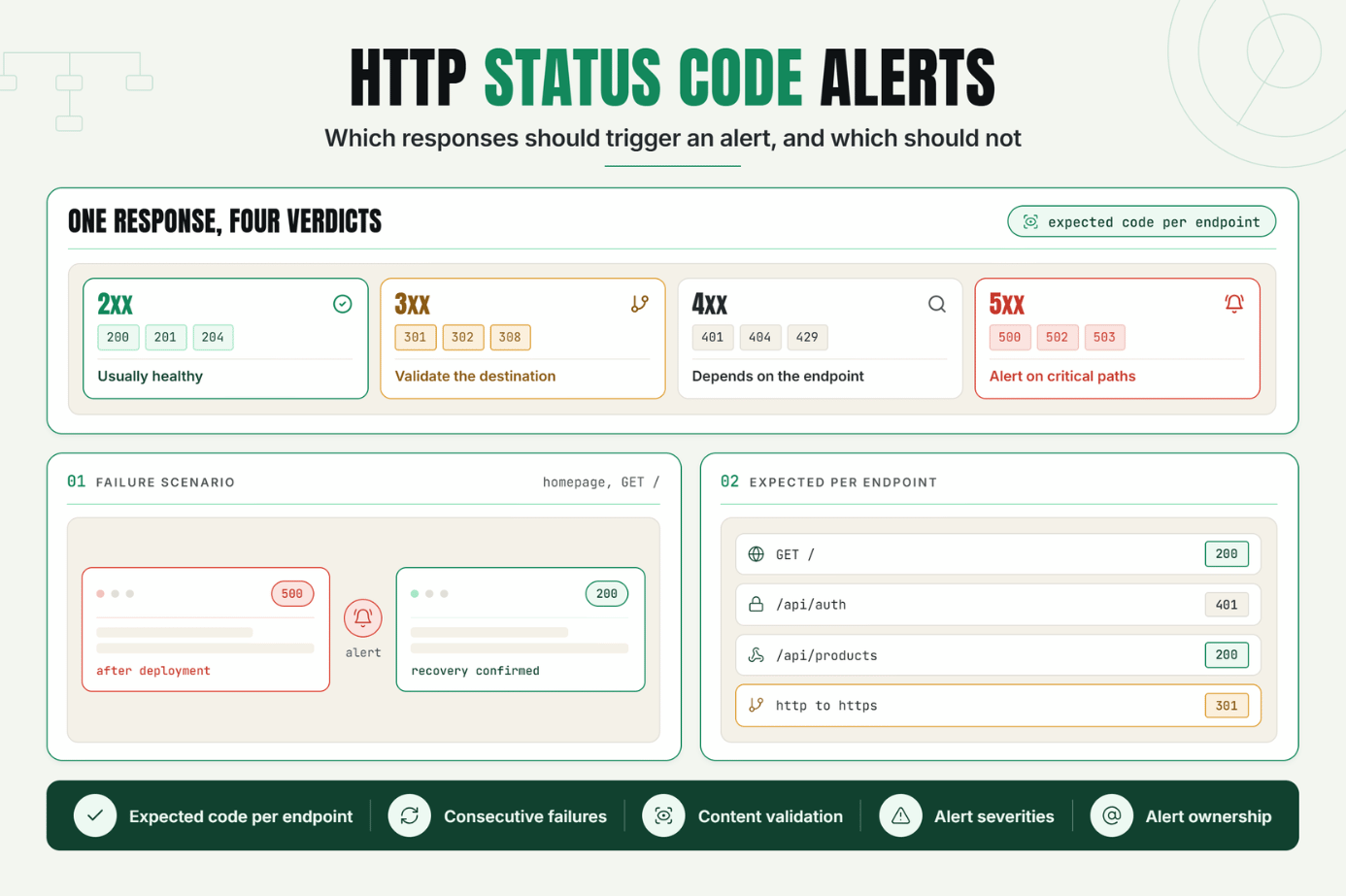
When a website or API becomes unavailable, one of the first signals a monitoring system can inspect is its HTTP status code. These three-digit responses provide valuable information about whether a request succeeded, was redirected, rejected, or failed on the server.
HTTP status codes monitoring helps developers, DevOps engineers, and technical website owners identify availability problems and configure more accurate uptime checks. Instead of treating every response as simply “up” or “down,” teams can use status codes to understand what is happening with an endpoint.
For example, a200 OK response generally indicates a successful request, while a 500 Internal Server Error may indicate an application or server-side problem. A 404 Not Found may indicate a broken URL, deleted resource, or incorrect endpoint.The Operational Risks Teams Face Without Effective HTTP Status Codes Monitoring
Without proper HTTP monitoring, teams may miss important application failures or generate unnecessary alerts for responses that are expected.
Common problems include:
- Missed server failures: Important 5xx responses may go unnoticed.
- Broken links: Unexpected 404 responses can affect customers and search visibility.
- Incorrect redirect behavior: Redirect chains or unexpected redirects can break user journeys.
- Noisy alerts: Monitoring every non-200 response as an outage can create unnecessary notifications.
- False health signals: A successful HTTP response may not always mean the application is functioning correctly.
- Poor incident diagnosis: Without status-code information, engineers have less context when investigating an alert.
Effective status code alerts should distinguish between expected responses and genuine failures.
How HTTP Status Codes Monitoring Works
An HTTP monitor periodically sends a request to a specified URL or API endpoint and evaluates the response against configured rules.
A monitoring check may evaluate:
- HTTP status code
- Response time
- Response body
- Headers
- Redirect behavior
- SSL/TLS certificate status
- Connection and DNS failures
The monitoring system then determines whether the endpoint should be considered healthy, degraded, or unavailable.
HTTP Status Code Categories
HTTP status codes are divided into five major categories:
| Category | Range | Meaning |
|---|---|---|
| 1xx | 100 - 199 | Informational responses |
| 2xx | 200 - 299 | Successful requests |
| 3xx | 300 - 399 | Redirection |
| 4xx | 400 - 499 | Client-side errors |
| 5xx | 500 - 599 | Server-side errors |
2xx Responses: Usually Healthy
Successful responses generally indicate that the server processed the request successfully.
Common examples include:
- 200 OK The request succeeded.
- 201 Created A resource was successfully created.
- 204 No Content The request succeeded without a response body.
For uptime monitoring, these responses are usually considered successful when they match the expected behavior of the endpoint.
3xx Responses: Redirect Monitoring
3xx responses indicate that additional action, often a redirect, may be required to complete the request.
Common examples include:
- 301 Moved Permanently
- 302 Found
- 307 Temporary Redirect
- 308 Permanent Redirect
A redirect is not automatically a failure. For example, redirecting HTTP traffic to HTTPS may be intentional.
However, unexpected redirects can indicate configuration problems. That's why redirect monitoring should validate whether the destination and redirect behavior match expectations.
4xx Responses: Client and Endpoint Problems
4xx responses generally indicate that the request could not be fulfilled because of an issue related to the request.
Common examples include:
- 400 Bad Request
- 401 Unauthorized
- 403 Forbidden
- 404 Not Found
- 429 Too Many Requests
404 Monitoring
A 404 Not Found response can be expected for some endpoints but may indicate a serious problem for a critical page or API.
For example, if a homepage monitor suddenly returns 404, it should normally trigger an alert.
However, an API endpoint intentionally designed to return 404 when a resource doesn't exist should not necessarily be treated as an outage.
The correct rule depends on the expected behavior of the endpoint.
5xx Responses: Strong Candidates for Alerts
5xx responses indicate that the server encountered a problem while attempting to process a request.
Common examples include:
- 500 Internal Server Error
- 502 Bad Gateway
- 503 Service Unavailable
- 504 Gateway Timeout
These responses are generally strong candidates for monitoring alerts when they occur on critical production endpoints.
HTTP 500 Monitoring
HTTP 500 monitoring is particularly useful for detecting unexpected application failures. A 500 response may result from an unhandled exception, application bug, configuration issue, or other server-side problem.
For a critical customer-facing endpoint, repeated 500 responses should generally trigger an alert and investigation.
Should Every Non-200 Response Trigger an Alert?
No. Treating every response other than 200 as an outage can create false positives.
For example:
- A 301 redirect may be expected.
- A 204 response may be correct for an API.
- A 404 may be expected when testing a resource lookup.
- A 401 may be expected for an authentication test.
The right approach is to configure the expected status code or acceptable response range for each endpoint.
Status Code Alerts and Thresholds
Monitoring systems can use different alerting strategies.
For example:
- Alert immediately on a 500 response for a critical endpoint.
- Alert after multiple consecutive 503 responses.
- Allow an expected 301 redirect.
- Alert when a normally successful endpoint starts returning 404.
Using thresholds and consecutive failures can reduce false positives while still providing fast outage detection.
A Realistic Production Scenario and Recommended Monitor Setup
Consider a SaaS application with a public website, authentication system, and customer API.
A basic monitor might check only the homepage:
GET / However, this does not provide enough coverage for the entire application.
Monitor 1: Homepage
- Method: GET
- Expected status: 200
- Response-time threshold: Defined according to normal performance
- Content validation: Expected page content
Monitor 2: Authentication Endpoint
Authentication endpoints often have different expected responses depending on the request.
- Endpoint:
/api/auth - Expected response: Based on the test request
- Validation: Expected status and response structure
The monitoring rule should reflect the endpoint's intended behavior rather than assuming that only 200 is valid.
Monitor 3: Critical API
For an important API endpoint such as:
GET /api/products You could configure:
- Expected status: 200
- Maximum response time: Defined threshold
- Response validation: Expected JSON structure
- Alert condition: Consecutive failures
Monitor 4: Redirect Validation
Suppose:
http://example.com is expected to redirect to:
https://example.com A redirect monitor can verify that the expected redirect occurs and that the final destination responds successfully.
Example Failure Scenario
Imagine a production deployment introduces a server-side configuration problem. The homepage begins returning:
HTTP/1.1 500 Internal Server Error The uptime monitor detects the unexpected response and triggers a status code alert.
The engineering team can then investigate the deployment, server logs, application errors, and infrastructure configuration.
After the issue is fixed, the monitor receives the expected 200 response and confirms recovery.
Best Practices: Coverage, Check Frequency, Validation, Ownership, and Escalation
1. Define Expected Responses Per Endpoint
Don't apply one status-code rule to every endpoint.
Define what success means for each monitored URL or API.
2. Monitor Critical Endpoints
Prioritize endpoints that directly affect customers or core business functionality.
Examples include:
- Homepage
- Login
- Checkout
- Payment APIs
- Critical application APIs
- Health endpoints
3. Combine Status Codes With Other Signals
Status codes are valuable, but they should not always be used alone.
Consider combining them with:
- Response time
- Content validation
- Response body validation
- SSL checks
- DNS resolution
- Connection failures
4. Configure Consecutive Failure Rules
A temporary network problem should not always create a critical incident.
For appropriate endpoints, require multiple consecutive failures before sending an alert.
5. Use Different Alert Severities
A production 500 on a critical customer endpoint may require immediate escalation, while an unexpected redirect on a low-priority page may require a lower-severity notification.
6. Assign Alert Ownership
Every important alert should have a clear owner and escalation path.
7. Review Monitoring Rules After Application Changes
API versions, redirects, authentication requirements, and endpoint behavior can change after deployments.
Review the associated monitoring rules whenever application behavior changes.
Common Mistakes: Weak Checks, Noisy Alerts, Missing Dependencies, and Poor Routing
Mistake 1: Alerting on Every Non-200 Response
Some endpoints legitimately return status codes other than 200.
Better approach: Define expected responses based on endpoint behavior.
Mistake 2: Ignoring 5xx Responses
Server-side errors can indicate serious application or infrastructure problems.
Better approach: Configure appropriate alerts for unexpected 5xx responses on critical endpoints.
Mistake 3: Treating Every 404 as an Outage
A 404 can be either expected or unexpected.
Better approach: Use 404 monitoring where a missing resource represents a genuine availability or functionality problem.
Mistake 4: Ignoring Redirects
Unexpected redirects can create broken user journeys or configuration problems.
Better approach: Validate redirect destinations and avoid unexpected redirect chains.
Mistake 5: Monitoring Only Status Codes
An endpoint can return a successful status while still delivering incorrect content or unacceptable performance.
Better approach: Combine status-code validation with content and performance checks.
Mistake 6: Poor Alert Routing
An accurate monitor is not useful if alerts reach the wrong team or are ignored.
Better approach: Define ownership, severity, escalation, and notification channels in advance.
Use HTTP Responses to Build More Accurate Uptime Monitoring
HTTP status codes monitoring provides an important foundation for reliable website and API monitoring. Understanding the difference between successful responses, redirects, client errors, and server errors helps teams create more accurate monitoring rules.
The key is not to treat every non-200 response as an outage. Instead, define expected behavior for each endpoint and combine status-code validation with response time, content validation, and other relevant health signals.
Start by identifying your most critical production endpoints, define their expected HTTP responses, and configure monitors that can detect unexpected changes quickly.
Start Monitoring Your HTTP Endpoints
Ready to build more accurate endpoint health checks?
Start your 30-day Statixoup trial and configure your first monitor. Monitor HTTP status codes, validate critical endpoints, and receive actionable alerts when your website or API behaves unexpectedly.

