SMTP Monitoring Guide: Detect Mail Server Failures Before Messages Queue Up
Learn how SMTP monitoring helps detect mail server outages, delivery failures, authentication issues, and SMTP service disruptions before they impact users. Discover best practices for monitoring email infrastructure, SMTP ports, MX records, and mail delivery reliability.
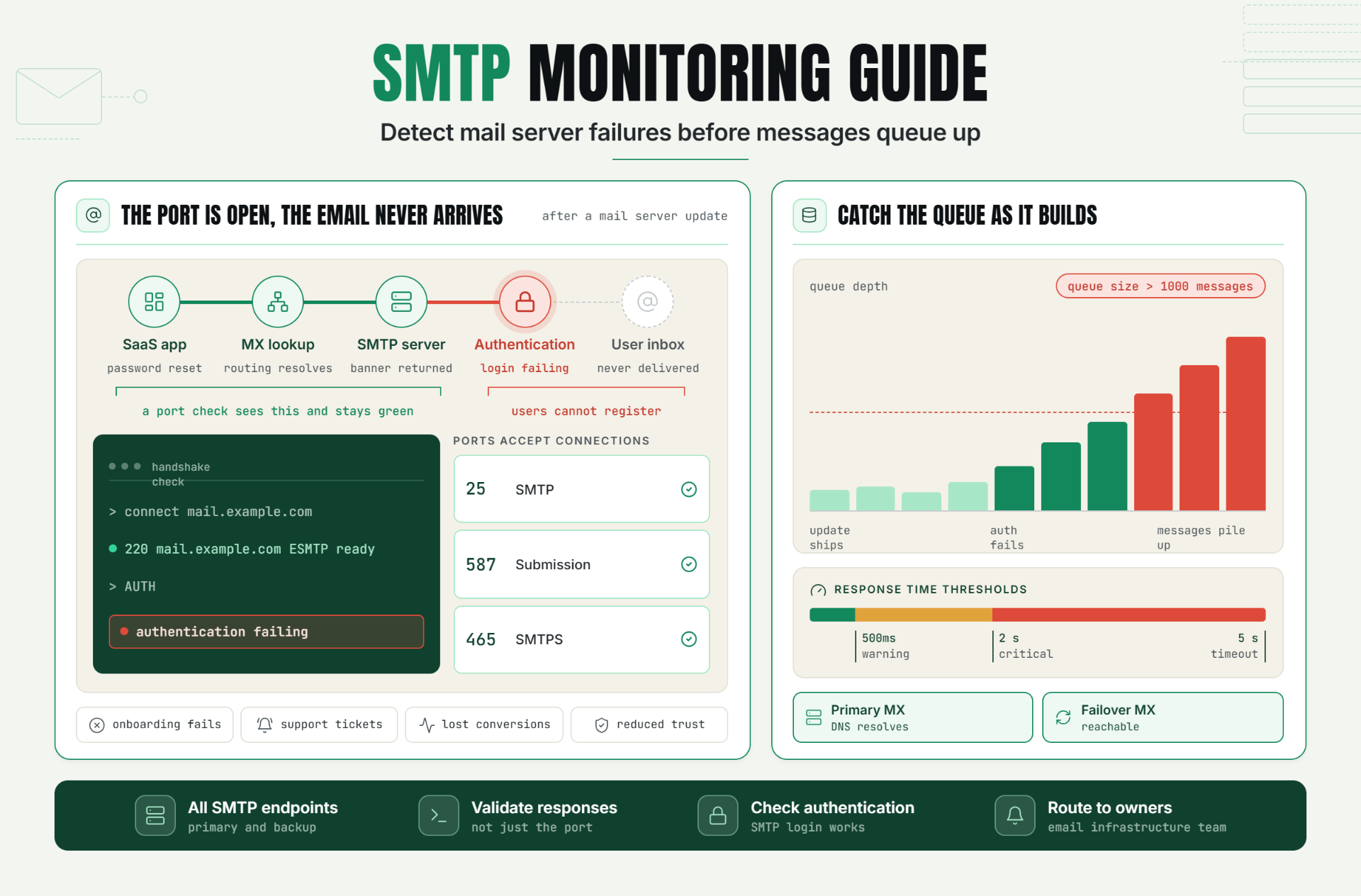
Email remains one of the most critical communication channels for businesses. Password resets, account verification emails, billing notifications, support responses, and transactional messages all depend on reliable mail delivery.
When SMTP services fail, customers may be unable to receive important communications, leading to support tickets, lost revenue, security concerns, and poor user experiences.
SMTP monitoring helps organizations proactively detect mail server issues, delivery failures, queue buildup, and infrastructure outages before they affect customers.
The Operational Risks Teams Face Without Effective SMTP Monitoring
Many organizations monitor websites, APIs, and applications while overlooking the infrastructure responsible for email delivery.
Without effective SMTP monitoring, teams risk:
- Undetected mail server outages.
- Email delivery delays.
- Growing mail queues.
- Authentication failures.
- DNS and MX record issues.
- Lost transactional emails.
- Customer communication breakdowns.
These failures often remain unnoticed until customers report missing emails or business workflows begin failing.
Proactive SMTP monitoring reduces the risk of prolonged email delivery incidents.
How SMTP Monitoring Works, Key Signals, Thresholds, and Diagnosis
What Is SMTP Monitoring?
SMTP monitoring validates the availability, responsiveness, and operational health of mail servers responsible for sending email.
Monitoring systems typically connect to SMTP endpoints, validate server responses, and measure service performance.
Common SMTP Ports to Monitor
- SMTP: 25
- SMTP Submission: 587
- SMTPS: 465
Availability monitoring should verify that mail servers accept connections and respond correctly.
Key Components of SMTP Monitoring
| Component | Purpose |
|---|---|
| SMTP Port Check | Verify server availability |
| Banner Validation | Confirm SMTP responses |
| MX Monitoring | Validate mail routing |
| Response Time Monitoring | Track performance |
| Mail Queue Monitoring | Detect delivery issues |
| Authentication Validation | Verify login functionality |
SMTP Handshake Validation
A healthy SMTP service should respond appropriately during connection attempts.
Example SMTP response: 220 mail.example.com ESMTP ready
Monitoring systems can verify that expected responses are returned during the handshake process.
MX Service Monitoring
MX records determine where inbound email should be delivered.
Monitoring should verify:
- MX record availability.
- DNS resolution.
- Mail routing configuration.
- Failover server accessibility.
Mail Queue Monitoring
Growing mail queues often indicate delivery problems.
Example alert condition: Queue Size > 1000 Messages
Monitoring queue depth helps teams identify issues before delivery delays become severe.
Recommended Thresholds
- Warning response time: 500ms
- Critical response time: 2 seconds
- SMTP timeout: 5 seconds
- Queue alert threshold: 1000 messages
A Realistic Production Scenario and Recommended Monitor Setup
Scenario: SaaS Platform Email Delivery Failure
A SaaS platform relies on email for account verification, password resets, and billing notifications.
Following a mail server update, SMTP authentication begins failing.
Users stop receiving verification emails and cannot complete account registration.
The Business Impact
- Failed customer onboarding.
- Increased support tickets.
- Lost conversions.
- Reduced customer trust.
Recommended Monitor Setup
| Monitor Type | Purpose |
|---|---|
| SMTP Port Monitor | Validate server availability |
| SMTP Banner Check | Verify handshake responses |
| MX Monitor | Validate routing infrastructure |
| Queue Monitor | Detect delivery bottlenecks |
| Authentication Check | Verify login functionality |
This layered approach improves visibility across the entire email delivery chain.
Best Practices: Coverage, Check Frequency, Validation, Ownership, and Escalation
1. Monitor All SMTP Endpoints
Cover primary and backup mail servers.
2. Validate SMTP Responses
Verify correct banner and handshake responses.
3. Monitor MX Records
Ensure mail routing infrastructure remains healthy.
4. Track Mail Queue Growth
Identify delivery bottlenecks early.
5. Monitor Authentication Workflows
Verify SMTP login and authorization processes.
6. Define Ownership
Assign responsibility for email infrastructure and incident response.
7. Configure Escalation Paths
Ensure critical email delivery failures reach the correct teams immediately.
Common Mistakes: Weak Checks, Noisy Alerts, Missing Dependencies, and Poor Routing
Mistake 1: Monitoring Only Port Availability
Better approach: Validate SMTP responses and functionality.
Mistake 2: Ignoring Mail Queues
Better approach: Track queue depth and growth trends.
Mistake 3: Not Monitoring MX Records
Better approach: Validate routing infrastructure continuously.
Mistake 4: Missing Authentication Checks
Better approach: Verify SMTP authentication workflows.
Mistake 5: Poor Alert Routing
Better approach: Send incidents directly to email infrastructure owners.
Reliable Email Delivery Starts with SMTP Monitoring
SMTP infrastructure powers many essential business workflows. Even short disruptions can affect customer onboarding, account security, billing, and support operations.
By monitoring SMTP availability, validating responses, tracking mail queues, and verifying MX infrastructure, teams can detect issues before email delivery failures impact customers.
The first step is identifying critical mail servers and implementing monitoring that validates both availability and operational functionality.
Start Monitoring SMTP Services Today
Ready to improve email infrastructure reliability?
Start your 30-day Statixoup beta and configure SMTP monitors for your mail servers.
Track SMTP availability, monitor mail delivery infrastructure, and receive alerts before email issues affect your business.

