Synthetic Monitoring Explained: Test Real User Journeys Before Customers Complain
Learn how synthetic monitoring helps teams test real user journeys before customers encounter problems. Discover how browser-based monitoring, synthetic transactions, and proactive testing can detect failures across login flows, checkout processes, and critical application workflows.
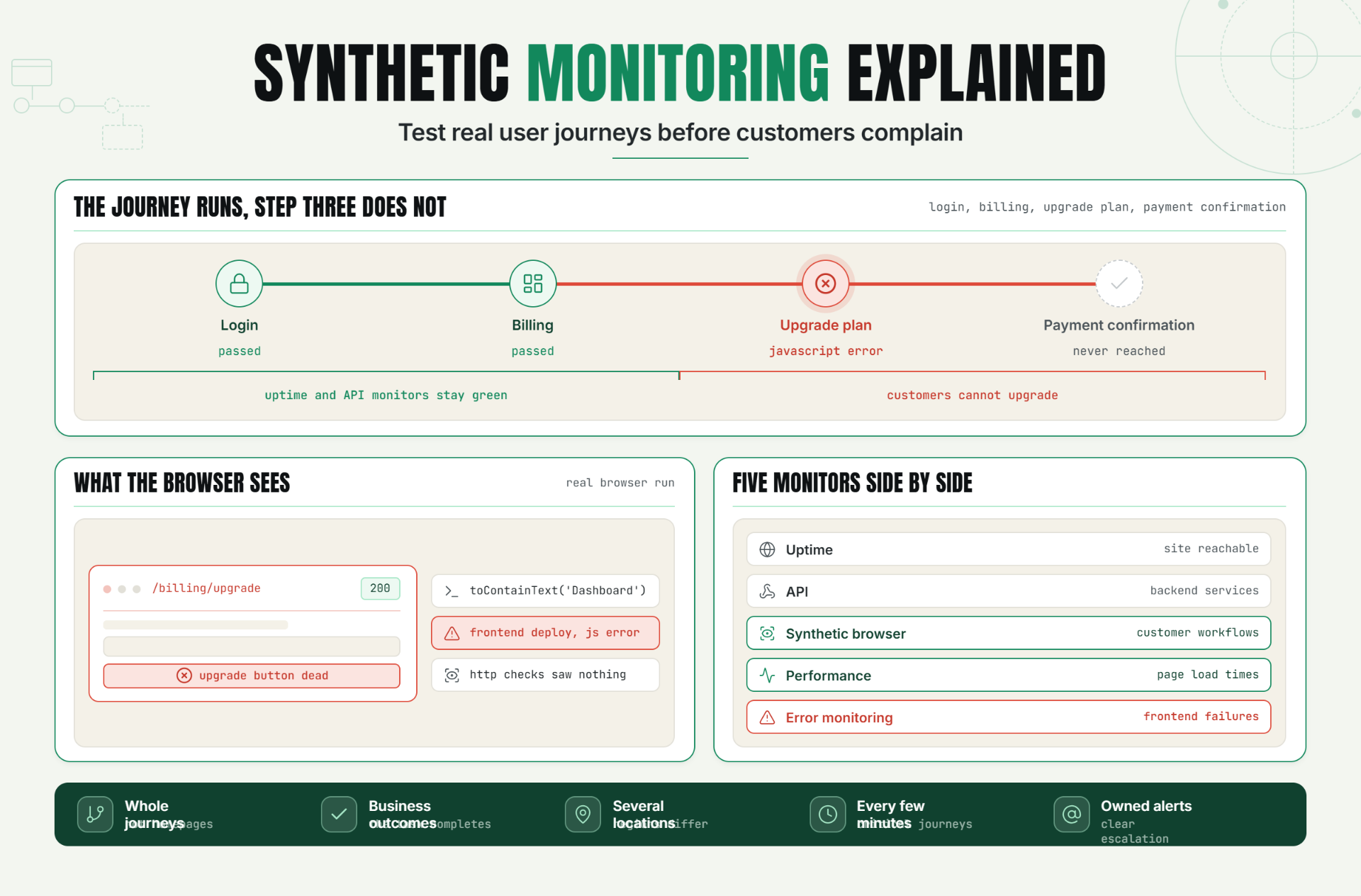
Modern applications are far more complex than simple websites. Users log in, complete purchases, upload files, generate reports, access dashboards, and interact with multiple backend services during a single session.
Traditional uptime monitoring can verify that a website responds successfully, but it often cannot determine whether critical customer workflows are functioning correctly.
A homepage may load successfully while users are unable to log in, complete a checkout, submit forms, or access essential features.
Synthetic monitoring helps organizations proactively test real user journeys before customers encounter problems. By simulating user interactions through browser automation, teams can identify issues early and maintain a reliable customer experience.
The Operational Risks Teams Face Without Effective Synthetic Monitoring
Many organizations rely on uptime checks and API monitoring to assess system health. While these monitoring methods provide valuable visibility, they often fail to validate complete customer workflows.
Without synthetic monitoring, teams risk:
- Broken login experiences.
- Failed checkout transactions.
- Unusable application features.
- Frontend JavaScript errors.
- Authentication failures.
- Customer-reported incidents.
- Revenue-impacting workflow disruptions.
These failures can occur while websites continue responding with successful status codes and uptime monitors report healthy systems.
The result is delayed detection and frustrated customers.
How Synthetic Monitoring Works, Key Signals, Thresholds, and Diagnosis
What Is Synthetic Monitoring?
Synthetic monitoring is a proactive monitoring technique that simulates real user interactions with applications, websites, and services.
Instead of waiting for actual users to report problems, synthetic monitoring continuously executes predefined workflows and validates expected outcomes.
How Synthetic Monitoring Works
A synthetic monitor performs actions that resemble real customer behavior.
Examples include:
- Opening a website.
- Logging into an application.
- Searching for products.
- Adding items to a cart.
- Completing checkout workflows.
- Submitting forms.
- Accessing customer dashboards.
The monitor validates each step and generates alerts if expected outcomes are not achieved.
Synthetic Transaction Monitoring
Synthetic transaction monitoring focuses on complete business workflows rather than individual pages or endpoints.
Example workflow:Login > Dashboard > Create Report > Download PDFIf any step fails, the monitor immediately reports the issue.
Browser Monitoring
Browser-based synthetic monitoring uses real browsers to execute workflows and validate frontend behavior.
This helps detect issues that traditional HTTP monitoring cannot identify.
Examples include:
- JavaScript errors.
- Broken UI components.
- Rendering failures.
- Frontend authentication issues.
- Client-side performance problems.
Playwright Monitoring
Many teams use browser automation frameworks such as Playwright to create advanced synthetic monitoring scenarios.
Example validation:expect(page.locator('h1')).toContainText('Dashboard')These validations confirm that applications behave as expected from a user perspective.
Key Signals to Monitor
| Signal | Purpose |
|---|---|
| Journey Success Rate | Validate workflows |
| Page Load Time | Track performance |
| Step Completion | Identify failures |
| Browser Errors | Detect frontend issues |
| Authentication Success | Validate access |
| Transaction Completion | Measure business reliability |
A Realistic Production Scenario and Recommended Monitor Setup
Scenario: SaaS Subscription Platform
A SaaS company offers customers a self-service subscription management portal.
One morning, a frontend deployment introduces a JavaScript error affecting the billing page.
The homepage remains available and API endpoints continue responding successfully.
However, customers can no longer upgrade their subscriptions.
The Business Impact
- Lost upgrades.
- Reduced revenue.
- Customer frustration.
- Increased support requests.
Recommended Monitor Setup
| Monitor Type | Purpose |
|---|---|
| Uptime Monitor | Verify website availability |
| API Monitor | Validate backend services |
| Synthetic Browser Monitor | Validate customer workflows |
| Performance Monitor | Track page load times |
| Error Monitoring | Detect frontend failures |
Example Synthetic Journey
Workflow:Login > Billing > Upgrade Plan > Payment ConfirmationIf any step fails, an alert is generated immediately.
Best Practices: Coverage, Check Frequency, Validation, Ownership, and Escalation
1. Monitor Critical Customer Journeys
Focus on workflows that directly impact revenue and customer experience.
2. Combine Synthetic and Uptime Monitoring
Availability checks and workflow validation should complement each other.
3. Validate Business Outcomes
Confirm that users can complete tasks successfully.
4. Monitor From Multiple Locations
Verify user experiences across regions.
5. Run Checks Frequently
Critical journeys should typically execute every few minutes.
6. Define Ownership
Assign responsibility for synthetic monitors and alert response.
7. Create Escalation Procedures
Ensure failures are routed to the correct teams quickly.
Common Mistakes: Weak Checks, Noisy Alerts, Missing Dependencies, and Poor Routing
Mistake 1: Monitoring Only Homepages
Better approach: Monitor complete user journeys.
Mistake 2: Ignoring Frontend Validation
Better approach: Use browser-based checks.
Mistake 3: Monitoring Too Few Workflows
Better approach: Cover critical customer actions.
Mistake 4: Running Checks Too Infrequently
Better approach: Schedule regular validation.
Mistake 5: No Alert Ownership
Better approach: Establish clear escalation paths.
Reliable Customer Experiences Require Journey Validation
Synthetic monitoring helps organizations move beyond simple uptime checks and validate the complete customer experience.
By testing real user journeys, monitoring browser behavior, and validating business outcomes, teams can identify issues earlier and improve application reliability.
The first step is identifying critical customer workflows and implementing synthetic monitoring that continuously validates those journeys.
Start Monitoring Real User Journeys Today
Ready to detect workflow failures before customers complain?
Start your 30-day Statixoup trial and configure your first synthetic monitor.
Monitor critical user journeys, validate business workflows, and receive alerts before issues impact customer experience.

