TCP vs UDP Monitoring: Choose the Right Check for Every Network Service
Learn the differences between TCP and UDP monitoring, when to use each protocol check, and how to monitor network services effectively. Discover best practices for validating port availability, detecting service failures, and improving infrastructure reliability.
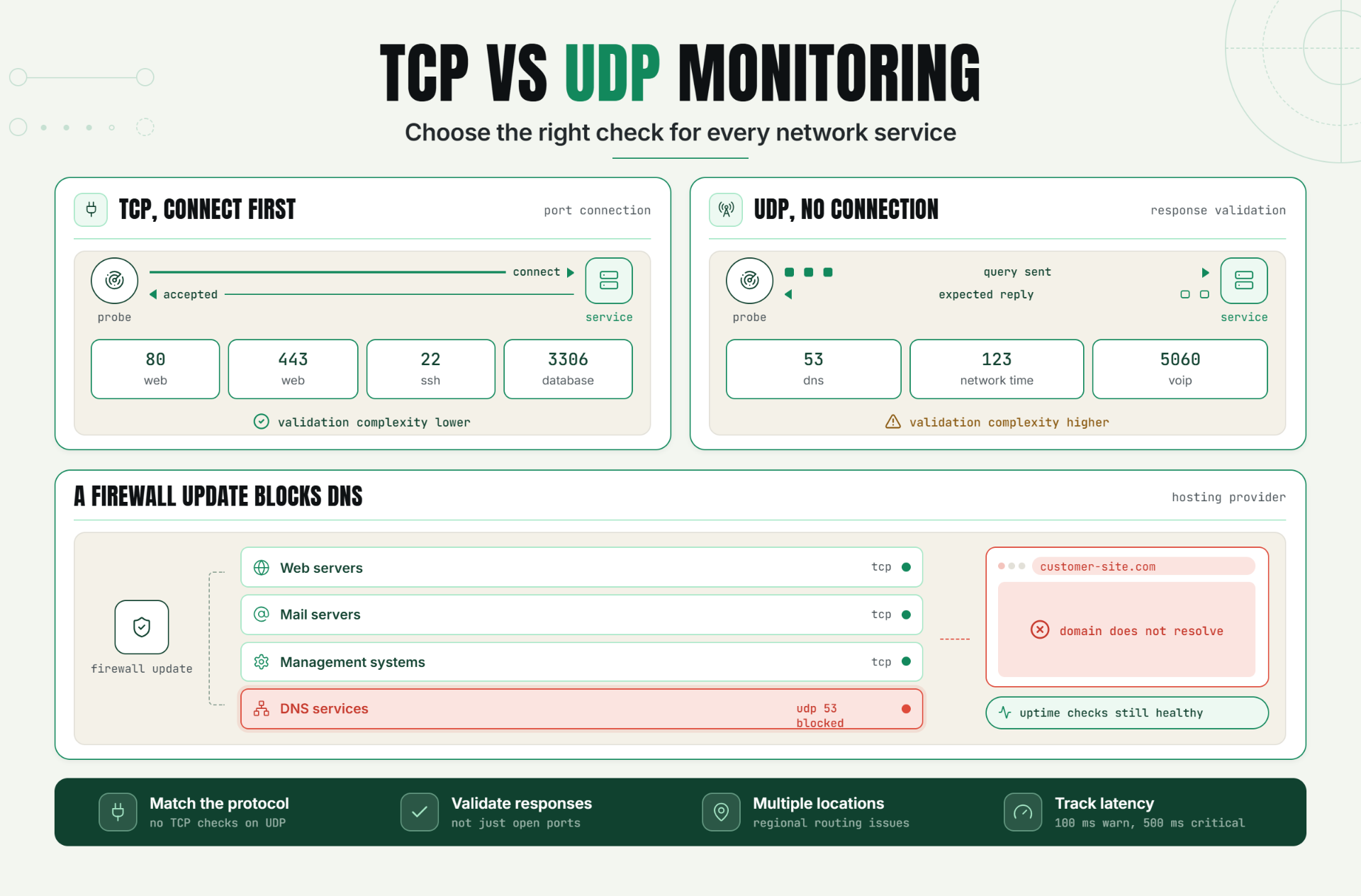
Modern infrastructure depends on a wide range of network services, each built on different communication protocols. Some services use TCP for reliable connections, while others use UDP for speed and low latency.
Monitoring these services correctly is critical for maintaining uptime, performance, and customer experience. Using the wrong monitoring approach can create blind spots that allow service disruptions to go undetected.
TCP vs UDP monitoring helps teams validate service availability, detect network issues faster, and ensure that critical infrastructure remains accessible.
The Operational Risks Teams Face Without Effective TCP vs UDP Monitoring
Many organizations monitor websites and APIs but overlook lower-level network services that support critical applications.
Without proper TCP and UDP monitoring, teams risk:
- Undetected service outages.
- Network connectivity issues.
- DNS failures.
- VoIP disruptions.
- Game server availability problems.
- Infrastructure downtime.
- Delayed incident response.
When protocol-level services fail, customer-facing systems may experience outages even when web monitoring continues reporting healthy results.
Effective protocol monitoring helps identify failures before they escalate into larger incidents.
How TCP vs UDP Monitoring Works, Key Signals, Thresholds, and Diagnosis
What Is TCP Monitoring?
TCP monitoring validates that a service accepts incoming TCP connections on a specified port.
TCP services establish a connection before exchanging data, making them easier to validate through connection checks.
Common TCP services include:
- Web servers.
- Databases.
- Email servers.
- SSH services.
- Application servers.
What Is UDP Monitoring?
UDP monitoring validates services that use connectionless communication.
Unlike TCP, UDP does not establish a connection before transmitting data, making monitoring more challenging.
Common UDP services include:
- DNS servers.
- VoIP systems.
- Streaming platforms.
- Gaming servers.
- Network services.
TCP vs UDP Monitoring Comparison
| Feature | TCP Monitoring | UDP Monitoring |
|---|---|---|
| Connection Required | Yes | No |
| Validation Complexity | Lower | Higher |
| Reliability | High | Application-dependent |
| Common Use Cases | Web, SSH, Databases | DNS, VoIP, Gaming |
| Monitoring Method | Port Connection | Response Validation |
Key Signals to Monitor
- Port availability.
- Connection success rate.
- Network latency.
- Response time.
- Packet loss indicators.
- Service availability.
Recommended Thresholds
- Warning latency: 100ms
- Critical latency: 500ms
- Connection timeout: 5 seconds
A Realistic Production Scenario and Recommended Monitor Setup
Scenario: Hosting Provider Infrastructure
A hosting company manages customer websites, DNS services, and email servers.
The infrastructure includes:
- Web servers using TCP.
- DNS services using UDP.
- Mail servers using TCP.
- Management systems using TCP.
A firewall update accidentally blocks DNS traffic.
Web servers remain operational, but customers cannot resolve domains.
The Problem
Traditional uptime checks continue reporting healthy websites because the web servers remain online.
However, DNS resolution failures prevent users from reaching those websites.
Recommended Monitor Setup
| Monitor Type | Purpose |
|---|---|
| HTTP Monitor | Validate website availability |
| TCP Monitor | Check web and mail services |
| UDP Monitor | Validate DNS availability |
| Latency Monitor | Track network performance |
This layered monitoring strategy provides broader visibility into service health.
Best Practices: Coverage, Check Frequency, Validation, Ownership, and Escalation
1. Match Monitoring to the Protocol
Use TCP monitoring for connection-based services and UDP monitoring for connectionless services.
2. Monitor Critical Ports
Focus on services that directly support business operations.
3. Validate Responses When Possible
Don't rely solely on open ports.
4. Monitor From Multiple Locations
Detect regional routing and connectivity issues.
5. Use Appropriate Check Intervals
Critical services should be monitored frequently.
6. Define Service Ownership
Assign responsibility for maintaining monitored services.
7. Implement Escalation Procedures
Ensure incidents reach the correct teams quickly.
Common Mistakes: Weak Checks, Noisy Alerts, Missing Dependencies, and Poor Routing
Mistake 1: Monitoring Only Web Services
Better approach: Monitor all critical network services.
Mistake 2: Using TCP Checks for UDP Services
Better approach: Match monitoring methods to service protocols.
Mistake 3: Monitoring Port Availability Only
Better approach: Validate service functionality when possible.
Mistake 4: Ignoring Network Latency
Better approach: Track performance alongside availability.
Mistake 5: Missing Escalation Rules
Better approach: Route alerts to the appropriate teams.
Effective Network Monitoring Requires the Right Protocol Checks
TCP and UDP monitoring play different but equally important roles in maintaining service reliability.
By selecting the correct monitoring approach for each protocol, validating critical services, and tracking network performance, teams can identify issues faster and reduce downtime.
The first step is auditing your infrastructure and ensuring that every critical TCP and UDP service has an appropriate monitoring strategy.
Start Monitoring TCP and UDP Services Today
Ready to improve visibility across your infrastructure?
Start your 30-day Statixoup trial and configure TCP and UDP monitors for your critical services.
Track service availability, detect protocol-level failures, and receive alerts before network issues affect your users.

