UDP Service Monitoring: How to Check DNS, Gaming, VoIP, and Streaming Endpoints
Learn how UDP monitoring helps detect failures in DNS, VoIP, gaming, streaming, and other connectionless services. Discover how to validate UDP availability, identify packet loss, and improve network reliability before users experience disruptions.
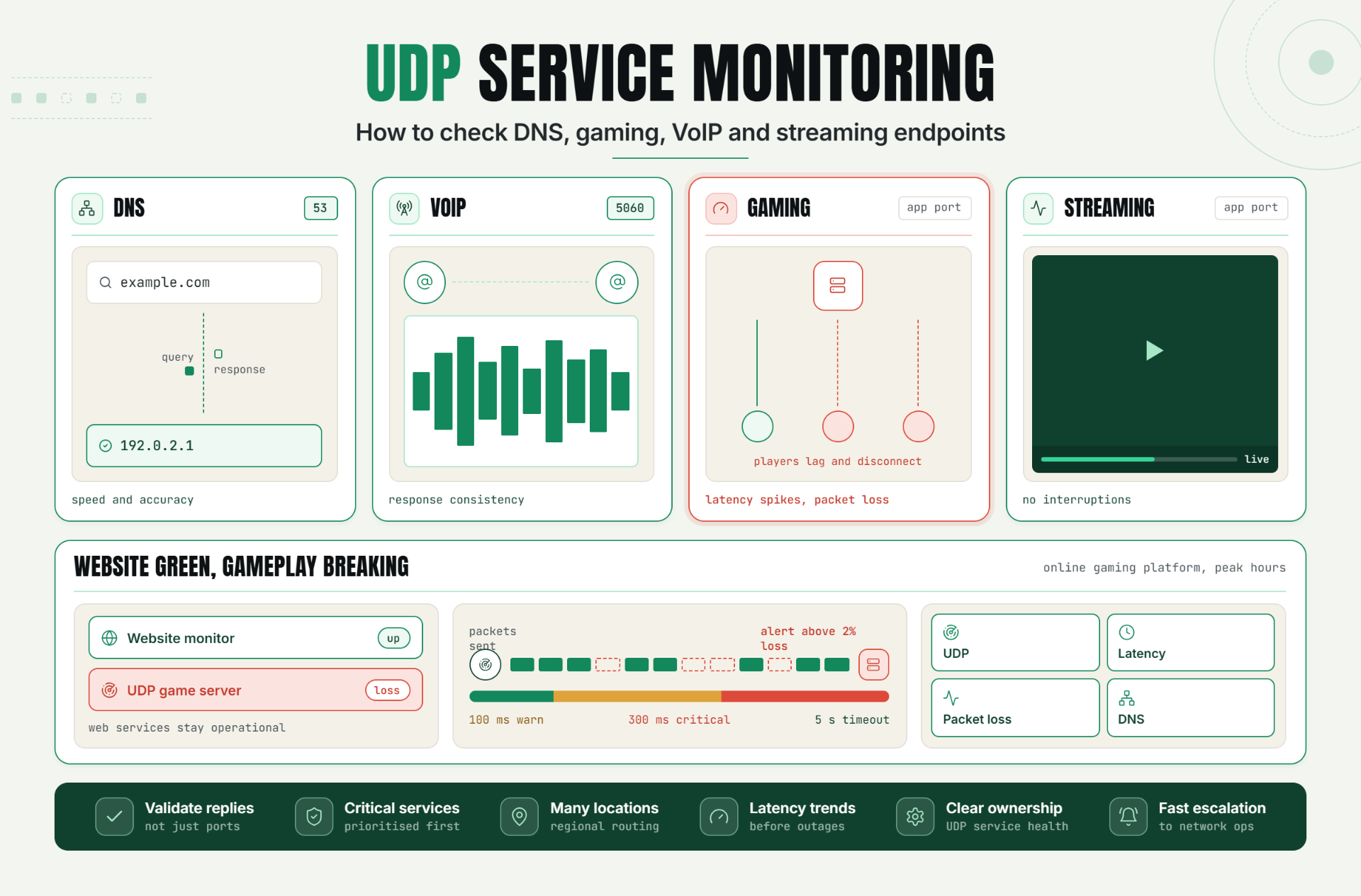
Many critical internet services rely on the User Datagram Protocol (UDP) for fast, low-latency communication. DNS lookups, VoIP calls, online gaming sessions, video streaming platforms, and time synchronization services all depend on UDP to deliver responsive experiences.
Unlike TCP-based services, UDP does not establish a connection before transmitting data. While this improves speed and reduces overhead, it also makes monitoring more challenging.
UDP monitoring helps organizations verify service availability, detect packet loss, identify latency issues, and ensure that critical network services remain operational.
The Operational Risks Teams Face Without Effective UDP Monitoring
Many monitoring solutions focus on websites, APIs, and TCP services while overlooking UDP-based infrastructure.
Without effective UDP monitoring, teams risk:
- DNS resolution failures.
- VoIP call disruptions.
- Gaming server outages.
- Streaming interruptions.
- Packet loss issues.
- Network latency degradation.
- Delayed incident detection.
These issues often impact customer experience immediately while remaining invisible to traditional uptime monitoring systems.
Organizations that depend on UDP services require dedicated monitoring to detect problems before they affect users.
How UDP Monitoring Works, Key Signals, Thresholds, and Diagnosis
What Is UDP Monitoring?
UDP monitoring validates the availability, responsiveness, and performance of services that communicate using the User Datagram Protocol.
Because UDP is connectionless, monitoring focuses on response validation rather than connection establishment.
Why UDP Monitoring Is Different
Unlike TCP services, UDP applications do not perform a handshake before exchanging data.
This means a monitoring system must send requests and validate responses to determine service health.
Example:DNS Query > DNS ResponseIf the expected response is not received, the service may be unavailable or experiencing network issues.
Common UDP Services to Monitor
| Service | Typical Port |
|---|---|
| DNS | 53 |
| NTP | 123 |
| SIP VoIP | 5060 |
| Gaming Servers | Application Specific |
| Streaming Services | Application Specific |
Key Signals to Monitor
- Service availability.
- Response success rate.
- Network latency.
- Packet loss indicators.
- Response validation.
- Regional accessibility.
DNS Service Monitoring
DNS monitoring verifies that name resolution services respond correctly and quickly.
Example validation:example.com > 192.0.2.1Monitoring should validate both response speed and response accuracy.
VoIP Monitoring
VoIP systems depend on UDP for real-time communication.
Monitoring should focus on:
- Availability.
- Latency.
- Packet loss.
- Response consistency.
Gaming Server Monitoring
Online gaming platforms require low-latency network performance.
UDP monitoring helps identify:
- Server availability.
- Packet loss.
- Latency spikes.
- Regional connectivity issues.
Recommended Thresholds
- Warning latency: 100ms
- Critical latency: 300ms
- Response timeout: 5 seconds
- Packet loss alert: Above 2%
A Realistic Production Scenario and Recommended Monitor Setup
Scenario: Online Gaming Platform
A gaming company operates multiplayer servers across multiple regions.
Players begin reporting lag and disconnections during peak traffic hours.
Traditional website monitoring reports healthy systems because web services remain operational.
However, UDP packet loss is affecting gameplay performance.
The Business Impact
- Poor player experience.
- Higher churn rates.
- Negative reviews.
- Increased support volume.
Recommended Monitor Setup
| Monitor Type | Purpose |
|---|---|
| UDP Monitor | Validate game server availability |
| Latency Monitor | Track regional performance |
| Packet Loss Monitor | Detect network degradation |
| DNS Monitor | Verify endpoint resolution |
This approach provides visibility into both service availability and network quality.
Best Practices: Coverage, Check Frequency, Validation, Ownership, and Escalation
1. Validate Responses, Not Just Ports
Confirm that services respond correctly to UDP requests.
2. Monitor Critical UDP Services
Prioritize DNS, VoIP, gaming, and streaming infrastructure.
3. Monitor From Multiple Locations
Identify regional routing and accessibility issues.
4. Track Latency Trends
Detect performance degradation before outages occur.
5. Configure Packet Loss Alerts
Packet loss often impacts user experience before complete failures occur.
6. Define Ownership
Assign responsibility for UDP service health and incident response.
7. Establish Escalation Procedures
Ensure critical alerts reach the appropriate teams quickly.
Common Mistakes: Weak Checks, Noisy Alerts, Missing Dependencies, and Poor Routing
Mistake 1: Monitoring Only Port Availability
Better approach: Validate application responses.
Mistake 2: Ignoring Packet Loss
Better approach: Monitor network quality indicators.
Mistake 3: Monitoring From One Location
Better approach: Use geographically distributed checks.
Mistake 4: Missing DNS Monitoring
Better approach: Continuously validate name resolution services.
Mistake 5: Poor Alert Routing
Better approach: Route incidents to network operations teams.
Reliable UDP Services Require Specialized Monitoring
UDP powers many performance-sensitive applications, including DNS, VoIP, gaming, and streaming platforms.
By validating service responses, monitoring latency, tracking packet loss, and detecting regional issues, teams can identify problems faster and improve service reliability.
The first step is identifying critical UDP services and implementing monitoring that validates both availability and network performance.
Start Monitoring UDP Services Today
Ready to improve visibility into your DNS, VoIP, gaming, and streaming infrastructure?
Start your 30-day Statixoup trial and configure your first UDP monitor.
Validate UDP availability, detect packet loss, monitor latency, and receive alerts before issues impact your users.

