Why Your Website Works on One Browser but Fails on Another: SSL Chain Errors Explained
Your SSL certificate is still valid, but some visitors are seeing security warnings. Why? Discover how certificate chain errors happen, how to identify them, and why monitoring the complete SSL trust chain matters.
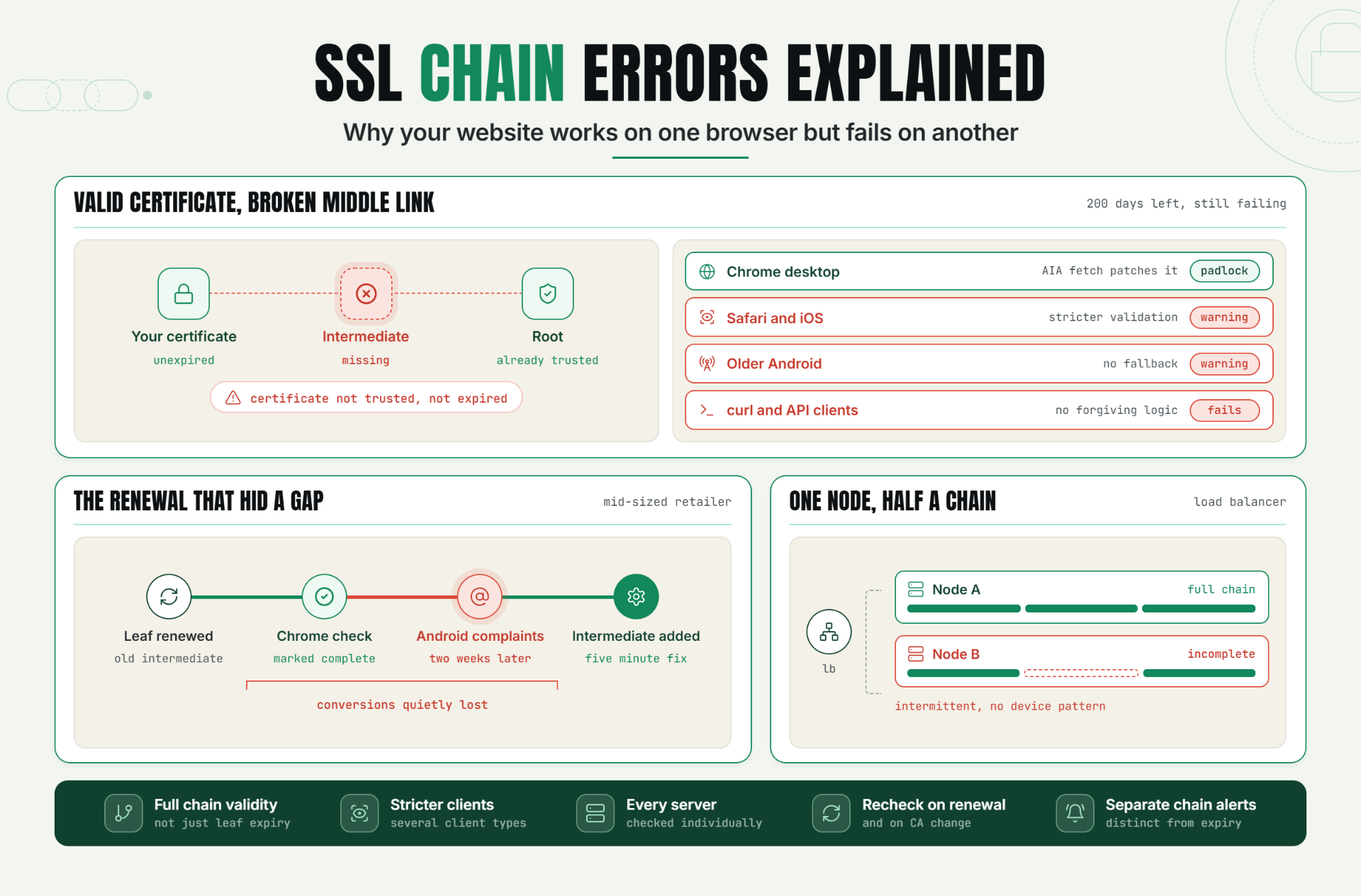
You check your site in Chrome. Padlock, green, perfectly normal. A customer messages you a screenshot from their phone: a full page security warning, "Your connection is not private."
Your first instinct is probably to check the certificate's expiration date. It's not expired, you have 200 days left on it. So what's actually broken?
This is the classic signature of an SSL certificate chain error: a problem that has nothing to do with when your certificate expires, and everything to do with whether the browser can trace a complete, unbroken path from your certificate back to something it already trusts.
Why Chain Errors Are a Different Problem Than Expiry
Most SSL monitoring focuses on one thing: when does the certificate expire. That's important, but it's only one failure mode. TLS chain validation is a completely separate concern and one that's far more likely to produce the exact symptom above: broken for some visitors, fine for others, with a certificate that isn't expired at all.
An expired certificate fails the same way for everyone, everywhere, the instant the clock passes the expiry date. A chain error fails selectively, based on what root and intermediate certificates the visitor's specific device already has cached or installed. That inconsistency is exactly what makes it so much harder to catch and so much more frustrating to diagnose than a simple expiry.
The Trust Chain, Explained Simply
A browser doesn't trust your certificate directly. It trusts a small set of root certificates built into the operating system or browser itself. Your certificate needs to connect back to one of those roots through a chain of trust:
Your certificate → Intermediate certificate(s) → Root certificate (already trusted)
Your server is responsible for presenting not just your certificate, but the intermediate certificate(s) that link it back to a trusted root. If that middle link is missing, incomplete, or wrong, the browser can't complete the chain even though your actual certificate is completely valid and unexpired.
This is why the single most common cause of a chain error has its own name: intermediate certificate missing. The end entity certificate is fine. The root is fine and already trusted. The piece that got left out during installation is the one in the middle.
Why This Breaks Inconsistently: The Real Operational Risk
If a chain error only failed for everyone, someone would notice on day one and fix it immediately. It's the inconsistency that makes this genuinely risky:
- Modern browsers often cache intermediate certificates they've seen before from other sites, meaning Chrome on a machine that's visited a site with the same intermediate recently might succeed where a fresh device fails completely.
- Different clients validate differently. A browser might tolerate a slightly incomplete chain and quietly fetch the missing intermediate itself (a feature some browsers support, called AIA fetching), while a mobile app, an API client, or an older browser has no such fallback and simply fails outright.
- This makes the failure look like "just some users," which is easy to dismiss. A support ticket saying "the site looks broken for me" from one customer, with everyone internally seeing a fine padlock, often gets written off as a one off local issue rather than investigated as a real, systemic misconfiguration.
- It silently affects trust and conversions before anyone escalates it. Every visitor who hits a security warning and doesn't report it just leaves. The ones who complain are a small, visible fraction of everyone actually affected.
Without deliberate SSL error monitoring that checks the full chain, not just the leaf certificate's expiry date, this exact failure mode can persist for a long time, quietly costing conversions from an unpredictable subset of visitors.
Symptom → Cause Lookup
| What You're Seeing | Likely Cause |
|---|---|
| Works in Chrome, fails in Safari or on iOS | Missing intermediate certificate Chrome's AIA fetching masks it, Safari is stricter |
| Works on desktop, fails on older Android devices | Root certificate not present in that device's older trust store, or an incomplete chain that a newer OS's fallback logic tolerates |
| Fails in automated tools, API clients, or curl, but "looks fine" in a browser | Confirms a chain issue command line tools typically don't have a browser's forgiving fallback behavior |
| Intermittent failures, no pattern by device | Load balanced servers serving the certificate inconsistently one node has the full chain configured, another doesn't |
| Fails immediately for everyone, no exceptions | Likely not a chain issue at all check expiry date and hostname match first |
| "Certificate not trusted" specifically (not "expired") | Strong signal of a chain issue the browser trusts the concept of certificates but can't verify this one's lineage |
How to Actually Diagnose a Chain Error
Step 1 — Rule out expiry and hostname mismatch first. These are simpler, more common causes, and eliminating them narrows the investigation quickly.
Step 2 — Check what your server is actually presenting. A command line tool like openssl s_client -connect yourdomain.com:443 showcerts shows you exactly what certificates your server sends, in what order which is a very different picture than what a forgiving browser might silently patch together.
Step 3 — Compare what's sent against what's required. Your certificate authority's documentation specifies which intermediate certificate(s) should accompany your specific certificate. If your server's output is missing one, that's very likely your answer.
Step 4 — Test across multiple clients, not just your primary browser. Because chain validation is client dependent, a single browser's success tells you very little. Test from a stricter client an older device, a command line tool, or a dedicated certificate validation service to see the failure a forgiving browser might be hiding from you.
Step 5 — Check consistency across every server behind your load balancer or CDN. If you run multiple servers, confirm each one independently presents the complete chain. A partial rollout of the correct configuration produces exactly the "sometimes it works" pattern that makes this so confusing to trace.
A Practical Production Scenario
A mid-sized retailer renews its SSL certificate ahead of expiry, well within their usual process. Internally, everyone checks the site in Chrome padlock, green, no warnings. The renewal is marked complete.
Two weeks later, customer support starts fielding a slow trickle of complaints, almost all from older Android devices and a specific budget phone brand popular in one particular region: "Your site says it's not secure." The team's first reaction is confusion, since their own checks show nothing wrong.
Running a dedicated chain validation check reveals the actual issue: the new certificate requires a different intermediate certificate than the previous one did, and the server configuration was updated with the new leaf certificate but never updated with the corresponding new intermediate. Chrome on modern desktops was silently fetching the missing intermediate on its own (AIA fetching) and never showing an error. Older Android browsers, without that fallback, failed outright.
The fix is a five minute server configuration change adding the correct intermediate certificate to the chain. The two weeks of quietly lost conversions from unrecognized failed connections, however, are gone for good.
Recommended Monitor Setup
- Monitor full chain validity, not just leaf certificate expiry, on every scheduled SSL check.
- Check from multiple simulated client types, since browser level fallback behavior can mask a chain error that stricter clients will catch.
- Verify chain consistency across every server behind a load balancer or CDN edge, individually.
- Recheck chain validity immediately after every certificate renewal, not just before the next expiry cycle.
- Alert specifically on "incomplete chain" as its own category, distinct from an expiry warning, so the team knows exactly which kind of fix is needed.
Best Practices for Monitoring Chain Validity
Check the full chain on every renewal, not just the leaf certificate. A new certificate frequently requires a different or updated intermediate certificate than the one it replaces assume this by default rather than as an edge case.
Test from more than a mainstream desktop browser. Modern browsers' fallback behavior (like AIA fetching) can mask a genuinely broken server configuration. A stricter client gives you the real picture.
Validate every server behind a load balancer individually. A correct chain on one node and an incomplete one on another produces intermittent failures that are painful to trace without per server checks.
Separate chain error alerts from expiry alerts. These require completely different fixes a chain error needs a server configuration change, while expiry needs a renewal and conflating them into one generic "SSL problem" alert slows down the response.
Reverify immediately after any certificate authority or provider change. Switching certificate authorities is one of the most common triggers for a chain mismatch, since the new CA's required intermediate is often different from the old one.
Document your certificate authority's required intermediate chain. Keeping this on hand turns "is our chain correct?" into a quick comparison instead of a fresh investigation every time.
Common Mistakes
Treating a browser's green padlock as proof the chain is correct. Modern browsers often compensate for a broken chain automatically, hiding a real misconfiguration from the very people checking for it.
Only checking the certificate's expiration date. Expiry monitoring is necessary but doesn't catch chain issues at all they're a separate class of failure requiring separate validation.
Assuming a renewed certificate automatically carries the correct intermediate. A new leaf certificate frequently pairs with a different intermediate certificate than before; the server configuration needs to be updated to match, not just the leaf swapped in.
Not testing across multiple client types. A single browser, especially a modern, forgiving one, can give a false sense of security that stricter clients older devices, API clients, command line tools won't share.
Overlooking inconsistency across load balanced servers. Assuming all servers behind a load balancer share identical SSL configuration, without individually verifying each one.
Lumping chain errors and expiry warnings into one generic alert. This slows diagnosis, since the two require entirely different remediation steps.
Start Monitoring the Whole Chain, Not Just the Date
An unexpired certificate isn't the same thing as a working one. If the chain behind it is incomplete, a meaningful slice of your visitors are hitting security warnings you can't even see from your own browser.
Start a 30 day Statixoup trial and configure certificate validation checks that cover the full trust chain, not just the expiration date. The next chain mismatch won't wait for a confused customer screenshot, you'll catch it directly.