Transaction Monitoring 101: Catch Broken Login, Signup, and Checkout Flows Before Your Customers Do
Detect broken login, signup and checkout journeys while your website and uptime checks still appear healthy. Test every step in a real user flow, identify slow or failed actions and capture the evidence needed for faster diagnosis. Protect customer experience, conversions and revenue by finding critical journey failures before customers report them.
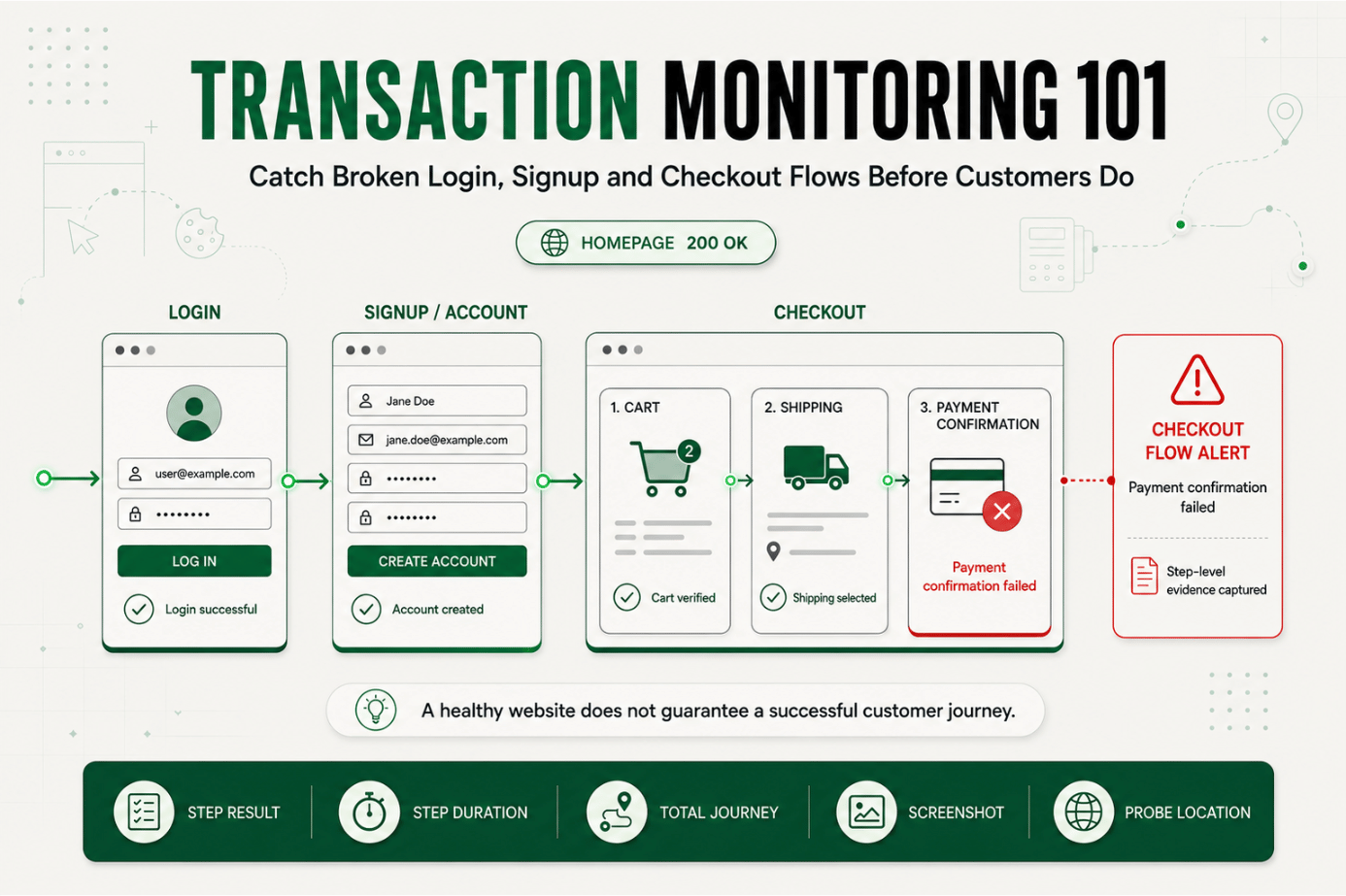
Your homepage loads in 400 ms. Your status page is green. Every uptime check is passing.
And yet a support ticket just came in: a customer tried to check out three times and gave up.
Nobody caught it, because nothing was actually down.
This is the gap that transaction monitoring exists to close. Login, signup, and checkout aren't single requests, they're multi step journeys, and a single broken step anywhere in that journey can quietly cost revenue while every individual system reports healthy.
If you're responsible for uptime, conversion, or revenue, transaction monitoring sometimes implemented through login flow monitoring, signup monitoring, and checkout monitoring is how you catch these failures before customers report them.
Why Transaction Monitoring Matters to Reliability and Customer Experience
Uptime monitoring answers one question: is the endpoint reachable? That's necessary, but it isn't the same question a paying customer is asking, which is closer to: can I actually log in, sign up, or pay? The Statixoup port monitoring guide shows how infrastructure checks expose connectivity failures, while transaction monitoring verifies whether the complete customer journey still works.
Login, signup, and checkout are the three journeys where a failure has an immediate, measurable cost. A slow blog page is an inconvenience. A checkout flow that silently fails at the payment step is lost revenue, and often a lost customer.
Transaction monitoring also called end-to-end monitoring or synthetic user journey monitoring simulates the exact sequence a real user follows: opening a page, filling a field, clicking a button, waiting for a redirect, confirming a result. It doesn't just ask whether a server responded. It asks whether the outcome the user expected actually happened. This follows the Google SRE distinction between black-box and white-box monitoring, where externally visible system behaviour must be observed directly.
That distinction matters because most production incidents involving login flow monitoring, signup monitoring, or checkout monitoring targets aren't full outages. They're partial breaks: a form that submits but never redirects, a payment provider that times out only for one card type, a session token that stops persisting after a deploy.
The Operational Risk of Skipping End-to-End Monitoring
Consider what's actually being monitored in a typical stack without end-to-end monitoring:
- The homepage returns a 200.
- The API health check passes.
- The database shows normal query times.
- SSL certificates are valid.
- Server CPU and memory are within range.
Every one of those checks can be green while checkout monitoring would have caught the real problem: a JavaScript error introduced in the last deploy prevents the "Place Order" button from submitting on Safari. A successful HTTP 200 response only confirms that the request succeeded at the protocol level; it does not prove the intended business outcome occurred.
This is the core operational risk. Individual component checks confirm that parts are working. They don't confirm that the path through those parts still works for a real user, in a real browser, in the right order, which is exactly what a synthetic user journey is built to verify.
Without journey level visibility, teams typically find out about broken flows one of three ways:
- A spike in support tickets, hours after the issue started.
- A drop in signup or conversion metrics, which takes a dashboard review to notice.
- A customer complaint on social media.
All three are slower and more damaging than catching the failure with a synthetic check that runs the same flow every few minutes.
How Transaction Monitoring Actually Works
At its core, transaction monitoring is a scripted, repeatable simulation of a user journey, run on a schedule from one or more locations.
A typical login flow monitoring script does roughly this:
- Load the login page and confirm it renders.
- Enter valid test credentials.
- Submit the form.
- Confirm the session is established (redirect to dashboard, cookie set, or specific element present).
- Log the total time and the outcome of each step.
A signup monitoring script follows a similar shape but usually has more steps: form validation, email verification triggers, account creation confirmation, and sometimes a welcome state check.
A checkout monitoring script is typically the longest and the most valuable to get right, because it touches the most systems:
- Add an item to the cart.
- Proceed to checkout.
- Enter shipping details.
- Enter test payment details.
- Submit the order.
- Confirm the order confirmation page or receipt appears.
- Optionally, confirm a web hook or downstream event fired.
Key Signals to Track at Each Step
Raw pass/fail isn't enough. The signals that make transaction monitoring useful are:
- Step level success or failure : which specific step broke, not just "the flow failed."
- Step-level duration : A step that used to take 1 second and now takes 9 seconds is often an early warning before it becomes an outright failure.
- Total journey duration : The end-to-end time a real user experiences.
- Error content : the actual error message, screenshot, or response body captured at the point of failure.
- Consistency across locations : Whether the failure reproduces from every monitoring location or only one.
Setting Thresholds That Mean Something
A common mistake is setting one blanket timeout for the entire journey. A better approach for end-to-end monitoring sets expectations per step:
| Step | Typical Healthy Range | Alert Threshold |
|---|---|---|
| Page load | 0.5–2s | > 4s |
| Form submission | 0.3–1.5s | > 3s |
| Redirect/confirmation | 0.5–2s | > 5s |
| Full journey | 3–8s | > 15s |
These numbers vary by product, but the principle holds: alert on the step where the delay actually occurred, not only on the total. A slow payment gateway step buried inside a "checkout took 12 seconds" alert is much harder to act on than an alert that says "payment confirmation step exceeded threshold."
Diagnosis: Isolating Where the Journey Broke
When a transaction monitoring check fails, the diagnostic question is the same one that matters in any layered system: did the failure happen at this step, or was it inherited from an earlier one?
A checkout monitoring failure at the payment step could mean:
- The payment provider's API is degraded (check their status page and your own API monitoring for that integration).
- A recent frontend deploy broke form validation before submission even occurs.
- The session established during login expired mid flow.
- A downstream inventory check is timing out and blocking order confirmation.
This is why step level logging matters more than a single pass/fail result. Without it, every checkout failure looks identical, and every investigation starts from zero.
A Practical Production Scenario: Checkout Monitoring in Action
Consider an illustrative example.
An ecommerce team runs synthetic checkout monitors every five minutes from three regions. At 2:14 PM, the monitor running from the US East location starts failing at the "payment confirmation" step. The US West and EU monitors are still passing.
The team's first instinct might be to assume the payment provider is down. But the provider's status page shows no incident, and the EU and US West flows are completing normally with the same payment provider.
Because the monitor captured a screenshot and the response body at the point of failure, the team can see the actual error: a timeout connecting to a feature flag service that only the US East cluster routes through.
Within minutes, the incident is scoped correctly:
- checkout is not universally broken;
- the payment provider is not at fault;
- the issue is regional and tied to a specific backend dependency;
- real transactions from US-East customers are currently failing.
That's a very different, much faster starting point than a vague "customers can't check out" report with no location, no step, and no error detail attached.
Recommended Monitor Setup
- Create a separate synthetic monitor for login, signup, and checkout don't combine them into one script.
- Use realistic, dedicated test accounts and test payment methods, not production customer data.
- Run checks frequently enough to catch short outages (every 1–5 minutes for checkout is common for revenue critical stores).
- Monitor from every region where you have meaningful traffic.
- Capture step level timing, screenshots, and error content on failure.
- Alert on the specific step that failed, with enough context to route it immediately.
- Review journey duration trends weekly, not just failures creeping slowness is an early signal.
Best Practices for Monitoring Revenue-Critical Flows
Cover the Full Path, Not Just the Landing Page
A login flow monitoring check that only confirms the login page loads isn't login monitoring it's page load monitoring with an extra label. The check has to submit credentials and confirm the session was actually established.
Match Check Frequency to Business Impact
Checkout deserves tighter check intervals than a marketing page. A five minute gap in checkout monitoring can mean five minutes of customers silently failing to pay. Signup can often tolerate a slightly longer interval, login usually sits close to checkout in priority.
Validate the Outcome, Not Just the Response Code
A 200 response doesn't mean the order was placed. Validate against something specific: an order confirmation number appearing, a "Welcome" element rendering, a redirect to the expected authenticated route. Response codes alone miss the failures that matter most, the ones where the server answered but the outcome was wrong.
Use Real Browsers for Real Journeys
Login, signup, and checkout frequently depend on JavaScript, cookies, redirects, and third party scripts (payment SDKs, fraud checks, analytics). A browser based synthetic user journey catches failures that a simple HTTP ping cannot.
Assign Clear Ownership Before the Alert Fires
Decide in advance who owns a login failure versus a checkout failure versus a signup failure. These often touch different teams auth, payments, growth and an alert that lands with no clear owner gets triaged slowly.
Keep a Rolling Baseline
Track normal duration and success rate for each flow so a "checkout is taking 40% longer than usual" alert is possible, not just a binary pass/fail.
Common Mistakes in Transaction Monitoring
Mistake 1: Monitoring Individual Endpoints Instead of the Full Journey
Why it happens: endpoint checks are simpler to set up and already exist for uptime purposes.
What to do instead: build a dedicated synthetic user journey that follows the same steps a real customer takes, start to finish.
Mistake 2: Weak Success Checks
Why it happens: it's faster to check for a 200 status code than to validate the actual page content or outcome.
What to do instead: assert on something specific to success an order ID, a session cookie, a "Welcome back" message not just that the server responded.
Mistake 3: Alerting Without Step Level Context
Why it happens: a single pass/fail flag is easier to build than step by step logging.
What to do instead: capture which step failed, how long it took, and what the error or screenshot showed at that moment.
Mistake 4: Ignoring Third-Party Dependencies
Why it happens: payment gateways, fraud checks, and email verification services are outside the team's own infrastructure, so they're easy to overlook.
What to do instead: include these dependencies explicitly in the journey and flag when a failure originates from a specific third party.
Mistake 5: Testing From One Location Only
Why it happens: one monitoring location is simpler and cheaper to set up.
What to do instead: run checks from the regions where real customers actually transact, since regional infrastructure and routing issues won't show up from a single vantage point.
Mistake 6: No Clear Escalation Path
Why it happens: the monitor was set up quickly, without deciding who responds.
What to do instead: define ownership for login, signup, and checkout failures ahead of time, along with expected response times.
Start Monitoring Your Critical Flows
Uptime checks tell you the lights are on. They don't tell you whether a customer can actually log in, create an account, or complete a purchase.
Start a 30-day Statixoup trial, configure browser monitors for your login, signup, and checkout journeys, and build step level evidence into your incident workflow. The next time a flow breaks, you'll know exactly where before your customers have to tell you.