DNS Errors Explained: Why Your Site Is Down and How to Fix It Fast
Site down with a DNS error? Learn what NXDOMAIN, SERVFAIL and DNS server not responding mean, how to fix DNS errors fast, and how to stop them recurring.
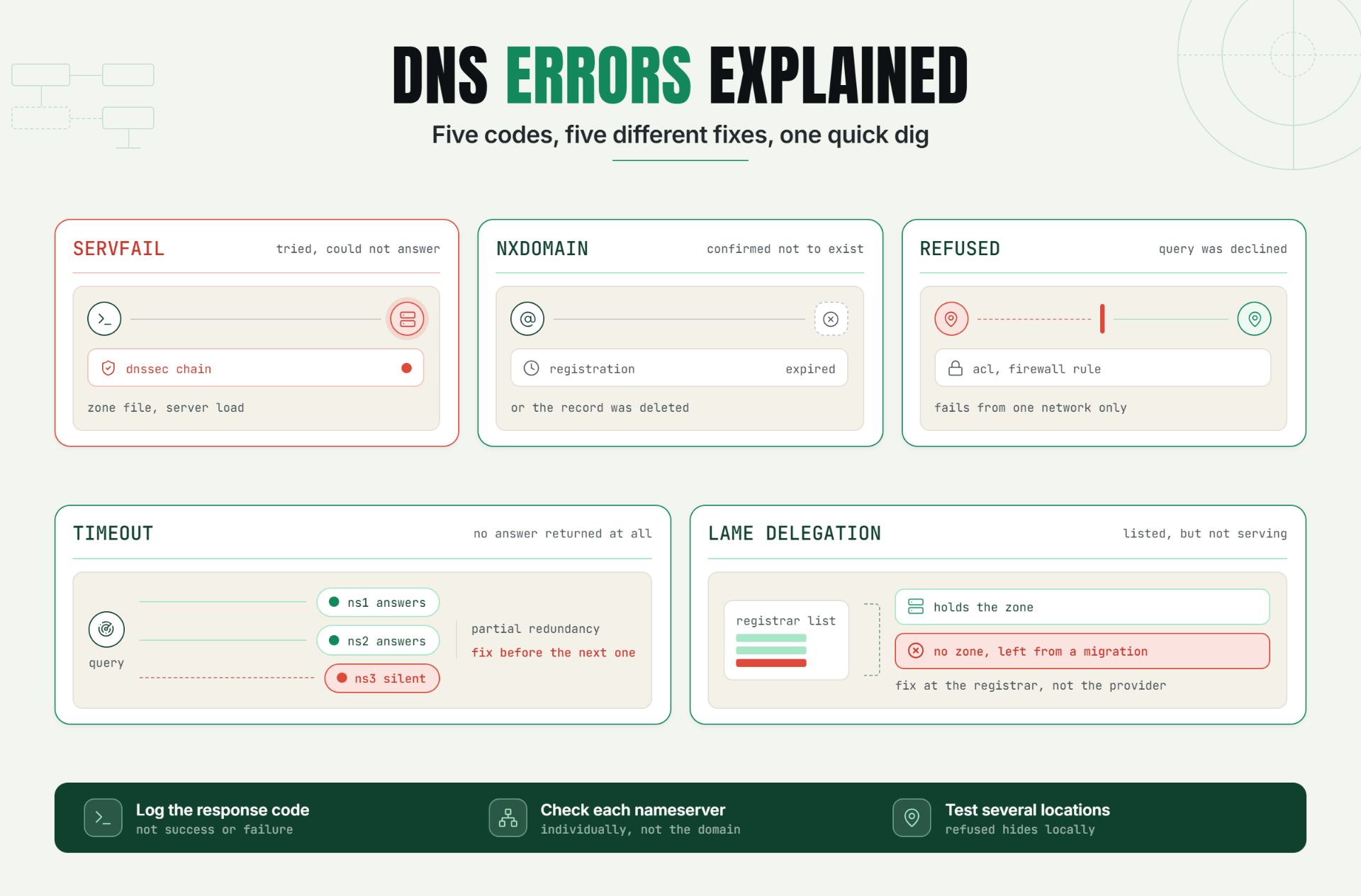
You run dig yourdomain.com and get back three letters that mean nothing to you: SERVFAIL. Or maybe it's NXDOMAIN. Your site won't load, your server logs show nothing wrong, and now you're staring at a DNS response code like it's a foreign language.
That's exactly what DNS errors website downtime incidents look like from the inside: a very small vocabulary that most teams have never had to learn, until the day they suddenly need it. Once you know what each code is actually telling you, most of these incidents stop being a mystery and start being a five minute diagnosis.
Why a DNS Error Looks Nothing Like a Server Problem
Most outages leave a trail: a 500 in your application logs, a spike in CPU, a database timeout. A DNS error leaves almost nothing on your end, because the failure happens before your server ever gets a chance to respond. The request dies at the lookup stage.
That's what makes a DNS misconfiguration so disorienting to troubleshoot under pressure. Your infrastructure can be perfectly healthy servers up, application deployed, database responding while the domain pointing to all of it is broken in a way none of your usual monitoring was built to see. The error code returned by dig or nslookup is often the only real clue you get, which is exactly why it's worth learning to actually read it.
The Operational Risk of Misdiagnosing DNS as Something Else
Teams without DNS specific monitoring tend to burn the most time not on fixing the problem, but on figuring out where to even look. A typical wasted-time sequence looks like this:
- Site is unreachable. First instinct: check the server. Server is fine.
- Check the application logs. Nothing unusual because the request never arrived.
- Check the load balancer, the CDN, the firewall. Still nothing.
- Someone finally runs a DNS lookup, twenty minutes in and sees the actual error.
By the time the error code is even looked at, a nameserver failure or a bad record change has often been live for the entire duration of the outage. The fix, once found, is frequently simple a two minute correction. The expensive part was the detour through every other system first.
The DNS Error Code Directory: What Each One Actually Means
SERVFAIL
What it means: The resolver reached a nameserver, but that nameserver couldn't produce a valid answer. This is a server side failure to answer, not "the record doesn't exist."
Common causes:
- DNSSEC validation failure (a signed record that doesn't verify correctly)
- The authoritative nameserver is overloaded or misconfigured
- A zone file error on the authoritative server itself
Quick diagnosis: run dig yourdomain.com against your authoritative nameserver directly, then against a public resolver like 8.8.8.8. If the authoritative server itself returns SERVFAIL, the problem is at the source, not somewhere downstream.
NXDOMAIN
What it means: The nameserver responded, and the answer was clear: this domain or record does not exist. Not "temporarily unavailable" the DNS system is confidently telling you nothing is there.
Common causes:
- Domain registration expired or was not renewed
- A record was deleted (often by accident during cleanup)
- A typo in the domain being queried, or a subdomain that was never actually created
Quick diagnosis: confirm the domain's registration status first an expired domain is the single most common cause of a sudden, otherwise inexplicable NXDOMAIN on a site that was working fine yesterday. If registration is current, check whether the specific record still exists in your DNS zone.
REFUSED
What it means: The nameserver received the query and actively declined to answer it often a permissions or access control issue rather than a missing record.
Common causes:
- The nameserver is configured to only answer queries from specific sources, and the requester isn't authorized
- A firewall or ACL rule change on the DNS server itself
Quick diagnosis: test the same query from a different network or location. If it succeeds elsewhere but fails from one specific vantage point, the issue is almost always an access restriction rather than the record itself.
Timeout / No Response
What it means: No answer came back at all not an error message, just silence. The query went out and nothing returned within the expected window.
Common causes:
- The nameserver is down or unreachable due to a network issue
- A nameserver failure where the server process itself has crashed or is unresponsive
- Network-level packet loss between the resolver and the authoritative server
Quick diagnosis: query each of your domain's listed nameservers individually. If only one is unresponsive and others answer correctly, you likely still have partial redundancy working in your favor but it needs fixing before the healthy ones also fail.
Lame Delegation
What it means: The parent zone says a specific nameserver is authoritative for your domain, but that nameserver doesn't actually know anything about it. It's listed as responsible, but it isn't actually configured to answer.
Common causes:
- A nameserver was removed from the DNS provider's configuration but never updated at the registrar
- A migration between DNS providers left one old nameserver still listed
Quick diagnosis: query each nameserver listed at your registrar directly. If one returns REFUSED, SERVFAIL, or simply doesn't have your zone, it's lame and needs to be removed or corrected at the registrar level, not the DNS provider level.
Quick Reference
| Error Code | What It Signals | Where to Look First |
|---|---|---|
| SERVFAIL | Server tried and failed to answer | DNSSEC chain, zone file, authoritative server load |
| NXDOMAIN | Domain or record confirmed not to exist | Registration status, then the specific DNS record |
| REFUSED | Query was actively declined | Access controls, firewall/ACL rules |
| Timeout / No Response | No answer returned at all | Individual nameserver health, network path |
| Lame Delegation | Listed nameserver doesn't know the zone | Registrar's nameserver list vs. actual DNS provider config |
A Practical Production Scenario
Consider an illustrative example.
A small agency's client site goes down on a Friday afternoon. The hosting provider confirms the server is healthy. The application team confirms nothing was deployed that day. Twenty five minutes into the investigation, someone finally runs dig and sees SERVFAIL.
The cause: a DNSSEC key had rotated on the registrar side three days earlier, but the corresponding record at the DNS provider was never updated to match. The mismatch meant every validating resolver rejected the domain's DNS answers outright a slow building failure that had nothing to do with the site's actual infrastructure.
Because nobody had DNS specific monitoring in place, the SERVFAIL had likely been intermittent for days before becoming a full outage, invisible the entire time because every other system reported healthy. Once identified, the fix resyncing the DNSSEC keys took under ten minutes. Finding it took most of the afternoon.
Recommended Monitor Setup
- Query your domain's DNS records on a schedule and log the specific response code, not just "success or failure."
- Check each nameserver individually, not just the domain as a whole.
- Track domain expiration dates separately from DNS record health.
- Check from multiple geographic locations to catch access-restriction issues like REFUSED.
- Alert differently based on the specific error code returned, since SERVFAIL, NXDOMAIN, and a timeout each point to a different fix.
Best Practices for Catching DNS Errors Before Customers Do
Monitor the Response Code, Not Just Uptime
A binary "domain resolves or doesn't" check misses the diagnostic value of knowing which error occurred. Log the actual code every time.
Check Every Nameserver, Individually
A domain with four nameservers where one has gone lame or unresponsive can still function until a second one fails too. Individual checks catch the degradation before it becomes total.
Separate DNSSEC Validation Checks From Basic Resolution Checks
A SERVFAIL caused by a DNSSEC mismatch requires a completely different fix than one caused by an overloaded server, and telling them apart quickly saves real time.
Track Domain and DNSSEC Key Expiration Proactively
Both NXDOMAIN and SERVFAIL can trace back to something expiring quietly in the background, unrelated to any recent change your team made on purpose.
Test Resolution From More Than One Location
A REFUSED or inconsistent answer that only shows up from certain networks is invisible to a single location check.
Common Mistakes When Diagnosing DNS Errors
Mistake 1: Assuming Every DNS Problem Looks the Same
Why it happens: SERVFAIL, NXDOMAIN, REFUSED, and a timeout all present as "the site won't load," so they get lumped into one generic "DNS is down" event.
What to do instead: treat each error code as a distinct diagnosis with its own likely cause, and let the code direct the investigation.
Mistake 2: Checking the Server Before Checking DNS
Why it happens: the server is the most familiar system, so it's the first place teams look.
What to do instead: since DNS resolution happens before a request ever reaches your infrastructure, rule it out first with a quick dig.
Mistake 3: Not Checking DNSSEC Separately
Why it happens: a DNSSEC validation failure produces SERVFAIL, which looks identical to any other SERVFAIL cause from the outside.
What to do instead: check the DNSSEC chain directly rather than assuming a generic server or zone issue.
Mistake 4: Overlooking Domain Expiration as a Cause
Why it happens: an expired domain feels like an administrative problem, not a technical one, so it's rarely the first thing checked.
What to do instead: confirm registration status early it's one of the fastest things to rule in or out.
Mistake 5: Only Checking From One Location
Why it happens: a single machine or office network feels like a representative test.
What to do instead: test resolution from multiple geographic locations, since a REFUSED response tied to an access restriction on one network path is invisible if every check comes from the same place.
Start Catching These Automatically
Knowing what SERVFAIL or NXDOMAIN means helps once you're already in an outage. The better outcome is catching the underlying nameserver failure or misconfiguration before it ever reaches that point.
Start a 7 day Statixoup trial and set up DNS monitoring that checks your records, nameservers, and domain expiration continuously so the next DNS error gets caught by a monitor, not by a customer.