Planned Maintenance Monitoring: Keep Visibility During Work
Learn how planned maintenance monitoring helps teams reduce alert noise without losing visibility during scheduled work. This guide covers maintenance windows, selective alert suppression, customer updates, and post-maintenance recovery checks.
That is the problem planned maintenance monitoring solves. For DevOps teams, IT operations, SaaS companies, and support leaders, it coordinates checks, notification suppression, customer communication, ownership, and recovery validation around scheduled work. Statixoup supports the surrounding reliability workflow with 30-second monitoring, failure validation, incident evidence, alert routing, and branded status pages.
The short answer is simple: keep checks running, mute only the expected notifications, publish the maintenance window, and restore normal alerting automatically at the deadline. Then run post-maintenance checks before declaring success. Planned maintenance monitoring should reduce noise without creating a blind spot.
The Problem With Treating Planned Work as Harmless Downtime
Scheduled downtime still affects real users. A checkout request can fail. A mobile client can retry until it times out. A support agent can receive ten tickets without knowing what changed. And if every expected restart pages the on-call engineer, the team learns to ignore the monitoring system at exactly the wrong moment.
The opposite approach is worse. Teams sometimes disable every monitor because they know the service will be unavailable. That removes the noise, but it also removes the evidence. Without planned maintenance monitoring, nobody can tell whether the database was unreachable for four minutes or forty, whether an unrelated API failed, or whether the service actually recovered.
Change deserves that caution. The Uptime Institute's 2025 outage analysis says nearly 40% of organizations experienced a major human-error outage in the previous three years. Of those incidents, 85% came from staff not following procedures or from flawed procedures. Planned maintenance monitoring turns a vague plan into a timed, testable operating procedure.
There is another dependency problem. Your website may be intentionally offline while billing, authentication, DNS, and a third-party email API are supposed to stay healthy. Muting the whole account hides failures outside the approved scope. Statixoup's guide to monitoring third-party APIs and SaaS dependencies is useful when mapping those boundaries.
How Planned Maintenance Monitoring Works
Planned maintenance monitoring is the process of continuing to observe a system during scheduled work while changing how expected failures are classified, routed, and communicated. It has five parts: scope, timing, checks, notifications, and exit criteria.
The key distinction in planned maintenance monitoring is monitoring versus paging. Checks collect evidence. Alerts classify conditions. Notifications interrupt people. A maintenance window can suppress selected notifications without turning off the checks that prove what happened.
Microsoft documents the same separation in its Azure Monitor alert processing rules. Its rules can suppress action groups for selected resources on a one-time or recurring schedule while fired alerts remain visible. That model is safer than disabling every alert rule.
1. Define a narrow maintenance window
Start with an exact start time, end time, time zone, owner, reason, and list of affected components. Avoid labels such as "overnight" or "until finished." Computers need boundaries. So do tired engineers.
A good planned maintenance monitoring window covers the expected task plus a modest validation buffer. If work is expected to take 30 minutes, a 45-minute window may be sensible. A four-hour window usually isn't. The correct buffer depends on rollback time, dependency risk, and how quickly the team can confirm recovery.
The hard-stop rule
Every planned maintenance monitoring setup needs an automatic end. If the service is still failing when the window closes, the condition becomes an incident and normal escalation resumes. Manual-only reactivation is too easy to forget.
2. Keep the right checks active
Don't settle for a homepage ping. Planned maintenance monitoring needs checks that answer distinct recovery questions:
- Website check: Does the public service return the expected status and content?
- API check: Does a critical endpoint return valid data, not merely HTTP 200?
- Browser journey: Can a user sign in, search, or complete a key transaction?
- Dependency check: Are authentication, payments, DNS, and external APIs healthy?
- SSL and domain checks: Did certificate or DNS work introduce a separate failure?
- Heartbeat check: Did the migration, backup, or scheduled job finish?
This is where planned maintenance monitoring earns its place. It preserves a timeline. Statixoup's API monitoring guide beyond a 200 OK response explains why response assertions matter when a service appears technically reachable but returns the wrong payload.
3. Suppress alerts by scope, not by habit
Suppress only notifications caused by expected behavior. A brief 503 response from the application may be expected. A failed payment provider, expired certificate, or database replication error may not be.
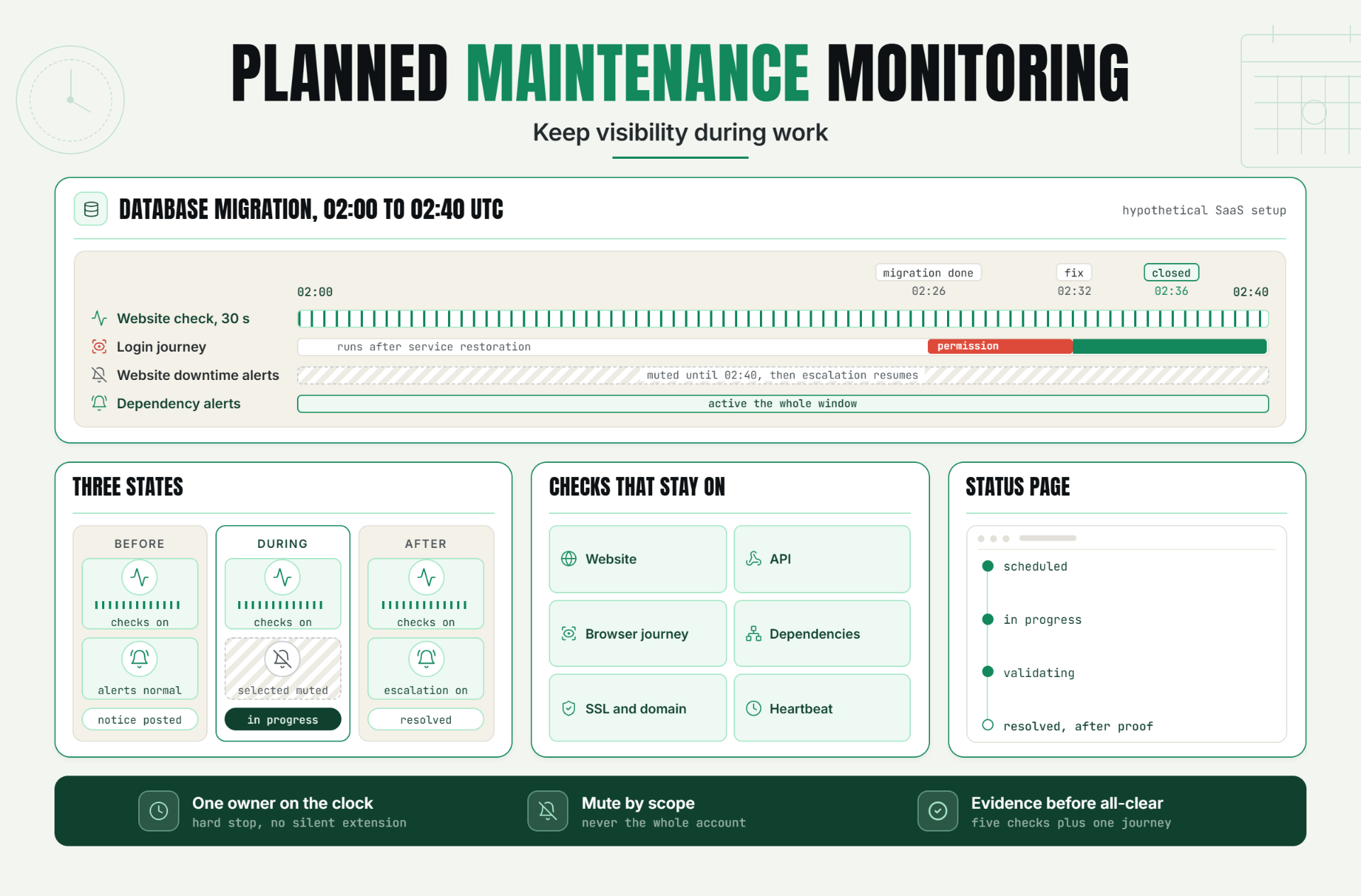
Use three planned maintenance monitoring states:
| State | Checks | Notifications | Customer message |
|---|---|---|---|
| Before the window | Normal | Normal | Scheduled notice visible |
| During expected work | Continue | Selected routes muted | Maintenance in progress |
| After deadline | Continue | Normal escalation resumes | Resolved or incident update |
My view is firm here: "mute everything" isn't a maintenance strategy. It's an absence of strategy. Planned maintenance monitoring should make expected noise quieter while keeping unexpected risk loud.
4. Use a maintenance status page before customers ask
A planned maintenance monitoring status page should state what is changing, which services may be affected, when work starts, the expected duration, and when the next update will arrive. Keep the language plain. Customers don't need the internal ticket number unless it helps them.
Statixoup's homepage describes branded status pages that share real-time system status, incident updates, and maintenance notices. Pair that public view with synthetic monitoring for customer journeys, because an operational dashboard and a customer-visible workflow answer different questions.
Here's the communication rhythm:
14. Publish the scheduled notice before the change. 2. Mark maintenance as in progress at the start. 3. Update the page if scope or timing changes. 4. Publish an all-clear only after validation. The result is a record customers and support teams can follow without guessing.
5. Make post-maintenance checks the exit gate
The change isn't complete when the command finishes. It is complete when the service behaves correctly for users.
Planned maintenance monitoring checks should test availability, expected content, API assertions, latency, login, one revenue-critical journey, background jobs, and major dependencies. If the change touched DNS or certificates, validate them from more than one location. If it changed a database, confirm reads and writes.
Google's SRE guidance on alerting evaluates alerts using precision, recall, detection time, and reset time. Those four ideas fit maintenance well. You want meaningful recovery signals, coverage of significant failure, fast detection of an overrun, and alerts that clear cleanly after recovery.
Planned maintenance monitoring also needs a short observation period. Five green seconds after a restart prove little. Set a stability gate that reflects traffic and cache warm-up, such as five consecutive successful checks plus one completed browser journey.
A Production Example: Database Migration at 2:00 a.m.
Consider this clearly hypothetical SaaS setup. A team plans a schema migration expected to take 25 minutes. The public app may return maintenance responses for up to eight minutes. Authentication, the status page, and support systems should remain available.
The weak setup is common: pause the website monitor, tell the on-call engineer in chat, run the migration, and remember to switch monitoring back on. That isn't planned maintenance monitoring. It works until the migration stalls or the engineer closes the wrong tab.
The stronger planned maintenance monitoring setup looks like this:
| Item | Recommended setup | Why it matters |
|---|---|---|
| Window | 02:00 to 02:40 UTC | Includes task time, validation, and rollback decision |
| Owner | Database engineer | One person owns the clock and exit decision |
| Website check | Continue every 30 seconds | Preserves the outage and recovery timeline |
| API assertions | Continue on health and read endpoints | Detects broken data behind a healthy status code |
| Browser journey | Run login after service restoration | Confirms a customer-critical workflow |
| Notification suppression | Mute website downtime until 02:40 | Prevents expected paging without muting dependencies |
| Status page | Scheduled, in progress, validating, resolved | Gives support and customers one source of truth |
| Escalation | Resume automatically at 02:40 | Converts an overrun into an incident |
At 02:26, the migration finishes. The website returns 200, but the login journey fails because a session table permission wasn't restored. Planned maintenance monitoring catches the functional failure before the all-clear. The team fixes the permission at 02:32, observes five successful checks, completes the browser journey, and closes the window at 02:36.
No invented revenue claim is needed. The value is operational: the team finds a real defect during the approved window, avoids a false resolution message, and retains evidence for review. For deeper transaction coverage, see Statixoup's Playwright browser monitoring guide.
Best Practices for Safer Maintenance Windows
Keep one named owner on the clock
Assign one person to start the planned maintenance monitoring window, watch its deadline, approve extensions, and close it. Shared ownership usually means no ownership. The change lead can delegate checks, but the final state should never be ambiguous.
Match suppression to the expected failure
Mute the website-down route if downtime is planned. Keep security, certificate, dependency, and data-integrity alerts active unless the change specifically affects them. Planned maintenance monitoring works best when scope mirrors the change plan.
Put rollback criteria in writing
Decide before the work which planned maintenance monitoring signals trigger rollback: migration duration, error rate, API assertion failure, or a missed checkpoint. That removes debate when the clock is running.
Test the status-page workflow
Support should know where to send customers and who posts updates. Use timestamps and promise only the next update, not an optimistic completion time.
Require evidence before the all-clear
Use a small recovery checklist with named checks and a stability period. Green dashboard tiles are helpful, but a completed user journey is stronger proof.
Common Mistakes That Turn Maintenance Into an Incident
Disabling the monitor instead of suppressing notifications
This removes alert noise by deleting visibility. Planned maintenance monitoring keeps checks running and changes routing instead. Otherwise, the team loses the incident timeline and can't measure the overrun.
Muting every service in the account
It happens because broad suppression is quick. But an unrelated DNS, payment, or authentication failure can disappear inside the window. Scope planned maintenance monitoring to affected monitors and documented dependencies.
Forgetting the time zone
"2:00 a.m." is not a complete schedule for a distributed team. Store the time zone, display it in customer communications, and confirm daylight-saving behavior for recurring windows.
Declaring success after the first green check
A process can restart before caches warm, queues drain, or authentication works. Use planned maintenance monitoring checks and observe several consecutive successes.
Extending the window silently
An extension changes customer impact and incident risk. Record the decision, publish a new update, and set another hard deadline. If the work no longer matches the approved scope, stop calling it routine maintenance.
The Main Takeaway
Planned work isn't automatically safe work. The best planned maintenance monitoring keeps evidence flowing, reduces only the expected noise, gives customers an honest timeline, and makes recovery something the team proves.
The first action is small: take your next change ticket and add five fields before approval. Add the exact window, affected monitors, muted routes, recovery checks, and the person who owns the all-clear.
Start Monitoring Your Next Maintenance Window
Start a 30-day Statixoup beta and configure the website, API, dependency, and browser checks needed for your next maintenance window. Build the monitoring plan before the change starts, then use the results to close the window with evidence instead of hope.
Start Monitoring Your Next Maintenance WindowEditor note: Add the approved Statixoup author bio block before publishing, including photo, role, verified credentials, and profile link. The live archive identifies Nensi Khunt as the author of current Statixoup articles, but no public role or credential was verified during research.
Post a Comment

Hardik Vaghani
Hardik Vaghani is a Digital Marketing Professional and SEO Strategist based in Surat, Gujarat, India. He currently works with Ethnic Infotech, contributing to SEO, content marketing, technical SEO, and digital growth strategies. Hardik also creates blog content for Fusion5, focusing on technology, laptops, and consumer electronics. With expertise in SEO, Google Ads, Meta Ads, Local SEO, and Content Strategy, he helps businesses improve online visibility, rankings, and lead generation through data-driven marketing.
Frequently Asked Questions
Related Blogs