Free vs Paid Uptime Monitoring: Which Features Matter Most
A free monitor can say the website is up while a customer reports checkout has been broken for eleven minutes, and both can be true. This blog breaks down free vs paid uptime monitoring across check interval, validation depth, alert routing, and retention, then makes the case that upgrading should follow a specific operational risk, not a longer feature list.
That gap is the real issue behind free vs paid uptime monitoring. Statixoup monitors websites, APIs, SSL certificates, DNS, scheduled jobs, and network paths, with current paid options adding checks as fast as 30 seconds, browser monitoring, and escalation controls. The choice isn't really “free or paid?” It is “what failure could hurt the business, and how quickly must someone know?”
Here is the short answer. Free monitoring is usually enough for a personal site, an early product, or a low-risk brochure website. Paid monitoring starts to earn its cost when missed transactions, slow detection, weak alert routing, short data history, or limited coverage cost more than the subscription.
My stance is simple: don't pay for a long feature list. Pay when a specific operational risk has outgrown the free plan.
The Risk of Choosing by Price Alone
A free plan can look perfectly adequate while the business is small. Then traffic rises, the team adds an API, checkout depends on a payment provider, and one person becomes responsible for every alert. The monitor hasn't become worse. The system around it has become more valuable and more complicated.
The opposite mistake is just as common. A startup buys advanced monitoring, connects every channel, and creates dozens of shallow checks. The result is a bigger bill and more noise, not better reliability. A paid uptime monitoring plan is only useful when its extra controls solve a known problem. This is why free vs paid uptime monitoring must be evaluated against business impact, not monitor count alone.
If your current checks miss short failures, review Statixoup's guide to 30-second, 1-minute, and 5-minute monitoring intervals. Detection speed changes what your reports can see.
How Free vs Paid Uptime Monitoring Actually Differs
Free vs paid uptime monitoring differs across six practical areas: check frequency, monitor types, validation depth, alert routing, retention, and team governance. Price is only the wrapper around those capabilities.
1. Monitoring check interval changes the blind window
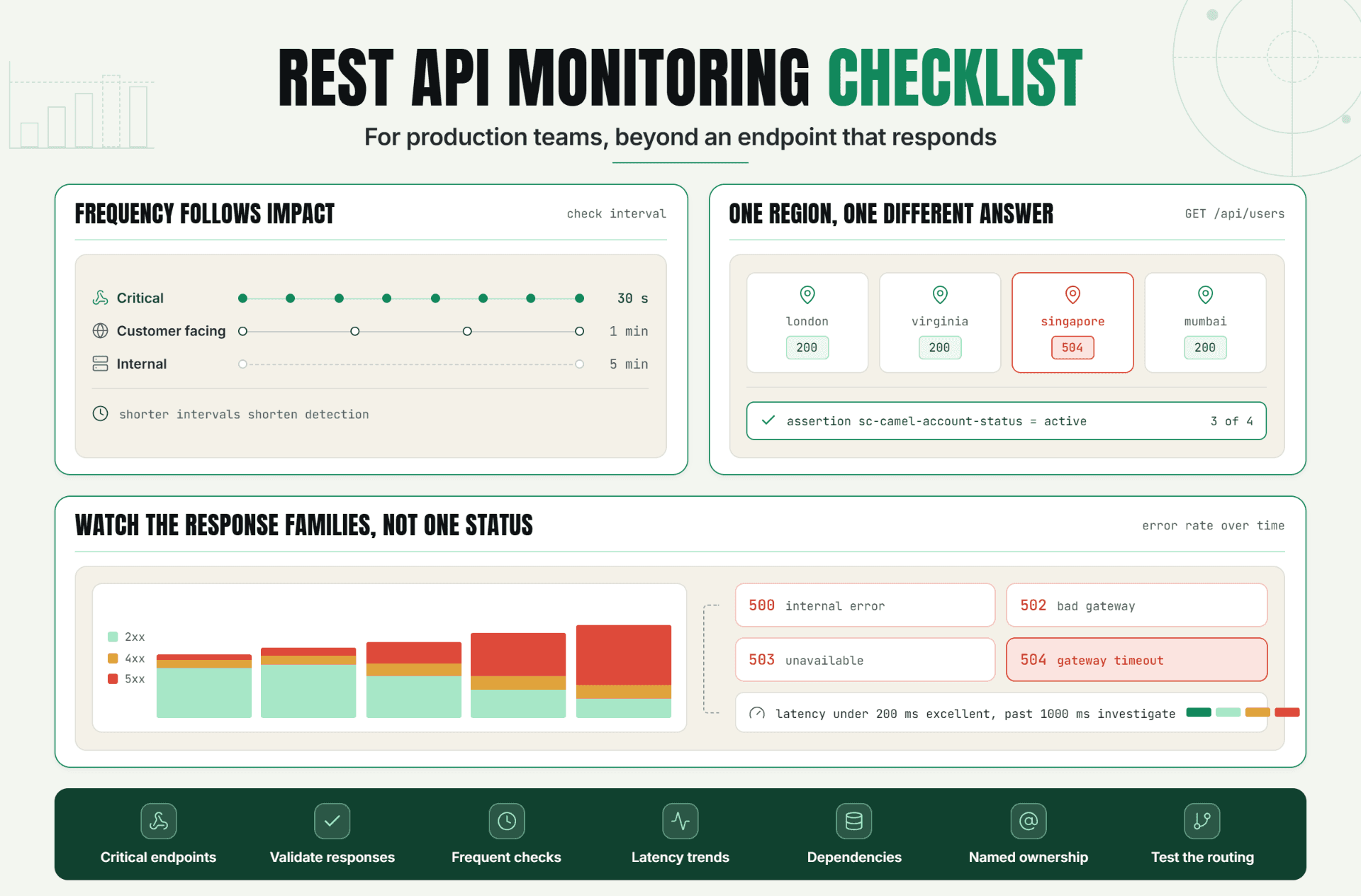
A three-minute interval can leave nearly three minutes between a failure and the first observation. A 30-second check shrinks that worst-case waiting period to roughly 30 seconds before validation and notification time are added.
That doesn't mean every page deserves a 30-second check. Your terms page probably doesn't. Login, checkout, and a revenue-critical API might. Sensible free monitoring stays on low-risk pages while faster coverage protects transactions.
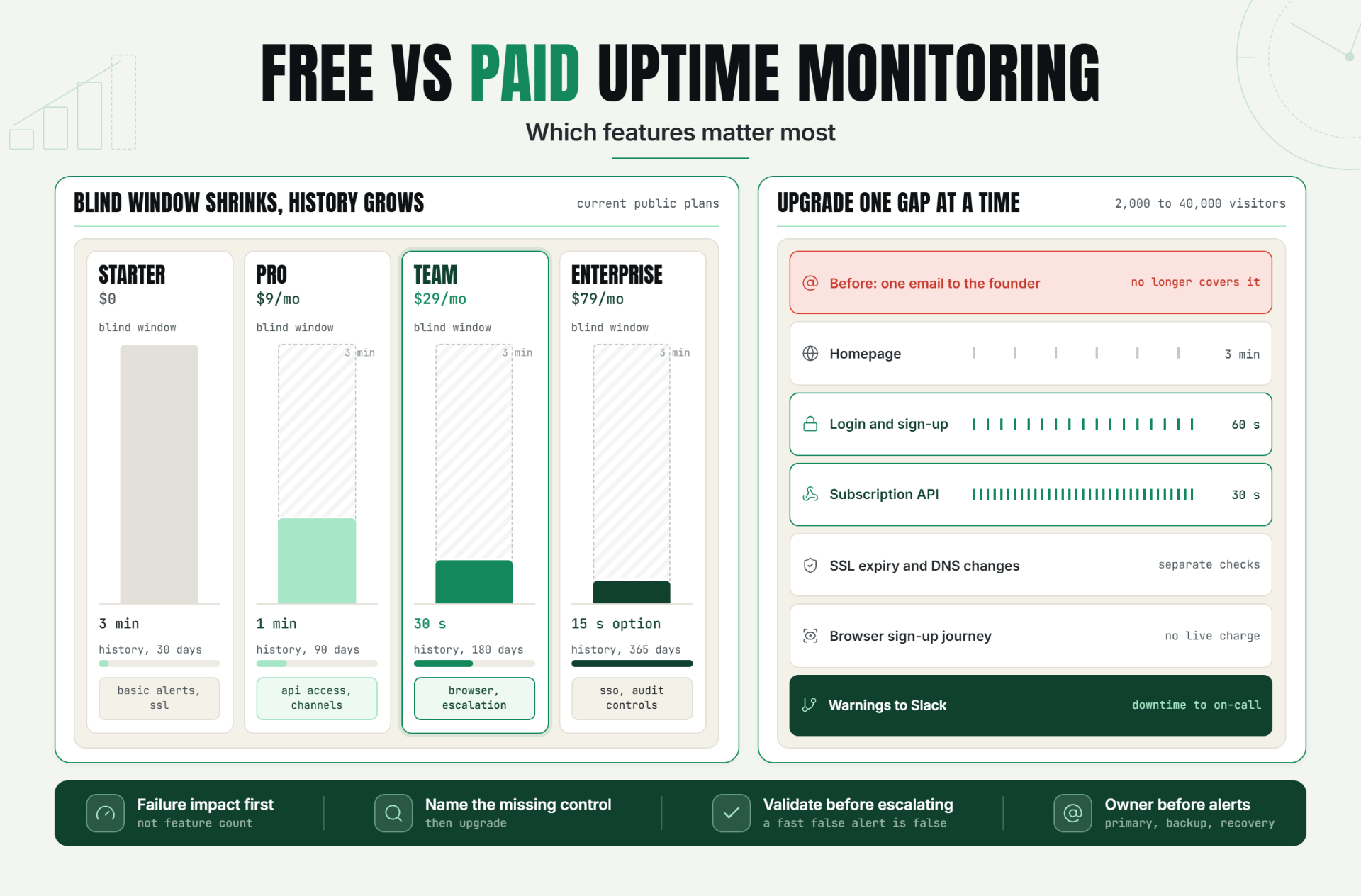
Statixoup's current pricing page lists a 3-minute interval on Starter, 1-minute checks on Pro, 30-second checks on Team, and an optional 15-second upgrade on Enterprise. Those numbers make the free vs paid uptime monitoring decision concrete: faster checks should follow higher impact.
Amazon Web Services documents that CloudWatch Synthetics canaries can run once per minute and capture latency, screenshots, logs, and metrics. That is a useful benchmark. Mature monitoring is about evidence, not just faster pings.
The interval should match the cost of being blind
If a checkout outage could lose several orders per minute, a three-minute interval is a business choice, not just a technical setting. If a portfolio page is down briefly at 3 a.m., the same interval may be completely reasonable.
2. A status code isn't proof that the service works
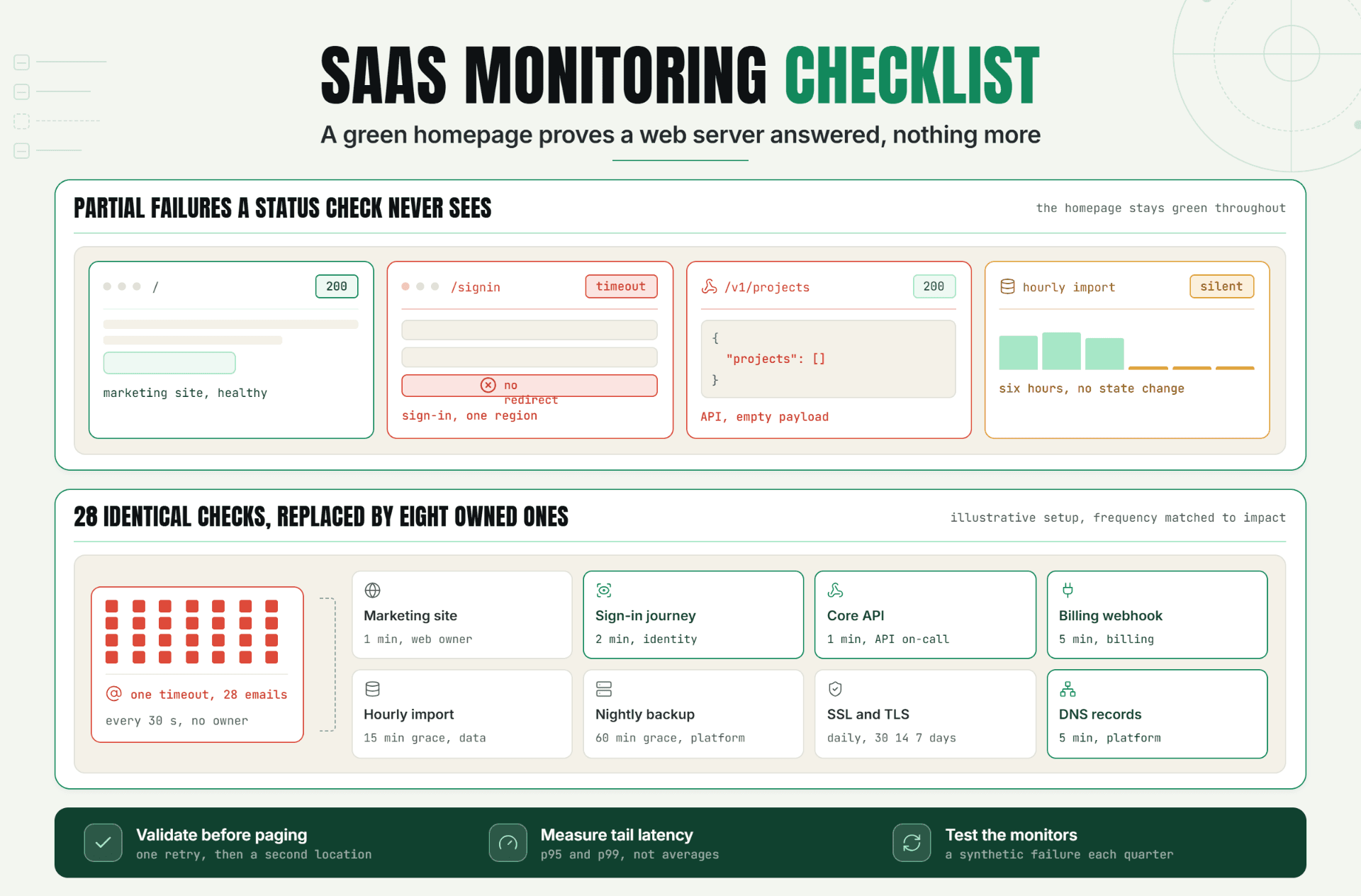
Basic free website monitoring often asks whether a URL responded. A 200 OK answer can still hide an empty product grid, a broken sign-in form, or an API returning the wrong JSON.
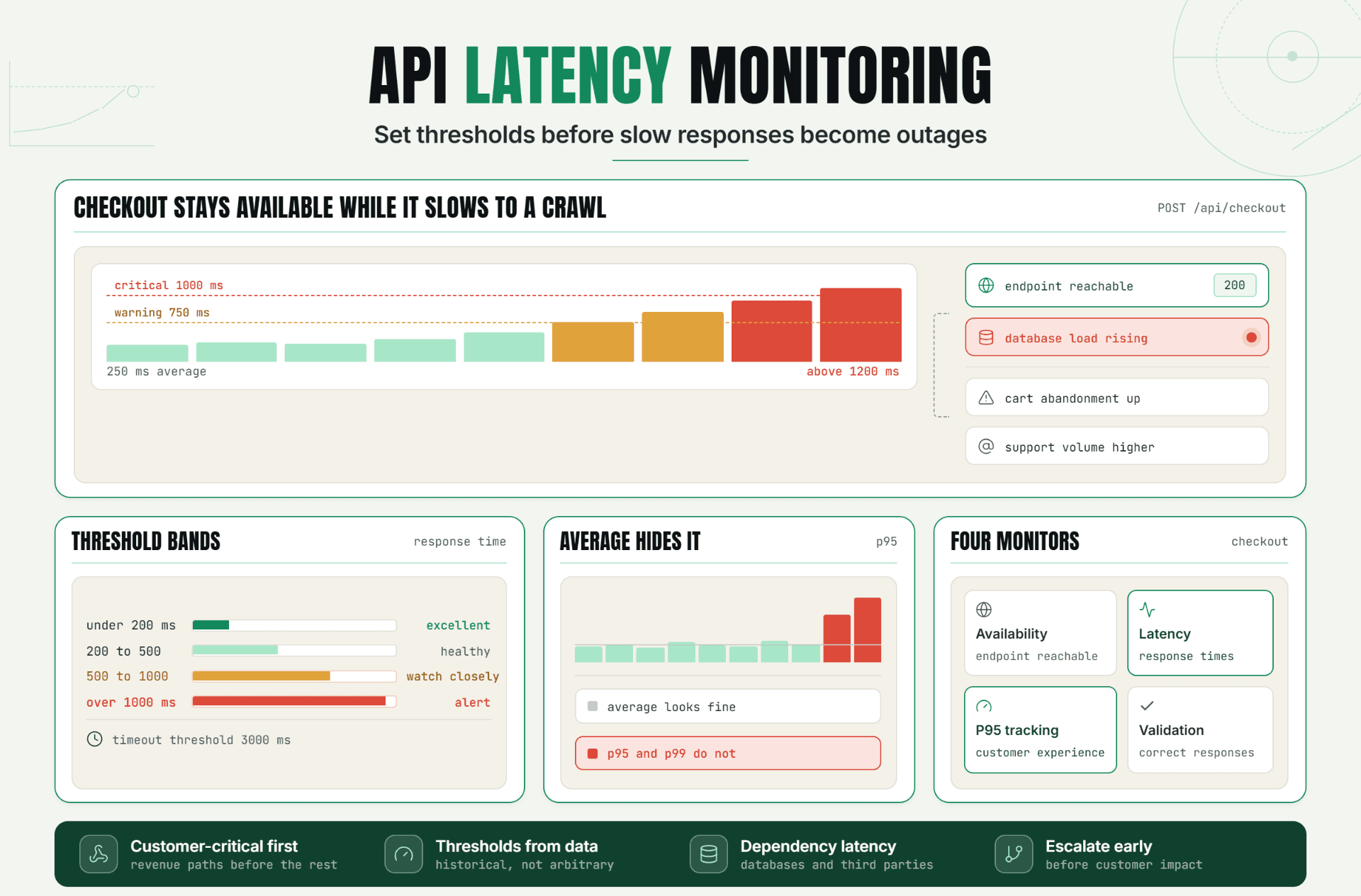
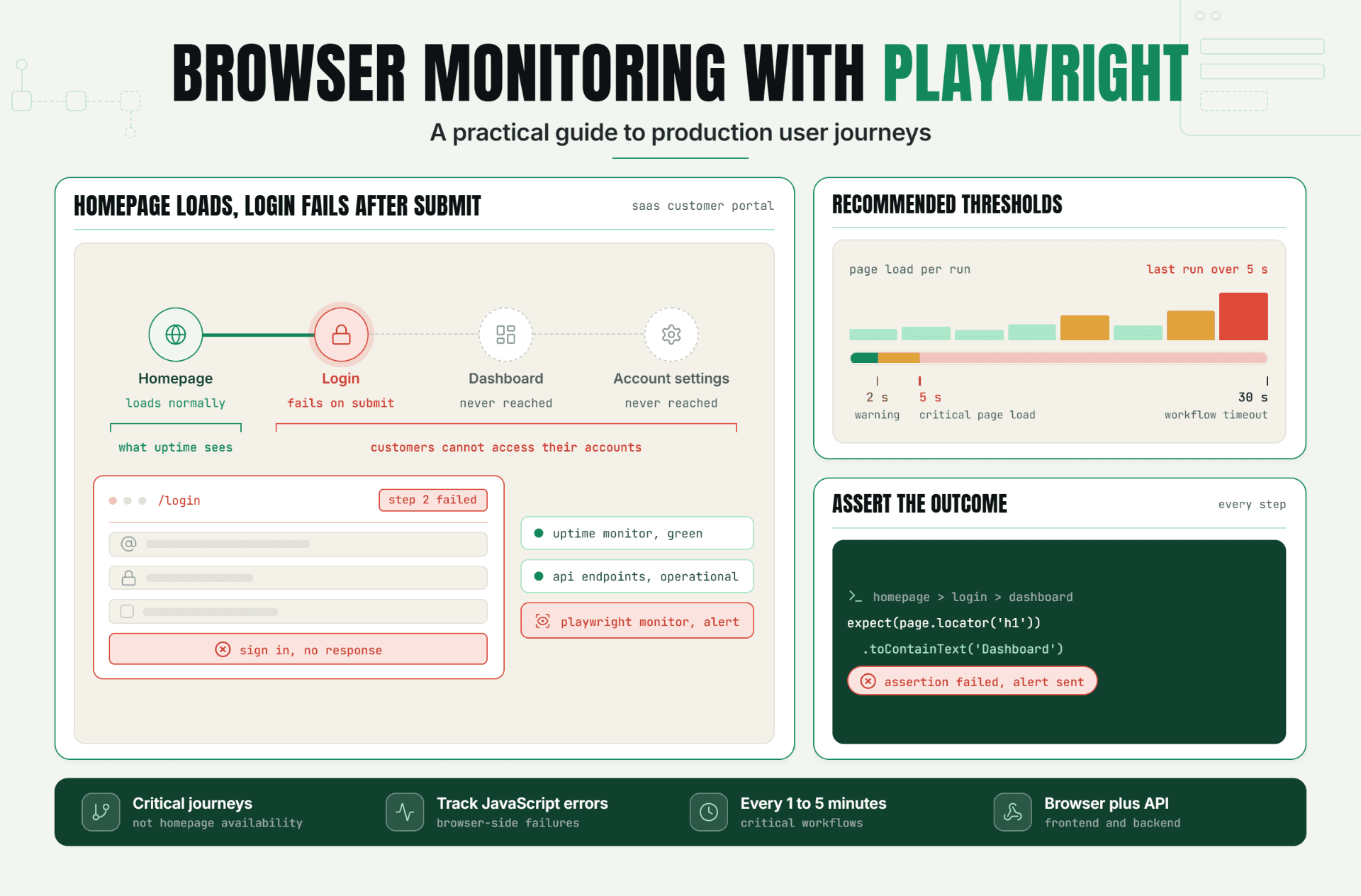
Paid plans become useful when they add expected content, response-time thresholds, API assertions, browser transactions, DNS checks, SSL validation, port monitoring, and heartbeat checks. This is the practical value of paid monitoring: checking whether a customer action works, not whether a server merely answered. Statixoup describes browser monitoring with Playwright for rendered interactions and transaction validation. That covers a different failure class from a simple HTTP ping.
For a deeper explanation of the noisy-alert problem, see Statixoup's guide to reducing false positive alerts. A shallow check can be cheap and still be expensive to trust.
3. Alert delivery becomes an ownership problem
Email works when one person watches one site during normal hours. Growth changes that. The right responder may depend on the service, severity, schedule, and whether the first notification was acknowledged.
This is where free vs paid uptime monitoring starts to separate sharply. Statixoup's Starter plan currently includes email plus one supported platform. Higher tiers add more channels, while Team adds on-call scheduling and escalation.
The feature matters only if the route is tested. We covered the operating model in the Statixoup guide to incident alert routing. An impressive channel list can't fix an alert that has no owner.
4. History determines how much you can learn
Thirty days of retention can answer, “Was the site down this month?” It is weaker for quarter-over-quarter trends, renewal discussions, seasonal comparisons, or recurring incident patterns.
Statixoup currently lists 30-day history on Starter, 90 days on Pro, 180 days on Team, and 365 days on Enterprise. Longer retention is a quiet reason to upgrade. It turns monitoring from a live alarm into evidence for capacity work, vendor reviews, and reliability planning.
Google's SRE availability table shows why small percentages need context: 99.9% availability permits about 43.2 minutes of downtime per month, while 99.99% permits about 4.32 minutes. A report needs enough history and trustworthy checks to support that distinction.
5. Team controls arrive after shared ownership
The moment several people can edit monitors, silence alerts, or change escalation rules, permissions matter. Role-based access control, audit logs, single sign-on, and IP restrictions rarely matter to a solo founder. They matter quickly in a team, agency, or regulated environment.
So the free vs paid uptime monitoring question changes with headcount. The need isn't “more users.” It is controlled changes, visible responsibility, and fewer accidental gaps.
6. Uptime monitoring pricing should be read as a system
Don't compare only the monthly number. Check how a provider counts monitors, runs, notification credits, team members, status pages, retention, and premium check types. Honest uptime monitoring pricing includes those limits, not just the number printed beside the plan name.
Statixoup uses monthly token pools alongside plan features. Its current public pricing lists Starter at $0, Pro at $9 per month, Team at $29, and Enterprise at $79. Because prices and allowances can change, verify the current Statixoup uptime monitoring pricing before publishing or buying.
| Plan level | Best fit | Check speed shown today | Capability that changes the decision |
|---|---|---|---|
| Starter, free | Personal sites and early projects | 3 minutes | Basic alerts, thresholds, SSL toggle, 30-day history |
| Pro, $9/month | Growing sites and small SaaS products | 1 minute | API access, more channels, richer incidents, 90-day history |
| Team, $29/month | Shared production ownership | 30 seconds | Browser, DNS, SSL and port checks, RBAC, escalation |
| Enterprise, $79/month | Larger or controlled environments | 30 seconds, 15-second option | SSO/SAML, audit controls, advanced SLAs, longer retention |
A Practical Production Scenario
Consider an illustrative startup selling subscriptions through a marketing site and web app. It begins with 2,000 monthly visitors and one developer. Six months later, paid campaigns bring 40,000 visitors, two engineers rotate support, and sign-up depends on an API plus a payment gateway.
The original free setup checks the homepage every three minutes and emails the founder. It still works exactly as configured. It just doesn't cover the business anymore. That is the usual point where free website monitoring needs a focused upgrade.
The team should not replace it with 40 monitors overnight. A sensible free vs paid uptime monitoring upgrade looks like this:
- Keep the homepage on a 3-minute check because it is useful but not transactional.
- Check login and sign-up every 60 seconds with expected status and content.
- Check the subscription API every 30 to 60 seconds and validate the response body.
- Monitor SSL expiry and DNS changes separately.
- Add a browser journey for sign-up without completing a live charge.
- Route warnings to Slack and verified downtime to the on-call owner.
- Map public components to a status page so customers can see confirmed incidents.
The result is narrower than “monitor everything,” but much stronger. The paid spend protects the paths that create and retain revenue.
And here's the thing: if the startup still has no after-hours responder, faster alerts won't solve the real problem. It may be better to fix ownership first. The Statixoup article on alert fatigue in DevOps explains why more notifications can reduce attention instead of improving it.
Best Practices for Choosing a Plan
Start with failure impact, not feature count
List the five customer actions that matter most. Give each one an acceptable detection time and owner. This keeps free vs paid uptime monitoring tied to real risk.
Upgrade one coverage gap at a time
Move to a paid plan when you can name the missing control: one-minute checks, API assertions, a browser transaction, multi-channel alerts, longer retention, or role-based access. “We might need it later” isn't a strong buying reason.
Validate before escalating
Use retry rules, more than one location where appropriate, and checks that verify expected content. A fast false alert is still false. But don't stretch validation until short real incidents disappear.
Assign ownership before enabling notifications
Every critical check needs a primary responder, a backup, an acknowledgement window, and a recovery message. The channel is secondary.
Review the plan after business changes
Revisit free vs paid uptime monitoring after launching payments, adding a region, changing hosting, hiring an operations team, or committing to an SLA. Those events change the cost of delayed detection.
Common Buying and Setup Mistakes
Paying for speed while checking the wrong page
Why it happens: interval numbers are easy to compare. What to do instead: monitor login, checkout, APIs, and background jobs before paying to ping the homepage faster.
Treating every failure as equally urgent
Why it happens: teams want to avoid missing anything. What to do instead: separate warning, incident, and paging thresholds. This makes free vs paid uptime monitoring useful without creating alert chaos.
Ignoring dependencies
Why it happens: the website itself looks healthy. What to do instead: cover DNS, SSL, payment, authentication, and scheduled jobs where they can block customers.
Buying retention without reviewing history
Why it happens: longer history sounds valuable. What to do instead: schedule a monthly review of availability, latency, repeated incidents, and ignored alerts. Data nobody reads isn't an operational advantage.
Assuming a paid plan creates reliability
Why it happens: the dashboard looks complete. What to do instead: test a controlled failure, confirm the evidence, follow the notification, acknowledge it, and verify recovery. Tools expose problems. People and process resolve them.
The Decision That Matters
Free monitoring isn't a toy, and paid monitoring isn't automatically mature. The right plan is the smallest one that detects the failures your customers care about, produces evidence your team can use, and reaches someone able to act.
Start with one question: what important failure could happen today without this setup noticing quickly enough? Your answer tells you whether to improve the check, the process, or the plan.
Start With a 30-Day Statixoup Trial
Start a free 30-day Statixoup trial and configure the monitor tied to your highest-impact customer journey. Set the interval, expected response, validation rule, and alert owner. Then test it before adding the next monitor.
Start With a 30-Day Statixoup TrialPost a Comment

Hardik Vaghani
Hardik Vaghani is a Digital Marketing Professional and SEO Strategist based in Surat, Gujarat, India. He currently works with Ethnic Infotech, contributing to SEO, content marketing, technical SEO, and digital growth strategies. Hardik also creates blog content for Fusion5, focusing on technology, laptops, and consumer electronics. With expertise in SEO, Google Ads, Meta Ads, Local SEO, and Content Strategy, he helps businesses improve online visibility, rankings, and lead generation through data-driven marketing.
Frequently Asked Questions
Related Blogs