Website Monitoring for Agencies: Stop Client Alert Chaos
A client messages that checkout is broken, and the team has 43 monitoring emails but no clear owner for the account. This blog explains why agency alerts turn into noise as client rosters grow, and how to fix it with a proper monitor inventory, client ownership, and an escalation path that separates a real outage from a warning that can wait. It also covers common monitoring mistakes that keep agencies firefighting instead of catching issues first.
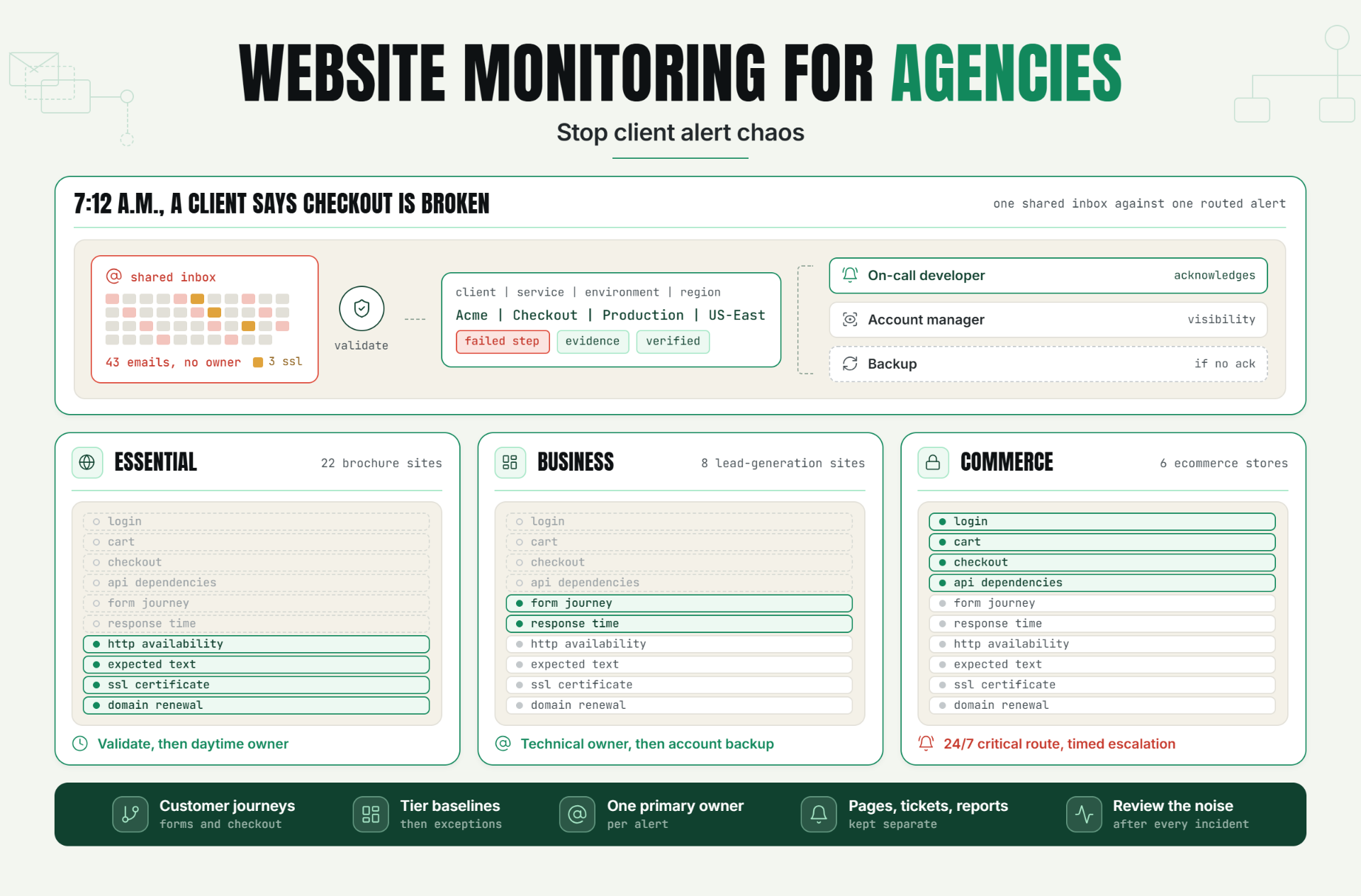
That is the real case for website monitoring for agencies. Statixoup gives teams a place to watch availability and investigate failures, while its published monitoring guides cover uptime checks, transaction failures, alert validation, and incident diagnosis. For agencies managing many unrelated websites, the goal is not simply “more alerts.” It is reliable detection, useful evidence, and a routing process that gets the right person involved.
In plain language, website monitoring for agencies means checking every client site from outside its hosting environment, confirming that critical functions still work, and assigning each alert to an owner. A sensible setup covers uptime, page content, response time, SSL certificates, domains, DNS, and important user journeys. It also separates an urgent outage from a warning that can wait until office hours.
Why Client-Site Monitoring Becomes Chaotic
The problem usually starts with growth. Five clients are easy to remember. Fifty are not. Sites sit across different hosts, content-management systems, registrars, DNS providers, and ecommerce platforms. Some run campaigns at midnight. Others only need business-hours support. An agency monitoring workflow that relies on memory stops working long before the team admits it.
Then the alerts arrive without context. “Website down” does not say which client is affected, what failed, whether another location confirmed it, or who owns the response. A generic inbox becomes the queue. People assume someone else has checked it.
The risk is commercial as well as technical. Uptime Institute’s 2024 outage analysis found that 54% of respondents said their most recent significant, serious, or severe outage cost more than $100,000. That survey concerns data-center and IT outages rather than agency websites specifically, so the figure should not be treated as an average client-site loss. It does show why fast, organized agency monitoring matters when digital services fail.
How Website Monitoring for Agencies Works
Effective website monitoring for agencies starts with a service inventory, not a monitor button. Every site needs a business priority, technical dependency map, contact, response promise, and escalation path. The monitor configuration comes after those decisions.
Build a Monitor Inventory Around Client Risk
List every production domain and record what users must be able to do. A brochure site may need availability, expected page text, SSL, and domain checks. An online store needs those checks plus login, product search, cart, checkout, payment-provider dependency, and order-confirmation coverage.
This is the difference between a green homepage and a working website. Statixoup’s guide to hidden failures on websites that still appear online explains why an HTTP 200 response cannot prove that a user journey works.
This agency monitoring inventory should record:
- client and website name
- production URL and critical paths
- service tier and support hours
- account owner and technical responder
- hosting, DNS, registrar, and certificate contacts
- required monitors and check frequency
- notification route and escalation delay
- maintenance windows and reporting audience
Label Monitors So an Alert Explains Itself
Use a predictable format such as Client | Service | Environment | Region. “Acme | Checkout | Production | US-East” is immediately useful. “Monitor 127” is not.
Labels matter more as multi-site uptime monitoring expands. They make filters, handovers, reports, and post-incident reviews much easier. They also reduce the chance that a freelancer or weekend responder opens the wrong hosting account.
Match Each Check to a Real Failure Mode
Availability checks answer a narrow question: can an external probe reach the endpoint and receive the expected response? Statixoup’s uptime monitoring explanation is a useful foundation for setting that check correctly.
But agency website monitoring normally needs several signals:
- HTTP availability: detects unreachable pages and wrong status codes.
- Content validation: confirms that expected text or page elements still appear.
- Response time: catches slow endpoints before they become full outages.
- SSL alerts: warn before a TLS certificate expires or becomes invalid.
- Domain monitoring: tracks renewal and DNS risks that an uptime check alone may miss.
- Transaction checks: test login, signup, search, cart, or checkout flows.
- Dependency checks: watch APIs, databases, payment gateways, and background jobs where practical.
Google’s Site Reliability Engineering guidance describes latency, traffic, errors, and saturation as the four golden signals for user-facing systems. An agency does not need enterprise telemetry for every small site. Still, the principle is valuable: one green uptime check cannot describe reliability by itself.
Set Frequency and Validation by Impact
Check frequency should reflect the client’s damage window. A high-revenue checkout may justify a 30 or 60-second check. A low-traffic brochure site may be adequately covered every five minutes. Faster checks give earlier evidence, but they also increase volume and can amplify unstable thresholds.
The fix is validation, not simply slower monitoring. Statixoup’s guide to reducing false-positive alerts recommends confirming a failure with retries or another signal before paging. A brief regional network issue should not wake three people if the website is healthy elsewhere.
Use this setup sequence:
14. Classify the client site by business impact. 2. Identify the customer-facing journey that must work. 3. Choose the smallest set of checks that proves it. 4. Set the frequency and retry rule. 5. Assign the first responder and escalation timer. 6. Run a controlled failure test. The result is a monitor that is both faster and more believable.
Route Alerts by Client, Severity, and Time
Website monitoring for agencies breaks down when every notification reaches every person. A cleaner agency monitoring system routes a critical, verified outage to the on-call responder. Send certificate-expiry warnings and non-urgent performance issues to a daytime queue. Give the account owner visibility without making them the technical first responder.
Each rule needs an acknowledgement window. If the first owner does not respond, the incident should move to the backup. Statixoup’s article on incident alert routing covers ownership, escalation timing, and why a notification is not the same as a response process.
Client communication should also follow severity. A two-minute failed probe that recovered during validation does not need a dramatic client email. A confirmed checkout failure does. Agency status reports should summarize availability, incidents, response times, and actions taken, but avoid burying clients in raw probe data. Good agency website monitoring makes that summary easier to defend.
A Realistic Multi-Client Monitoring Setup
Consider this illustrative example. Northline Digital manages 36 client sites: 22 brochure sites, eight lead-generation sites, and six ecommerce stores. The agency previously sent every uptime, plugin, SSL, and hosting warning into one shared inbox.
The predictable result was alert chaos. A five-second timeout could create several emails, while an expiring certificate disappeared under routine CMS notices. Account managers forwarded alerts to developers manually. Nobody could state the acknowledgement time with confidence.
Northline reorganizes the portfolio into three service tiers:
| Tier | Typical site | Monitoring setup | Alert handling |
|---|---|---|---|
| Essential | Brochure site | HTTP, expected text, SSL, domain | Validate, then daytime owner unless fully down |
| Business | Lead-generation site | Essential checks plus form journey and response time | Technical owner, then account backup |
| Commerce | Ecommerce store | Business checks plus login, cart, checkout, API dependencies | 24/7 critical route with timed escalation |
The agency then tests one controlled failure per tier. It verifies the alert text, owner, retry behavior, escalation, recovery notice, and client-facing summary. No performance claim is assumed here. The practical outcome is organizational: each signal has a purpose, every client has an owner, and responders know what happens next.
When a Commerce checkout fails at 7:12 a.m., the alert names the client, failed step, environment, and evidence. The on-call developer acknowledges it. The account manager gets a visibility notification. If there is no acknowledgement within the agreed window, the backup receives the escalation.
That is what scalable client website monitoring looks like. The agency monitoring process removes guesswork before the incident starts.
Best Practices for Cleaner Agency Alerts
Start With Customer Journeys
Monitor what clients sell or promise. If leads matter, test the form. If revenue depends on checkout, test checkout. A homepage-only check is cheap, but it can create false confidence in agency website monitoring.
Keep Coverage Consistent, Then Add Exceptions
Create a baseline template for each service tier because consistency makes onboarding and agency monitoring audits easier. Add client-specific checks only when a real dependency or response promise requires them.
Give Every Alert One Primary Owner
Shared responsibility often means no responsibility. Name the technical owner, backup, account contact, and response window. Test the chain quarterly and after staffing changes.
Separate Pages, Tickets, and Reports
Page for verified, urgent, actionable failures. Create tickets for work that can wait. Put trends and lower-priority findings into agency status reports. This protects attention without hiding risk.
Review Noise After Every Incident
If an alert did not change an action, ask whether it needs a different threshold, channel, grouping rule, or severity. The website incident-response guide can help agencies turn monitor evidence into a repeatable diagnosis process.
Common Monitoring Mistakes
Monitoring Only the Homepage
Why it happens: the check is quick to configure. Why it fails: forms, APIs, login, and checkout can break while the homepage stays green. Add content and transaction checks for the journeys tied to leads or revenue.
Sending Every Warning to Everyone
Why it happens: broad distribution feels safer. In practice, repeated low-value alerts teach people to ignore the channel. Route by client, severity, time, and ownership.
Treating One Failed Probe as an Outage
Why it happens: agencies want instant detection. One probe can fail because of a temporary path or regional issue. Use a quick retry or corroborating location before escalating, unless the service is unusually time-sensitive.
Forgetting SSL and Domain Dates
Why it happens: teams focus on application uptime. An expired certificate or missed domain renewal can take a healthy application away from users. Track both dates, owner access, and renewal responsibility.
Promising Reports Without Defining the Numbers
Why it happens: “monthly uptime report” sounds simple. Clients may interpret it differently. Define the measurement window, exclusions, maintenance treatment, incident criteria, and source before putting uptime into a contract.
Build a Monitoring Process Clients Can Trust
The strongest agency website monitoring setup is not the one with the most checks. It is the one where every check covers a known risk, every urgent alert has evidence, and every incident has an owner.
Start with one portfolio audit. List each live client site, its critical journey, business tier, current monitors, renewal dates, and escalation contact. That single document will expose missing coverage and duplicated noise faster than adding another generic alert channel.
Website monitoring for agencies becomes scalable when the operating rules are as clear as the technical checks. Clients get earlier, calmer communication. Developers get fewer useless interruptions. Account managers get reports they can explain.
Start Monitoring Client Sites with Statixoup
Start a 30-day Statixoup trial and configure one representative site from each client tier. Test availability, the key customer journey, SSL and domain warnings, notification ownership, and escalation. Once those templates behave properly, roll them out across the rest of the portfolio.
Start a 30-day Statixoup trialPost a Comment

Hardik Vaghani
Hardik Vaghani is a Digital Marketing Professional and SEO Strategist based in Surat, Gujarat, India. He currently works with Ethnic Infotech, contributing to SEO, content marketing, technical SEO, and digital growth strategies. Hardik also creates blog content for Fusion5, focusing on technology, laptops, and consumer electronics. With expertise in SEO, Google Ads, Meta Ads, Local SEO, and Content Strategy, he helps businesses improve online visibility, rankings, and lead generation through data-driven marketing.
Frequently Asked Questions
Related Blogs