Keyword Monitoring vs Uptime Monitoring: How to Detect Broken Pages That Still Return 200 OK
Learn how keyword monitoring detects broken webpages that still return 200 OK responses. Discover how content validation helps identify soft errors, missing content, and customer-facing issues that traditional uptime monitoring can miss.
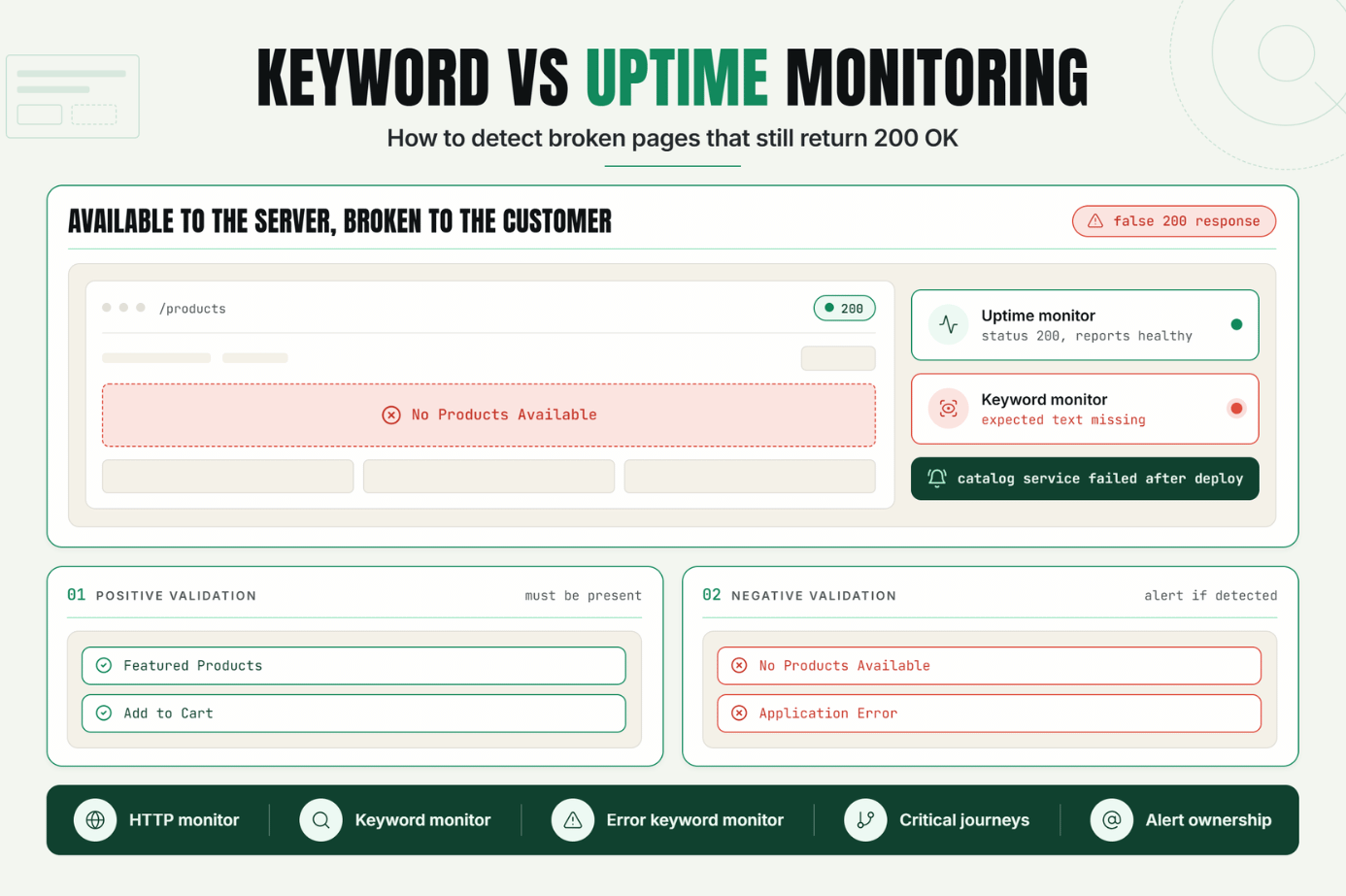
Many monitoring systems consider a website healthy when it responds successfully and returns an HTTP 200 status code. However, a successful response does not always mean the page is functioning correctly.
Error messages, broken templates, failed product searches, missing content, maintenance notices, and application exceptions can all appear on a page while the server continues returning a valid response.
This is where keyword monitoring becomes valuable. By validating the actual content displayed to users, teams can detect issues that traditional uptime monitoring may miss.
For ecommerce teams, SaaS operators, marketers, and developers, keyword monitoring helps bridge the gap between technical availability and real user experience.
The Operational Risks Teams Face Without Effective Keyword Monitoring
Traditional uptime checks are useful for detecting outages, but they cannot always detect broken user experiences.
Without content validation, organizations may experience:
- False 200 responses: Pages return successfully while displaying application errors.
- Hidden ecommerce failures: Product listings fail while category pages remain available.
- Broken customer journeys: Login, checkout, or signup pages stop functioning correctly.
- SEO risks: Error pages may remain indexable while returning HTTP 200.
- Lost revenue: Customers encounter issues before monitoring systems detect them.
- Longer incident response times: Teams receive alerts only after users report problems.
Keyword monitoring helps identify these issues by validating what users actually see on the page.
How Keyword Monitoring Works
Keyword monitoring verifies that specific text appears or does not appear within a webpage response.
Unlike standard uptime monitoring, which focuses on status codes and response times, keyword monitoring evaluates page content.
Uptime Monitoring vs Keyword Monitoring
| Monitoring Type | Checks | Detects |
|---|---|---|
| Uptime Monitoring | Availability, status codes, response time | Server outages and connectivity failures |
| Keyword Monitoring | Page content and text validation | Broken pages, content issues, soft failures |
What Is a False 200 Response?
A false 200 response occurs when a webpage returns a successful status code while displaying content that indicates a problem.
For example, a webpage may return 200 OK while showing an application error message. Error text such as Database Connection Failedor Something Went Wrong may be visible to users even though uptime checks report success.Positive Keyword Validation
Positive validation confirms that expected text appears on the page.
Examples include:
- Homepage branding
- Product names
- Navigation elements
- Account dashboard text
- Application health indicators
Negative Keyword Validation
Negative validation confirms that unwanted text does not appear.
Examples include:
- Application error messages
- Database exceptions
- Maintenance notices
- Server stack traces
- Template rendering failures
Soft Error Detection
Soft error detection identifies situations where a page appears available from a technical perspective but fails from a user perspective.
A page may return 200 OK while displaying No Products Available due to a backend integration failure.Traditional uptime checks may not detect this issue, but keyword monitoring can.
Key Monitoring Signals
- Expected content presence
- Unexpected content appearance
- Response status codes
- Response times
- Page rendering behavior
- Application health indicators
- Critical workflow validation
Thresholds and Diagnosis
Keyword monitors can trigger alerts when:
- Expected keywords disappear
- Unexpected keywords appear
- Multiple validation checks fail simultaneously
- Critical content changes unexpectedly
Combining content validation with uptime monitoring provides stronger diagnostic capabilities.
A Realistic Production Scenario and Recommended Monitor Setup
Imagine an ecommerce website that relies on a product catalog service.
The homepage continues loading successfully after a deployment.
The server returns 200 OK and standard uptime monitoring reports no issues.However, the product service fails.
Instead of displaying products, the page shows No Products Available.Customers can no longer browse products, even though uptime checks remain green.
Recommended Monitor Configuration
| Monitor | Purpose |
|---|---|
| HTTP Monitor | Verify page availability |
| Keyword Monitor | Validate expected content |
| Error Keyword Monitor | Detect unwanted messages |
Example Validation Rules
- Expected keyword: Featured Products
- Expected keyword: Add to Cart
- Alert if detected: No Products Available
- Alert if detected: Application Error
This configuration allows teams to detect customer-impacting failures much faster.
Best Practices: Coverage, Check Frequency, Validation, Ownership, and Escalation
1. Monitor Critical User Journeys
Focus on pages that directly impact customers and revenue.
2. Validate Positive and Negative Keywords
Confirm expected content exists while ensuring error messages remain absent.
3. Combine Keyword Monitoring with Uptime Monitoring
Use both techniques together for broader coverage.
4. Review Validation Rules Regularly
Content changes over time. Update validation rules when applications evolve.
5. Monitor Business-Critical Pages
- Homepage
- Product pages
- Checkout
- Login
- Account dashboard
- Pricing pages
6. Assign Alert Ownership
Ensure alerts route to the appropriate team.
7. Use Escalation Policies
Critical customer-facing failures should trigger immediate escalation.
Common Mistakes: Weak Checks, Noisy Alerts, Missing Dependencies, and Poor Routing
Mistake 1: Monitoring Only Status Codes
Availability does not always equal functionality.
Better approach: Add content validation checks.
Mistake 2: Monitoring Generic Keywords
Generic text may appear on multiple pages.
Better approach: Choose page-specific validation keywords.
Mistake 3: Ignoring Negative Validation
Error messages often provide valuable detection signals.
Better approach: Monitor for known error text.
Mistake 4: Monitoring Only One Page
Critical workflows span multiple pages.
Better approach: Validate multiple customer journeys.
Mistake 5: Poor Alert Routing
Alerts lose value when they reach the wrong people.
Better approach: Define ownership and escalation paths.
Mistake 6: Failing to Update Rules
Keyword validation becomes outdated as applications evolve.
Better approach: Review monitors after releases.
Reliability Requires More Than a 200 OK Response
Keyword monitoring helps organizations detect failures that traditional uptime checks may miss.
By validating page content, monitoring critical user journeys, and detecting soft errors, teams gain a more accurate view of website health.
The first step is identifying your most important customer-facing pages and adding content validation alongside standard uptime monitoring.
Start Monitoring Content, Not Just Availability
Ready to detect issues that traditional uptime checks miss?
Start your 7-day Statixoup trial and configure your first keyword monitor.
Validate critical page content, detect false 200 responses, and receive alerts before customers discover problems.

