Status Page Notifications: Email, SMS, Webhook or RSS?
Compare email, SMS, webhook, and RSS options for delivering reliable status page notifications. Understand which channel works best for urgent alerts, detailed updates, automated workflows, and public incident access.
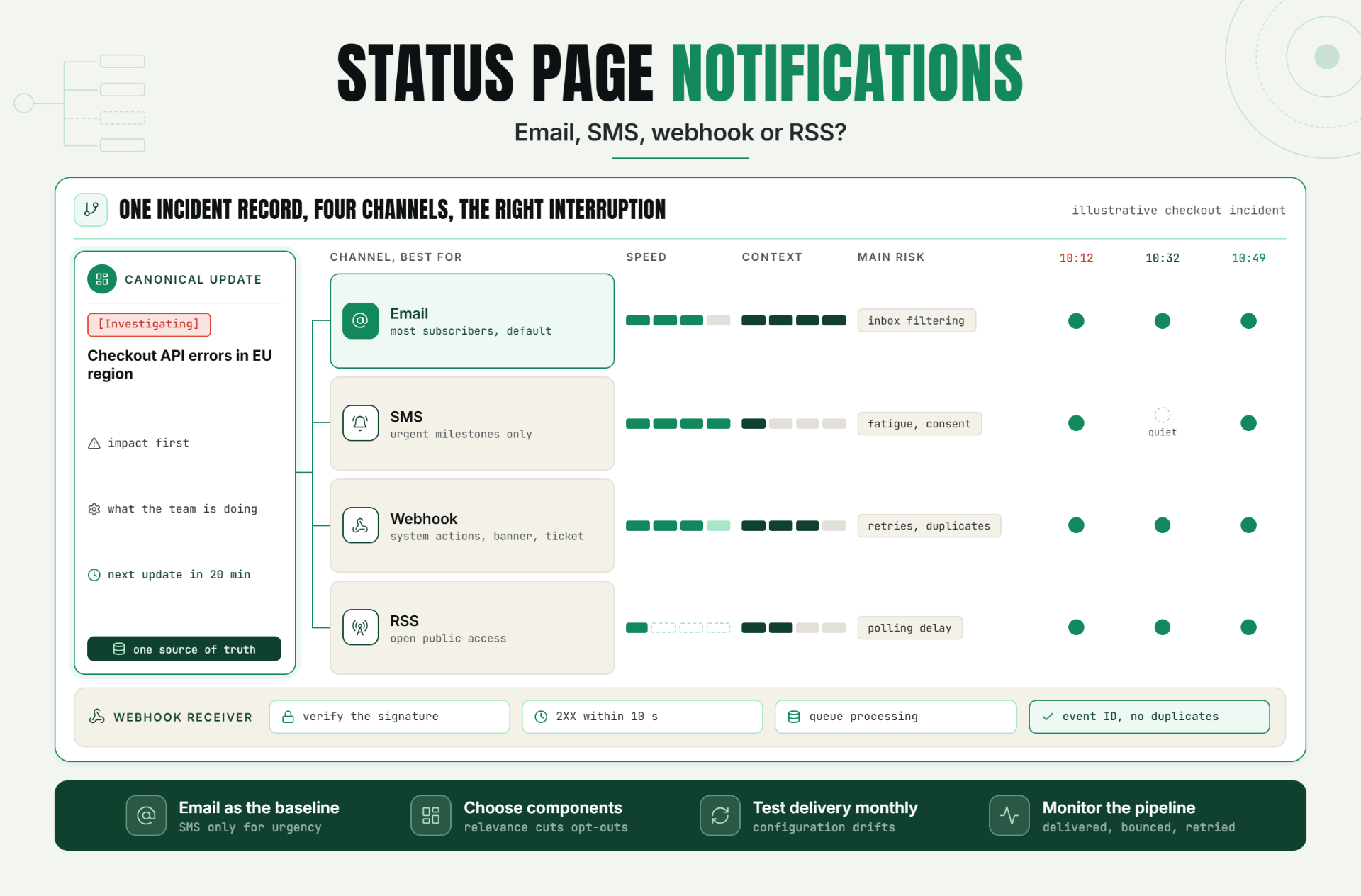
The short answer is simple. Email should be the default for detailed incident updates. SMS works best for urgent milestones, webhook notifications belong in automated workflows, and an RSS incident feed gives technical users a public option without another account. Most teams need two or three channels, not one channel forced onto everyone.
The mistake is treating reach as the only goal. Delivery speed matters, but so do context, subscriber consent, automation, cost, and what happens when status page notifications themselves fail.
The Problem With One-Channel Incident Communication
Customers don't all watch incidents the same way. A developer may want structured events in an internal system. A support lead needs enough detail to answer tickets. An executive may only care when service is unavailable and when it is restored. One stream of status page notifications can't serve all three without becoming either noisy or incomplete.
Poor status page notifications create a second incident. Messages arrive late, the wrong people get paged, routine updates interrupt customers, and automated systems miss the event entirely. Teams then compensate with manual emails and chat messages. That feels quick during the first outage. By the fifth outage, nobody knows which status page notifications are authoritative.
A public reliability workflow should have one source of truth. Statixoup monitoring and status communication can provide that starting point, while subscribers choose how the information reaches them.
How Status Page Notifications Work
Status page notifications are event-driven messages tied to an incident, maintenance window, or component change. A status page publishes the canonical update, then delivery services transform that update for each channel. The content should stay consistent even when the format changes.
A practical event model has four moments: investigating, identified, monitoring, and resolved. Scheduled maintenance adds planned, in progress, and completed. Not every channel needs every moment. In Atlassian Statuspage, for example, SMS is limited to incident or maintenance creation, resolution, and maintenance start, while email can be sent for all selected updates. That is a useful reminder: status page notifications reflect a product decision, not a universal standard.
Match the channel to the subscriber's job
The strongest setup is role-based. Customers who need narrative context subscribe to status page notifications by email. People who must react immediately add SMS. Internal tools receive webhook notifications. Readers who prefer a feed reader use RSS. Component-level choices matter too, because a billing customer may not need alerts about a separate analytics feature.
Email: the dependable default
Incident email alerts carry subject lines, timestamps, affected components, links, and enough explanation to reduce support questions. They are searchable later, work across company sizes, and suit ongoing updates. Email is also where confirmation and unsubscribe flows are easiest to explain.
The weakness is crowded inboxes. Vague status page notifications with a subject such as “service update” disappear. Use a stable pattern instead: “[Investigating] Checkout API errors in EU region.” Put impact first, then what the team is doing, then the next update time. Keep it short enough to scan.
Atlassian documents a 90-day expiry for its email subscription confirmation link. Your platform may differ, but the operational lesson holds: monitor unconfirmed subscribers and make the confirmation step obvious. A subscriber who never confirms is not an alert recipient.
SMS: reserve attention for real urgency
SMS status updates are hard to ignore. That is exactly why these status page notifications should be scarce. Send them for major incident declaration, material impact escalation, and recovery. Don't send every investigative note as a text. People will unsubscribe, and the genuinely urgent message will lose its force.
Consent and country support need review before launch. Atlassian notes that U.S. SMS subscriptions use short-code confirmation by replying YES, while other supported countries use a confirmation link. It also documents a limit of 10 automatic SMS subscriptions per IP in four hours. Those are platform-specific numbers, but they show why teams must test the actual subscription path instead of assuming SMS is globally uniform.
Webhook notifications: turn updates into actions
Webhook notifications send structured incident data to another application. These status page notifications might create a support banner, post into an internal Slack workflow, open a service ticket, or pause a scheduled customer campaign. Webhooks are for systems, not human prose.
What the receiver must do
A receiver should validate the sender, acknowledge quickly, queue the payload, and process it once. GitHub's official webhook guidance says receivers should return a 2XX response within 10 seconds. It also recommends subscribing only to needed events, using a secret, keeping SSL verification enabled, and redelivering missed events after downtime.
So the setup is: 1. Choose incident events. 2. Create an HTTPS endpoint. 3. verify the signature or shared secret. 4. return a 2XX response quickly. 5. queue processing. 6. record the event ID to prevent duplicates. The result is automation that can survive retries without repeating actions.
For teams building this workflow, Statixoup's monitoring platform is the logical place to connect detection, status updates, and downstream response.
RSS: quiet, open, and still useful
An RSS incident feed is the least intrusive form of status page notifications. It needs no phone number, usually needs no account, and works well for technical customers who already follow feeds. It is also easy to archive or poll from simple scripts.
But RSS is pull-based. The feed reader decides when to check, so delivery may lag. It also offers weak proof that a specific person saw status page notifications. Keep it as a public access channel, not the only path for a severe outage.
Status Notification Channel Comparison
| Channel | Best for | Speed | Context | Cost | Main risk |
|---|---|---|---|---|---|
| Most subscribers | Fast | High | Low | Inbox filtering | |
| SMS | Urgent milestones | Very fast | Low | Higher | Fatigue and consent |
| Webhook | System actions | Near real time | Structured | Build effort | Retries and duplicates |
| RSS | Open public access | Reader dependent | Medium | Low | Polling delay |
A Practical Production Scenario
Imagine a B2B SaaS company with 3,000 customer accounts. At 10:12 a.m., synthetic checks detect elevated checkout API errors in one region. This is an illustrative scenario, not a claimed Statixoup customer result.
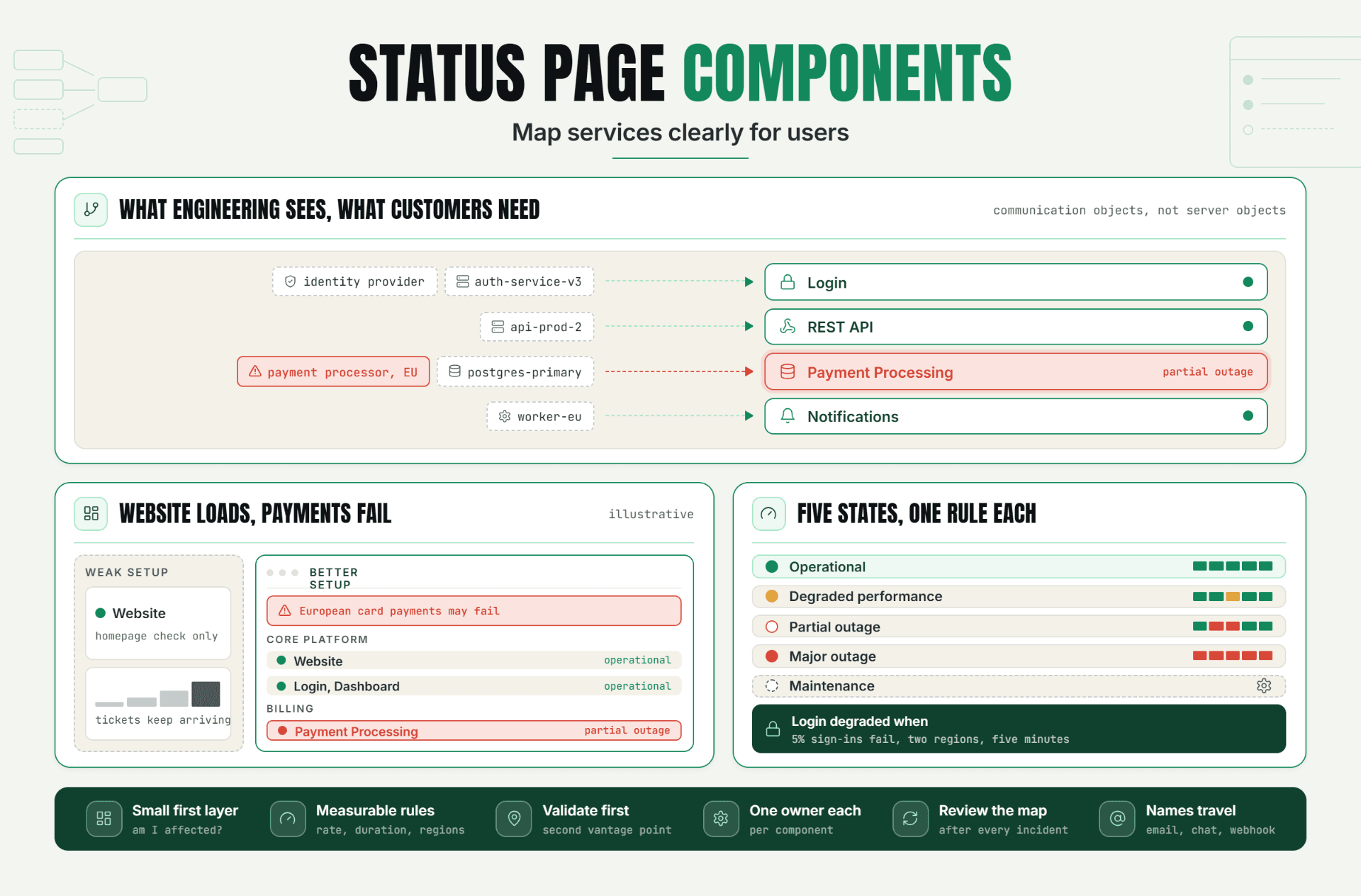
The weak setup sends one generic email to every status page subscriber. Support receives tickets before the email lands. Developers copy the message into Slack. The customer success team sends a second email with different wording. Ten minutes later, customers are comparing timestamps instead of understanding impact.
The better setup begins with one incident record. Status page notifications by email go to subscribers of the checkout component with the impact, affected region, and a promised update in 20 minutes. SMS goes only to subscribers who chose critical alerts. A signed webhook updates the in-app banner and creates a support macro. RSS publishes the same canonical entry for public readers.
At 10:32 a.m., the team identifies a database connection pool issue. Email and webhook subscribers receive the detail. SMS stays quiet because impact has not materially changed. At 10:49 a.m., metrics recover. Final status page notifications go to all subscribed channels, and the status page remains the record of what happened.
This isn't about maximizing sends. It is about sending the right level of interruption. In my view, an alert system that reaches everyone for every update is not “proactive.” It is badly routed.
A 30-day beta gives a team enough time to test this flow against real operating habits. Start from the Statixoup homepage and use a controlled incident drill before inviting every customer.
Best Practices for Status Page Notifications
1. Make email the baseline because it carries context without demanding immediate attention. Add SMS only where urgency justifies the interruption.
2. Let subscribers choose components because relevance reduces opt-outs. A user of your API should not be forced to follow an unrelated mobile feature.
3. Publish the next update time because silence creates duplicate tickets. Even “next update in 30 minutes” is useful when the cause is still unknown.
4. Separate customer channels from on-call paging because status page notifications explain customer impact. Status page notifications should not replace PagerDuty, Opsgenie, or an equivalent internal escalation system.
5. Test delivery monthly because configuration drifts. Confirm email authentication, SMS consent, webhook secrets, retry handling, RSS timestamps, and unsubscribe links.
6. Monitor the notification pipeline because a green status page with failed outbound messages is still a communication failure. Track accepted, delivered, bounced, retried, and permanently failed events where the channel supports those states.
7. Keep one canonical message because channel-specific wording can create contradictions. Shorten for SMS, structure for webhook, but don't change the incident facts.
Common Mistakes
Sending every update by SMS. It happens because teams confuse speed with value. Reserve SMS status page notifications for declaration, escalation, and recovery, then keep investigative detail in email and on the page.
Treating a webhook as fire-and-forget. Network failures and duplicate deliveries are normal. Use signatures, unique event IDs, a queue, retry handling, and a dead-letter path.
Ignoring confirmation and opt-out states. A form submission does not always equal an active subscription. Track pending confirmations, bounces, quarantines, STOP replies, and removals.
Leaving dependencies out of component choices. Customers subscribe to “Payments,” but the incident is filed only under “Database.” Map the dependency so affected subscribers actually receive the event.
Routing status page notifications like internal alerts. Customers need impact and next-update timing, not stack traces. Keep internal diagnosis in the incident workspace and customer-facing status concise.
Conclusion
The best status page notifications are not the loudest. They are the ones subscribers trust enough to keep enabled. Email carries the story, SMS marks the urgent moments, webhooks move systems, and RSS keeps access open.
Start with email and component selection. Then add one channel at a time, test it under failure, and watch whether it reduces uncertainty. That is the real reliability gain.
Start With One Useful Subscription Flow
Start a 30-day Statixoup beta and configure one customer-visible monitor with email subscriptions first. Run a controlled incident test, measure delivery, then add SMS, webhook, or RSS only where the audience has a clear reason to use it.
Sources and editorial notes
Atlassian Statuspage: Enable subscribers | GitHub Docs: Best practices for using webhooks
Editor note: Add the verified author bio block before publishing, including photo, title, credentials, experience, and profile link. Statixoup author information was not publicly verifiable during research, so no name or credential has been invented.
Internal-link note: The verified Statixoup homepage is linked four times in the body. Replace repeated homepage links with four relevant, verified Statixoup blog or product URLs when those pages are publicly indexable.
Post a Comment

Hardik Vaghani
Hardik Vaghani is a Digital Marketing Professional and SEO Strategist based in Surat, Gujarat, India. He currently works with Ethnic Infotech, contributing to SEO, content marketing, technical SEO, and digital growth strategies. Hardik also creates blog content for Fusion5, focusing on technology, laptops, and consumer electronics. With expertise in SEO, Google Ads, Meta Ads, Local SEO, and Content Strategy, he helps businesses improve online visibility, rankings, and lead generation through data-driven marketing.
Frequently Asked Questions
Related Blogs