Website Online but Not Working? 12 Hidden Failures to Watch For
Your uptime monitor says everything's fine, but customers can't check out, log in, or submit a form. Learn the 12 functional failures basic uptime checks miss and how to catch partial outages before they cost you.
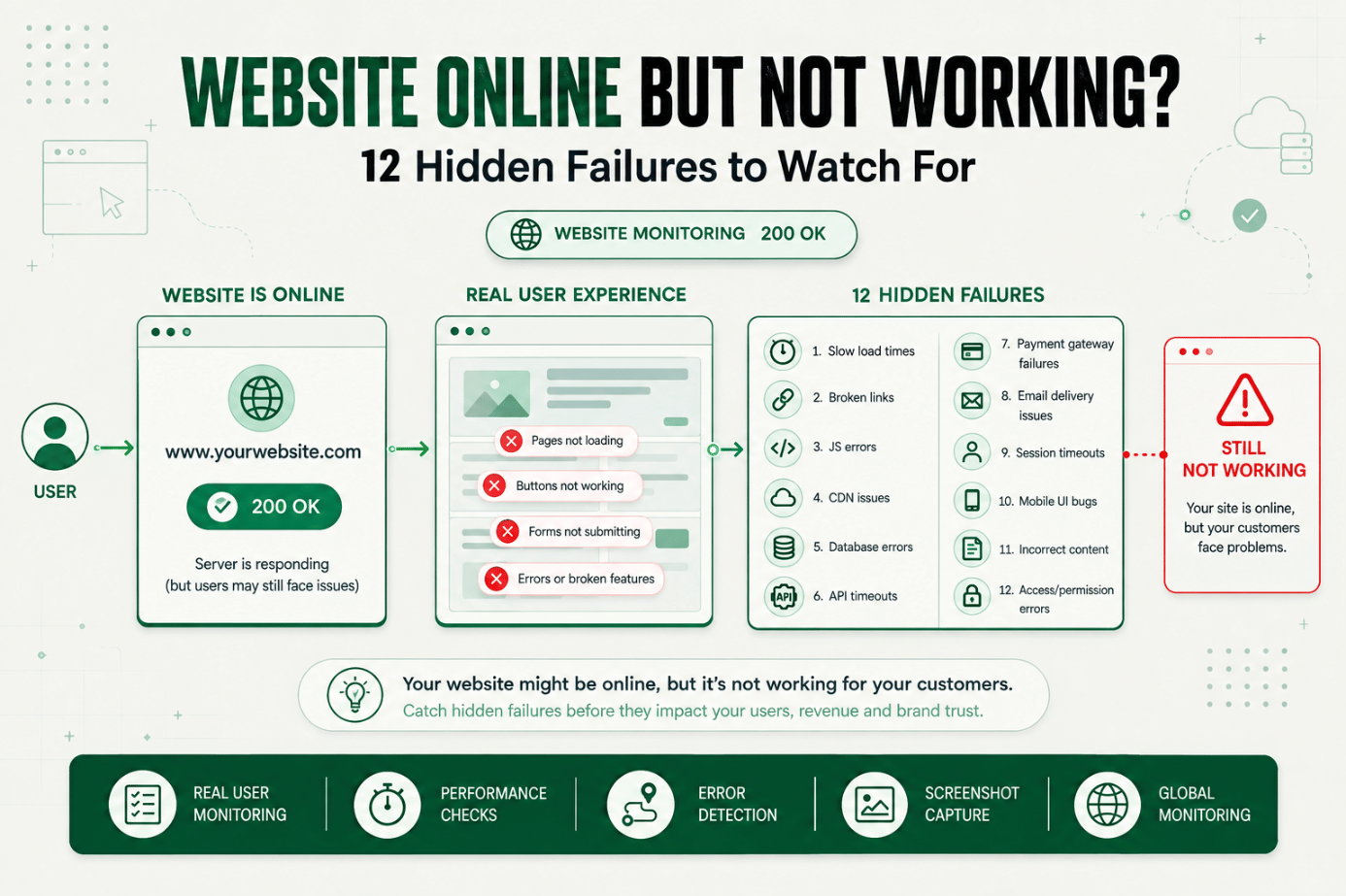
Your uptime monitor says everything is fine. Green checkmark, 200 response, no alerts.
Meanwhile, a customer just tried to submit a support form and got nothing no error, no confirmation, just silence. Another tried to add an item to their cart and the button did nothing at all.
This is the website up but not working problem: the server is reachable, but the site isn't actually doing what it's supposed to do. It's one of the most common and most underdiagnosed gaps in monitoring setups, because a basic ping or status check simply isn't built to catch it.
Why "Website Up but Not Working" Matters to Reliability and Customer Experience
A standard uptime check answers one narrow question: did the server respond? It doesn't ask whether the page rendered correctly, whether the buttons worked, or whether a form submission actually went anywhere.
That gap matters because most real world failures aren't full outages. They're partial outages a broken checkout button, a search bar that returns nothing, a form that submits into a black hole. The server is still up. The response code is still 200. But a real visitor hits a dead end.
This is why "website up but not working" is such a common symptom led search. People experience the failure firsthand a page that looks fine but doesn't respond the way it should and go looking for an explanation, because their monitoring dashboard is telling them nothing is wrong.
The cost of this gap isn't abstract. A transaction failure during checkout is lost revenue. A broken signup form is a lost lead. A support form that silently fails is a frustrated customer who now has no way to reach you, and no idea you don't know either.
The Operational Risk of Relying on Basic Uptime Checks Alone
Most uptime monitors work by sending a request to a URL and checking the HTTP status code. If it's 200 (or whatever range you've defined as healthy), the check passes.
The problem is that a 200 response only confirms the server sent something back. It says nothing about:
- Whether the page's JavaScript executed without errors
- Whether critical page elements actually rendered
- Whether interactive elements (buttons, forms, dropdowns) work
- Whether a multistep process, like checkout, completes end to end
- Whether third party scripts the page depends on loaded successfully
A page can return a perfect 200 status and still be functionally broken, a broken website detection gap that a basic monitor is architecturally incapable of closing, because it was never designed to interact with the page the way a real user does.
Without deeper checks, teams typically discover these failures the same three ways they discover any invisible failure:
- Support tickets pile up before anyone on the technical side notices.
- A drop in conversions or signups shows up days later in a report.
- Someone finally reproduces it manually and realizes the monitor never would have caught it.
How "Up but Not Working" Failures Happen: 12 Failures Basic Uptime Checks Miss
Below are the specific failure types that a status code only uptime check will not detect, along with why each one slips through.
1. JavaScript Errors That Block Page Functionality
A script error can prevent buttons, forms, or interactive components from working, while the underlying HTML still loads and returns a 200. This is why JavaScript error monitoring capturing console errors during a real page load catches issues a status check never will.
2. Broken Forms That Submit but Don't Process
A contact, signup, or checkout form can accept input and show no visible error, while the backend silently fails to process it. The user sees nothing wrong. The submission never arrives.
3. Payment Failures at the Final Checkout Step
A payment gateway can time out or reject a transaction on a specific browser, card type, or region, while the rest of the site functions normally. This is a transaction failure hiding behind an otherwise healthy looking page.
4. Broken Internal Links and Redirects
A redirect loop, a dead internal link, or a misconfigured route can strand users mid journey, even though the homepage and individual endpoints all return valid responses.
5. Slow or Failing Third Party Scripts
Pages often depend on external scripts analytics, chat widgets, payment SDKs, fraud checks. If one of these hangs or fails, it can block rendering or functionality even though your own servers are perfectly healthy.
6. Session and Authentication Failures
A session token that doesn't persist correctly can log users out mid flow or prevent login entirely, while the login page itself loads without issue.
7. Missing or Broken Images and Assets
A CDN hiccup or misconfigured asset path can leave a page visually broken or missing critical content, without affecting the HTTP status code returned for the page itself.
8. Search Functionality Returning No Results
An indexing failure or broken search API can make internal search return empty results for valid queries, quietly breaking product discovery on ecommerce and content sites alike.
9. Shopping Cart and Inventory Sync Issues
A cart that doesn't update quantities correctly, or an inventory system that shows in stock items as unavailable (or vice versa), directly affects revenue without triggering any infrastructure level alert.
10. Broken Mobile Specific Rendering
A responsive layout bug or a mobile only script failure can make a site fully functional on desktop while effectively broken for the majority of traffic on mobile devices.
11. API Rate Limiting or Throttling Under Load
An API dependency that starts throttling under real traffic can cause intermittent functional failures that never show up in a single low frequency uptime ping.
12. Silent Failures From Recent Deploys
A code change can introduce a regression that breaks one specific flow often the newest or least tested one while every other part of the site, including the homepage uptime check, continues to pass.
Key Signals and Thresholds for Catching These Failures
Because these are functional failures, not connectivity failures, the signals worth tracking look different from a standard uptime check:
| Signal | What It Catches | Suggested Check Frequency |
|---|---|---|
| Console/JS errors on page load | JavaScript failures blocking functionality | Every 5–10 minutes |
| Form submission success | Broken forms, silent submission failures | Every 5–15 minutes |
| Full transaction completion | Checkout, signup, login failures | Every 1–5 minutes |
| Key element presence | Missing content, broken rendering | Every 5–10 minutes |
| Third-party script load time | Slow or failing dependencies | Every 10–15 minutes |
Diagnosis: Narrowing Down the Actual Failure
When a functional check fails, the first question is always: which layer broke? Was it the page itself, a specific interaction, a third party dependency, or a recent deploy? Step level detail what was clicked, what loaded, what error appeared turns "something is wrong" into an actionable starting point instead of a guessing game.
A Practical Production Scenario
Consider an illustrative example.
A support lead starts noticing an uptick in tickets that all mention "nothing happens when I click submit" on the contact form. The team checks their uptime dashboard every check is green, and has been for weeks.
They add a functional monitor that actually fills in the form fields and submits, rather than just loading the page. Within one check cycle, the monitor fails: the submit button triggers a JavaScript error caused by a recent script update from a marketing tag manager, and the form request never fires.
The uptime check never had a reason to fail, because the page itself loaded fine the status code was always 200. Only a check that actually interacted with the page the way a visitor does could catch it.
Recommended Monitor Setup
- Add functional checks not just status checks for any form, login, or checkout flow.
- Capture JavaScript console errors as part of every page level check, not just failures.
- Validate specific outcomes (confirmation messages, redirect targets, order numbers) rather than just page load.
- Include third party script load and response time in your monitoring scope.
- Test from multiple browsers and device types, since functional bugs are often browser or device specific.
- Re-run functional checks immediately after any deploy that touches a critical flow.
Best Practices for Catching Partial Outages
Look at the Path, Not Just the Page
If you are checking to see if people can log in, it is not enough to check if the login page loads. You have to try to log in and confirm it actually works put in real login information and verify the person is truly logged in.
Check the Important Things More Often
Check the things that matter most more often than the things that are less critical. The checkout process is very important, so it should be checked more often than a marketing page. If checkout is not working, people cannot pay, and that creates cascading problems. Signup is not quite as critical as checkout, but it still matters. Login sits close to checkout in priority.
Confirm What Actually Happened, Not Just What the Page Says
Do not just check whether the page loads without error. Check whether the thing that was supposed to happen actually happened. If someone places an order, confirm the order was actually created look for a concrete signal like an order number. A page that looks fine is not proof that it is fine.
Use a Real Browser to Test the Website
Test with an actual browser, not a simple ping. Login, signup, and checkout processes typically depend on JavaScript and cookies, and only a real browser environment can execute and validate those correctly.
Make Sure Someone Is Responsible
Decide in advance who is responsible for fixing a broken login, signup, or checkout flow. When ownership is defined ahead of time, a failure gets routed and resolved faster.
Keep Track of Speed and Reliability Over Time
Track how long each step takes and how consistently it succeeds. This makes it possible to catch degradation a flow getting slower or less reliable before it becomes a full failure, and to alert on that trend automatically.
Common Mistakes in Functional Monitoring
Mistake 1: Only Checking Parts of the Site Instead of the Whole Flow
This happens because checking individual parts is simpler to set up. Check the whole process from start to finish, the way a real customer would actually use the site.
Mistake 2: Not Checking Whether Things Really Worked
This happens because it's easier to check whether the page loaded than to verify the actual outcome. Confirm the result if someone logs in, check that they're really logged in, not just that the page returned successfully.
Mistake 3: Not Knowing What Went Wrong When Something Breaks
This happens because it's easier to know that something failed than to know why. Capture which specific step failed and what error occurred, so the problem can be fixed quickly instead of reinvestigated from scratch each time.
Mistake 4: Ignoring Third Party Dependencies
Scripts and services you don't control analytics tags, payment SDKs, chat widgets can break your site's functionality even when your own infrastructure is healthy. Include them in your monitoring scope.
Mistake 5: Testing From Only One Location or Device
Testing from a single location or device type misses failures that only show up regionally or on mobile. Test from multiple locations and device types to get a realistic picture.
Mistake 6: Not Knowing Who Will Fix the Problem
Setting up a monitor without deciding who responds to a failure delays resolution. Assign ownership before the first alert ever fires.
Start Monitoring What Actually Matters
Just checking whether your website is reachable isn't enough. You need to know whether people can actually use it — log in, sign up, check out, and get what they came for.
Start a 30-day Statixoup trial and configure functional and transaction monitors for the flows that matter most to your business. The next time something breaks, you'll know before your customers have to tell you.