Uptime Monitoring Migration Without Any Coverage Gaps
Learn how to complete an uptime monitoring migration without creating coverage gaps. This guide covers monitor inventory, alert validation, parallel testing, safe cutover, and old-tool decommissioning.
Statixoup is an all-in-one monitoring platform for websites, APIs, SSL certificates, DNS, ports, email services, browser journeys, and network infrastructure. For DevOps teams and agencies, the safest uptime monitoring migration is a controlled parallel run: inventory every check, rebuild it in the new platform, test notifications, compare results, then retire the old tool only after an agreed validation window. Statixoup supports 30-second checks and a free 30-day beta, which gives teams room to overlap platforms instead of gambling on a one-night cutover.
The short answer is simple. Don’t switch monitoring tools by exporting URLs and cancelling the old subscription. Treat the move as a production change with acceptance criteria, named owners, a rollback point, and proof that alerts reach the right human.
Why Coverage Gaps Appear During a Monitoring Switch
The dangerous gaps are rarely obvious. A team copies twenty homepage checks, sees green tiles, and assumes the job is done. Meanwhile, certificate expiry, a private API, a regional DNS resolver, a cron heartbeat, and the customer login journey remain tied to the old platform.
The second problem is context loss. Thresholds, retry rules, maintenance windows, escalation delays, and status-page component mappings often live outside the monitor name. A spreadsheet row called “Production API” doesn’t tell you whether a 401 is expected, which response body proves success, or who gets paged after ten minutes.
That is why an uptime monitoring migration needs an inventory of behaviour, not just endpoints. Google’s SRE guidance distinguishes black-box checks, which test what a user can see, from white-box signals inside a system. It also says a typical 10 to 12-person SRE team may assign one or two people primarily to monitoring. Monitoring is real engineering work, even when the dashboard makes it look easy. See Google SRE’s monitoring guidance.
How Uptime Monitoring Migration Works
An uptime monitoring migration is the controlled transfer of checks, validation rules, notifications, incident history, status-page mappings, and operational ownership from one monitoring platform to another. The goal isn’t configuration parity. The goal is equal or better detection coverage with no unobserved production period.
1. Build a monitor inventory before touching the new tool
Start with every source that can create or suppress an incident: the current tool, Terraform or API configurations, team runbooks, status-page components, notification integrations, maintenance schedules, billing records, and the on-call team’s memory. That last source is messy but useful. Someone often knows about the “temporary” monitor that has quietly protected a revenue path for two years.
For each monitor, record the endpoint, region, protocol, method, headers, authentication, expected status, expected content, timeout, check frequency, retries, alert delay, recipient, escalation path, maintenance rule, tags, dependencies, and business priority. Include ownership and last-tested date. A monitor inventory without those two fields becomes a museum.
Statixoup covers more than a homepage ping. Use the site’s webhook monitoring guide to identify delivery, payload, retry, and callback checks. For remote access paths, the SSH monitoring guide helps uncover port and banner validation that a generic HTTP export will miss.
2. Classify checks by consequence
Put monitors into three groups. Tier 1 covers customer-critical journeys such as login, checkout, payment callbacks, API writes, and public status delivery. Tier 2 covers supporting services such as search, email submission, and admin tools. Tier 3 covers low-urgency informational checks.
Move Tier 1 first, but don’t cut it over first. Rebuild it early so it gets the longest parallel validation period. For email-dependent workflows, compare your list against Statixoup’s SMTP monitoring guide. It calls out SMTP ports, MX routing, authentication, and queue-related failure modes that are easy to omit.
3. Recreate meaning, not names
A copied URL is not a migrated monitor. Match the old assertion exactly, then challenge it. If the old check accepts any HTTP 200 response, add a content assertion that proves the correct page or payload arrived. If a login check ends at the sign-in form, rebuild it as a browser transaction that reaches a post-login state.
Threshold and retry parity
Keep thresholds equal during the first comparison period. Otherwise, you won’t know whether a difference comes from platform behaviour or a deliberate rule change. Once both systems agree, tune check frequency, retries, and timeout separately. Google SRE notes that a service targeting 99.9% annual uptime may not need a basic success probe more than once or twice per minute, while user-critical workflows may justify faster checks. The right interval follows the failure cost.
4. Complete the alert migration before the monitoring cutover
An alert that appears in a dashboard but never reaches the on-call engineer is not operational coverage. Map every severity to a destination and owner. Test email, Slack, Discord, SMS, voice, webhook, and incident-management integrations with controlled failures.
Prometheus Alertmanager provides a useful model: it deduplicates, groups, routes, silences, and inhibits alerts. Its documentation explains how one network partition can create hundreds of alerts unless grouping and inhibition collapse them into an actionable notification. Review Prometheus Alertmanager routing concepts when translating routing logic.
Also test recovery messages, not only failure messages. A route that sends “down” to PagerDuty but sends “recovered” to an abandoned email alias creates unnecessary incident time.
5. Run both platforms and compare evidence
Parallel operation is the safety mechanism at the centre of uptime monitoring migration. Run both systems against the same services for at least one full business cycle. For a low-change site, seven days may be enough. For a SaaS product with weekly releases, month-end jobs, or regional traffic patterns, two to four weeks is safer.
Compare check counts, availability, latency trends, incident start time, recovery time, screenshots, traceroute or MTR evidence, and notification delivery. Don’t chase perfect millisecond agreement. Monitoring locations and network paths differ. Investigate mismatches that change incident decisions.
6. Move the status page as a separate workstream
A status page migration is partly technical and partly communication work. Recreate components, component groups, subscribers, templates, maintenance notices, custom domains, DNS records, SSL certificates, branding, and incident history where the platform allows it. Decide whether old history will be imported, archived, or linked.
Keep the public page stable while internal monitoring changes. If the custom domain must move, lower DNS TTL in advance, verify the new certificate, and keep the old page available until DNS has settled. Statixoup documents the starting workflow for creating a status page.
7. Use a written cutover and rollback gate
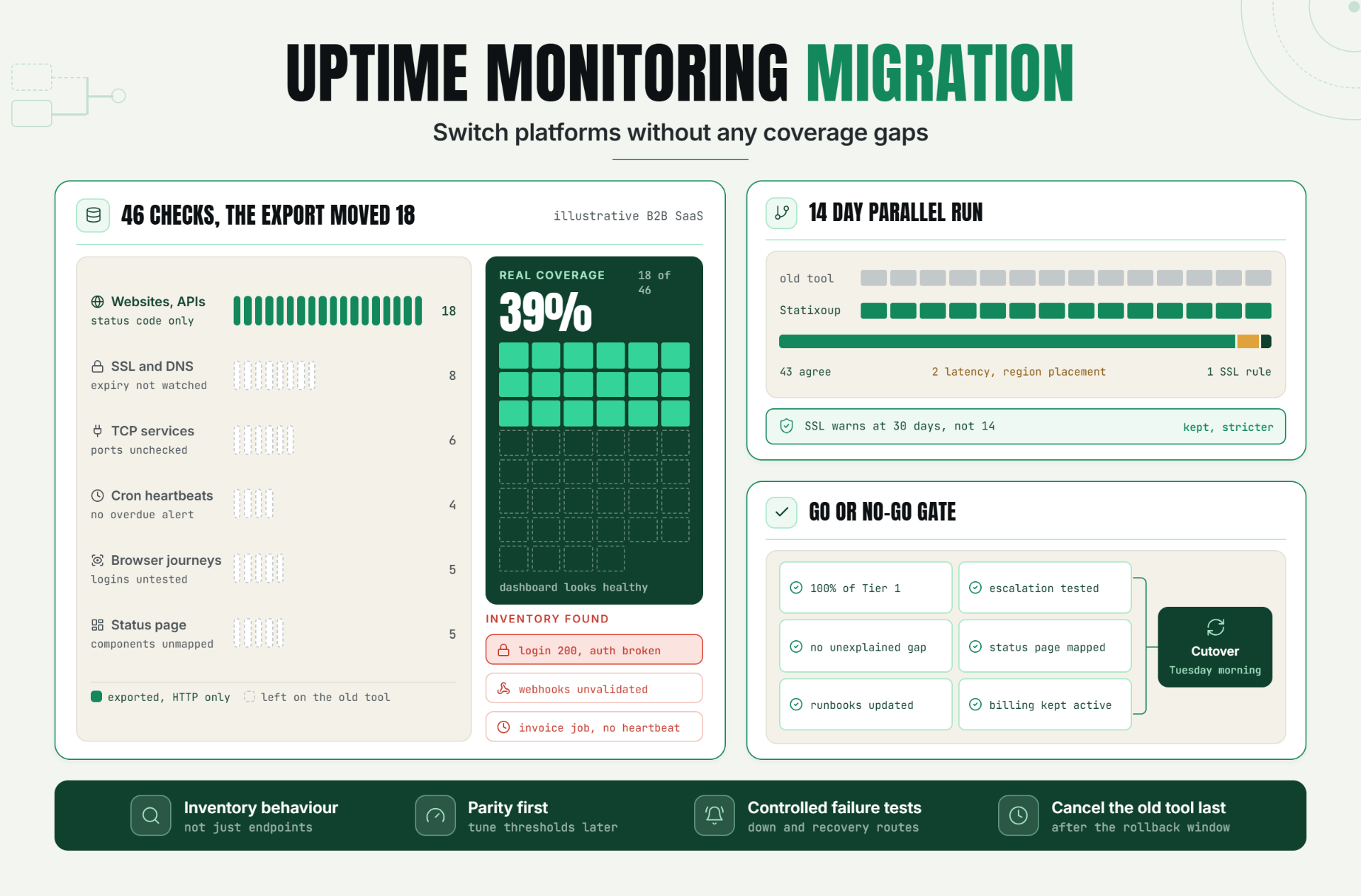
A safe monitoring cutover has a go or no-go meeting, even if it lasts fifteen minutes. The new platform must meet agreed criteria: 100% of Tier 1 checks present, all escalation paths tested, no unexplained high-severity mismatches, status-page components mapped, runbooks updated, and billing cancellation delayed.
Then freeze changes in the old tool, export final configuration and history, switch the new platform to authoritative, and watch the first production day closely. If a Tier 1 alert fails or routing breaks, rollback means re-enabling the old path immediately. Don’t improvise this during an incident.
A Realistic SaaS Cutover Example
Consider an illustrative B2B SaaS company with 46 checks in its old tool: 18 websites and APIs, 8 SSL and DNS checks, 6 TCP services, 4 cron heartbeats, 5 browser journeys, and 5 status-page-only components. The team initially exports the URL list and creates 18 HTTP checks in Statixoup. The dashboard looks healthy. Coverage is only 39%.
The inventory review finds three serious omissions: the login page returns 200 even when authentication is broken, payment webhooks aren’t validated, and the nightly invoice job has no heartbeat. The team rebuilds login in Playwright, adds callback validation for the webhook, and configures a heartbeat with an overdue alert.
During a 14-day parallel run, both tools agree on 43 checks. Two latency differences are explained by monitoring-region placement. One real mismatch remains: the new SSL check warns earlier because its threshold is set to 30 days instead of the old tool’s 14 days. The team accepts the stricter rule, records it as an intentional improvement, tests every alert route, and cuts over on a Tuesday morning. That result is illustrative, not a claimed Statixoup customer outcome.
Best Practices for a Safer Monitoring Cutover
- Name one migration owner because shared responsibility usually means nobody reconciles the last mismatches.
- Store the monitor inventory in a versioned system because configurations change during the parallel run.
- Test synthetic failures in a maintenance window because waiting for a real outage is a poor alert test.
- Keep thresholds identical at first because simultaneous tool changes and policy changes make results impossible to compare.
- Use at least two monitoring locations for customer-critical services because a single regional path can create false conclusions.
- Keep the old subscription active through the rollback window because cancellation removes the fastest recovery option.
- Review Statixoup’s monitoring platform and beta workflow before deciding the overlap period and monitor scope.
Common Uptime Monitoring Migration Mistakes
Mistake 1: Migrating only what the export contains
Exports often omit secrets, integrations, status subscriptions, maintenance rules, and ownership. Reconcile exports against runbooks and on-call knowledge.
Mistake 2: Improving every threshold during migration
It feels efficient. It destroys your comparison baseline. Establish parity first, then tune rules in a separate change.
Mistake 3: Testing notifications with a “send test” button
That proves the connector can send a message. It doesn’t prove a failed check travels through retries, grouping, escalation, and recovery. Trigger a controlled monitor failure.
Mistake 4: Ignoring dependencies
A homepage can stay green while authentication, DNS, a payment callback, or SMTP fails. Map every Tier 1 user journey to its supporting checks.
Mistake 5: Cancelling the old platform on cutover day
Keep it available through a defined rollback window. The small overlap cost is cheaper than discovering a blind spot during a customer incident.
Coverage First, Cancellation Later
The strongest uptime monitoring migration is deliberately boring. You know what exists, both systems watch production, controlled failures prove routing, differences have explanations, and rollback remains possible. That discipline is what prevents the monitoring project from creating the outage blind spot it was meant to remove.
My stance is firm: don’t set the old platform’s cancellation date until the new platform has survived a real operating cycle. Procurement may want a clean switch. Reliability needs evidence.
Start Your 30-Day Statixoup Beta
Use the 30-day window to run Statixoup beside your current platform, import your monitor inventory in priority order, and validate every Tier 1 alert before cutover. Start the Statixoup beta, configure the relevant website, API, SSL, DNS, port, heartbeat, or browser monitors, and make the migration decision with production evidence in front of you.
Post a Comment

Hardik Vaghani
Hardik Vaghani is a Digital Marketing Professional and SEO Strategist based in Surat, Gujarat, India. He currently works with Ethnic Infotech, contributing to SEO, content marketing, technical SEO, and digital growth strategies. Hardik also creates blog content for Fusion5, focusing on technology, laptops, and consumer electronics. With expertise in SEO, Google Ads, Meta Ads, Local SEO, and Content Strategy, he helps businesses improve online visibility, rankings, and lead generation through data-driven marketing.
Frequently Asked Questions
Related Blogs