Real Cost of Website Downtime in 2026: Calculate Yours Now
Most businesses never put a real number on the cost of website downtime until an outage hits. This guide breaks down what downtime actually costs beyond lost sales, walks through a simple formula to calculate your own number, and shows how faster detection cuts the damage.
That's the real problem with the cost of website downtime. It's not that outages happen. Every site has them. It's that most businesses never actually put a number on what an outage costs them, so they keep treating monitoring as a "nice to have" instead of what it actually is: insurance against a bill you haven't seen yet.
Here's the fast answer:
the cost of website downtime typically runs anywhere from a few hundred dollars an hour for a small site to well over $300,000 an hour for mid-size and large enterprises, according to ITIC's 2024 Hourly Cost of Downtime Survey. Your own number depends on your hourly revenue, how many people your site supports, and how fast you catch the problem. The formula is simple. Most of the work is being honest about your inputs.
The Problem With Guessing at Downtime Costs
Ask a founder what an hour of downtime costs them and you'll usually get a shrug. "A lot," maybe. Or "depends on when it happens." Both are true and both are useless when you're trying to decide whether monitoring is worth $30 a month or $300.
Most teams find out the hard way. The site goes down during a product launch, or a payment webhook silently fails for six hours, and only then does someone open a spreadsheet and start adding things up. By then it's a postmortem, not a budget decision.
The businesses that actually plan around this treat it differently. They run the numbers before the outage, not after.
What the Real Cost of Website Downtime Actually Includes
Most people think of downtime cost as one number: lost sales. That's the visible part. It's rarely the biggest part.
Direct Revenue Loss
This is the easy one, and it's the number most downtime cost estimates start and stop at. If your site makes money while it's up, every minute it's down is a minute of zero. For an ecommerce store, that's abandoned carts. For a SaaS product, that's blocked signups, failed logins, and support tickets piling up instead of revenue coming in.
The Costs Nobody Puts in the Spreadsheet
Here's where it gets interesting. Direct revenue loss is usually the smallest slice of the total downtime cost.
- Employee productivity. If your team can't work because the tool they use is down, you're paying salaries for zero output.
- Support surge. Every outage generates tickets, and someone has to answer them, usually at overtime rates if it's after hours.
- SLA penalties. If you've promised customers a certain uptime, breaking that promise adds contractual credits or refunds straight onto your downtime cost.
- Reputation and churn. Customers remember outages longer than you'd like. A Statista survey reported that 44% of users say they'd switch to a competitor after a service was unreachable for more than an hour.
- SEO impact. Search engines don't love sending traffic to a site that was unreachable during a crawl.
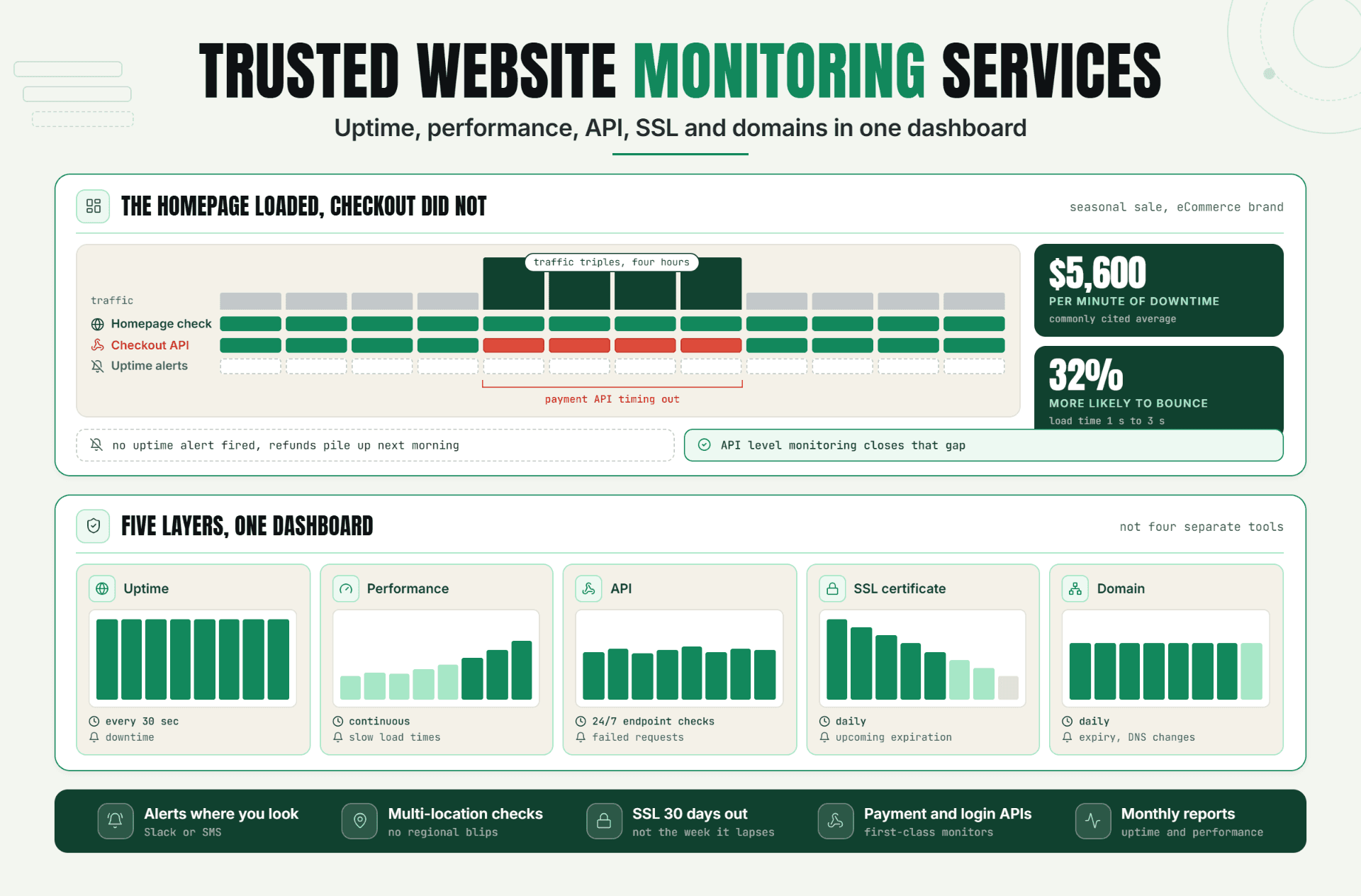
Add those together and the true cost of website downtime is almost always higher than what shows up on the sales dashboard. That's the part most founders miss until it's already happened once, which is exactly why a full setup covers more than a single homepage ping. We go deeper on that in our guide to trusted website monitoring services.
How to Calculate the Cost of Downtime for Your Business
You don't need a finance degree to work out your downtime cost. You need four numbers and a bit of honesty about your peak hours.
- Take your annual revenue and divide it by 8,760 (hours in a year) to get your average revenue per hour.
- Multiply by a peak multiplier if the outage happens during your busiest hours. A 2x or 3x multiplier is common for ecommerce sites during sales events.
- Add your indirect costs: employee hours lost multiplied by hourly pay, support ticket costs, and any SLA penalties that apply. These indirect numbers often double the final downtime cost on their own.
- Multiply the combined hourly figure by however many hours the outage actually lasts.
The result is your downtime cost calculator, built from your own numbers instead of an industry average that may not apply to you.
A Worked Example
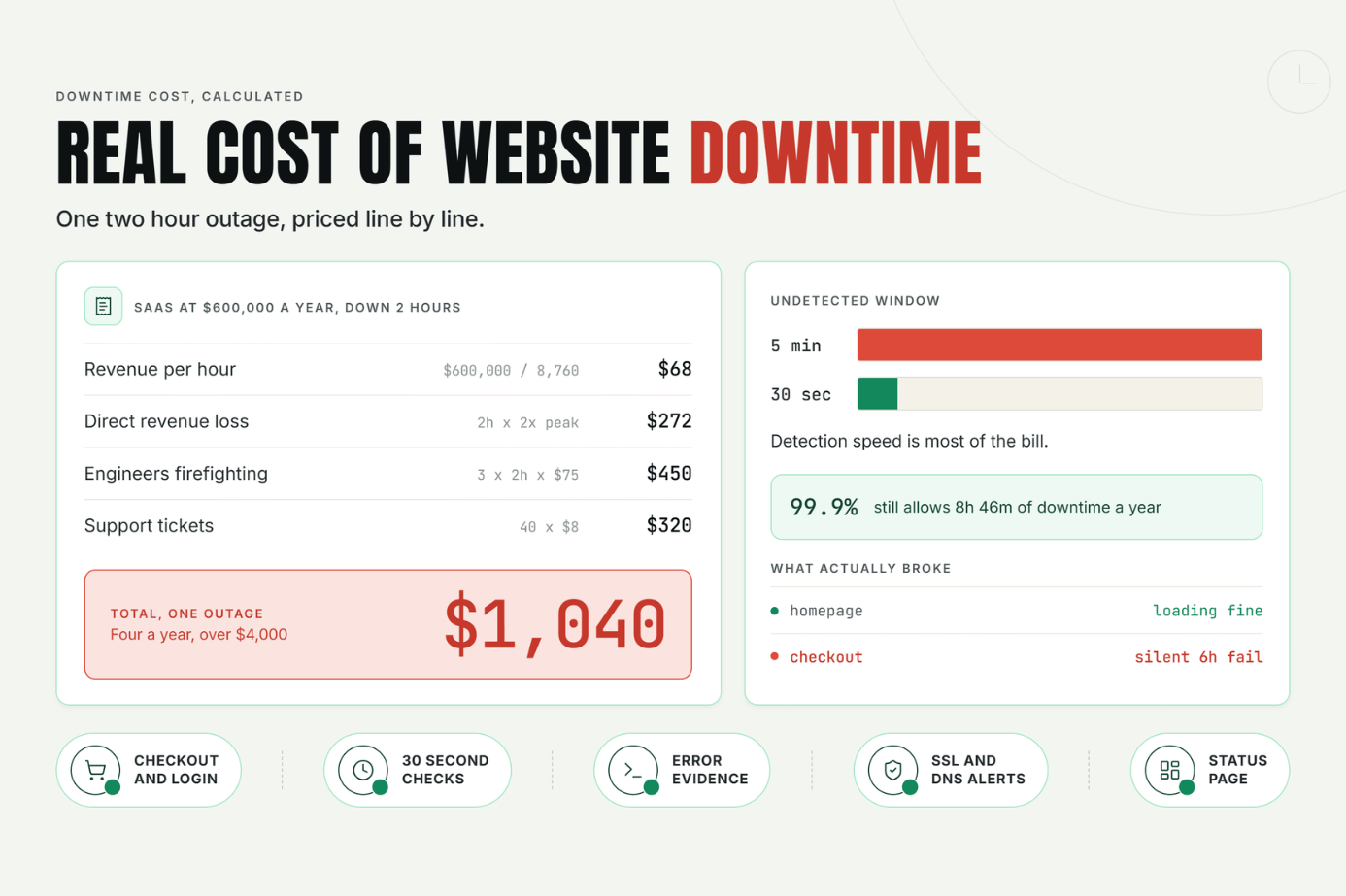
Say you run a SaaS product doing $600,000 in annual revenue. That's roughly $68 an hour on average. Now say a bug takes your login page down for two hours on a Wednesday afternoon, right when usage typically peaks.
Direct revenue loss: $68 × 2 hours × 2x peak multiplier = $272.
Now add the indirect side. Three engineers spend the two hours firefighting instead of shipping, at a blended $75 an hour: $450. Support handles 40 extra tickets that day at roughly $8 each in labor: $320.
Total downtime cost for that single outage: just over $1,040. Not catastrophic on its own. But run that math on four outages a year, and you're looking at over $4,000 in avoidable downtime cost for a company that size, before you even count churn.
Adjusting for Peak Hours and Seasonality
That $272 direct-loss number would look very different on Black Friday. Ecommerce teams should run this calculation twice: once for an average hour, and once for your single highest-traffic hour of the year. The gap between those two downtime cost figures is usually the argument that gets monitoring approved.
What I've Seen Working With SaaS and Ecommerce Teams
I won't pretend I've personally watched a server go down at 3am. My job is content, not on-call. But I've spent enough time interviewing founders and pulling outage data for client case studies to have a pretty clear pattern in front of me.
The pattern is this: nobody budgets for downtime until after the first expensive one. A mid-size ecommerce client I researched last year had a payment gateway integration fail silently for almost six hours overnight. Nobody caught it because their old monitoring only pinged the homepage, and the homepage loaded fine the whole time. Checkout was the part that was broken.
Nobody had actually priced out what that downtime cost the business until finance asked why the month's numbers looked light. That's not a rare story. It's close to the default. And it's exactly why "is the site up" isn't the same question as "is the site working."
For context on scale: Oh Dear's analysis of monitored sites found that over 61% experienced at least one outage, averaging 47 incidents across the monitoring period. Most were short. Every single one was still a moment where a real visitor hit a site that wasn't there.
Best Practices for Keeping Your Downtime Cost Low
Once you've run your own numbers, the next question is what actually moves your downtime cost. A few things consistently help:
- Monitor the journey, not just the homepage. Checkout, login, and search are where the real money leaks happen. A basic uptime ping won't catch a broken payment webhook, and it won't catch the cost that comes with it either.
- Cut your detection interval. The gap between an outage starting and someone noticing is where most of the downtime cost accumulates. Moving from 5-minute checks to 30-second checks can shrink that undetected window dramatically, because you're finding out about the problem while it's still small and cheap.
- Track uptime monitoring ROI, not just uptime percentage. A 99.9% uptime badge still allows nearly nine hours of downtime a year. What matters is whether that downtime hit during your highest-revenue hours.
- Get diagnostic evidence automatically. Screenshots and error logs captured at the moment of failure cut the time it takes to actually fix the problem, which shortens the outage and the bill that comes with it.
- Set up a status page before you need one. Customers forgive outages faster when they can see you already know about it.
Common Mistakes That Quietly Inflate the Bill
A few habits quietly inflate the downtime cost most teams end up paying, without anyone noticing until the numbers are added up.
Mistake 1: Only monitoring the homepage. The homepage is almost always the last thing to break. Checkout, login, and API endpoints fail first and more often, and they're usually where the real downtime cost is hiding.
Mistake 2: Treating every alert as equally urgent. Alert fatigue is real. If your monitoring throws false positives every few days, your team starts ignoring real ones too, and that delay is where cost piles up.
Mistake 3: Never recalculating after growth. A downtime cost estimate from two years ago is probably wrong now. Revenue changes, and so does the number.
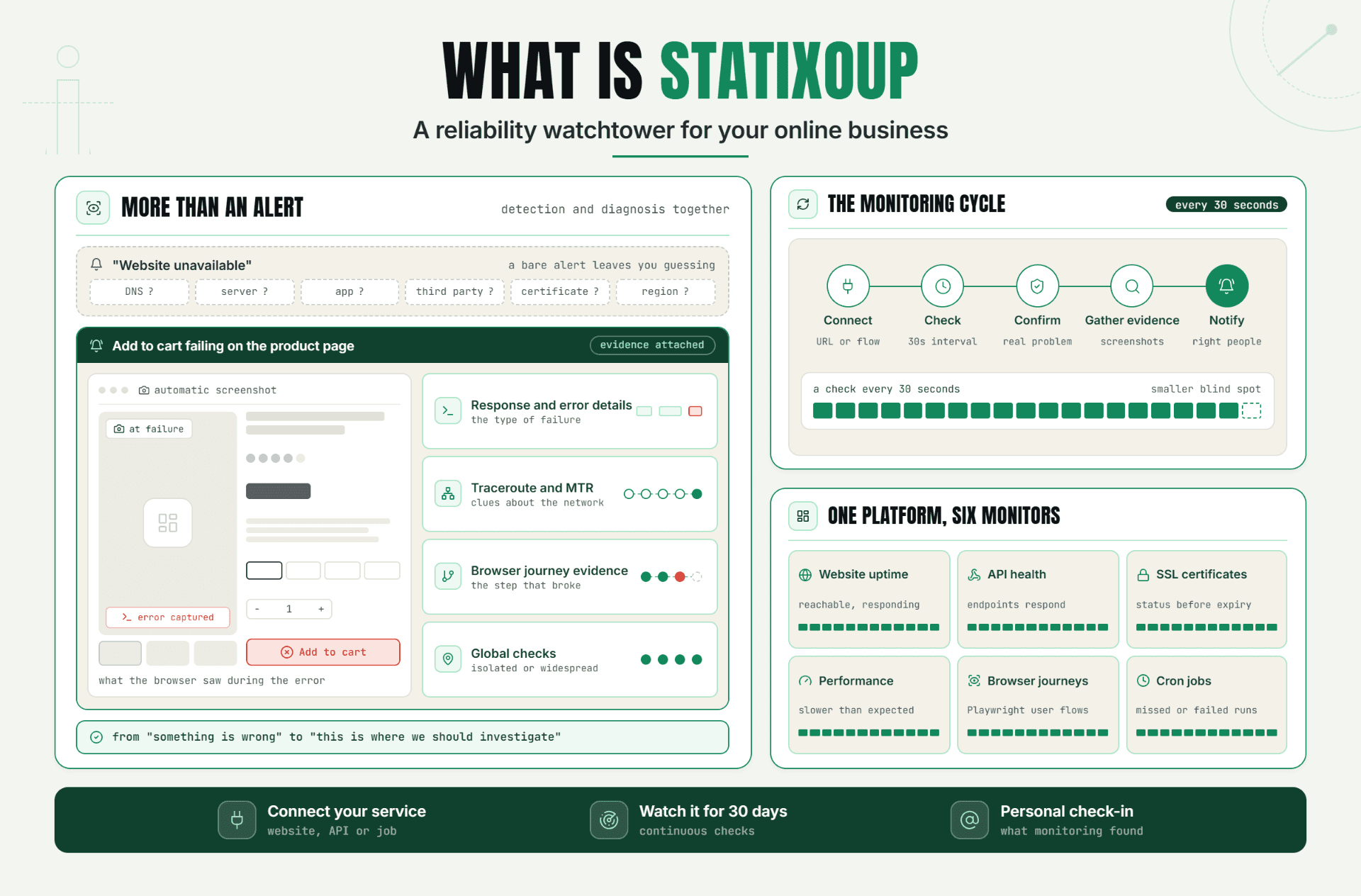
Mistake 4: Skipping SSL and DNS checks. An expired certificate doesn't feel like "the site is down," but to a visitor staring at a browser warning, it might as well be. This is one of the quieter, easily preventable causes of lost trust, and it's exactly the kind of gap we covered in what Statixoup actually monitors beyond basic uptime.
Mistake 5: Assuming slow is fine as long as it's technically "up." A page that loads in 12 seconds instead of 2 isn't down on paper. It's still losing you customers who left before it finished loading, and that lost patience belongs in your downtime cost math too.
Conclusion
The cost of website downtime isn't really about the outage itself. It's about how long it takes someone to notice, and how much of your business depends on the part that broke. Run the formula once with your own numbers, and monitoring stops looking like a technical expense and starts looking like what it actually is.
I've changed my mind on this one over the past year. I used to think downtime cost calculators were a marketing gimmick. Now I think they're the single fastest way to get a monitoring budget approved, because the number does the arguing for you.
Call to Action
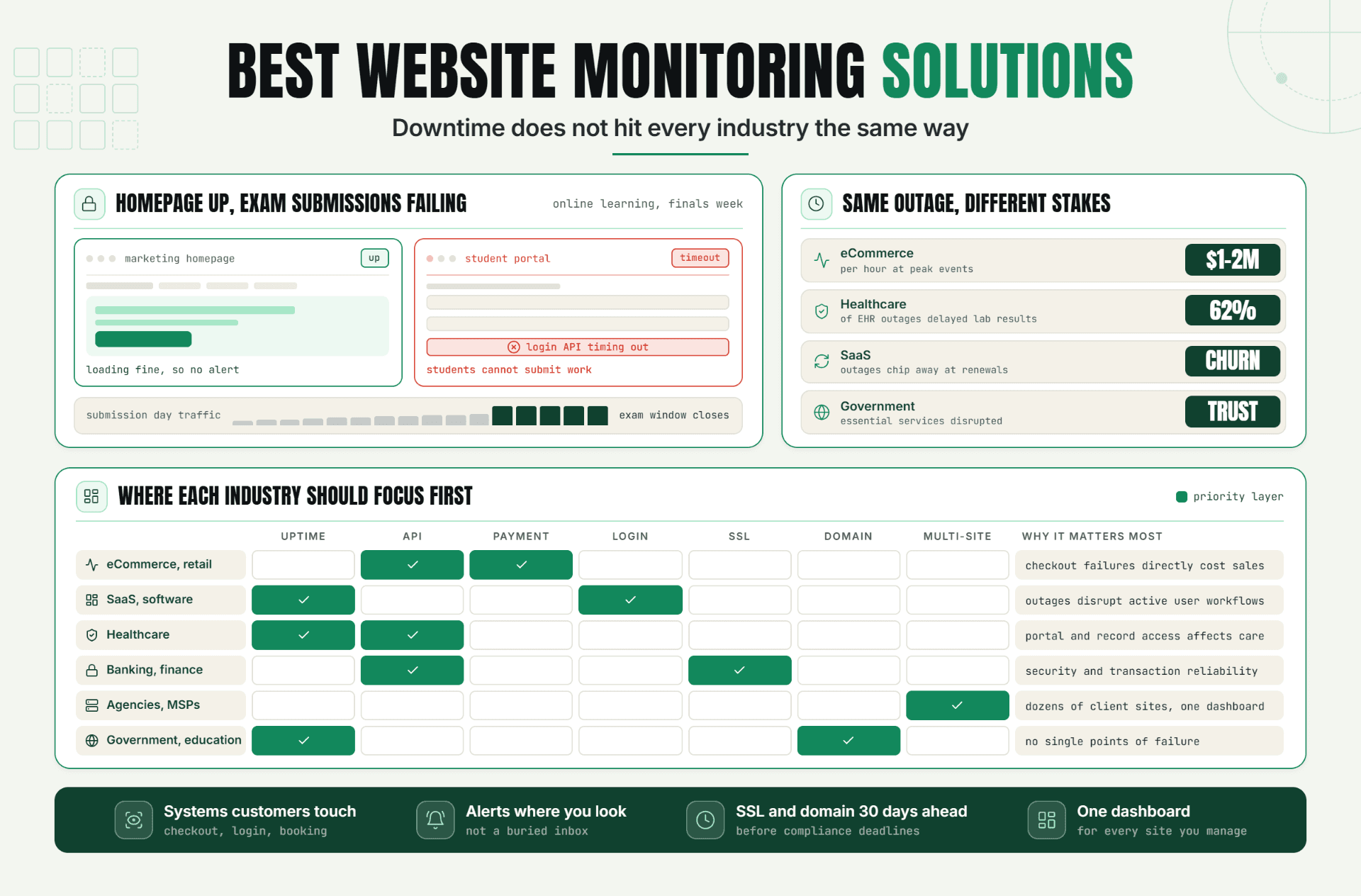
If you want the fuller picture of what a monitoring setup should actually cover beyond just uptime, we go deeper in our guide to trusted website monitoring services. For a plain-language explanation of how the platform behind these numbers works, read what Statixoup is and how it checks your site every 30 seconds. If your business sits in a specific industry, our breakdown of monitoring needs across 15 industries is worth a look too.
Run your own numbers against our pricing and see where the math lands. Or skip straight to it: start your free 30-day trial and let Statixoup catch the next outage in 30 seconds instead of however long it currently takes you to notice.
Post a Comment

Hardik Vaghani
Hardik Vaghani is a Digital Marketing Professional and SEO Strategist based in Surat, Gujarat, India. He currently works with Ethnic Infotech, contributing to SEO, content marketing, technical SEO, and digital growth strategies. Hardik also creates blog content for Fusion5, focusing on technology, laptops, and consumer electronics. With expertise in SEO, Google Ads, Meta Ads, Local SEO, and Content Strategy, he helps businesses improve online visibility, rankings, and lead generation through data-driven marketing.
Frequently Asked Questions
Related Blogs