DNS Monitoring: How to Detect Changes Before They Cause an Outage
A single incorrect DNS record can take down your website or email even when your servers are working perfectly. Learn how DNS monitoring detects record changes, nameserver issues, and potential problems before they cause an outage.
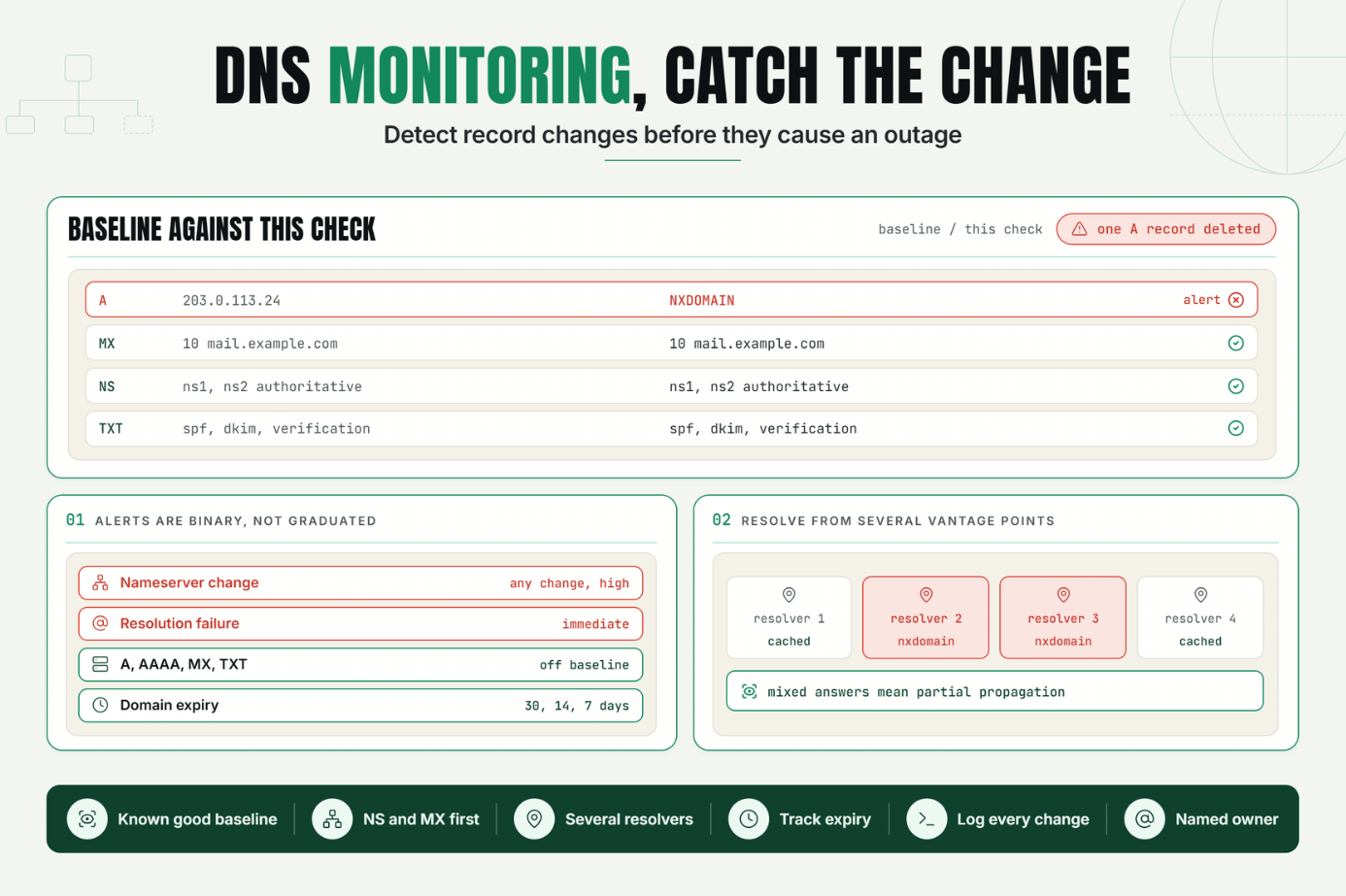
A single wrong character in a DNS record can take down a website, break email delivery, and fail SSL validation, all at once and every one of your servers can be perfectly healthy the entire time.
DNS sits underneath almost everything else in your stack, which is exactly why it's so easy to overlook. Teams monitor uptime, response time, and application health closely, but the DNS layer itself often goes unwatched until something breaks. By then, the damage is already visible to customers.
DNS monitoring closes that gap. It's the practice of continuously checking your DNS records, resolution behavior, and nameserver responses so that a bad change accidental or malicious gets caught in minutes instead of being discovered through a wave of "your site is down" messages.
Why DNS Monitoring Matters to Reliability and Customer Experience
DNS translates a domain name into the actual server address a browser, email client, or API needs to connect to. When that translation is correct, it's invisible. When it's wrong, nothing above it matters a perfectly healthy server behind an incorrect or missing DNS record is unreachable, full stop.
This is what makes a DNS outage so disruptive relative to how little usually causes it. A single mistyped IP address in an A record, an expired domain registration, an accidentally deleted MX record, or an unauthorized nameserver change can each independently break a site, break email, or both often without triggering any alert from application or server monitoring, since those systems assume DNS resolution already succeeded.
DNS monitoring matters because it watches the layer everything else depends on, rather than assuming it's static and correct. For businesses relying on uptime for revenue, and for any team responsible for domains they don't touch often, catching a bad DNS change quickly is often the difference between a five minute fix and a multi hour outage compounded by cached, stale records propagating further.
The Operational Risk of Leaving DNS Unmonitored
DNS changes happen less frequently than deploys, which is exactly why they tend to fall outside normal monitoring and change management processes. A few realities make this risk worse than it might first appear:
- DNS changes are often made outside the usual deploy pipeline through a registrar dashboard or DNS provider's console, frequently by someone other than the engineering team, with no code review or rollback plan attached.
- Propagation delay obscures the timeline. Because DNS changes propagate gradually based on TTL values, a bad change can appear to "come and go" across different networks and caches, making it harder to pin down when the actual mistake happened.
- Application level monitoring assumes DNS already works. An uptime check, a transaction monitor, or an API health check all depend on DNS resolution succeeding just to send their first request if DNS itself is broken, these checks may fail in ways that look like a different kind of outage entirely.
- DNS is also a common attack target. Unauthorized changes to nameservers or records through a compromised registrar account, for instance can silently redirect traffic without triggering any conventional security alert.
Without DNS record monitoring in place, teams typically discover a DNS problem the same way they discover any invisible failure: a spike in "the site is down" reports, a sudden drop in email deliverability, or a security researcher flagging suspicious nameserver behavior all after the damage is already spreading.
How DNS Monitoring Works: Key Signals, Thresholds, and Diagnosis
What DNS Monitoring Actually Checks
At its core, DNS monitoring periodically queries your domain's DNS records and nameservers, then compares the results against an expected, known good state. When a value that shouldn't have changed does change, or a query fails to resolve at all, that's the trigger for an alert.
Key Record Types Worth Watching
- A / AAAA records : the IP addresses your domain points to a change here can silently redirect traffic or break resolution entirely.
- MX records : mail server destinations a bad change here breaks email delivery without affecting the website at all.
- NS records : which nameservers are authoritative for your domain unauthorized changes here are a common sign of domain hijacking.
- CNAME records : aliases pointing to other domains, often used for subdomains and third party services (CDNs, email providers, SaaS tools).
- TXT records : used for domain verification, SPF/DKIM email authentication, and ownership proofs; changes here can break email deliverability or domain verification silently.
- SOA record and TTL values : changes here affect how quickly other DNS changes propagate, which matters for diagnosing timeline issues.
DNS Change Detection: What "Different" Actually Means
DNS change detection works by taking a baseline snapshot of your records and nameserver responses, then comparing every subsequent check against that snapshot. A meaningful diff isn't just "the response changed" it's specifically which record type changed, from what value to what value, and whether that change matches an expected, planned update or not.
Nameserver Monitoring: A Different Layer of Risk
Nameserver monitoring watches which servers are actually authoritative for your domain, since a change here overrides everything else. If your domain's nameservers are switched intentionally or through unauthorized access all of the individual record checks in the world won't help, because queries are now being answered by a different authority entirely.
Setting Thresholds and Alert Conditions
| Signal | Alert Condition |
|---|---|
| A/AAAA record value | Any unexpected change from baseline |
| MX record value | Any unexpected change from baseline |
| NS records (nameservers) | Any change at all treat as high priority |
| TXT records (SPF/DKIM/verification) | Any unexpected change from baseline |
| Domain expiration date | Alert at 30, 14, and 7 days before expiry |
| Resolution failure (NXDOMAIN, timeout) | Immediate alert |
Unlike performance thresholds, most DNS monitoring alerts should be binary rather than graduated a DNS record either matches its expected state or it doesn't, and there's rarely a meaningful "warning" tier for something this foundational.
Diagnosis: Confirming Domain Resolution Behavior
When a DNS alert fires, the diagnostic process centers on domain resolution monitoring across multiple vantage points: does the domain resolve consistently from different geographic locations and resolvers, or only from some? Inconsistency often points to partial propagation of a recent change, while a consistent failure everywhere usually indicates the change (or the mistake) has fully taken effect.
A Practical Production Scenario
Consider an illustrative example.
An agency manages DNS for a client's ecommerce site through a third party registrar. A junior team member, cleaning up old records, accidentally deletes an A record still in active use by a regional storefront subdomain, believing it to be unused.
Within the next check cycle, the agency's DNS monitoring flags a resolution failure for that subdomain the record that used to resolve to a valid IP now returns NXDOMAIN. The alert includes the specific record type, the subdomain affected, and the fact that it previously resolved successfully as recently as the last check.
Because the alert arrived within minutes and named the exact record involved, the team restores the A record before the change fully propagates across resolvers, and before any meaningful customer traffic is affected. Without DNS monitoring, this likely would have surfaced hours later as a wave of regional "the site won't load" complaints, with far more time spent diagnosing which record was actually the problem.
Recommended Monitor Setup
- Establish a baseline snapshot of all DNS records currently in use, including subdomains and third party service records (CDN, email, verification).
- Monitor A, AAAA, MX, NS, and TXT records for any unexpected deviation from that baseline.
- Treat nameserver (NS) changes as a high priority alert category, regardless of size.
- Monitor domain expiration dates well in advance, not just DNS record values.
- Check resolution from multiple geographic locations and resolvers to catch propagation related inconsistencies.
- Document every intentional DNS change so monitoring alerts can be quickly confirmed as expected or flagged as suspicious.
Best Practices for DNS Monitoring
Establish a Known Good Baseline First
Before you can detect a bad change, you need a documented, accurate picture of what "correct" currently looks like across every record type and subdomain in use.
Prioritize Nameserver and MX Changes
Not all DNS changes carry equal risk. Nameserver changes can redirect your entire domain's traffic, and MX changes can silently break email both deserve immediate, high priority alerting rather than routine notification.
Monitor From Multiple Locations and Resolvers
DNS propagation means a change (or a problem) can appear inconsistently depending on where you're checking from. Monitoring from multiple vantage points helps distinguish a partial rollout from a genuine, fully propagated failure.
Track Domain Expiration as Part of DNS Monitoring
An expired domain registration is functionally indistinguishable from a DNS outage to your users, even though it's an administrative failure rather than a technical one. Alert well before expiration, not on the day of.
Document Every Planned DNS Change
When your team already knows a change is coming, a corresponding alert should be quick to dismiss as expected rather than requiring a full investigation. A simple change log dramatically speeds up triage.
Assign Clear Ownership for DNS Alerts
Decide in advance who is authorized to make DNS changes and who responds to DNS alerts. Because DNS changes are infrequent and often made outside normal deploy processes, ownership can otherwise become unclear exactly when it matters most.
Common Mistakes in DNS Monitoring
Mistake 1: Assuming DNS Is Too Stable to Need Monitoring
Why it happens: DNS records change infrequently, so it's easy to treat them as a "set it and forget it" layer.
What to do instead: monitor DNS continuously regardless of how rarely records change, since infrequent changes are exactly what make an unexpected one so easy to miss.
Mistake 2: Treating All Record Changes With the Same Priority
Why it happens: it's simpler to set up one generic "DNS changed" alert than to categorize by record type.
What to do instead: prioritize nameserver and MX record changes as high severity alerts, since they carry outsized risk compared to a minor TXT record update.
Mistake 3: Monitoring From Only One Location
Why it happens: a single check location is simpler and cheaper to set up.
What to do instead: check resolution from multiple geographic locations and resolvers, since DNS propagation and regional resolver behavior can make a problem visible in some places and not others.
Mistake 4: Ignoring Domain Expiration Dates
Why it happens: domain renewal is an administrative task, easy to overlook amid technical monitoring priorities.
What to do instead: include expiration date tracking as part of your DNS monitoring setup, with alerts well ahead of the actual renewal deadline.
Mistake 5: Not Documenting Intentional DNS Changes
Why it happens: DNS changes are infrequent enough that teams often skip formal change tracking.
What to do instead: log every planned DNS change, so a monitoring alert can be quickly matched against a known, intended update instead of triggering a full investigation every time.
Mistake 6: No Clear Owner for DNS Alerts
Why it happens: DNS management is sometimes handled by whoever set up the domain originally, without a documented handoff or escalation path.
What to do instead: explicitly assign ownership for DNS changes and alert response, since ambiguity here can turn a five minute fix into a much longer outage.
Start Monitoring Your DNS Before It Costs You
DNS is the layer everything else depends on, and it's often the least actively monitored part of the stack. A single unexpected change accidental or malicious can undo every other reliability effort your team has made.
Start a 7 day Statixoup trial and configure DNS monitoring for your domain's records and nameservers. The next time something changes that shouldn't have, you'll know within minutes, not after the outage reports start coming in.