How Often Should You Monitor a Website? Comparing 30-Second, 1-Minute, and 5-Minute Checks
How often should you monitor a website? Compare 30-second, 1-minute, and 5-minute monitoring intervals to understand their impact on downtime detection, mean time to detect (MTTD), customer experience, and incident response.
When a website goes down, every minute matters. The longer it takes to detect an outage, the longer customers experience disruptions, revenue opportunities are lost, and support teams remain unaware of the issue.
Choosing the right website monitoring frequency is one of the most important decisions in any monitoring strategy. While many organizations focus on what they monitor, they often overlook how often monitoring checks should run.
Should checks run every 30 seconds, every minute, or every five minutes? The answer depends on your business requirements, customer expectations, and tolerance for downtime.
The Operational Risks Teams Face Without Effective Website Monitoring Frequency
Monitoring too slowly can leave outages undetected for several minutes, while monitoring too aggressively can generate unnecessary noise.
Without an appropriate monitoring cadence, organizations risk:
- Longer outage detection times.
- Increased customer impact during incidents.
- Higher mean time to detect (MTTD).
- Delayed incident response.
- Missed short-duration outages.
- Reduced confidence in monitoring systems.
- Unnecessary alert fatigue.
The interval between checks directly influences how quickly teams learn about problems.
How Website Monitoring Frequency Works
What Is Website Monitoring Frequency?
Website monitoring frequency refers to how often a monitoring system performs checks against a website, API, or service.
Common monitoring intervals include:
- 30-second checks
- 1-minute checks
- 5-minute checks
- 10-minute checks
Why Check Frequency Matters
The shorter the interval, the faster a monitoring system can detect downtime.
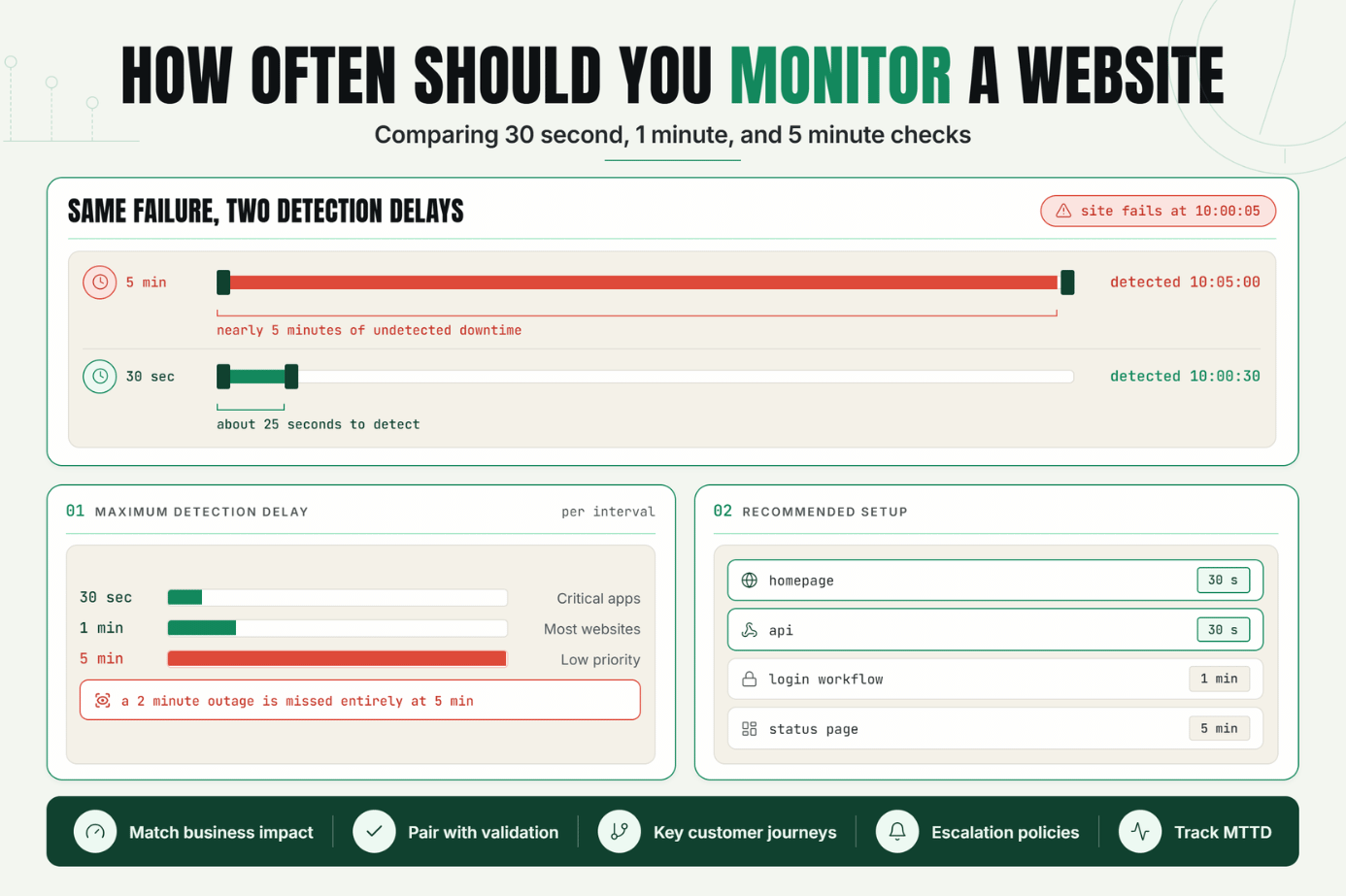
A monitor running every 30 seconds can typically detect outages much faster than one running every 5 minutes.Monitoring Frequency Comparison
| Check Interval | Maximum Detection Delay | Best For |
|---|---|---|
| 30 Seconds | 30 Seconds | Critical applications |
| 1 Minute | 60 Seconds | Most business websites |
| 5 Minutes | 5 Minutes | Low-priority systems |
Impact on Mean Time to Detect (MTTD)
Mean Time to Detect measures how long it takes teams to identify incidents.
A 30-second monitoring cadence generally produces lower MTTD than a 5-minute cadence.
Faster detection often results in faster recovery and reduced customer impact.
Detecting Short Outages
Short-duration outages are increasingly common in cloud-native environments.
An outage lasting2 minutes may be detected by a 30-second monitor but completely missed by a 5-minute monitor.
This creates blind spots that affect reliability reporting and incident analysis.
Balancing Speed and Alert Accuracy
Shorter intervals improve detection speed but should be combined with validation mechanisms to reduce false positives.
Common approaches include:
- Multiple confirmation checks
- Multi-location validation
- Content verification
- Dependency monitoring
A Realistic Production Scenario and Recommended Monitor Setup
Consider an ecommerce website generating revenue around the clock.
Scenario A: 5-Minute Monitoring
- Website fails at 10:00:05.
- Next check occurs at 10:05:00.
- Detection delay is nearly 5 minutes.
Customers experience downtime while the issue remains undetected.
Scenario B: 30-Second Monitoring
- Website fails at 10:00:05.
- Next check occurs at 10:00:30.
- Detection delay is approximately 25 seconds.
The incident is identified much sooner, allowing teams to respond faster.
Recommended Monitor Configuration
| Monitor Type | Interval |
|---|---|
| Homepage Monitor | 30 Seconds |
| API Monitor | 30 Seconds |
| Login Workflow | 1 Minute |
| Status Page | 5 Minutes |
Best Practices: Coverage, Check Frequency, Validation, Ownership, and Escalation
1. Match Monitoring Frequency to Business Impact
Critical services should be monitored more frequently than non-essential systems.
2. Use Faster Checks for Revenue-Critical Services
Ecommerce, SaaS platforms, and customer portals benefit from short intervals.
3. Combine Frequency with Validation
Fast monitoring works best when paired with content validation and multi-location checks.
4. Monitor Key Customer Journeys
- Homepage
- Login
- Checkout
- Public APIs
- Account dashboards
5. Define Escalation Policies
Ensure incidents reach the right teams immediately.
6. Review Monitoring Performance Regularly
Measure detection speed and adjust intervals as requirements change.
Common Mistakes: Weak Checks, Noisy Alerts, Missing Dependencies, and Poor Routing
Mistake 1: Using 5-Minute Checks for Critical Services
Better approach: Use shorter intervals for customer-facing applications.
Mistake 2: Monitoring Everything at the Same Frequency
Better approach: Adjust intervals based on business importance.
Mistake 3: Ignoring Validation
Better approach: Combine uptime checks with content validation.
Mistake 4: Chasing Speed Without Accuracy
Better approach: Use verification checks before alerting.
Mistake 5: Not Measuring Detection Performance
Better approach: Track MTTD and continuously improve monitoring.
Faster Detection Leads to Better Reliability
The right website monitoring frequency can significantly reduce downtime impact and improve incident response.
While 1-minute monitoring remains common, 30-second monitoring provides faster detection and greater visibility into short-duration outages.
The first step is identifying your most critical services and ensuring monitoring intervals align with business expectations.
Start Monitoring With Faster Detection
Ready to reduce detection delays and improve reliability?
Start your 7-day Statixoup trial and configure your first monitor.
Monitor critical services every 30 seconds and detect downtime before it impacts more customers.

