Alert Fatigue in DevOps: Causes, Signs & a Fix
Alert fatigue is one of the most common problems facing DevOps teams today, quietly eroding focus and slowing incident response. This post breaks down what causes alert fatigue DevOps teams struggle with, the early warning signs to watch for, and a practical fix your team can start using right away.
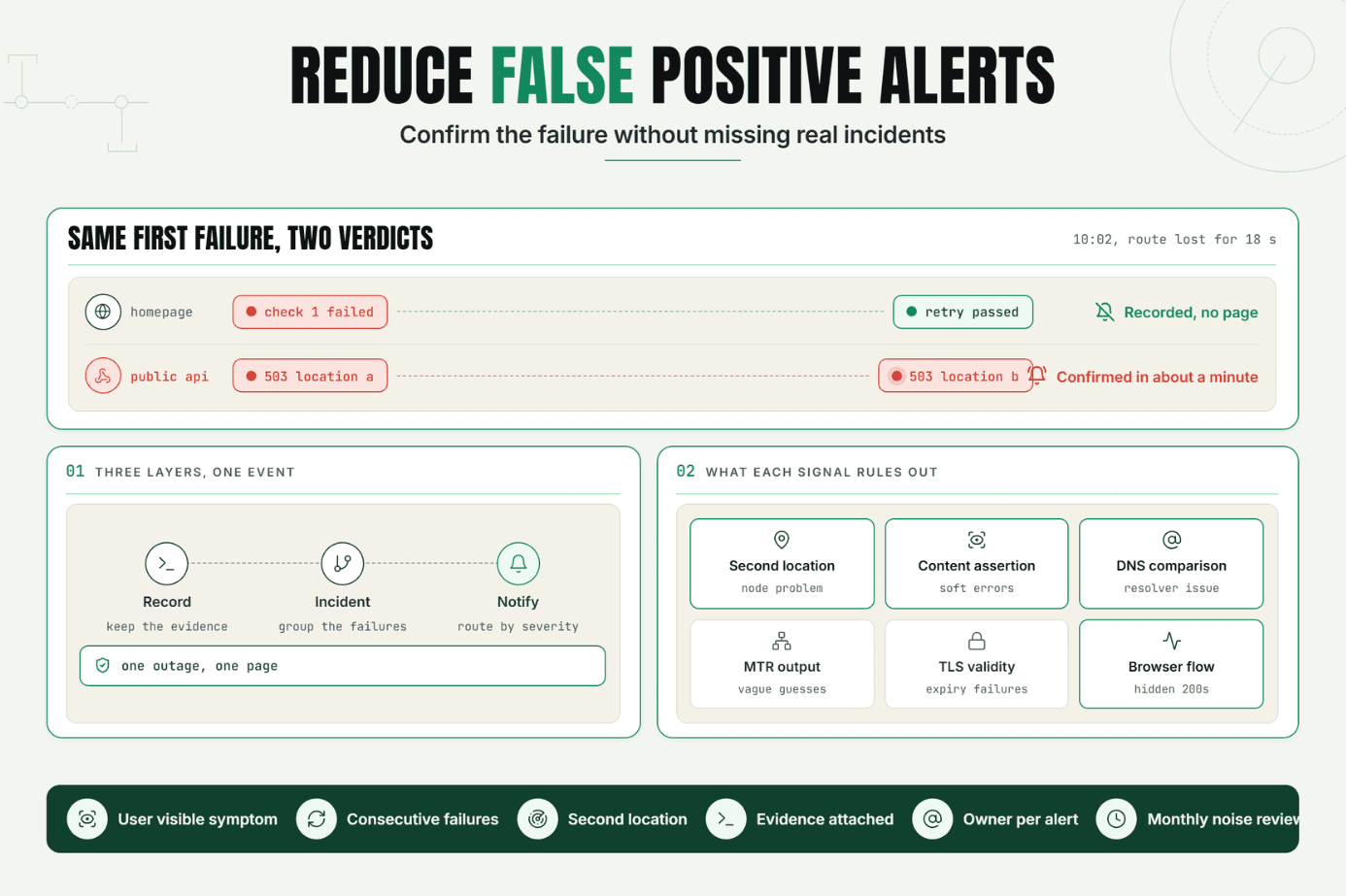
Statixoup is a monitoring platform for websites, APIs, SSL certificates, domains, DNS, ports, and browser transactions. Its public product page says checks can run every 30 seconds and use worldwide locations plus intelligent validation to reduce false alerts. That matters here because the practical fix for alert fatigue is simple: page only on a verified, customer-relevant failure, route it to one accountable owner, and escalate when nobody responds.
In plain language, alert fatigue happens when people receive so many low-value or repeated notifications that their response slows down. Better thresholds help, but thresholds alone won’t fix it. Teams also need failure validation, severity-based routing, clear ownership, and regular removal of alerts that don’t trigger an action.
The Operational Risk Behind Alert Fatigue
A noisy pager changes behavior. Engineers begin acknowledging alerts before reading them. Slack channels fill with duplicates. Owners assume somebody else is investigating. The team’s incident history then becomes a record of notification volume, not service risk.
The customer sees the consequence first. A real login or payment failure sits beside CPU warnings, brief network blips, expired test certificates, and five copies of the same downstream outage. Monitoring alert noise stretches detection, triage, and incident escalation precisely when speed matters.
This isn’t solved by telling people to “pay more attention.” The system trained them to ignore it. Google’s SRE on-call guidance describes a target of no more than two incidents per on-call shift so responders retain time for follow-up. It also presents a hypothetical overloaded team receiving five paging incidents per shift, with one-third of shifts above budget. Those numbers are a useful alert fatigue benchmark, not a universal law.
For the customer-facing layer, start with how website availability checks work. It separates basic reachability from the deeper checks needed to prove a service is usable.
How Alert Fatigue in DevOps Actually Works
Alert fatigue DevOps teams experience is the repeated exposure to signals that demand attention but rarely require immediate human action. It has four common inputs: weak checks, unstable thresholds, duplicate notifications, and unclear routing.
Start with customer symptoms, not every component twitch
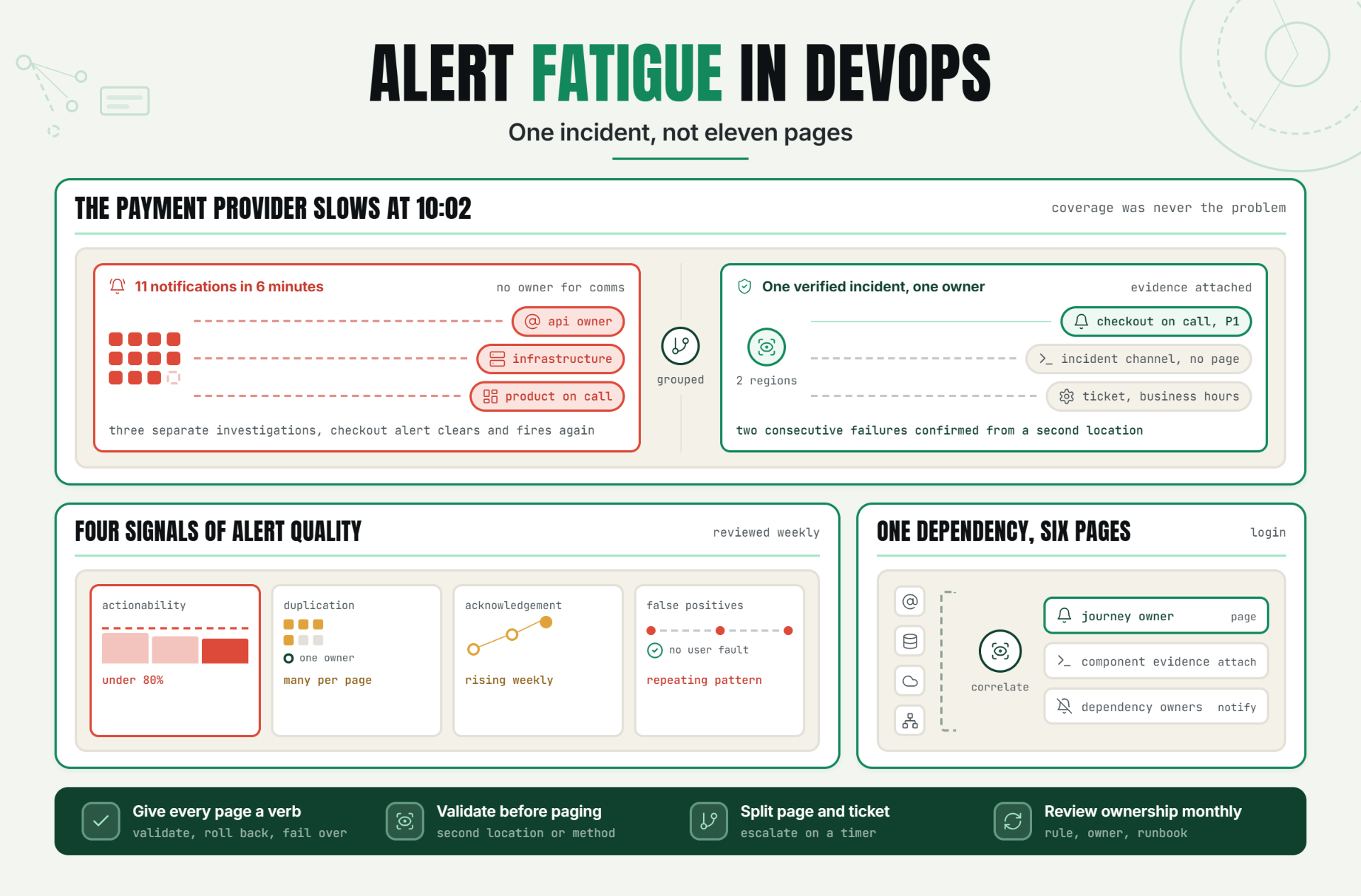
Page on symptoms that threaten a service objective. Ticket lower-urgency causes for business-hours work. A checkout journey failing in two regions is page-worthy. One pod restarting successfully usually isn’t.
Google’s SRE on-call model classifies immediate pages as actionable and SLO-impacting, while lower-priority events move to email, tickets, or dashboards. The distinction is blunt on purpose. If a responder can’t take a useful action now, the event probably shouldn’t wake them.
Prometheus alerting practices give similar official guidance: keep alerting simple, alert on symptoms, and allow slack for small blips. Its documentation also recommends linking each alert to a relevant console and runbook. That context turns notification text into a starting point for controlling alert fatigue.
Measure alert quality with four signals
Track alert fatigue DevOps risk with a small scorecard:
| Signal | What to measure | Warning sign | Response |
|---|---|---|---|
| Actionability | Pages that led to a human action | Under 80% | Downgrade, redesign, or remove the rule |
| Duplication | Notifications tied to one incident | More than one page per owner | Group by incident and dependency |
| Acknowledgement | Time to human acknowledgement | Rising week over week | Fix routing and ownership |
| False positive rate | Verified alerts with no user-impacting fault | Any repeating pattern | Add confirmation and content checks |
The 80% figure is a working team threshold, not an industry statistic. Pick a number, review it weekly, and tighten it as your data improves. What matters is that every page has an owner and an expected action. Otherwise, DevOps alert fatigue returns under a new dashboard.
The dependency check most teams miss
A login monitor can fail because of DNS, identity, database, CDN, or network trouble. If each dependency pages independently, one incident becomes six interruptions. Map dependencies, correlate failures, and page the owner of the affected customer journey. Keep component evidence attached for diagnosis.
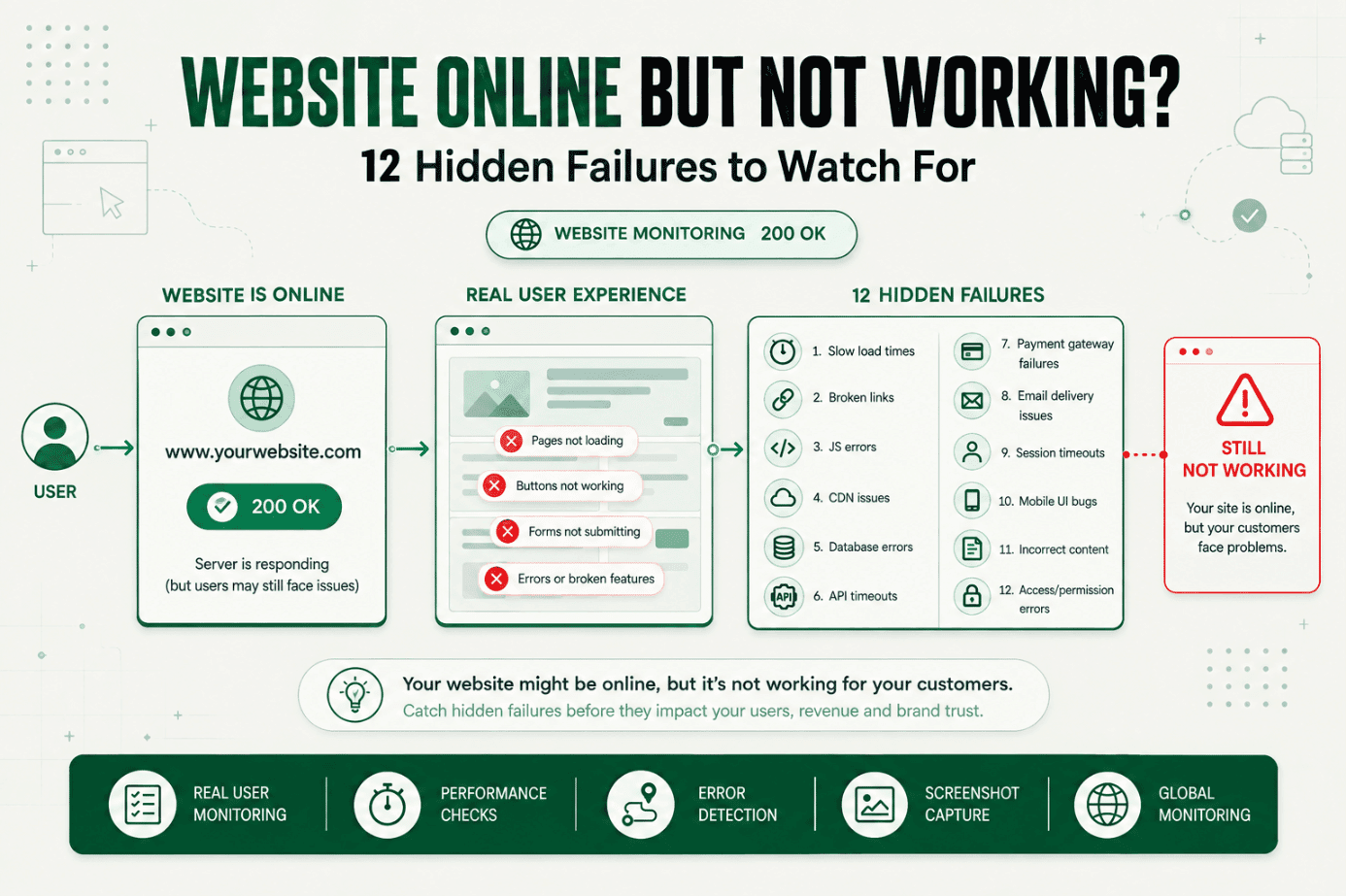
This is where hidden website failures worth monitoring become useful. An HTTP 200 response can still hide broken content, JavaScript, authentication, or a third-party failure.
Set thresholds around persistence and impact
Alert fatigue DevOps programmes often begin by raising every threshold. That quiets the pager, but it can also hide slow failures. A safer model combines persistence, scope, and impact.
Use this process:
- Define the customer action that must work.
- Check it at a frequency that matches the service’s risk.
- Confirm failures from another location or with another method.
- Group related failures into one incident.
- Route by severity and ownership.
- Escalate only when acknowledgement or recovery misses a timer. The result is fewer pages without weaker coverage.
For a revenue path, an HTTP request may be the first layer. Add content validation or a real browser transaction when a successful status code can mask a broken journey. Statixoup’s guide to transaction monitoring for login, signup, and checkout explains that deeper layer.
Warning Signs That DevOps Alert Noise Is Winning
You don’t need a survey to spot alert fatigue DevOps trouble. Look at the last four weeks of alerts and ask five questions:
- Did responders acknowledge pages without leaving a note or taking an action?
- Did one outage create several pages for the same person?
- Were customers or support the first to report a failure?
- Did alerts land in channels with no named owner?
- Did the same rule fire again without a permanent follow-up?
Three “yes” answers are enough to start a cleanup. Honestly, I wouldn’t wait for a perfect baseline. Teams often spend more time designing an alert-quality dashboard than deleting the ten rules everyone already knows are useless.
On-call fatigue also shows up outside incident metrics: frequent rotation swaps, dread before a shift, shallow handoffs, and delayed project work after interrupted nights. Those are operational signals. Treat them with the same seriousness as latency or error rate because alert fatigue is already affecting capacity.
A Practical Production Example: One Incident, Not Eleven Pages
Consider this clearly hypothetical SaaS team. It runs a subscription checkout across two regions. The existing stack checks the homepage, API health, CPU, database connections, payment provider, and checkout endpoint every minute.
At 10:02 a.m., the payment provider slows down. Eleven notifications fire in six minutes. The API owner, infrastructure engineer, and product on-call all begin separate investigations. Nobody owns customer communication. The checkout alert clears once, fires again, and looks like more noise.
That setup produces alert fatigue DevOps teams recognize immediately. Coverage isn’t the problem. Coordination is.
Here is the recommended monitor setup:
| Layer | Check | Trigger | Destination |
|---|---|---|---|
| Primary | Browser checkout journey | Two consecutive failures confirmed from a second location | Page checkout on-call as P1 |
| Supporting | API response and content validation | Persistent failure for three minutes | Attach evidence to the incident |
| Dependency | Payment provider endpoint | Failure correlated with checkout | Notify incident channel, don’t page separately |
| Infrastructure | CPU and database saturation | Sustained threshold with user impact | Ticket owner unless correlated with P1 |
| Recovery | Complete checkout journey | Three successful cycles and backlog checked | Resolve incident and notify stakeholders |
The change reduces eleven competing notifications to one actionable incident plus evidence. That is an illustrative alert fatigue outcome, not a Statixoup customer claim. The exact reduction will depend on the existing rules.
For the response path, pair this setup with Statixoup’s website incident diagnosis method. It covers validation, ownership, containment, communication, and recovery checks.
Best Practices for Reducing On-Call Fatigue
Give every page a verb
Write the expected action into the notification: validate checkout, roll back release, fail over traffic, or contact the payment provider. Actionable alerts shorten the blank-screen moment after somebody wakes up.
Match check frequency to business impact
Run frequent checks on revenue, authentication, and customer access. Lower-priority pages can run less often. Frequency isn’t the enemy. Unverified paging causes alert fatigue.
Validate before paging
Confirm a failure from another location, repeat the check, or test the expected content. Statixoup says its monitoring uses worldwide checks and intelligent validation to minimize false alerts. Use that validation where a transient network path could create monitoring alert noise.
Separate notification from escalation
An informational event may belong in a dashboard. A ticket needs a business-hours owner. A page needs immediate action. Incident escalation should begin only when severity or an acknowledgement timer calls for it.
Review ownership every month
Services move faster than on-call documentation. Review each paging rule, owner, runbook, destination, and escalation timer monthly. Also run a safe alert-delivery test after changing integrations.
Common Mistakes That Keep the Pager Noisy
Monitoring only HTTP status
It happens because status checks are easy. But a 200 response can return the wrong page or a broken app shell. Add content validation or browser monitoring for critical journeys.
Adding a delay to every alert
Long delays hide brief failures, but they also slow real detection. Use persistence plus independent validation. Don’t turn alert fatigue DevOps work into blanket suppression.
Paging a team instead of an owner
This feels safe. It creates duplicate effort and weak accountability. Page the current owner, notify the incident channel, and escalate to a backup after a defined acknowledgement window.
Keeping alerts “just in case”
If a page hasn’t produced an action across repeated firings, it is evidence without urgency. Put it in a dashboard or ticket queue. Delete it if nobody uses it.
Closing on one green result
One passing check can be a transient recovery. Require multiple successful cycles and replay the original user journey. Then check queued work before closing the incident. Repeated reopenings create alert fatigue fast.
Conclusion
The practical fix for alert fatigue DevOps teams face isn’t fewer monitors. It is fewer unverified interruptions. Monitor the customer journey deeply, validate failures, group dependencies, route one incident to one owner, and measure whether each page caused an action.
Start with the ten noisiest rules. You’ll learn more by repairing those this week than by debating a perfect alerting philosophy for a quarter.
Start a 7-Day Statixoup Trial
Start Statixoup’s free 7-day trial and configure one monitor for your most important customer journey. Set the check frequency, add content or browser validation where needed, confirm failures from multiple locations, and route the resulting alert to a named owner.
One trusted page beats twenty ignored ones.
Post a Comment

Hardik Vaghani
Hardik Vaghani is a Digital Marketing Professional and SEO Strategist based in Surat, Gujarat, India. He currently works with Ethnic Infotech, contributing to SEO, content marketing, technical SEO, and digital growth strategies. Hardik also creates blog content for Fusion5, focusing on technology, laptops, and consumer electronics. With expertise in SEO, Google Ads, Meta Ads, Local SEO, and Content Strategy, he helps businesses improve online visibility, rankings, and lead generation through data-driven marketing.
Frequently Asked Questions
Related Blogs