Website Incident Response: The Proven Diagnosis Method
When responding to a website incident, dashboards can look healthy even while a specific region can't reach the site. This guide covers a step-by-step diagnosis process using HTTP checks, DNS comparison, traceroute, and MTR to pinpoint the real cause fast.
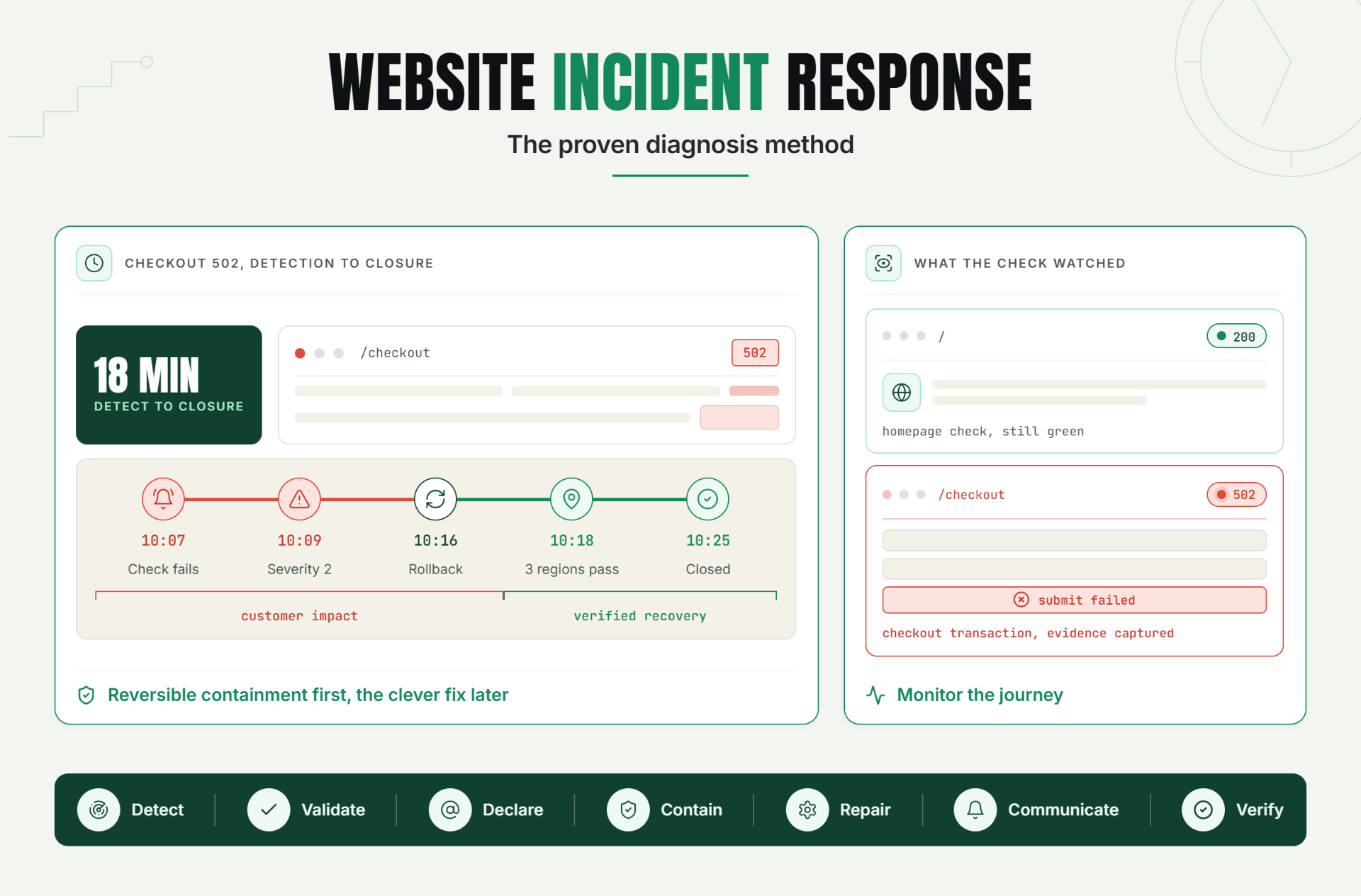
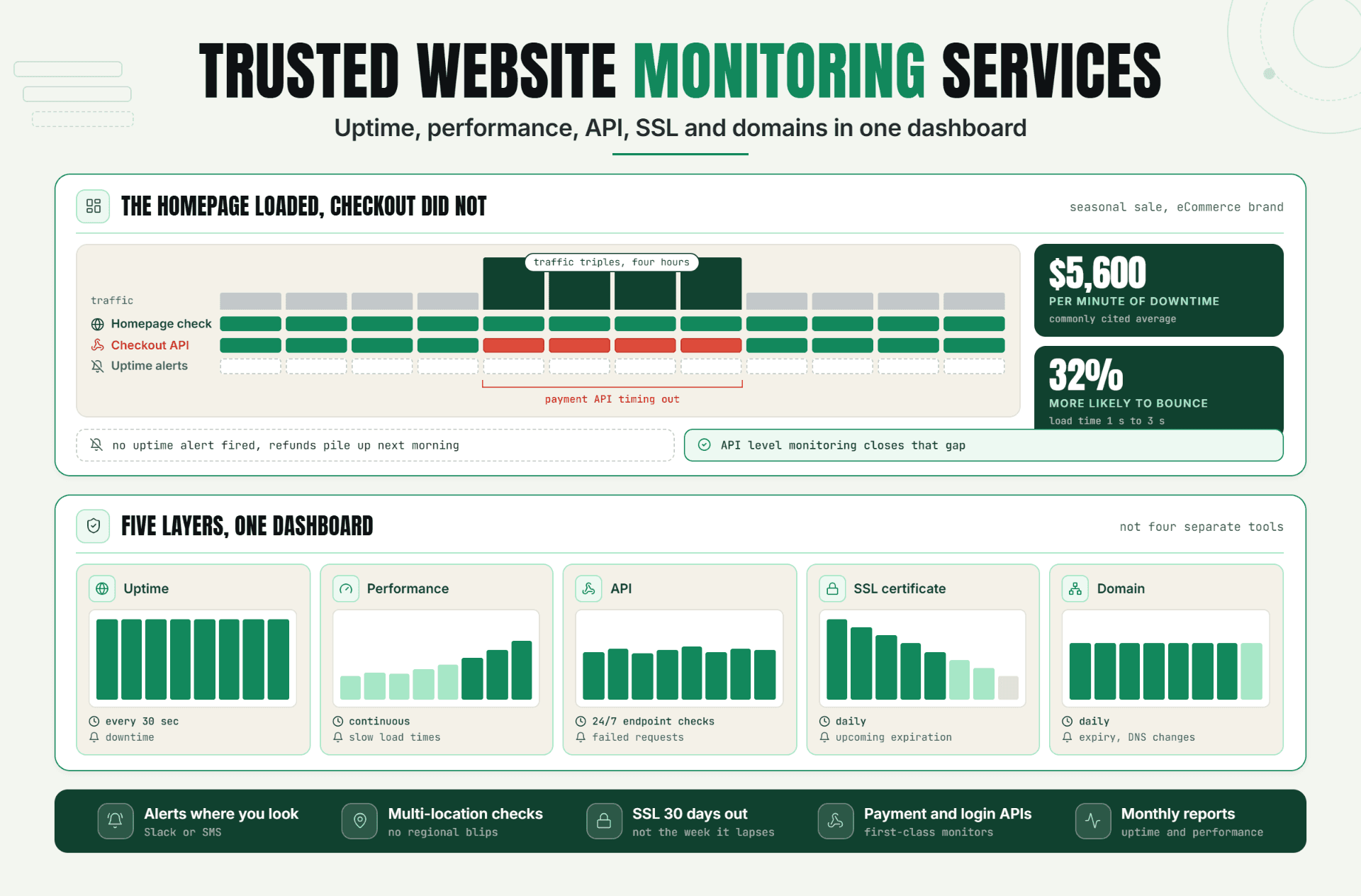
Statixoup's approach to website incident response starts with external evidence: 30-second checks, intelligent validation, error screenshots, real-time alerts, and a customer-facing status page. Those are practical signals for SaaS, DevOps, and support teams because they answer three questions fast: Is the site actually broken? Which user journey failed? Who needs to act now?
Website incident response is the repeatable process a team uses to detect, confirm, contain, communicate, repair, and learn from a website outage. A useful process gives one person authority to coordinate, preserves evidence before it disappears, and keeps customers informed until service is stable.
Most teams don't need a 40-page runbook. They need an incident response plan that survives a stressful Tuesday morning.
The Risk of Responding Without a Plan
Without a defined outage response plan, everyone sees a different problem. Support sees angry tickets. Engineering sees a database timeout. Leadership sees lost revenue. Nobody knows who owns the decision to roll back, post a public update, or call a third-party provider.
That confusion has a cost. The Uptime Institute's Annual Outage Analysis 2024 found that 54% of respondents said their most recent significant, serious, or severe outage cost more than $100,000. Sixteen percent put the cost above $1 million. Those are data-center figures, not a price estimate for every website, but they make the operational point clearly: slow, improvised decisions can get expensive.
If you need a way to estimate your own exposure, Statixoup's guide to the real cost of website downtimeseparates direct revenue loss from support load, SLA credits, and churn risk.
How Website Incident Response Works
Strong website incident response separates signals, decisions, and actions. A signal says that a condition changed. A decision says the change is important enough to become an incident. An action reduces customer impact or restores service.
Mix those layers and alerts become arguments. Separate them and the outage response becomes much calmer.
Start with customer-visible signals
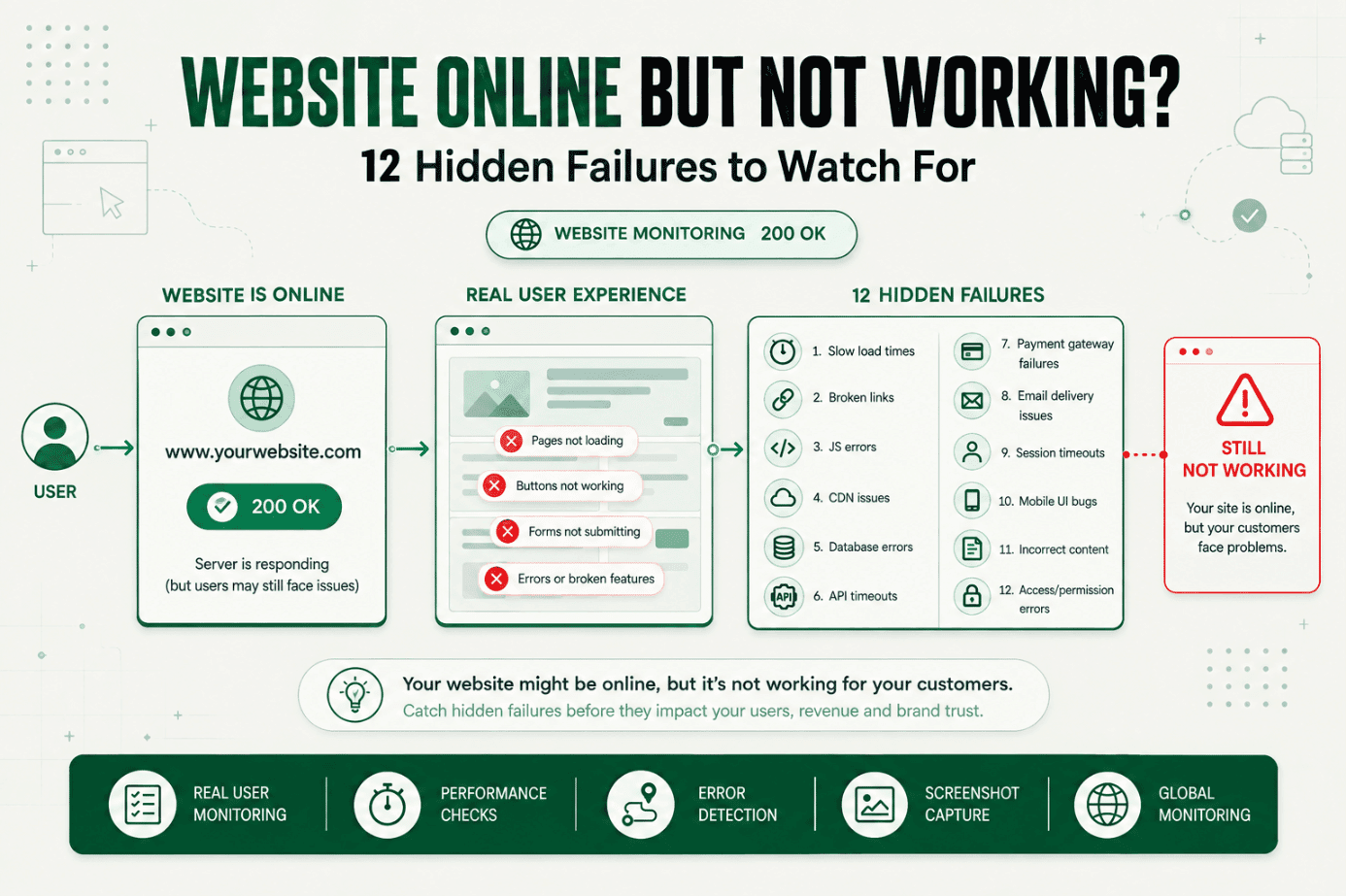
Google's Site Reliability Engineering guidance on monitoring distributed systemsdefines black-box monitoring as testing externally visible behavior the way a user would experience it. That should be the front door of website incident response. An HTTP 200 response isn't enough if the page is blank, the login button fails, or checkout can't complete.
Monitor the journeys that make or break the service:
- Homepage or health endpoint availability
- Login and account access
- Search or dashboard loading
- Checkout, payment, or subscription flow
- API response correctness
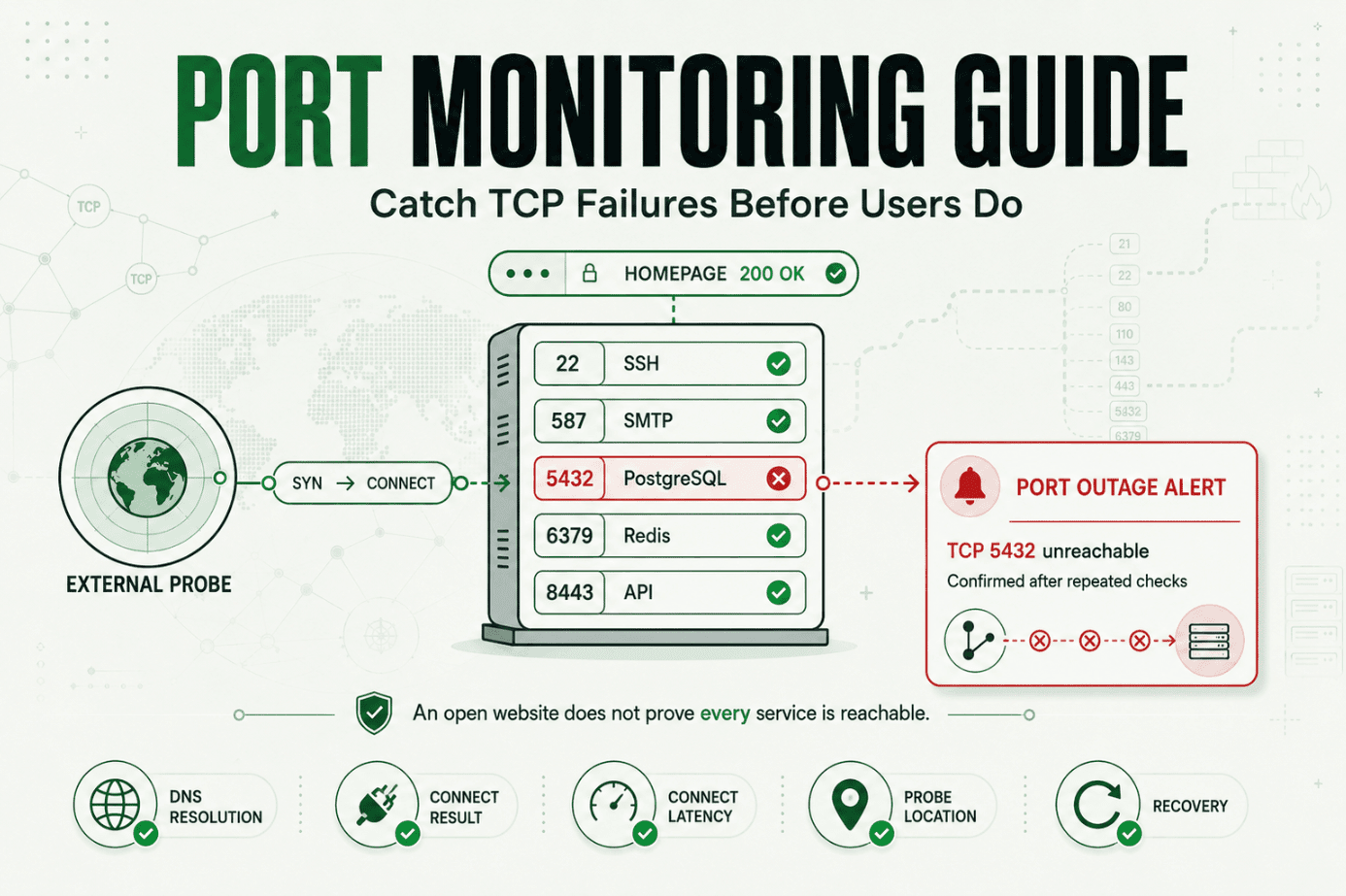
- SSL expiry and DNS resolution
- Scheduled jobs and background workers
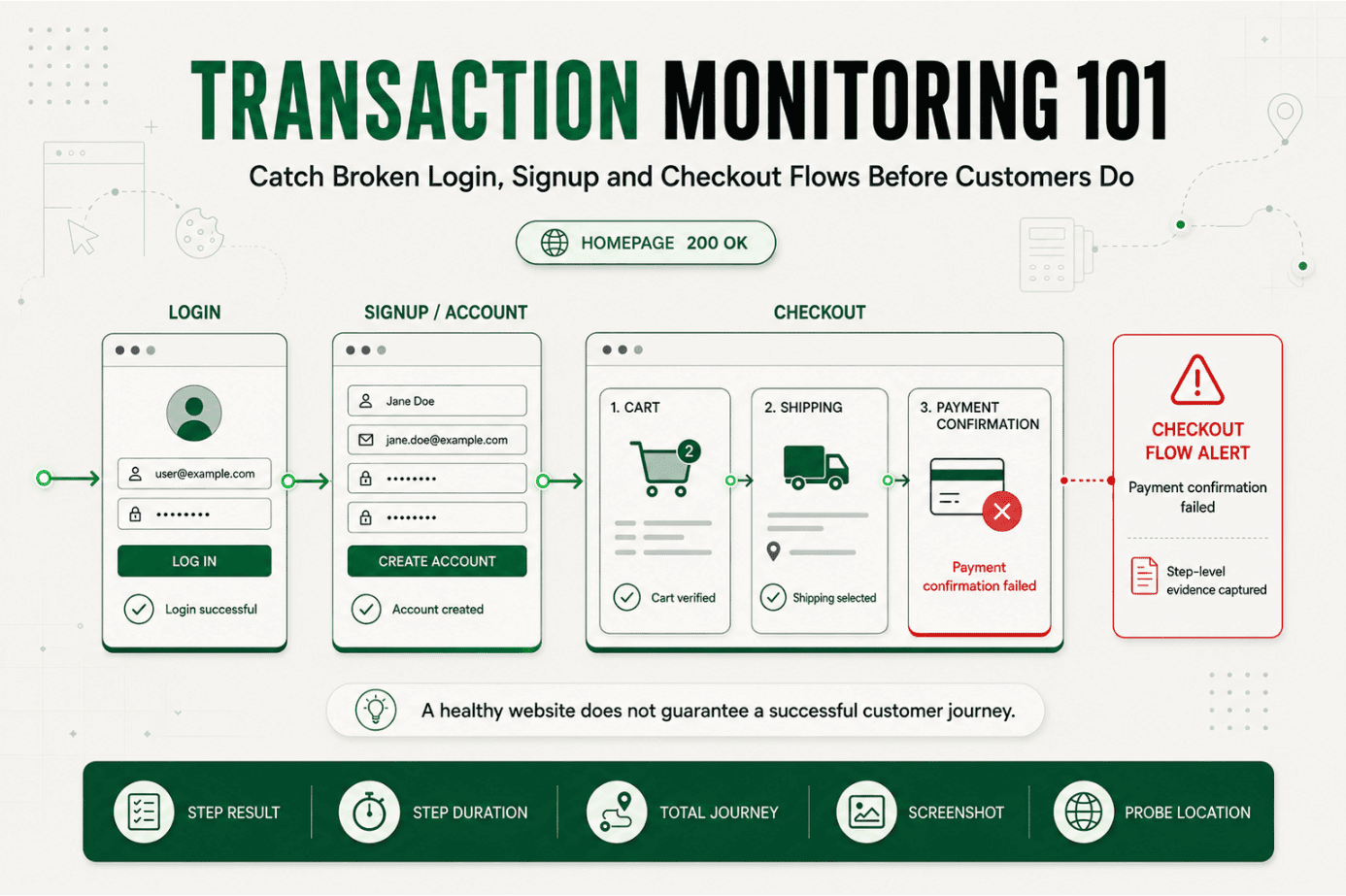
Statixoup describes website, API, SSL, and performance monitoring with checks every 30 seconds. Its Playwright browser monitoring can also test JavaScript-rendered interactions and transaction outcomes. That matters when the server responds but the user journey doesn't.
Set thresholds that map to impact
A threshold should trigger a specific response. If nobody can explain what an alert requires, it shouldn't wake somebody up.
Google SRE recommends watching four golden signals: latency, traffic, errors, and saturation. For a public website, translate them into usable conditions. Page on repeated checkout failures, a sustained 5xx rate, or latency beyond the service-level objective. Send a lower-priority notification for a slow trend that can wait until working hours.
Confirm before declaring a production incident
One failed probe can be local noise. Two or three failures from separate locations, paired with an error screenshot or transaction failure, are stronger evidence. Statixoup says its global checks use intelligent validation to reduce false alerts. Your declaration rule should still be written down, such as: "Declare a Severity 2 incident after two validated failures within 90 seconds on a revenue-critical journey."
And here's the uncomfortable bit: a perfect threshold doesn't exist. Start conservative, review every alert for 30 days, then tune it using actual false-positive and missed-incident evidence.
Give the incident management process named roles
Small teams can combine roles, but their incident response process shouldn't leave responsibilities vague.
| Role | Owns | Does not own |
|---|---|---|
| Incident commander | Priorities, severity, coordination, closure | Deep technical debugging |
| Technical lead | Diagnosis, mitigation, repair, validation | Customer messaging |
| Communications lead | Status page, support brief, update cadence | Choosing the fix |
| Scribe | Timeline, evidence, decisions, follow-ups | Directing responders |
For a five-person company, one person may command and communicate while another diagnoses. That's fine. The key is saying it aloud in the incident channel: "Maya is incident commander. Arun is technical lead. Updates go out every 20 minutes."
A Seven-Step Outage Response Workflow
The practical sequence is:
- Detect.
- Validate.
- Declare and assign severity.
- Contain customer impact.
- Diagnose and repair.
- Communicate.
- Verify recovery and review. The result is a recovery workflow that remains usable while the team is under pressure.
1. Detect and preserve evidence
Start the clock at the first failed check, not the first support ticket. Capture the affected URL, status code, response time, location, screenshot, error body, and the last known successful check. Don't refresh the evidence away.
For network symptoms, Statixoup's comparison of MTR versus traceroute explains why repeated path measurements can reveal intermittent latency or packet loss that one snapshot misses.
2. Validate the alert
Reproduce the failure from a second location or monitoring node. Check whether the symptom affects one region, one dependency, or every customer. Compare black-box evidence with logs and infrastructure metrics.
Ask one blunt question: can a real user complete the important action? If no, move. Don't spend 12 minutes proving the root cause before declaring impact.
3. Declare, classify, and assign ownership
Use a small severity model. Severity 1 means broad loss of a critical service or a security-threatening failure. Severity 2 means material degradation or failure of a major journey. Severity 3 means limited impact with a workaround.
Open one incident channel. Name the commander, technical lead, communications lead, and scribe. Record the declaration time and the next update time.
4. Contain before you perfect
Containment reduces harm without requiring a complete diagnosis. In a website outage response, that may mean rolling back the latest deployment, disabling a failing feature flag, routing traffic away from a region, switching to a read-only mode, or placing checkout in maintenance.
This is where opinion matters: the safest reversible mitigation usually beats the clever fix. A production incident isn't the moment to redesign the subsystem.
5. Diagnose with a timeline
Line up deployments, configuration changes, traffic shifts, provider notices, and monitoring evidence. Check dependencies explicitly. A healthy web server can still produce a failed customer journey when DNS, SSL, authentication, a database, or a payment provider breaks.
Expired certificates deserve their own watch because they can block browsers and service-to-service calls. The SSL certificate monitoring guide recommends early expiry alerts instead of relying on somebody's calendar.
6. Communicate on a fixed cadence
Post the first status message as soon as impact is confirmed, even if the cause is unknown. A credible incident communication workflow says what customers are experiencing, when it started, what the team is doing, and when the next update will arrive.
Don't publish speculation. "Checkout is failing for some customers; we're investigating and will update by 10:40 UTC" is useful. "The database probably ran out of connections" is risky until verified.
Statixoup's branded status pages are designed to publish live status, incident updates, and maintenance notices on a dedicated subdomain. Keep the status page outside the main application's failure path whenever possible.
7. Verify the website recovery workflow
A green server metric isn't recovery. Repeat the failing user journey from multiple locations, watch several successful check cycles, confirm queues are draining, and ask support whether new complaints have stopped.
Then close the incident with a final status update. Preserve the timeline and assign follow-up work. The Uptime Institute found that four in five respondents believed their most recent serious outage could have been prevented through better management, processes, or configuration. The incident review process is where that prevention work starts.
A Realistic Production Incident: Checkout Returns 502
This is an illustrative scenario, not a claimed Statixoup customer result.
At 10:07 UTC, a SaaS billing page begins returning HTTP 502 after a routine deployment. The homepage stays healthy. The generic uptime check remains green, but a Playwright transaction monitor fails when it submits the checkout form. A second global location confirms the same failure 30 seconds later.
The alert reaches Slack with the failed step and screenshot. Support hasn't received a ticket yet.
At 10:09, the on-call engineer declares Severity 2. The incident commander sets a 15-minute update cadence and posts a status-page notice: new subscriptions are failing, existing accounts remain available, and investigation is underway.
The first guess is the payment provider. Its status page is green. The incident timeline shows that the application deployment finished three minutes before the first failure. Logs then reveal a missing environment variable in the new checkout service.
Rolling back is faster than patching. The technical lead reverses the deployment at 10:16. Transaction checks pass from three locations at 10:18, and five more checks stay green. Support confirms that new checkout complaints have stopped. The incident closes at 10:25.
What didn't work? A shallow homepage check. What changed the production incident response? Monitoring the actual revenue journey, routing the evidence to the right channel, and using a public status update before tickets piled up. The scenario's 18-minute recovery isn't a promised outcome. It shows how an outage response plan removes avoidable delay.
Best Practices for Reliable Website Incident Handling
Monitor outcomes, not just servers
Check the customer action because a healthy host can serve a broken product. Effective website incident response pairs basic uptime with browser transactions, DNS, SSL, API, and heartbeat monitoring according to the service's real dependencies.
Match check frequency to business impact
Use frequent checks for login, checkout, and paid APIs because every undetected minute extends impact. Slower checks may be enough for a brochure page. Statixoup advertises 30-second monitoring, but frequency alone isn't quality. Validation and actionable routing matter too.
Put the downtime checklist beside the alert
Attach the first five actions, owner, escalation path, dashboard, rollback instructions, and status-page link to the alert. Responders shouldn't hunt through a wiki while customers are waiting.
Test ownership every quarter
Run a 30-minute game day with one simulated failure. Verify that the alert reaches the current on-call person, the commander is clear, the status page works, and the website recovery workflow tests the whole user journey.
Review noisy and silent monitors
Every page should be actionable. Google SRE warns that frequent pages make people skim, second-guess, or ignore alerts. Review false positives, alerts without owners, and incidents found by customers instead of monitoring.
Common Mistakes That Slow Recovery
Checking only for HTTP 200
It happens because status codes are easy to monitor. But a successful response can contain an error message or broken JavaScript. Add content validation or a browser transaction for critical paths.
Paging everyone at once
Teams do this to feel safe. It usually creates duplicate work and competing decisions. Page the designated responder, then escalate on a timer or severity rule.
Missing third-party dependencies
The application dashboard looks healthy, so responders keep searching their own code. Map DNS, CDN, identity, payments, database, email, and cloud dependencies before the next incident. Give each one a check or a documented verification step.
Closing after the first green check
One success may be a fluke or a single healthy region. Require several successful cycles, complete the original failed journey, and check the backlog before calling recovery.
Sending vague status updates
"We're looking into it" gives customers no useful decision point. Name the affected function, confirm what still works, timestamp the update, and promise the next update time.
Conclusion
The best website incident response process is boring in the right places. It detects the customer symptom, puts one person in charge, favors reversible containment, communicates on time, and refuses to call recovery until the user journey works again.
Fancy tooling can't rescue unclear ownership. But clear ownership without reliable evidence still moves slowly. A dependable incident response workflow puts both together, then tests the handoff before a real outage tests it for you.
Start Monitoring with Statixoup
Build the first version of your outage response plan today. Choose one revenue-critical URL or browser journey, set a clear failure threshold, route the alert to a named owner, and connect it to a status-page workflow.
Start Statixoup's free 30-day monitoring trial and configure that first monitor. The homepage currently advertises 30-second checks, real-time alerts, intelligent validation, incident evidence, and shareable status pages. One useful monitor with a real owner beats 20 checks that nobody trusts.
Post a Comment

Hardik Vaghani
Hardik Vaghani is a Digital Marketing Professional and SEO Strategist based in Surat, Gujarat, India. He currently works with Ethnic Infotech, contributing to SEO, content marketing, technical SEO, and digital growth strategies. Hardik also creates blog content for Fusion5, focusing on technology, laptops, and consumer electronics. With expertise in SEO, Google Ads, Meta Ads, Local SEO, and Content Strategy, he helps businesses improve online visibility, rankings, and lead generation through data-driven marketing.
Frequently Asked Questions
Related Blogs