Incident Communication Template: Ready-to-Use Messages
Learn how to communicate clearly during outages using ready-to-use templates for email, Slack, and status pages. The blog covers incident updates from initial acknowledgement through recovery, helping teams keep customers and stakeholders informed.
The short answer is simple: good incident communication templates state what is affected, what users may experience, what the team is doing, and when the next update will arrive. They don't guess at causes or recovery times. They give internal teams and customers one reliable version of events.
That distinction matters. PagerDuty's 2024 survey of 500 IT leaders found that 90% said outages or disruptions had reduced customer trust. The same research put the average resolution time at 175 minutes. Silence during a three-hour incident isn't neutral. Customers fill the gap themselves.
Why Improvised Outage Messages Fail
The hard part isn't typing a message. It's deciding what can be said while engineers are still learning what happened. One person calls it a full outage. Another says performance is degraded. Support promises a fix in 20 minutes because that sounds reassuring. Ten minutes later, the estimate is clearly wrong.
Now the communication itself has become an incident.
Without incident communication templates, teams lose time rewriting the same facts for Slack, email, and a public page. Updates drift apart. Owners change midstream. Customers ask support for information that already exists somewhere else, just not where they looked.
PagerDuty's separate 2024 preparedness study found that 38% of organizations affected by multiple outages during the July global disruption experienced communication breakdowns between departments. That isn't a copywriting problem. It's an operational design problem.
How Incident Communication Templates Work
Incident communication templates are pre-approved message structures for each stage of a service disruption. They separate stable fields, such as affected service and next update time, from facts that change during investigation. The goal isn't to make every outage sound identical. It's to stop responders from inventing the structure while the clock is running.
A useful set covers five moments:
- Acknowledged: The team has confirmed a problem and started investigating.
- Identified: The likely fault or affected dependency is known.
- Mitigating: A rollback, failover, capacity change, or other action is under way.
- Monitoring: Service appears restored, but checks are still running.
- Resolved: Recovery is confirmed and normal service has returned.
Statixoup's synthetic monitoring guide explains why testing a real user journey can reveal failures that a basic homepage check misses. That evidence should shape the message. If login works but checkout fails, say exactly that.
Build Every Outage Message From the Same Facts
Before anyone posts, create a small incident fact sheet. It can live in the incident channel, ticket, or runbook. Keep these fields visible:
- Incident ID and severity
- Start time in one named time zone
- Affected products, regions, or workflows
- User-visible symptoms
- Current response stage
- Confirmed facts only
- Incident commander and communication owner
- Next update time
- Public incident URL
One fact sheet feeds all incident communication templates. The wording changes by audience, but the underlying facts don't.
Set a “known, unknown, next” rule
Every update should answer three questions. What do we know? What remains unknown? What happens next? This rule gives writers permission to be honest without sounding helpless.
For example: “We have confirmed elevated API errors in the EU region. The cause is still under investigation. Engineers are reviewing the latest deployment, and we will update this page by 10:45 UTC.”
That's useful. It doesn't speculate.
Match the Message to the Channel
Slack, a status page, and email don't have the same job.
| Channel | Primary audience | Best use | Typical length | Owner |
|---|---|---|---|---|
| Incident Slack channel | Responders and stakeholders | Decisions, evidence, owners, next actions | Short and frequent | Incident commander or scribe |
| Public status page | All affected users | Confirmed impact and recovery progress | Brief and stable | Communications owner |
| Customer email | Directly affected accounts | Account-specific impact or major milestones | Focused and contextual | Support or customer success |
Statixoup documents how to connect uptime alerts to Slack. Use that alert as a trigger for coordination, not as the customer-facing message itself. Raw monitor output is evidence. It isn't communication.
A Five-Step Communication Workflow
- Verify the alert. Confirm the failure from a second check, region, or user journey.
- Open one source of truth. Record the incident ID, impact, owner, and timestamps.
- Publish the acknowledgement. Use the approved outage message template for the relevant channels.
- Update on schedule. Send a meaningful change or a time-based holding update, even when diagnosis continues.
- Confirm recovery. Validate the affected journey, publish the recovery notice, and link the postmortem later if appropriate.
The result is a predictable rhythm. Responders know who writes. Customers know when they'll hear again.
Ready-to-Use Outage Message Templates
Replace the bracketed fields. Remove any line you can't support with evidence.
Internal Incident Message for Slack
Acknowledgement
[SEV-LEVEL] [INCIDENT-ID] | [SERVICE OR JOURNEY] Started: [TIME + TIME ZONE] Impact: [WHAT USERS ARE EXPERIENCING] Scope: [REGIONS / PLANS / COMPONENTS] Confirmed: [KNOWN FACTS] Investigating: [CURRENT LINE OF INQUIRY, IF SAFE] Incident commander: [NAME] Communications owner: [NAME] Next internal update: [TIME] Public update: [URL OR NOT YET PUBLISHED] Progress update
[INCIDENT-ID] update at [TIME] Change since last update: [NEW EVIDENCE OR ACTION] Current impact: [USER-VISIBLE CONDITION] Action in progress: [ROLLBACK / FAILOVER / FIX] Owner: [NAME OR TEAM] Next checkpoint: [TIME] Keep internal messages factual, but allow technical detail that helps decisions. Link logs and dashboards rather than pasting a wall of output into the main channel.
Status Page Update Templates
Investigating
We are investigating [ISSUE] affecting [SERVICE, REGION, OR WORKFLOW]. Users may experience [SYMPTOM]. Our team began investigating at [TIME + TIME ZONE]. We will provide the next status page update by [TIME]. Identified
We have identified [CONFIRMED HIGH-LEVEL CAUSE] affecting [SCOPE]. The team is [ACTION]. Users may continue to experience [SYMPTOM]. The next update will be posted by [TIME]. Monitoring
Service has recovered following [HIGH-LEVEL ACTION]. We are monitoring [SERVICE OR JOURNEY] and validating [KEY CHECKS]. Some users may need to retry [ACTION]. We will post another update by [TIME]. Resolved
The incident affecting [SERVICE OR JOURNEY] was resolved at [TIME + TIME ZONE]. Service has returned to normal, and monitoring confirms [VALIDATION RESULT]. The incident ran from [START] to [END]. We are reviewing the event and will share further details [WHEN OR IF APPLICABLE]. Statixoup's documentation shows how to create a public status page. Give that page a stable URL so support, customer success, and automated notices all point to the same record.
Customer Outage Email Templates
Major incident email
Subject: Service issue affecting [PRODUCT OR WORKFLOW] Hi [NAME OR CUSTOMER], > We are investigating a service issue affecting [SCOPE]. Since [TIME + TIME ZONE], you may have experienced [SPECIFIC SYMPTOM]. Our engineering team is [CURRENT ACTION]. > You can follow confirmed updates here: [STATUS PAGE URL]. We will send another email by [TIME] if the issue remains active. > If this is blocking a time-sensitive task, reply with [DETAILS SUPPORT NEEDS] so our support team can assess your case. Recovery notice
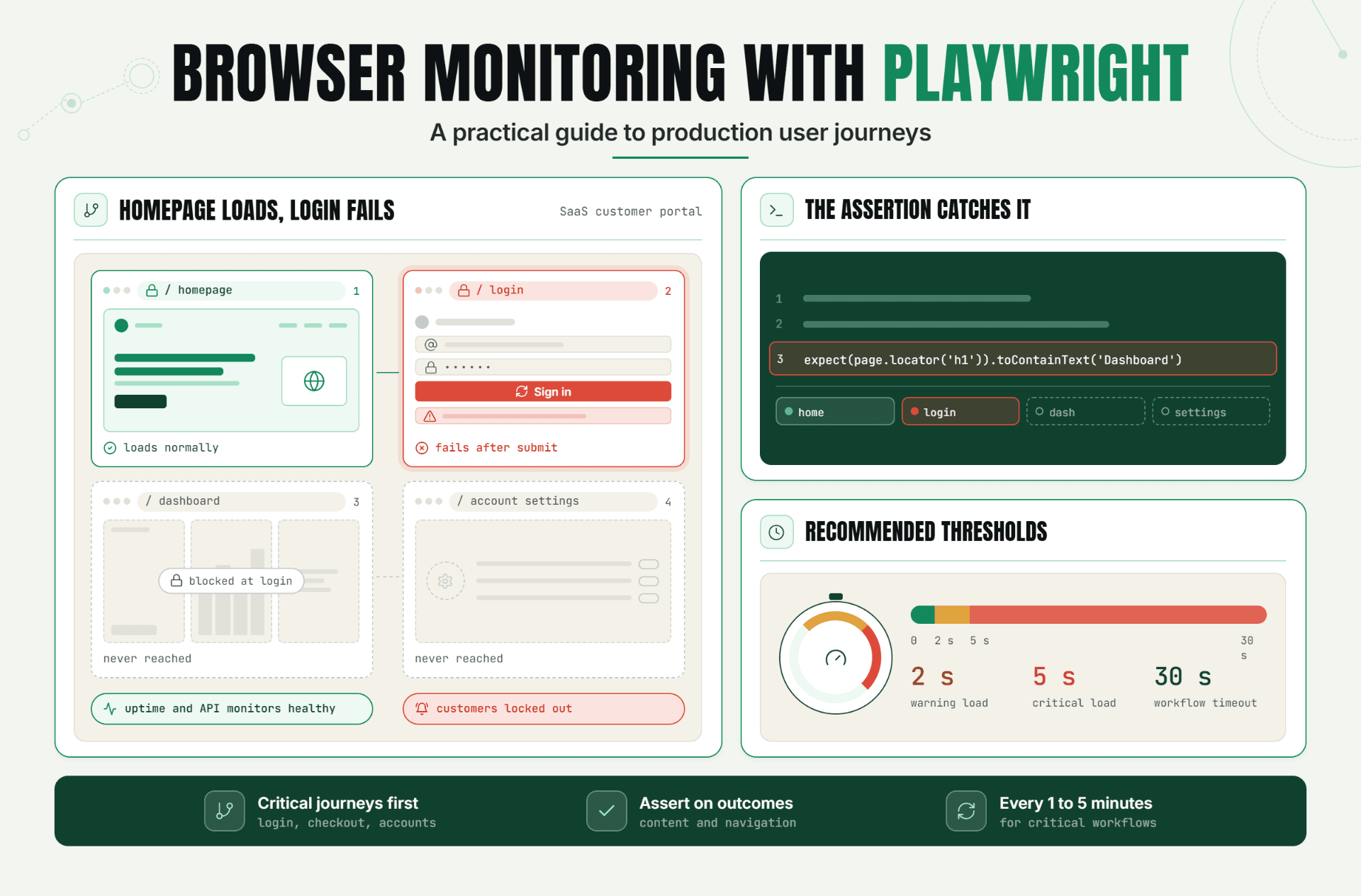
Subject: [PRODUCT OR WORKFLOW] service restored Hi [NAME OR CUSTOMER], > Service for [SCOPE] was restored at [TIME + TIME ZONE]. Monitoring confirms [VALIDATION RESULT]. The disruption lasted from [START] to [END] and affected [SYMPTOM OR JOURNEY]. > No action is required unless you still see [KNOWN RESIDUAL ISSUE]. If you do, reply with [USEFUL SUPPORT DETAILS]. We are reviewing the incident and will share a follow-up [TIMEFRAME, IF COMMITTED]. Don't email every user for a brief, low-impact event. Use account-level evidence and severity criteria. The browser monitoring with Playwright guide is useful when the affected experience is a specific journey such as sign-in, purchase, or form submission.
A Realistic SaaS Outage Example
This is an illustrative scenario, not a Statixoup customer claim.
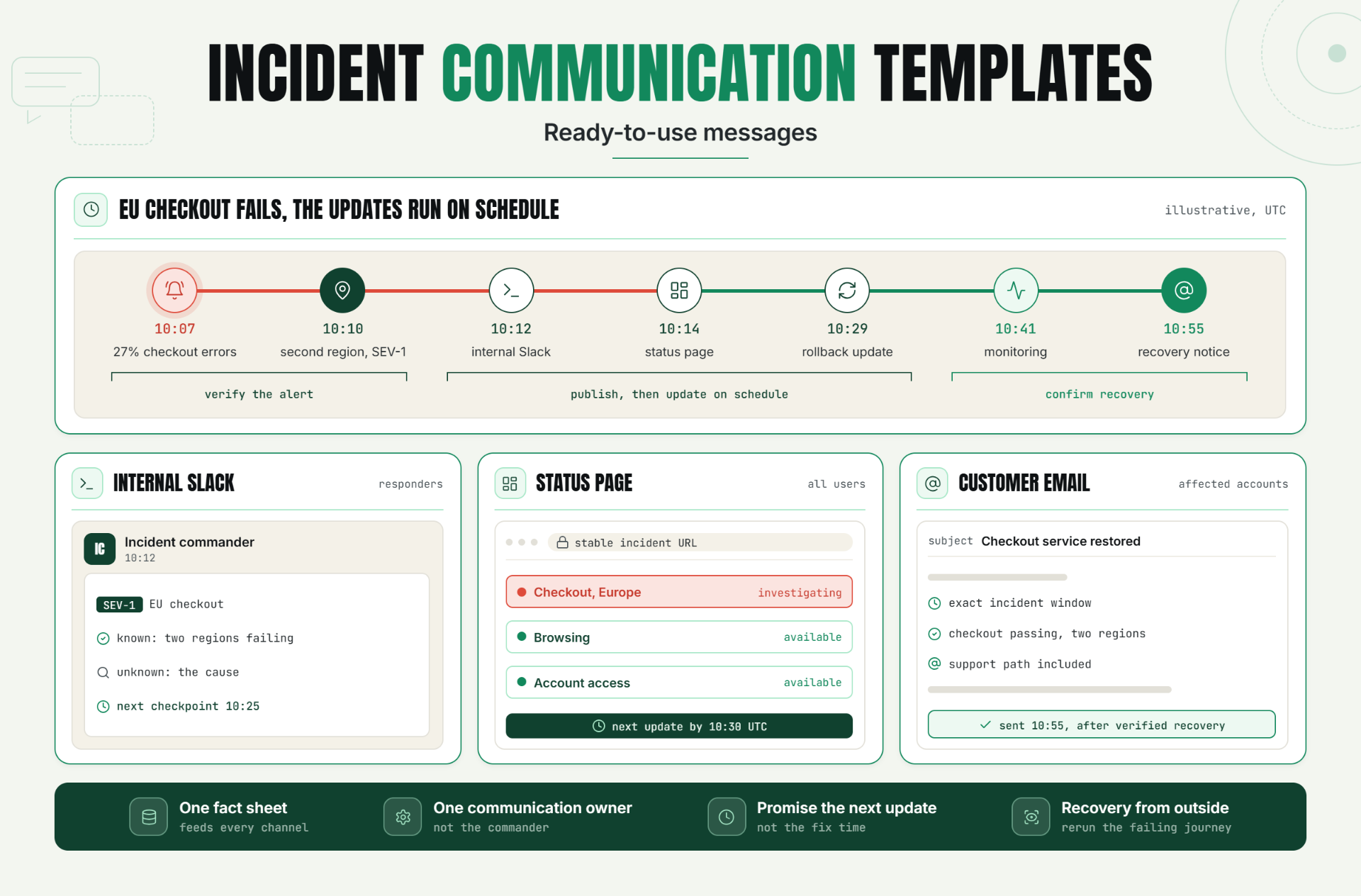
At 10:07 UTC, a checkout API monitor reports a 27% error rate. A homepage uptime check still passes. At 10:10, a second region confirms failures, so the incident commander declares SEV-1. The affected scope is checkout for EU customers. Browsing and account login remain available.
The weak response would say: “Our website is down. We're working hard to fix it soon.” It's broad, unhelpful, and already inaccurate.
The better response uses incident communication templates:
- 10:12 internal Slack: incident ID, severity, EU checkout scope, monitor evidence, owners, and 10:25 checkpoint.
- 10:14 status page: “We are investigating increased checkout failures for customers in Europe. Browsing and account access remain available. Next update by 10:30 UTC.”
- 10:29 status page: rollback in progress, impact unchanged, next update at 10:45.
- 10:41 monitoring update: error rate has returned to baseline; synthetic checkout tests are passing from two regions.
- 10:55 recovery notice: service restored, exact incident window stated, support path included.
What changed? The team didn't write faster because someone suddenly became a better writer. They decided the structure, owners, and update rhythm before the incident.
Best Practices for Clear Incident Updates
Write for the User's Experience
Say “checkout attempts may fail” instead of “the transaction service is degraded.” Customers care about what they can and can't do. Internal teams can retain the technical wording in their internal incident message.
Assign One Communication Owner
The incident commander shouldn't debug and rewrite customer copy at the same time. Name a communication owner who gathers confirmed facts, sends updates, and records timestamps. This keeps incident communication templates consistent without slowing engineering.
Promise the Next Update, Not the Fix Time
Recovery estimates become liabilities when evidence is thin. Promise a communication checkpoint you control. For SEV-1 events, 15 to 30 minutes is a reasonable starting cadence, but your own severity policy and customer commitments should decide it.
Validate Recovery From the Outside
A deployment succeeding isn't proof that users recovered. Run the affected monitor, region, API assertion, or browser journey before the recovery notice. Statixoup's website monitoring for agencies guide also shows why ownership and routing matter when one team watches several services or customer sites.
Rehearse the Templates
Run a 20-minute tabletop exercise. Give the team a fake monitor alert and ask them to publish internal, public, and customer drafts. You'll find missing owners, permissions, and distribution lists before a real outage finds them for you.
Common Mistakes That Make Outage Communication Worse
Calling Every Failure a Full Outage
This happens when responders copy a monitor state without checking user impact. Replace “down” with the affected action, region, or component. Precise scope lowers panic and helps support triage.
Guessing the Root Cause Too Early
The first theory is often wrong. Say what is confirmed and what is being investigated. Update the cause only when the incident commander accepts the evidence.
Repeating “We Are Investigating” for an Hour
A holding update can still add value. State what has been ruled out, whether impact changed, what action is under way, and when the next message will arrive.
Letting Channels Contradict Each Other
This usually happens when support, engineering, and customer success draft independently. Feed every channel from the same incident record. Give one person final publishing authority.
Declaring Recovery After One Green Check
One successful request may be luck. Verify the original failing journey across relevant locations, watch it for a defined period, and then issue the recovery notice.
Make the Next Incident Easier to Understand
The best incident communication templates don't make an outage look smaller. They make the truth easier to follow. Customers learn what is affected and when they'll hear again. Responders stop rewriting the same message. Support gets a trusted link instead of chasing engineers for fragments.
Start with three drafts: acknowledgement, progress update, and recovery notice. Assign an owner. Then test them against one realistic failure scenario this week.
Start Your 7-Day Free Trial
Detection and communication should connect. Start your 7-day free trial (no credit card needed), configure the monitor for your most important customer journey, connect alerts to Slack, and create a status page your team can update from a verified incident record..
Post a Comment

Hardik Vaghani
Hardik Vaghani is a Digital Marketing Professional and SEO Strategist based in Surat, Gujarat, India. He currently works with Ethnic Infotech, contributing to SEO, content marketing, technical SEO, and digital growth strategies. Hardik also creates blog content for Fusion5, focusing on technology, laptops, and consumer electronics. With expertise in SEO, Google Ads, Meta Ads, Local SEO, and Content Strategy, he helps businesses improve online visibility, rankings, and lead generation through data-driven marketing.
Frequently Asked Questions
Related Blogs