Shopify Downtime Cost: What an Outage Really Costs You
Most Shopify owners count only missed orders, so they underestimate what downtime costs. This guide turns an outage into a real money figure, including hidden costs like wasted ads and COD calls, with Diwali sale examples and a free calculator walkthrough.
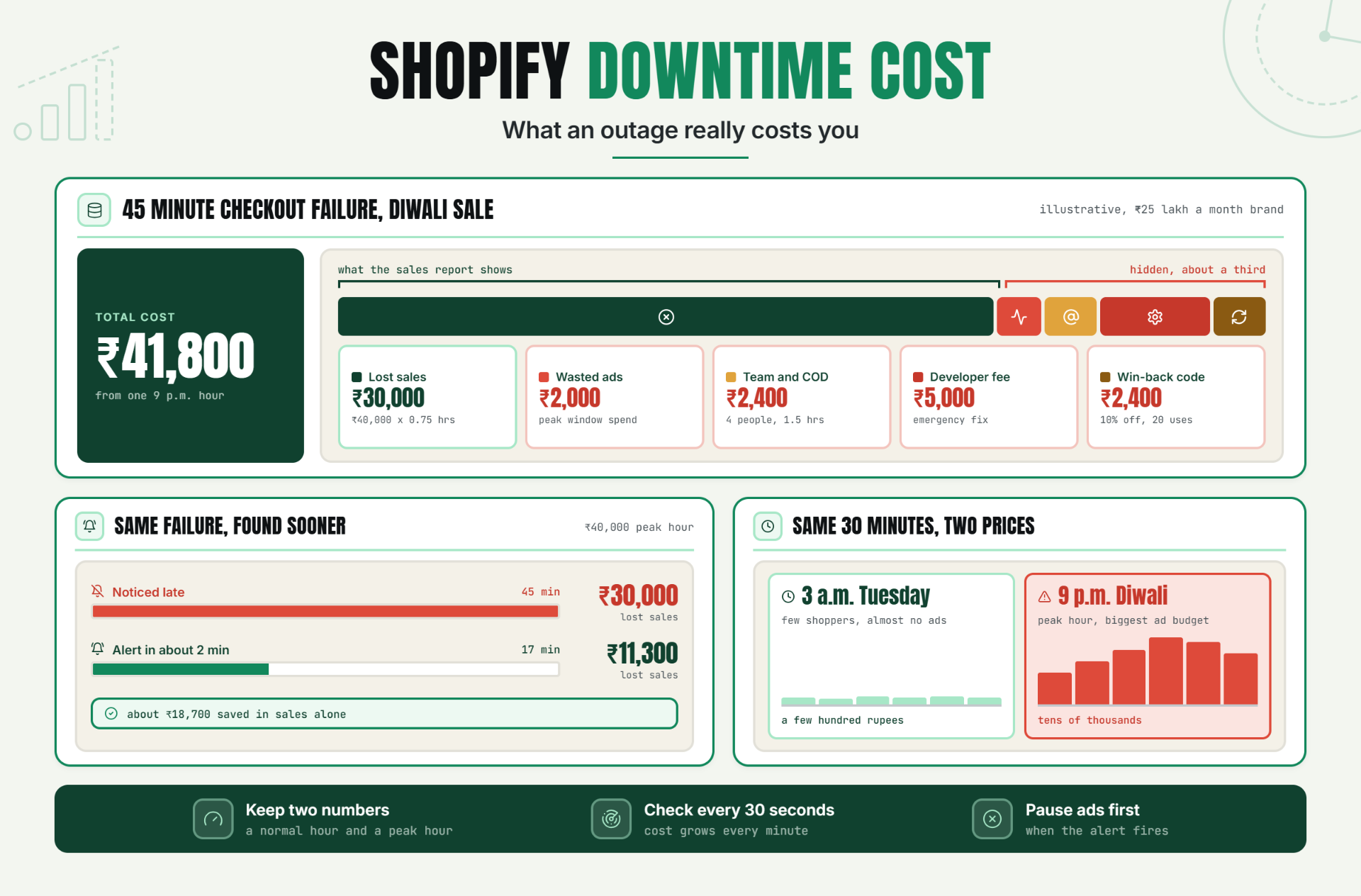
For most Indian D2C stores, an hour of Shopify downtime costs your normal revenue per hour, multiplied by how busy that hour is, plus ad spend, team time and win-back discounts. And the part you control best is how many minutes pass before you find out.
Why "We Were Down for 40 Minutes" Sounds Small
"The store was down for 40 minutes" is the kind of sentence that gets said in a team call and forgotten by lunch. Forty minutes sounds like nothing. Then you put a rupee figure next to it, and the conversation changes.
Big platform outages show how quickly this happens. On Cyber Monday, December 1, 2025, Shopify had a login authentication problem that locked merchants out of their admin and Retail POS; TechCrunch said the exact number of affected merchants was unclear, but Downdetector logged about 4,000 outage incidents. TechCrunch reported problems began around 6:45 a.m. PT. CNBC quoted Shopify's status update at 2:31 p.m. EST saying it had "found and fixed an issue with our login authentication flow." PYMNTS and Retail Brew both reported that customer checkout kept working, so the main pain was merchants "flying blind" on one of the busiest days of the year. That same weekend, Shopify says its merchants still did a record US$14.6 billion in Black Friday Cyber Monday sales, up 27%. The Logic reported that, according to Shopify president Harley Finkelstein, merchants were clocking US$5.1 million in sales per minute at one point on Black Friday.
Then on June 3, 2026, a different outage hit customers directly. PYMNTS reported that Shopify announced the issue at 9:27 a.m. EDT, though StatusGator logged the first user outage reports 20 minutes earlier, at 13:07 UTC (9:07 a.m. EDT). It affected admins, checkouts, storefronts, Retail POS and access to support. Shopify said it had identified the problem at 10:37 a.m. and resolved it at 11:31 a.m. EDT. PYMNTS reported that merchants on X said shoppers saw a page reading "This store does not exist," with an advertisement for Shopify on it. Search Engine Land made the point every D2C founder should remember: "If Shopify storefronts or checkouts are unavailable, paid traffic can't convert into sales, potentially wasting ad spend and skewing campaign performance data."
Note that reports on the June outage's length differ. PYMNTS called it a two-hour outage. An ALM Corp blog post put it at "approximately three hours and ten minutes," counting the monitoring period. Either way, the lesson for your store is the same.
Why Most Store Owners Underestimate Downtime
Most owners only count the orders they didn't get. That is the biggest reason Shopify downtime cost gets underestimated.
Shopify's sales report shows what was sold. It cannot show what was not sold, and it definitely does not show:
- The Meta and Google ad budget that kept spending while the store was broken
- Carts that were abandoned and never came back
- The hours your team spent on WhatsApp and calls, answering "was my payment deducted?" and following up on COD orders
- The freelancer or agency invoice for the emergency fix
- The discount code you sent to win customers back
- The shopper who tried once during your Diwali sale, failed, and bought from a competitor instead
None of these show up as a red line in your dashboard. All of them are real money.
How to Calculate Shopify Downtime Cost
There are two ways to do this. Use the first if you have good traffic data. Use the second if you want a quick estimate in under a minute.
Formula 1: Lost Sales from Traffic
The formula
Lost sales = visitors per hour × conversion rate × average order value (AOV) × hours down
Why this formula fits D2C stores
Many top-ranking guides reuse an enterprise formula built around employees × wage × hours. That works for an office whose software goes down. A Shopify store earns money from shoppers, not from staff sitting at desks. So the traffic-based formula gives you a far more honest number.
A quick example
Say you get 200 sessions an hour in the evening. Your conversion rate is 2% and your AOV is ₹1,000.
200 × 0.02 × ₹1,000 = ₹4,000 in sales per hour. A 90-minute outage (1.5 hours) puts about ₹6,000 of sales at risk.
Formula 2: The Simple Version
The formula
Lost sales = average revenue per hour × hours down × peak multiplier
How to pick a peak multiplier
The peak multiplier is how much busier the outage hour is than your average hour. Use 1 for a quiet weekday. For sale days, work it out from your own data. Divide revenue in your busiest sale hour by your average hour. There is no universal multiplier that applies to every store, so don't borrow someone else's. Your own Shopify data is the only number that counts.
Average revenue per hour, explained
Take monthly revenue and divide by the number of hours you actually sell. If most of your orders come between 9 a.m. and 11 p.m., that is 14 selling hours a day, not 24. Dividing by 24 makes your hourly figure look smaller than it really is during the hours that matter.
Where to Find Each Number in Shopify Analytics
You don't need any app for this. Everything is inside your Shopify admin under Analytics.
Sessions (visitors)
The Analytics overview dashboard shows sessions, and Shopify's Help Center says its key sales, session and fulfillment metrics update within about a minute. Note: Shopify's Help Center says a session measurement update rolled out from September 21 to 23, 2026. It says to treat it "as a measurement change for sessions, conversion rate, and other session-based metrics." So if you compare months across that date, your numbers may shift even if your traffic didn't.
Conversion rate
Shown on the overview dashboard. Shopify defines it as "sessions that completed checkout / sessions."
Average order value
Shopify calculates AOV as (gross sales minus discounts) divided by orders. You can see the Average order value over time report under Analytics > Reports > Sales.
Sales by hour of day
In Shopify's sales reports, the Group by option lets you view data by "hour, day, week, month, quarter, year, hour of day, day of week, or month of year." Pick hour of day for a recent sale period. That shows you exactly which hours are your money hours.
The Hidden Costs Shopify's Sales Report Won't Show
Wasted Meta and Google Ad Spend
How it adds up
Your campaigns keep running when your store is down. Every click lands on an error page or a checkout that fails. If you spend ₹20,000 a day on ads and most of it goes out in the evening, a one-hour evening outage can burn a good chunk of that day's budget. It also confuses the ad algorithm, because clicks with zero purchases look like a bad audience, not a broken store.
Abandoned Carts That Never Return
Why they are expensive
Some shoppers retry later. Many don't. During a sale, they have five other tabs open with competitors offering similar deals. Recovery emails and WhatsApp nudges help, but you can't recover what you never captured, such as shoppers who never got far enough to enter a phone number.
Team Time Spent Fixing and Replying to Customers
What to count
Count every hour your team spends on the incident: checking the store, posting on social media, answering DMs, and calling COD customers to confirm whether their order actually went through. In Indian D2C, COD confirmation calls are a real cost that US guides never mention.
Agency or Developer Fees
What to count
If you call a freelancer or agency at night to look at a broken theme or payment app, that is a direct cost. Note it even if it falls under a retainer, because it is time that could have gone into growth work.
Discounts Given to Win Customers Back
What to count
A "sorry for the trouble, here's 10% off" code feels cheap. Multiply it by every affected customer who uses it, though, and it becomes a real line item.
The Trust Hit on a Sale Day
Why it matters most during festivals
This one is the hardest to put in rupees, so calculators leave it out. But a first-time buyer who meets a broken checkout during your Diwali sale may never come back. Treat this as a reason to round your estimate up, not down.
Full Outage vs Partial Outage
A full outage is obvious. The store doesn't load, customers message you, and everyone knows something is wrong.
A partial outage is sneakier and often more expensive. The homepage loads, product pages look fine, and your ads keep sending traffic. But something in the buying path is broken: the payment gateway times out, a checkout app conflicts with a theme update, or an order webhook stops firing so orders never reach your fulfilment system.
Why partial outages cost more
- They last longer because nobody notices quickly.
- Your full ad spend flows into a store that cannot take money.
- Customers may be charged without an order being created. That leads to angry support tickets and refund work.
A basic "is my homepage up?" check won't catch these. You need checks on the pages and services that matter for buying. If payment events reach your systems through webhooks, read our guide on webhook monitoring for payment and order events. Statixoup's homepage lists "Catch checkout and storefront failures" for ecommerce, and its meta description mentions monitoring "transactions."
Why Timing Changes Everything
Two outages can last the same 30 minutes and cost wildly different amounts.
30 minutes at 3 a.m. on a Tuesday
Few shoppers, almost no ad spend, no team woken up if it fixes itself. The cost might be a few hundred rupees.
30 minutes at 9 p.m. during a Diwali sale
Your peak hour, your biggest ad budget of the year, influencer posts driving traffic, and customers with sale-day urgency. The same 30 minutes can cost tens of thousands of rupees, as Example 2 below shows.
This is why a single "cost per hour" number is not enough. You need a normal-day figure and a peak-day figure.
How to Use the Statixoup Downtime Cost Calculator
The free Statixoup Downtime Cost Calculator turns your numbers into a total loss figure in seconds. It needs no signup. Here is what each field means for a Shopify store.
Important: the calculator's labels show a dollar sign ($). The maths works the same in any currency, so you can enter rupee amounts and read the result in rupees.
Field 1: Revenue lost per hour
The tool describes this as "$ / hour your business normally makes." For a Shopify store, enter the figure from Formula 1 or Formula 2 above. Use your peak-hour figure if you are estimating a sale-day outage. Don't use your 24-hour monthly average.
Field 2: Employees affected
The tool calls this "Number of staff sitting idle." For a D2C brand, think of it as the people pulled into the incident: support staff, the ops person handling COD calls, and the founder refreshing the store.
Field 3: Avg. wage per employee
Entered "per hour, including benefits." A simple way: monthly salary divided by about 200 working hours. For example, ₹40,000 a month works out to roughly ₹200 an hour.
Field 4: Recovery team cost
The tool describes this as "$ / hour for IT / support to fix it." Enter your freelancer's or agency's hourly rate for emergency work.
Field 5: Hours of downtime
"How long the system was down." Enter decimals for minutes, for example 0.75 for 45 minutes. Measure from when the problem started, not when you noticed it.
Reading the total loss result
The "YOUR TOTAL LOSS" figure combines lost revenue, idle staff cost and recovery cost. It does not include wasted ad spend or win-back discounts. Add those separately, as the examples below show.
Three Worked Rupee Examples
All three examples are illustrative. The store sizes, traffic, wages and fees are assumptions picked to show the maths. They are not real client results or industry averages. Plug in your own numbers.
Example 1: Small D2C Store, ₹3 Lakh a Month, 2-Hour Weekday Outage
The store
About ₹10,000 a day in sales. AOV ₹800. Conversion rate 1.5%. Around 60 sessions an hour during a late-morning weekday window. Daily ad spend about ₹1,500.
Lost sales
60 sessions × 0.015 × ₹800 × 2 hours = ₹1,440
Hidden costs
- Ad spend during the outage (assumed ₹100 an hour × 2): ₹200
- Team time: 2 people × ₹250 an hour × 2 hours = ₹1,000
- Freelancer to check the theme and apps: ₹1,500
Total
₹1,440 + ₹200 + ₹1,000 + ₹1,500 = about ₹4,140
What it means
Not a disaster on its own. But if it happens four times a year, that is over ₹16,000. Even then, it is the low-risk end of the scale, because it happened on a quiet weekday.
Example 2: Mid-Size Brand, ₹25 Lakh a Month, 45-Minute Checkout Failure During a Diwali Sale
The store
Normal day about ₹83,000. On the main Diwali sale day, assume sales reach ₹3.3 lakh. The 9 p.m. hour, based on this brand's own hour-of-day report, brings in about ₹40,000. AOV ₹1,200. Ad spend ₹20,000 a day, weighted towards the evening.
Lost sales
Storefront stays up, but the payment step fails for 45 minutes.
₹40,000 per hour × 0.75 hours = ₹30,000
(This assumes none of these shoppers return. Some will, so treat ₹30,000 as the upper end of lost sales.)
Hidden costs
- Wasted ads: about 10% of the day's ₹20,000 budget spent in that peak window = ₹2,000
- Team time: 4 people × ₹400 an hour × 1.5 hours (including clean-up and COD calls) = ₹2,400
- Emergency developer fee: ₹5,000
- Win-back discount: 50 affected customers × 40% use a 10% code × ₹120 average discount = ₹2,400
Total
₹30,000 + ₹2,000 + ₹2,400 + ₹5,000 + ₹2,400 = about ₹41,800
The detection difference
Now imagine the same failure was caught by an alert within about 2 minutes and fixed (say, by switching the payment gateway or rolling back an app) within 15 more. That is about 17 minutes, or 0.28 hours.
₹40,000 × 0.28 = about ₹11,300 in lost sales instead of ₹30,000. Ad waste and support load shrink too. Same problem, same fix, but finding out sooner saves around ₹18,700 in sales alone.
Example 3: Agency Adding Up Yearly Downtime Across 10 Client Stores
The portfolio
10 Shopify client stores, each averaging about ₹1,500 in revenue per selling hour.
Assumptions per store, per year
- 4 incidents (theme bugs, app conflicts, payment issues, platform outages)
- Each lasts about 1.5 hours before someone notices and fixes it
- About ₹2,000 of team and developer time per incident
Cost per store
Lost sales: 4 × 1.5 hours × ₹1,500 = ₹9,000
Team and fix time: 4 × ₹2,000 = ₹8,000
Total: ₹17,000 a year per store
Across 10 stores
₹17,000 × 10 = ₹1.7 lakh a year
How to use this with clients
This is the number an agency can put on a proposal slide. Statixoup's own guide to offering uptime monitoring as an agency retainer service suggests pricing "against what an hour of downtime would cost the client, using the Downtime Cost Calculator as the conversation starter." That post shows example India retainer prices of ₹1,500 to ₹3,000 per site a month. It also says plainly that these "are not market data, not Statixoup prices." Run each client's real numbers before you quote.
Best Practices
Calculate your per-hour cost once and write it down
Do it today with the Downtime Cost Calculator. Keep two numbers: a normal hour and a peak hour.
Recalculate before every big sale
Diwali, end-of-season sales, Republic Day sales, your brand anniversary. Your peak-hour figure changes every time your traffic and ad budget change.
Track each outage in a simple log
Use a Google Sheet with columns for date, start time, time noticed, time fixed, cause, and estimated cost. After three or four entries, patterns appear.
Set a monitoring budget against one avoided outage
If one peak-hour checkout failure costs ₹40,000, a monitoring tool listed on Statixoup's site from $9 a month on the Pro plan pays for itself many times over by catching just one.
Reduce detection time with 30-second checks
Cost grows with every minute you don't know. Statixoup's homepage says it checks "as frequently as every 30 seconds on paid plans," while the Free plan uses 3-minute intervals. Alerts can go to email, Slack, Discord, WhatsApp, SMS and voice call. Monitor your storefront, a product page, your cart, and any payment or order webhook endpoints, not just the homepage.
Pause ads the moment an alert fires
Make it a written rule. Whoever receives the alert pauses Meta and Google campaigns first, then investigates. Restart once checkout is confirmed working.
Common Mistakes
Counting only lost orders
This leaves out ads, team time, fees and discounts. In Example 2, those made up nearly a third of the total.
Using the monthly average instead of peak-hour revenue
Dividing monthly revenue by 720 hours makes a 9 p.m. sale-day outage look tiny. Use your hour-of-day report.
Ignoring partial outages
A broken checkout or payment gateway with a working storefront is often the most expensive kind of downtime, because it goes unnoticed while ads keep running.
Forgetting ad spend
Your campaigns don't know your store is broken. They keep spending.
Assuming Shopify will compensate you
Shopify's standard Terms of Service do not promise uptime or refunds for lost sales (details in the FAQ below).
Measuring downtime from when you noticed
If the checkout broke at 8:40 p.m. and you found out at 9:25 p.m., the outage is 45 minutes, not the 10 minutes it took to fix after you noticed.
Quoting old enterprise statistics
You will see "$5,600 per minute" in many articles. It comes from a July 16, 2014 Gartner blog post by Andrew Lerner, based on enterprise IT surveys, and a DEV Community write-up notes he referenced a study putting the real range at $140,000 to $540,000 per hour. Another widely quoted figure, from ITIC's 2024 Hourly Cost of Downtime Survey of more than 1,000 firms, says an hour of downtime now exceeds $300,000 for over 90% of mid-size and large enterprises. These numbers say nothing useful about a ₹3 lakh or ₹25 lakh a month Shopify store. Your own data does.
Conclusion
You can't stop every Shopify outage. The December 2025 and June 2026 incidents prove that even the biggest platform has bad days. But the cost of an outage depends mostly on how fast you find out. Whatever caused the problem, every minute between "it broke" and "we know" is pure loss: sales gone, ads wasted, customers lost.
Detection time is the one number you fully control.
Find Out What Downtime Costs Your Store
Start by running your own numbers through the free Downtime Cost Calculator. Do it twice, once for a normal hour and once for your biggest sale hour. You can also check your store right now with the free Website Uptime Checker.
Then start a 7-day Statixoup free trial. The homepage says no credit card is needed. That way, the next outage costs you minutes, not hours.
Follow Statixoup
Enjoyed this post? Follow us for uptime monitoring tips, product updates, and new articles.
Post a Comment

Hardik Vaghani
Hardik Vaghani is a Digital Marketing Professional and SEO Strategist based in Surat, Gujarat, India. He currently works with Ethnic Infotech, contributing to SEO, content marketing, technical SEO, and digital growth strategies. Hardik also creates blog content for Fusion5, focusing on technology, laptops, and consumer electronics. With expertise in SEO, Google Ads, Meta Ads, Local SEO, and Content Strategy, he helps businesses improve online visibility, rankings, and lead generation through data-driven marketing.
Frequently Asked Questions
Related Blogs
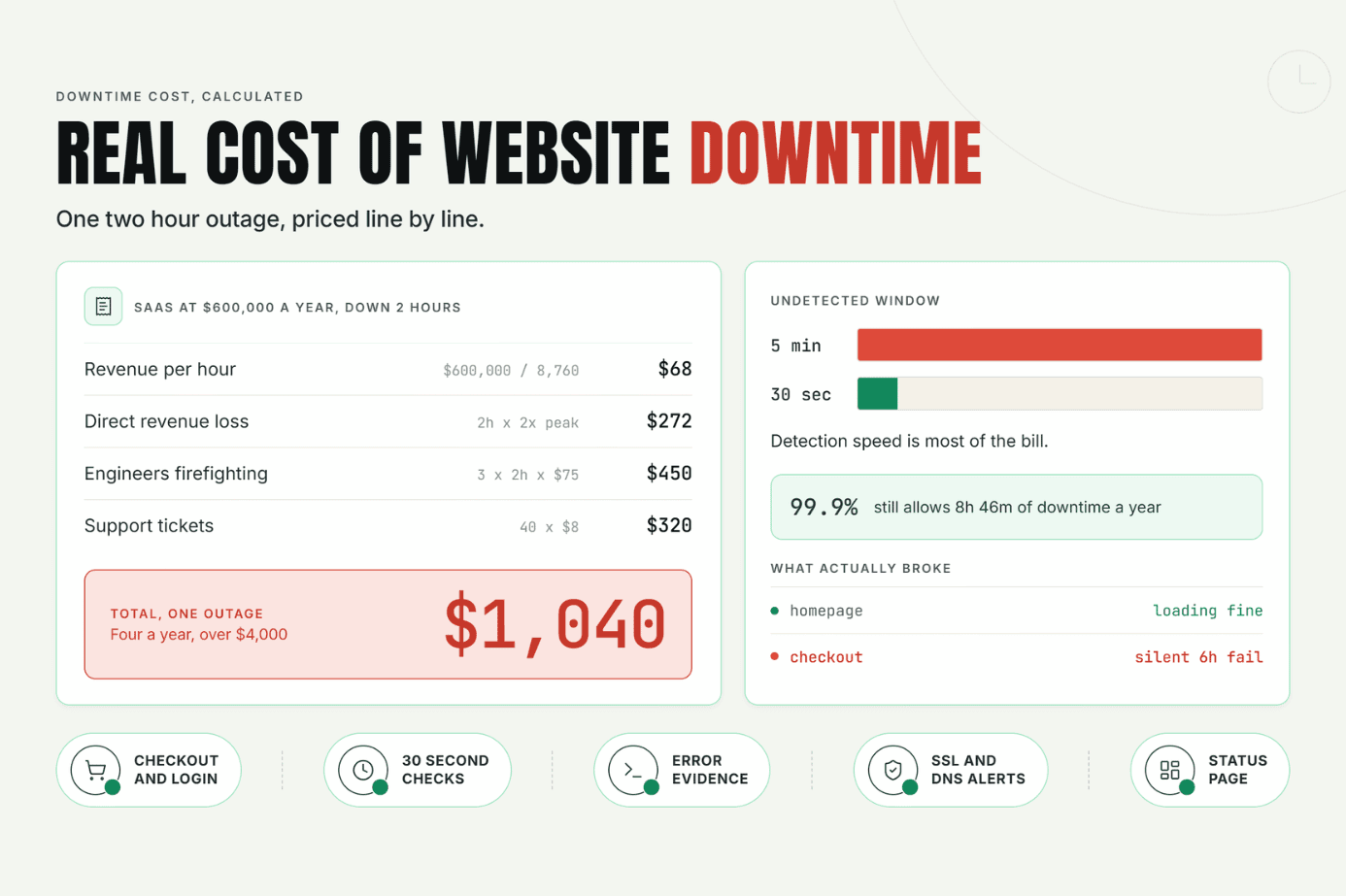
Most businesses never put a real number on the cost of website downtime until an outage hits. This guide breaks down what downtime actually costs beyond lost sales, walks through a simple formula to calculate your own number, and shows how faster detection cuts the damage.
Read Article
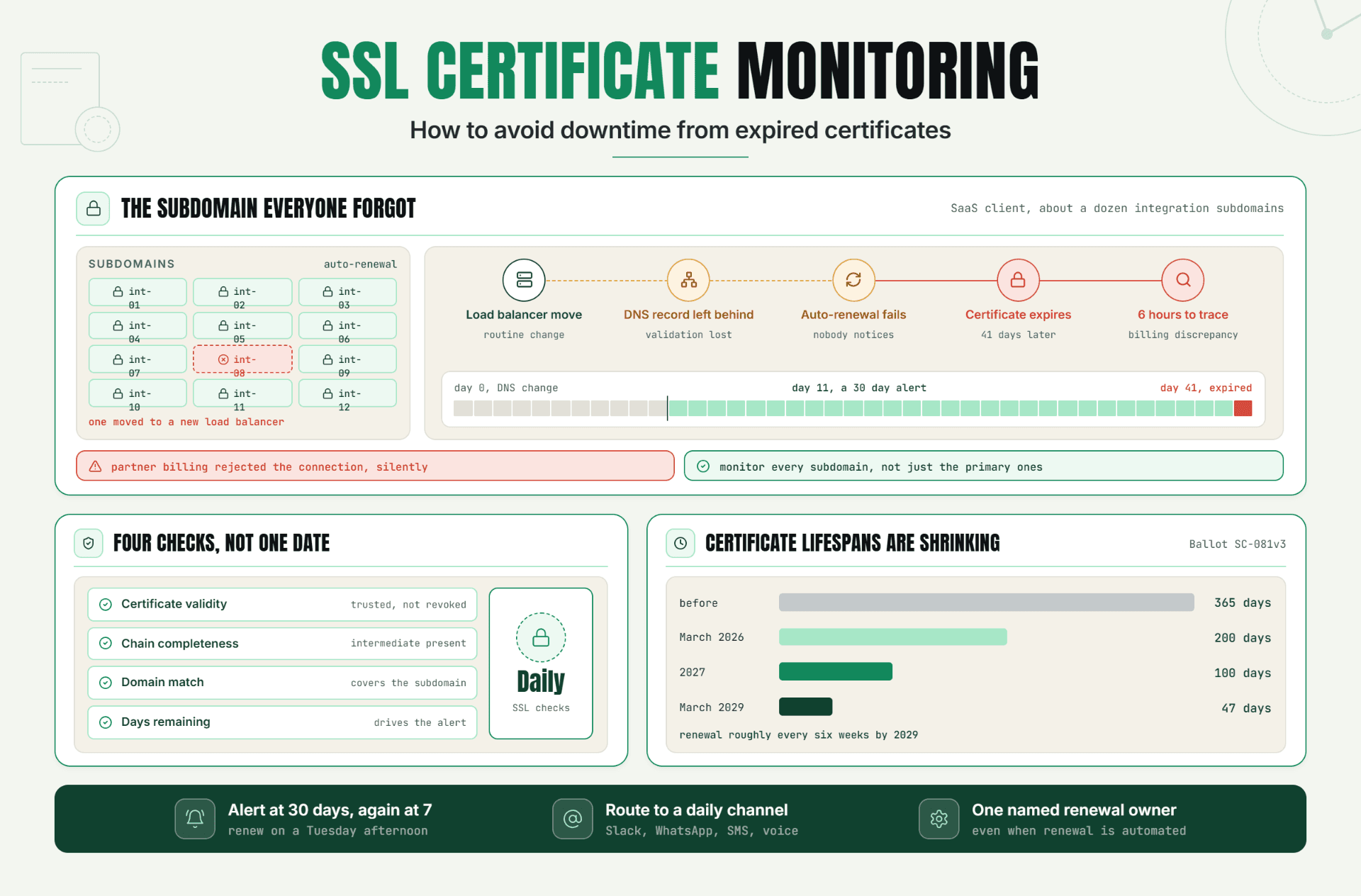
Expired SSL certificates don't fail loudly, they just fail. This guide breaks down how SSL certificate monitoring actually works, walks through a real incident where a missed renewal cost hours of debugging, and lays out the exact alert setup that stops it from happening to you. If you've ever been caught off guard by a certificate lapsing, this is the fix.
Read Article
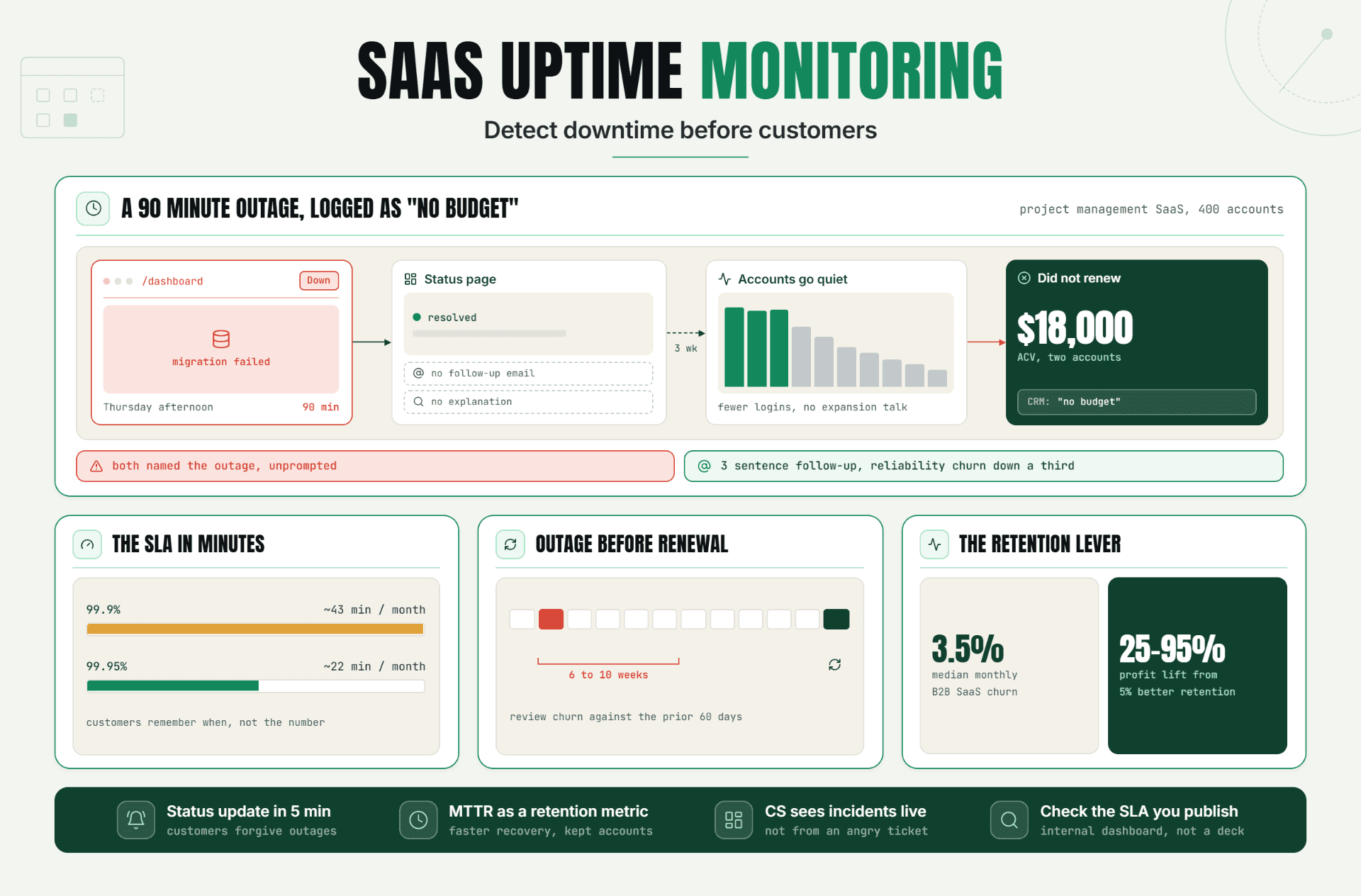
SaaS uptime monitoring is more than an operations tool it can directly impact customer trust, retention, and renewals. Learn how early outage detection, faster response, and proactive communication can help SaaS teams reduce churn and protect customer relationships.
Read Article
