Incident Alert Routing: How to Notify the Right Person at the Right Time
When a checkout error hits at 2 a.m. and the alert lands in an inbox nobody checks, that's a routing failure, not a detection one. This guide breaks down how incident alert routing works, from classifying severity to escalating when no one responds, plus the best practices and common mistakes that keep critical alerts from reaching the right person in time.
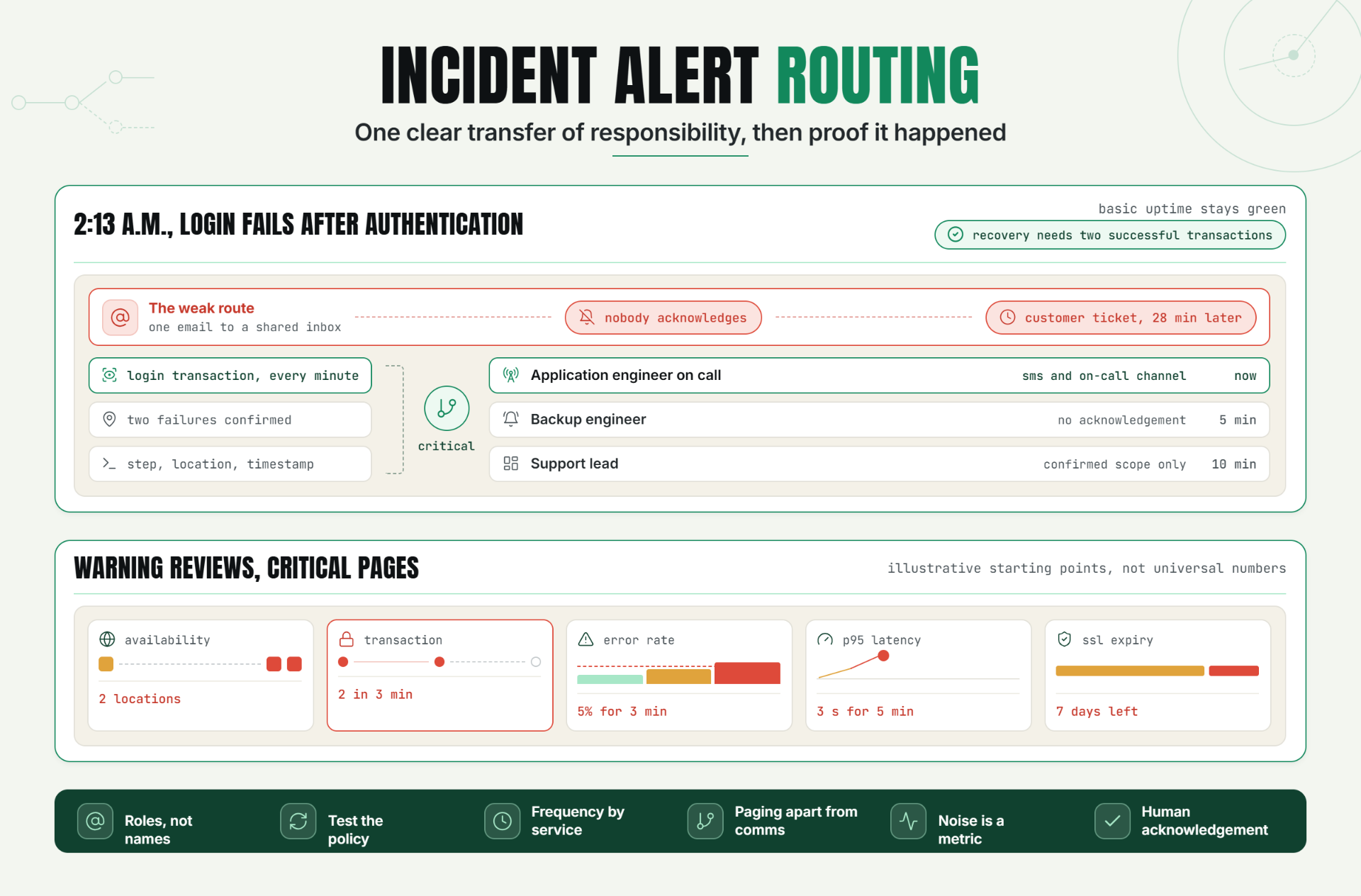
That is a routing failure, not a detection failure. Incident alert routing is the process of matching a confirmed service problem to the right owner, channel, urgency, and escalation path. For engineering managers, DevOps teams, support leads, and growing SaaS companies, Statixoup provides 30-second monitoring on its Business plan and supports team-based on-call escalation. That gives teams a practical foundation for moving from “something is wrong” to “the right person is acting.”
The short answer is simple. Effective incident alert routing classifies an event, identifies the current service owner, sends an on-call notification through an appropriate channel, waits for acknowledgement, and escalates if nobody responds. It also separates customer communication from technical paging so both happen without getting tangled together.
Most routing problems aren't caused by a missing tool. They're caused by fuzzy ownership and policies that were never tested. A longer contact list won't fix that.
The Problem Without Effective Routing
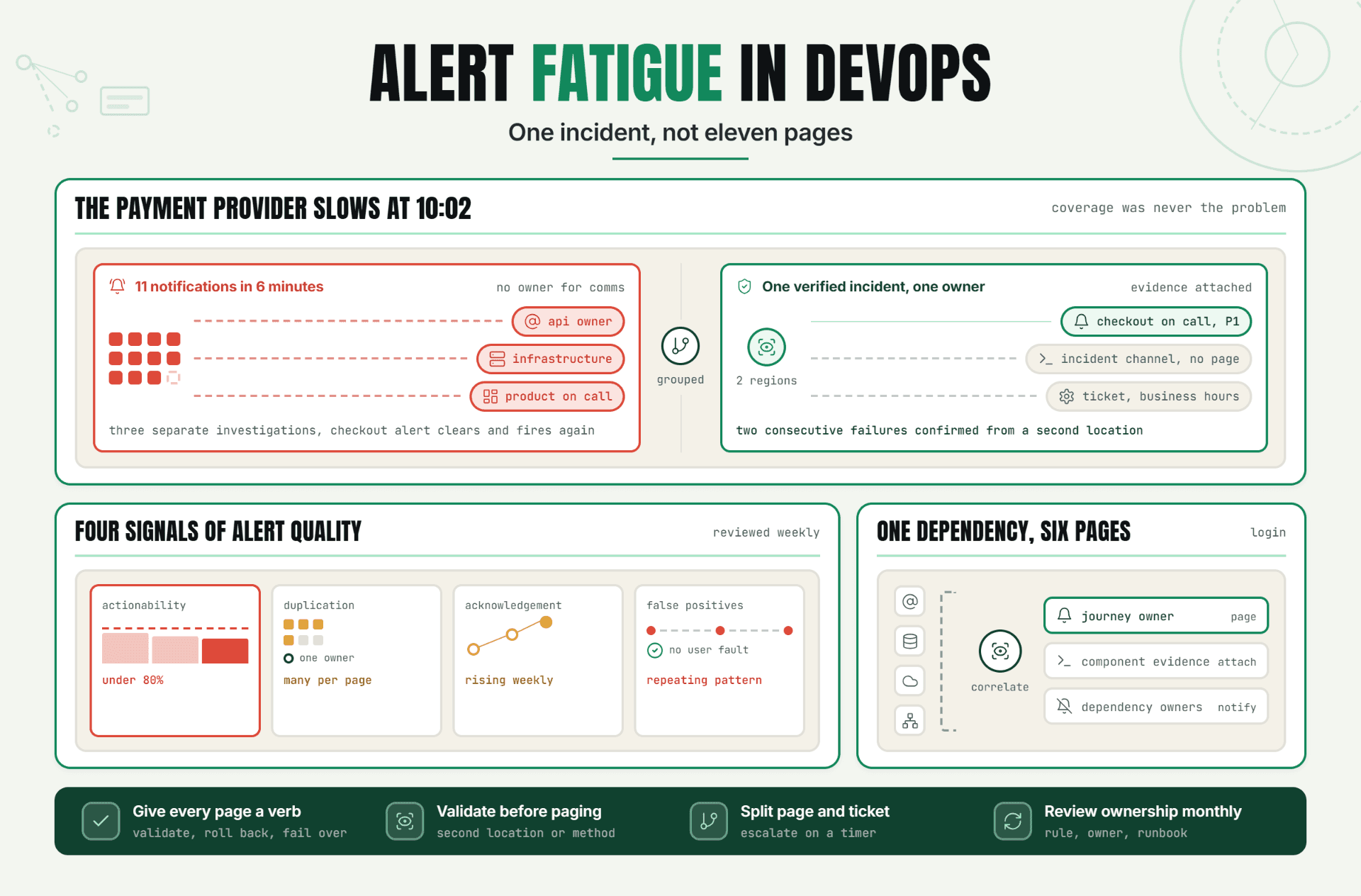
Teams rarely say, “Our routing model is broken.” They say, “I thought support had it,” “The webhook fired, but nobody owned the channel,” or “The primary engineer was on leave.” Meanwhile, downtime alerts keep arriving, customers keep retrying, and the incident clock keeps running. Weak incident alert routing hides inside those handoff gaps.
The operational risks are predictable: a critical page reaches an inactive account, five people receive the same low-value warning, a regional outage gets mistaken for a global failure, or a support lead posts an update before engineering has confirmed scope. Statixoup’s uptime monitoring guide explains the detection layer. Routing begins after that signal is validated.
How Smart Alert Routing Works
Incident alert routing is a decision system. It takes monitor data and answers four questions: How serious is this? Who owns the affected service right now? Which channel matches the urgency? What happens if the first person doesn't respond? A useful incident alert routing policy makes each answer obvious before an outage begins.
The cleanest setups keep those answers visible. Hidden logic becomes stale logic.
Start With Signals That Reflect User Impact
Google's Site Reliability Engineering guidance identifies four golden signals: latency, traffic, errors, and saturation. It also argues that a human page should be urgent, actionable, and tied to active or imminent user harm. That is a useful filter because every metric doesn't deserve the same route.
For a SaaS application, build incident alert routing around a small group of signals. This keeps incident alert routing tied to user-visible symptoms:
- Availability: failed HTTP or API checks, timeouts, and DNS failures.
- Correctness: an HTTP 200 response with missing content or a failed transaction.
- Performance: sustained latency above a service-specific threshold.
- Capacity: saturation that is likely to become customer-visible soon.
- Security and trust: SSL expiry, certificate errors, or unexpected domain behavior.
Do you page on every threshold breach? No. A single slow request might be a ticket. Two or three confirmed checkout failures from separate locations can justify an on-call notification. The route should follow customer impact, not dashboard color.
Statixoup describes validation designed to reduce false positives and offers automatic error evidence. Pair that evidence withresponse-time and page-load monitoring so the recipient can tell whether the likely owner is backend, frontend, network, or a third party.
Set Thresholds Before You Build the Alert Escalation Policy
Thresholds turn observations into decisions. Use a warning threshold for conditions that need review and a critical threshold for conditions that need immediate action. Then add a duration or confirmation rule. Incident alert routing becomes predictable only when those boundaries are written down.
An illustrative starting point might look like this:
| Signal | Warning | Critical route |
|---|---|---|
| HTTP availability | One failed check | Two confirmed failures from separate locations |
| Checkout transaction | One failed step | Two failures within three minutes |
| API error rate | Above 2% for five minutes | Above 5% for three minutes |
| Response time | p95 above 1.5 seconds for ten minutes | p95 above 3 seconds for five minutes |
| SSL certificate | 30 days to expiry | 7 days to expiry or validation failure |
These aren't universal numbers. A payroll API and a marketing microsite shouldn't share the same incident alert routing. Use service objectives, business hours, traffic patterns, and recovery time to set the real values. Review incident alert routing whenever those conditions change.
Google's SRE monitoring chapter gives a useful scale check: a 10 to 12 person SRE team may devote one or two people primarily to monitoring work. Smaller companies don't need that staffing model, but they do need named ownership. Someone must maintain thresholds, contacts, and policy tests.
Confirm the Failure Before Paging
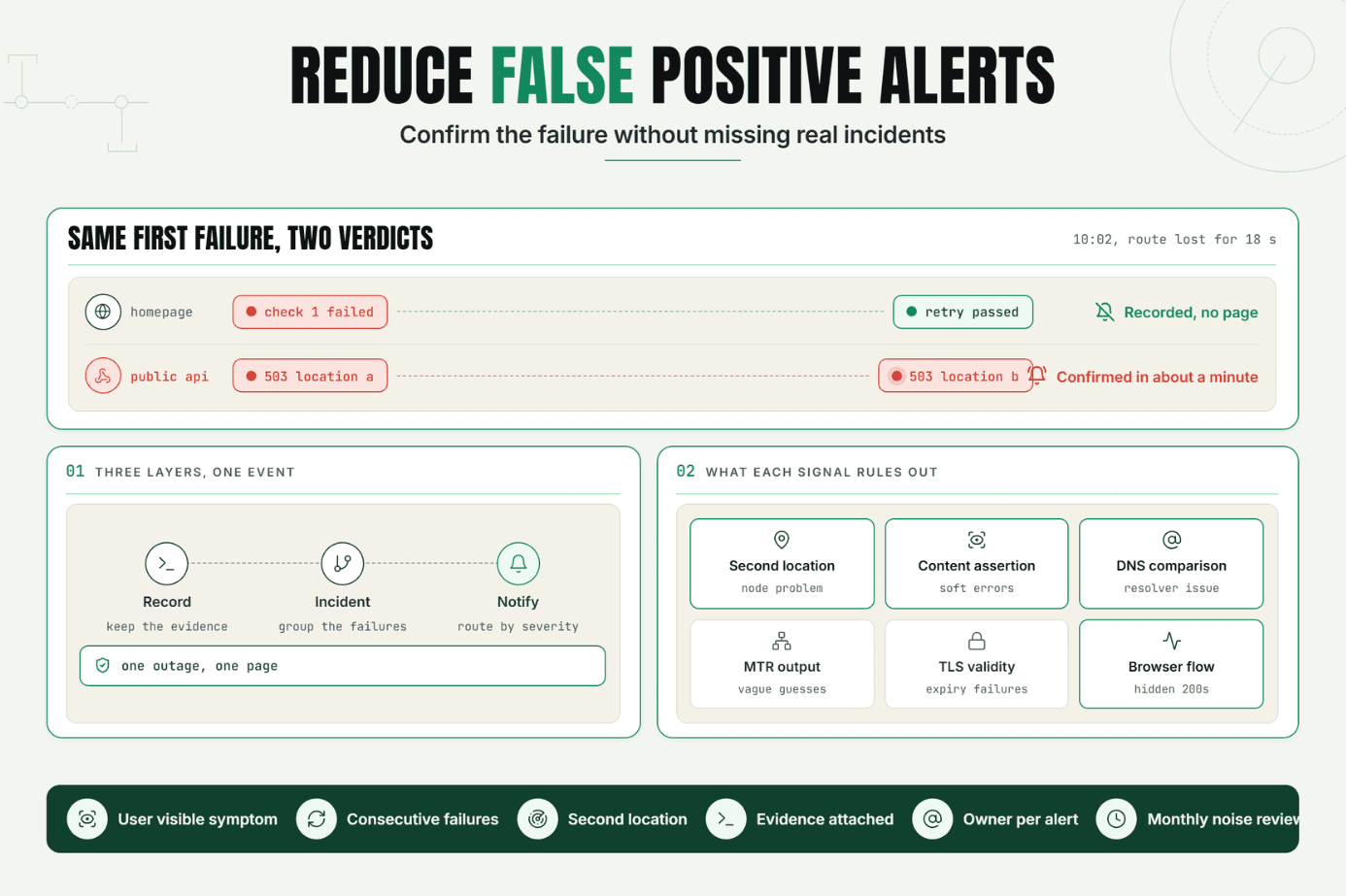
Confirmation can mean a repeat check, a second monitoring location, content validation, or a browser transaction. This step matters. Without it, incident alert routing becomes a noise amplifier. With it, incident alert routing carries evidence instead of suspicion.
For a customer-facing endpoint, a practical sequence is:
- Run the scheduled check.
- Validate the failure from another location.
- Attach status, timing, and error evidence.
- Classify severity.
- resolve the active owner.
- Send the alert.
- Escalate if it isn't acknowledged.
The result is a page that arrives with enough context to act.
Match Severity to Channel and Owner
Email is useful for low-urgency records. It is a poor choice for a checkout outage at 2:13 a.m. High-severity routing should use interruptive channels such as SMS, voice, or the team's active paging surface. Chat channels help with coordination, while webhook alerts connect monitoring to ticketing, automation, and incident systems.
Statixoup's Business plan lists Slack, Discord, Microsoft Teams, WhatsApp, SMS, and email, plus on-call scheduling and escalation. Its Enterprise plan adds advanced escalation rules and service-level agreements. The right incident alert routing uses fewer channels per event, but adds another channel when acknowledgement is missing. That restraint makes incident alert routing easier to trust.
A sensible ownership map has three layers:
- Primary owner: the engineer currently on call for the affected service.
- Secondary owner: a backup engineer or platform lead.
- Business owner: the support or incident lead responsible for customer impact and incident communication.
Support shouldn't diagnose database locks. Engineering shouldn't improvise customer wording in the middle of mitigation. Connected, separate roles work better.
Build Routing Around Acknowledgement
Sending isn't success. Acknowledgement is the point where the system knows a human has taken responsibility. Incident alert routing without acknowledgement is only message delivery.
Define the clock explicitly. For example, send the first on-call notification immediately, escalate to the backup after five minutes, and notify the incident lead after ten minutes if severity remains high. If the primary acknowledges, stop paging backups but continue incident communication in the shared channel.
This is where webhook alerts earn their keep. A webhook can open a ticket, attach the monitor evidence, or update an incident room after the routing platform changes state. But keep the paging path simple. Incident alert routing should be easy to explain during a handoff. Google's SRE guidance warns that complex dependency hierarchies become fragile as systems change.
Diagnose Before You Reroute
If the same team keeps receiving incidents it can't fix, don't add another escalation level. Fix the ownership map. Misrouted pages are evidence that incident alert routing needs maintenance.
Use the signal itself to narrow the route. A valid HTTP response with a broken login flow points toward the application team. Regional timeouts point toward DNS, CDN, ISP, or network ownership. Statixoup’s website incident response method covers HTTP checks, DNS comparison, traceroute, and MTR. Those details make incident alert routing faster because the first recipient sees a probable fault domain. Context is part of incident alert routing, not an optional attachment.
A Realistic Production Scenario
Imagine a growing B2B SaaS company with eight engineers, two support leads, and customers in India, Europe, and North America. At 2:13 a.m. IST, the public site is available, but the login transaction fails after authentication. Basic uptime remains green.
The weak setup sends one email to engineering@company.com. Nobody sees it. Support receives the first customer ticket 28 minutes later and starts a general incident message without knowing whether existing sessions are affected.
The recommended incident alert routing setup is different:
- A browser transaction checks login every minute and validates the expected post-login page.
- Two consecutive failures create a critical event. A basic homepage check remains informational because it still passes.
- Incident alert routing maps the failed login service to the active application engineer.
- SMS and the on-call channel carry the first page with screenshot, step name, location, and timestamp.
- No acknowledgement after five minutes triggers the backup engineer.
- A webhook creates an incident record and a shared response channel.
- The support lead receives a separate coordination notification with confirmed scope, not raw diagnostics.
- Recovery requires two successful transactions before the customer update is closed.
What didn't work in the first design? Availability alone. The server was up, so a weak check had nothing useful to route. Statixoup’s guide to hidden functional failures explains why login, checkout, and form failures need deeper validation.
The result of the improved design isn't a promised response-time number. It is a clearer operating condition: the application owner is paged, the backup path is timed, support gets confirmed facts, and recovery is verified. That is what good incident alert routing is supposed to produce. It also makes incident alert routing auditable after the event.
Best Practices for Reliable Alert Routing
Give Every Monitor One Accountable Owner
Use a team or service role, then resolve it to the current person through the schedule. This prevents alerts from depending on a permanently named employee who may be asleep, away, or no longer on the team.
Test the Full Alert Escalation Policy
Run a controlled test at least quarterly and after schedule, channel, or permission changes. Confirm delivery, acknowledgement, escalation, webhook behavior, and recovery. A policy that looks correct in a dashboard can still fail because an SMS number changed or a bot lost channel access. Testing turns incident alert routing from configuration into an operating practice.
Use Check Frequency That Matches the Service
Statixoup lists 30-second checks on its Business plan, one-minute checks on Growth, and three-minute checks on Starter. Faster checks make sense for revenue paths and APIs. Lower-priority pages can use slower checks because extra frequency adds noise and cost without changing the response.
Separate Paging From Incident Communication
Route technical evidence to responders and verified impact to support or communications. Both groups need the incident, but not the same message. This division reduces confusion and gives customers fewer speculative updates.
Review Noise as a Reliability Metric
Count alerts per shift, pages with no action, repeat incidents, and escalations caused by missing acknowledgement. If responders regularly ignore a route, treat that as a system defect. Honestly, adding more channels is usually the wrong fix. Better validation and clearer ownership beat louder alerts.
Common Incident Routing Mistakes
Paging on Weak Checks
A ping or HTTP 200 only proves that something answered. It doesn't prove login, checkout, search, or an API dependency works. Use content checks or browser transactions for critical user journeys.
Sending Every Alert Everywhere
Broadcasting downtime alerts to email, SMS, chat, and three teams feels safe. It creates duplicate work and trains people to wait for someone else. Match one primary route to severity, then escalate on a timer.
Ignoring Dependencies
An application team can't restore a failed payment provider. Attach dependency context and route confirmed third-party failures to the owner who can switch providers, disable a feature, or communicate impact.
Routing to Names Instead of Roles
People change shifts. Policies tied to one person age badly. Resolve roles through an on-call schedule and test substitutions, holidays, and handoffs.
Treating Webhook Delivery as Human Acknowledgement
A 200 response from a webhook endpoint proves machine delivery. It doesn't prove anyone accepted the incident. Track human acknowledgement separately and keep a fallback channel.
Conclusion
Reliable incident alert routing isn't about sending more notifications. It is about making one clear transfer of responsibility, then proving that transfer happened. Detection, ownership, context, acknowledgement, and escalation must work as one chain. When incident alert routing works, nobody has to guess who owns the next action.
Start with a single customer-critical journey. Give it a real owner, a verified failure rule, and a tested backup path. Once that route works under pressure, expand carefully.
Start a 7-Day Statixoup Trial
Start your free 7-day Statixoup trial and configure a monitor for your most important customer journey. Set the failure threshold, assign the primary and backup owners, choose the right on-call notification channel, and run a controlled incident alert routing test before calling the route finished.
Post a Comment

Hardik Vaghani
Hardik Vaghani is a Digital Marketing Professional and SEO Strategist based in Surat, Gujarat, India. He currently works with Ethnic Infotech, contributing to SEO, content marketing, technical SEO, and digital growth strategies. Hardik also creates blog content for Fusion5, focusing on technology, laptops, and consumer electronics. With expertise in SEO, Google Ads, Meta Ads, Local SEO, and Content Strategy, he helps businesses improve online visibility, rankings, and lead generation through data-driven marketing.
Frequently Asked Questions
Related Blogs