Shopify Store Down? How to Know Within 60 Seconds
When customers report your Shopify store down, every minute costs sales, especially during a sale with ads running. This guide shows a simple 60-second check to tell a Shopify outage from a store-only problem like DNS, SSL, a password page left on, or a broken checkout. You’ll also see how 30-second monitoring with WhatsApp, SMS and voice call alerts lets you know before your customers do.
It's 9 p.m. on the first night of your Diwali sale. Meta ads are live, orders are trickling in, and then a customer DMs you on Instagram: "site not opening."
That's how most owners discover a Shopify store down situation. Not from a dashboard. From a buyer who's already gone.
At Statixoup, we build 24/7 uptime monitoring for online stores and the agencies that run them. Our checks run every 30 seconds, and alerts go out on WhatsApp, SMS, voice call, Slack, Discord or email the moment a Shopify store goes down. So this guide is written from the monitoring side: what actually breaks, and how fast people find out.
Here's the short answer. To know your Shopify store is down within 60 seconds, you need an outside monitor checking your storefront every 30 seconds from more than one location, with alerts going straight to your phone. Shopify's status page tells you when Shopify is broken. It won't tell you when only your store is broken, and it won't call you either.
And that gap is where most of the lost sales hide.
Why a Shopify Store Down Alert Usually Comes From Customers
Type "is my Shopify store down" into Google and you'll mostly get one tip: check the status page. Fine. But the questions running through your head at that moment are messier. Is it everyone or just me? Is it Shopify, or something we changed yesterday? How long has it been like this?
Most owners find out late that their Shopify store is down. The site opens on the office Wi-Fi, so they assume it's fine. Or the homepage loads but checkout throws an error, and nobody notices until the order count goes flat around midnight.
On a quiet Tuesday, that's annoying. During a sale with ad spend running, a Shopify store down for even 20 minutes can burn a full day's Meta budget on traffic that can't buy anything.
How to Tell If Your Shopify Store Is Down in 60 Seconds
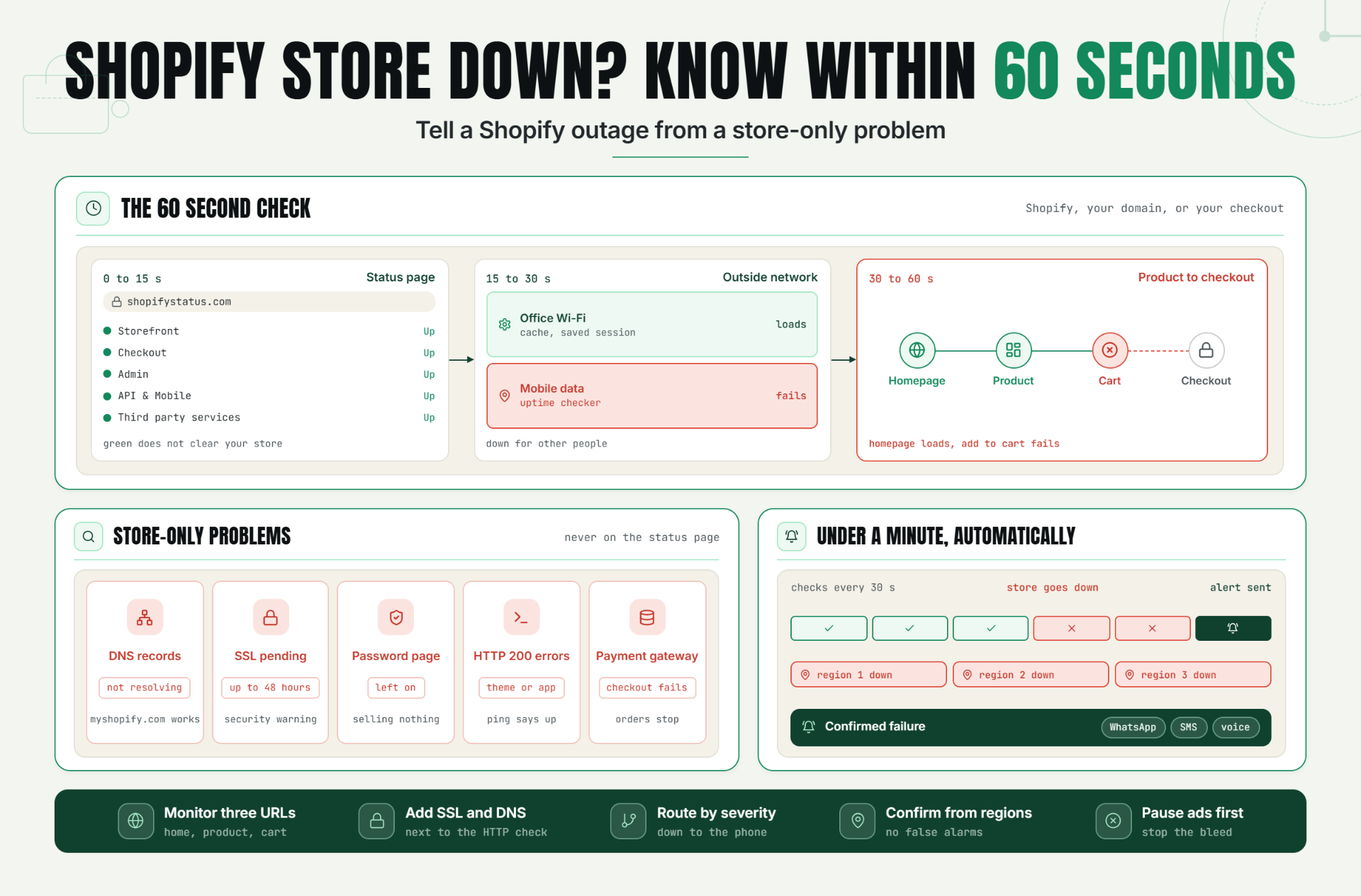
When a Shopify store is down, panic makes people refresh the same tab ten times. Don't. Run three checks in order instead. They take under a minute and answer the first question that matters: is this Shopify's problem or yours?
Step 1: Check the Shopify status page (0 to 15 seconds)
Open Shopify's official status page. It shows components like Storefront, Checkout, Admin, API & Mobile and Third party services. If Storefront or Checkout has an active incident, it's a platform problem, and your job switches to managing customers and ads.
One catch, though. The store-specific "My Shopify Status" view only appears when you're logged in, and Shopify's own changelog on the store-specific status page points out that incidents rarely hit every store at once. So a green page doesn't clear your store.
Also, the address is shopifystatus.com. A few older guides still send people somewhere else.
Step 2: Test from outside your own network (15 to 30 seconds)
Your office Wi-Fi, browser cache and saved sessions can all lie to you. Run your domain through our free website uptime checker, or open the store on mobile data. If it loads for you but fails from outside, your Shopify store is down for other people, probably because of a DNS or regional issue.
Step 3: Load a product page and the cart (30 to 60 seconds)
A homepage that loads proves very little. Open a best-selling product, add it to cart and get to checkout. If your Shopify store is down only at checkout, a homepage test will happily tell you everything's fine.
Here's the whole check as a process:
- Check shopifystatus.com for Storefront and Checkout incidents.
- Test your domain from outside your own network.
- Load a product page, add to cart and reach checkout.
The result is a clear answer, inside a minute, on whether it's Shopify, your domain, or your checkout.
Shopify Outage or Store-Only Problem? How to Read the Signs
Platform outages are real. On June 3, 2026, Shopify's status page logged an incident at 9:27 a.m. EDT that wasn't marked resolved until 11:31 a.m. EDT, according to PYMNTS. That's over two hours of disruption across admins, checkouts and storefronts.
But here's our honest view: store-only failures are the bigger everyday risk. A platform outage is loud, and everyone's talking about it within minutes. A store-only failure is quiet, and nobody's watching for it except you.
| What you see | Likely cause | Who fixes it |
| Status page shows a Storefront or Checkout incident | Shopify platform outage | Shopify (you handle customers and ads) |
| myshopify.com address works, custom domain doesn't | DNS records | You or whoever manages the domain |
| Browser shows a certificate or security warning | SSL certificate pending or failed | You, through domain settings |
| Visitors see a password page | Password protection left on | You, in Online Store > Preferences |
| Pages load but add to cart or checkout fails | Theme, app script or payment gateway | You, your developer or the app vendor |
Store-Only Reasons a Shopify Store Goes Down
None of these show up on Shopify's status page. Each one can leave your Shopify store down for one customer, one region or everybody.
DNS records pointing the wrong way
Changed DNS, moved registrars or switched on a Cloudflare proxy? Your custom domain can stop resolving while the myshopify.com address still works. Shopify's domain troubleshooting guide walks through A records, CNAME records and conflicting entries.
SSL certificate pending or failed
After a DNS change, the same Shopify help guide says the TLS certificate can take up to 48 hours to be issued. During that window, some visitors may see a security warning instead of your store. CAA records and DNSSEC settings can block it too.
Password page left on
It happens more than you'd think. Someone turns on the password page for a launch, forgets about it, and the store technically "works" while selling nothing.
Errors that still return HTTP 200
This is the sneaky one. A broken theme section, a Liquid error or an app script that crashes add-to-cart can still send back a normal 200 response. A basic ping says you're up. Your conversion rate says otherwise.
Payment gateway failures
The store loads, checkout opens, and then Razorpay or another gateway fails. Orders stop, but nothing looks "down" from the outside. We've covered how this plays out with order updates in our guide to webhook monitoring for delivery, retries and payloads.
Why Manual Checks Can't Hit 60 Seconds (and What Can)
The three-step check has one big flaw. It only starts when somebody suspects the Shopify store is down. At 2 a.m., mid flash sale or while you're on a flight, nobody suspects anything.
Speed matters more than it looks, too. According to Deloitte research published on web.dev, a 0.1-second improvement in mobile site speed lifted retail conversion rates by 8.4%. If a tenth of a second moves conversions that much, a dead checkout for an hour isn't a small leak.
How a Shopify downtime alert gets under a minute
Statixoup checks your site every 30 seconds. If your Shopify store goes down right after one check, the next check catches it within 30 seconds, and a confirmed failure sends the alert. That's how you get to "within 60 seconds" without anyone staring at a screen.
Why the failure has to be confirmed from more than one place
A single location can glitch. One bad network route and you get woken up for nothing. Confirming from multiple regions before alerting cuts those false alarms, which matters because teams start ignoring a noisy monitor within a week.
Where the alert should land
Email is fine for a weekly report. It's useless when your Shopify store is down at 2 a.m. Send critical alerts to WhatsApp, SMS or a voice call, and keep Slack or Discord for the team channel.
Three Sale-Day Scenarios and What Catches Each One
These are illustrative examples, not client case studies. But they're built from the failure patterns covered above, and each one plays out the same way in real stores.
A Diwali sale with ads running into a broken checkout
Say you run a Shopify fashion store doing around ₹8 lakh a month. It's the Diwali sale, and you're spending ₹15,000 a day on Meta ads. At 8 p.m., an app update breaks add-to-cart.
The homepage still loads, so a homepage-only ping stays green. What doesn't work: waiting for the morning sales report. What helps: separate monitors on a product page and the cart, plus a WhatsApp alert, so the first move is pausing ads before anyone starts debugging.
I'll be honest about one limit. An HTTP check won't catch every JavaScript failure inside the page. So pair it with a quick look at hourly orders in Shopify analytics during big sales. If orders drop to zero while traffic holds, treat it like your Shopify store is down.
A DNS change that takes the custom domain offline
An agency moves a client's domain to Cloudflare on a Friday evening. The myshopify.com address works, so the developer signs off and logs out.
The custom domain, the one in every ad and Instagram bio, stops resolving for part of the audience. With DNS and SSL monitors running next to the HTTP check, the first failed check flags it. Without them, the client finds out the Shopify store was down on Monday. Running a quick website health report before and after any DNS change is a cheap habit worth building.
An agency watching 20 client stores
Twenty stores means twenty chances for a Shopify store down situation nobody notices. More checking won't fix that. Better routing will.
Each client's alerts go to that client's own Slack or Discord channel. Critical alerts, like a Shopify store down on a sale day, go to the on-call person's WhatsApp or phone. And each client gets a status page to check instead of messaging you every time something feels slow.
Best Practices for Shopify Uptime Monitoring
If you only do three things from this list, do the first three. They catch most of the quiet ways a Shopify store goes down.
- Monitor three URLs, not one. Watch the homepage, a top product page and the cart, because checkout failures hide behind a perfectly healthy homepage.
- Add SSL and DNS monitors next to the HTTP check. After any domain change, these are the first things to break, and they rarely show up on Shopify's status page.
- Route alerts by severity. "Shopify store down" goes to WhatsApp, SMS or a voice call. "Response time is slow" goes to Slack or email. Mix them and people mute everything.
- Confirm failures from more than one location. One flaky node shouldn't wake anyone up, or your team learns to ignore the alerts that matter.
- Put "pause ads" at the top of your incident checklist. Every minute of paid traffic hitting a broken page is spend with zero return, so stop the bleed before you fix the cause.
- Test the whole setup before peak days. Trigger a test alert a week before a big sale and check that the right phones actually ring.
Common Mistakes That Delay a Downtime Alert
Treating Shopify's status page as your monitor
It's built to report platform incidents, not to watch your domain, theme or apps. So a green status page and a Shopify store down at the same time is completely normal. Use it as step one, then rely on your own external checks.
Trusting a 200 response
Theme and app errors can return a normal status code while add-to-cart is broken. That's why homepage-only checks miss so much. Monitor the product page and cart, and keep an eye on hourly orders during sales.
Forgetting SSL after a DNS edit
People change DNS, see the store load on their own laptop and move on. Meanwhile the certificate can take up to 48 hours, and some visitors hit a warning page. Set up the SSL monitor before the change, not after the complaints.
Relying on email-only alerts
Nobody reads email at 2 a.m. If your Shopify store is down overnight during a sale, an email alert just tells you what went wrong at breakfast. Use WhatsApp, SMS or a voice call for anything that stops orders.
Never putting a number on downtime
This is the mistake we see most. Without a rupee figure, monitoring always looks like an optional expense. Run your numbers through the downtime cost calculator once, and the cost of a single Shopify store down hour usually makes the budget decision for you.
Conclusion
You can't stop every Shopify outage. You can stop finding out about a Shopify store down situation from an angry Instagram DM. Shopify's status page covers the platform. Everything else, your domain, your certificate, your theme, your checkout, is on you to watch.
So here's our stance. If your store makes money every day, 30-second external checks with phone-level alerts aren't a nice extra. They're the difference between losing five minutes and losing a whole evening when your Shopify store is down.
Start Monitoring Your Store Before the Next Sale
Don't wait for the next sale to learn your Shopify store is down from a customer. Start a 7-day Statixoup free trial, no credit card needed, and add monitors for your homepage, top product page and cart in a few minutes. You'll get WhatsApp, SMS or voice alerts within seconds of a confirmed failure.
Not sure yet? Run your domain through the free website uptime checker first, see what Statixoup does, or compare Statixoup plans and pricing. One avoided Shopify store down evening during a sale will likely cover the cost.
Follow Statixoup
Enjoyed this post? Follow us for uptime monitoring tips, product updates, and new articles.
Post a Comment

Hardik Vaghani
Hardik Vaghani is a Digital Marketing Professional and SEO Strategist based in Surat, Gujarat, India. He currently works with Ethnic Infotech, contributing to SEO, content marketing, technical SEO, and digital growth strategies. Hardik also creates blog content for Fusion5, focusing on technology, laptops, and consumer electronics. With expertise in SEO, Google Ads, Meta Ads, Local SEO, and Content Strategy, he helps businesses improve online visibility, rankings, and lead generation through data-driven marketing.
Frequently Asked Questions
Related Blogs
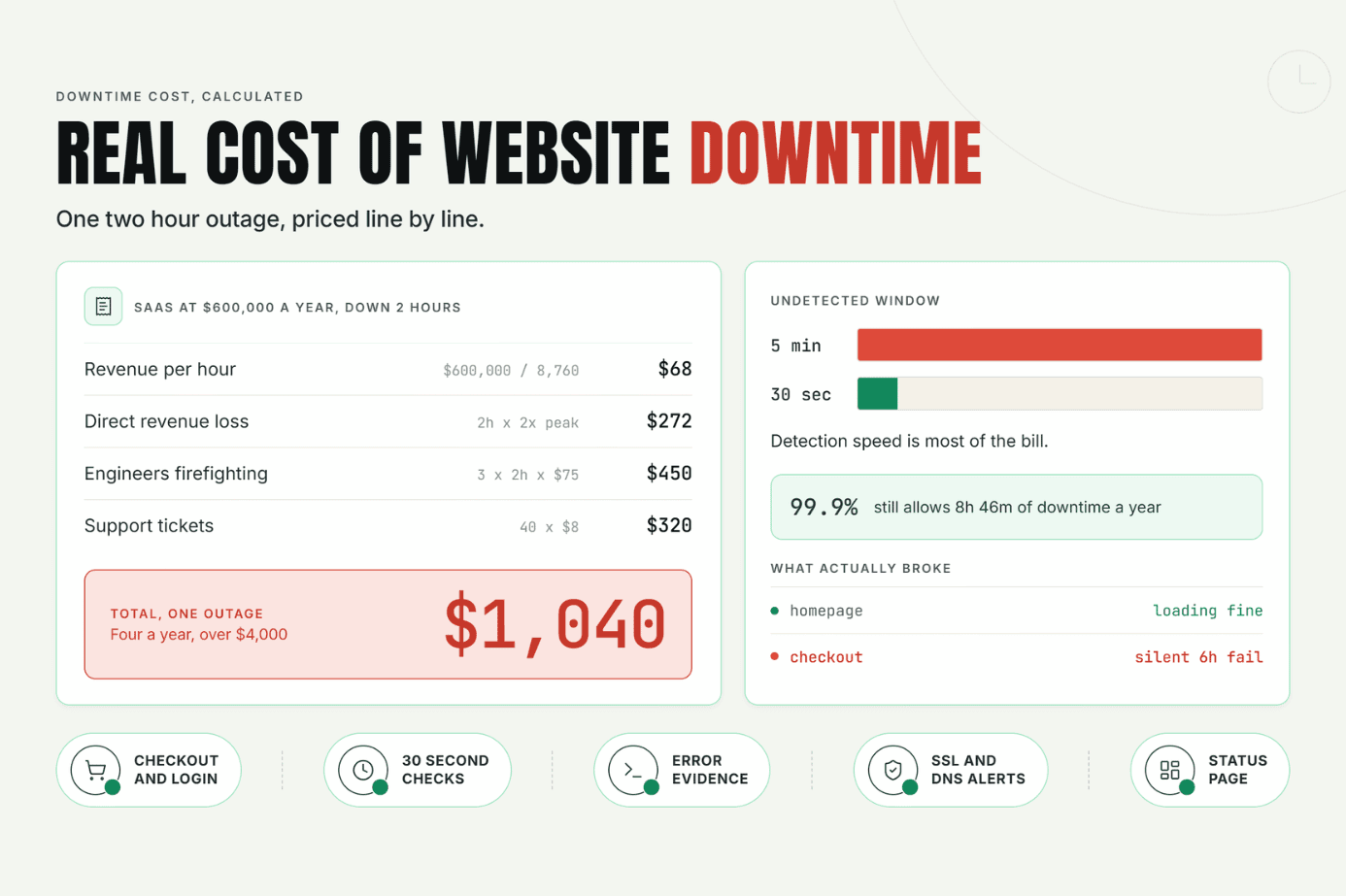
Most businesses never put a real number on the cost of website downtime until an outage hits. This guide breaks down what downtime actually costs beyond lost sales, walks through a simple formula to calculate your own number, and shows how faster detection cuts the damage.
Read Article
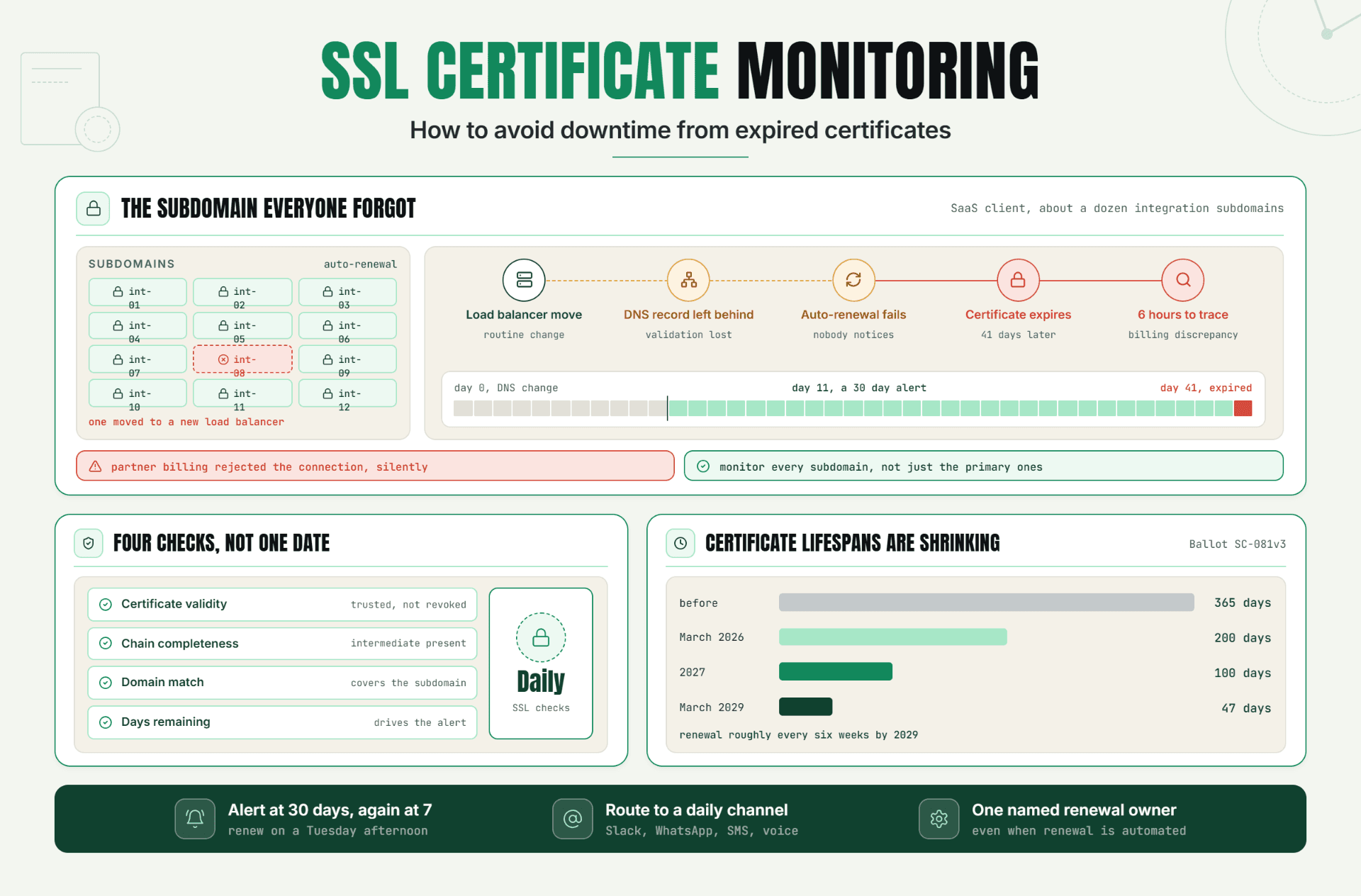
Expired SSL certificates don't fail loudly, they just fail. This guide breaks down how SSL certificate monitoring actually works, walks through a real incident where a missed renewal cost hours of debugging, and lays out the exact alert setup that stops it from happening to you. If you've ever been caught off guard by a certificate lapsing, this is the fix.
Read Article
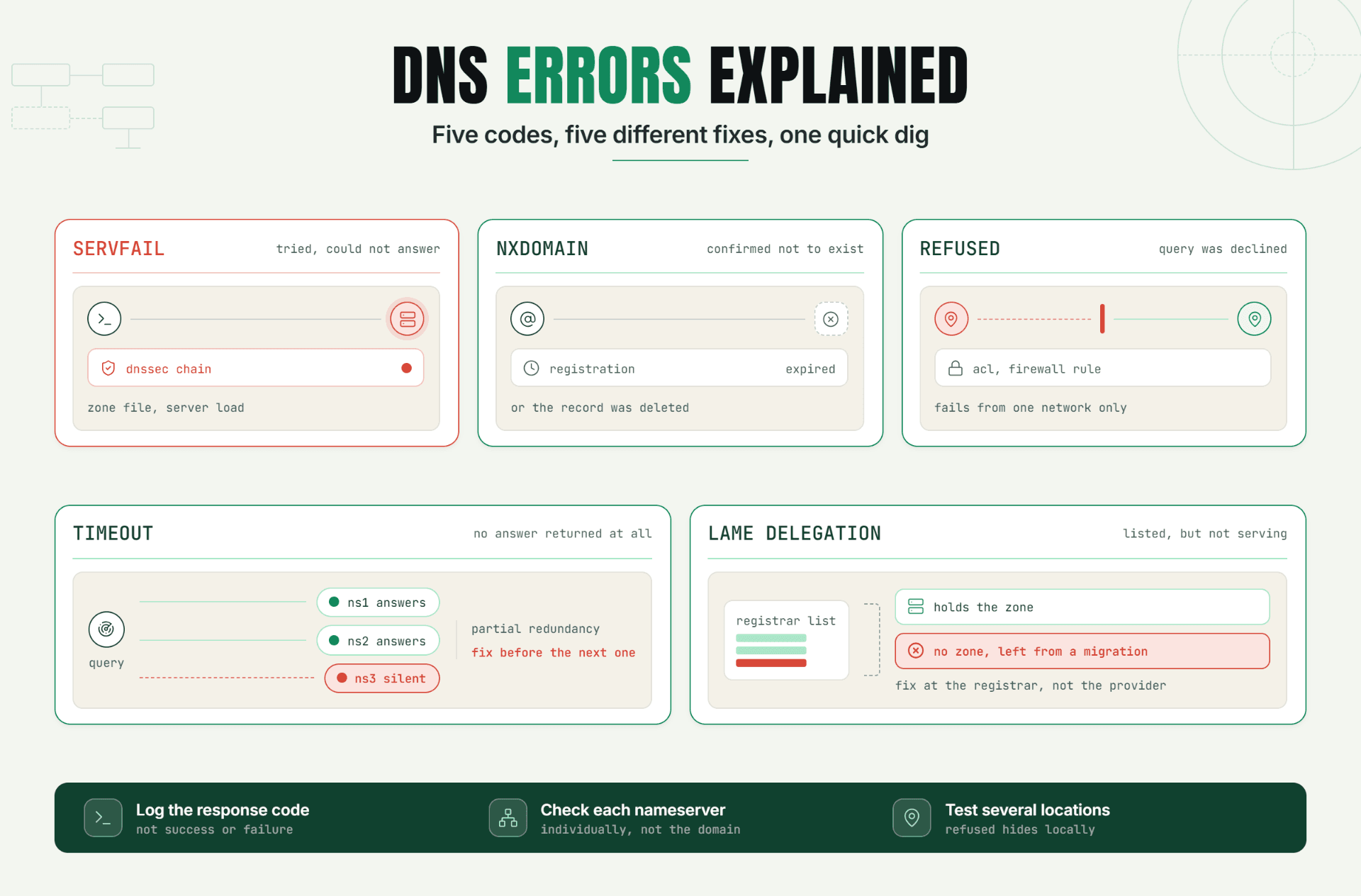
Site down with a DNS error? Learn what NXDOMAIN, SERVFAIL and DNS server not responding mean, how to fix DNS errors fast, and how to stop them recurring.

Read Article
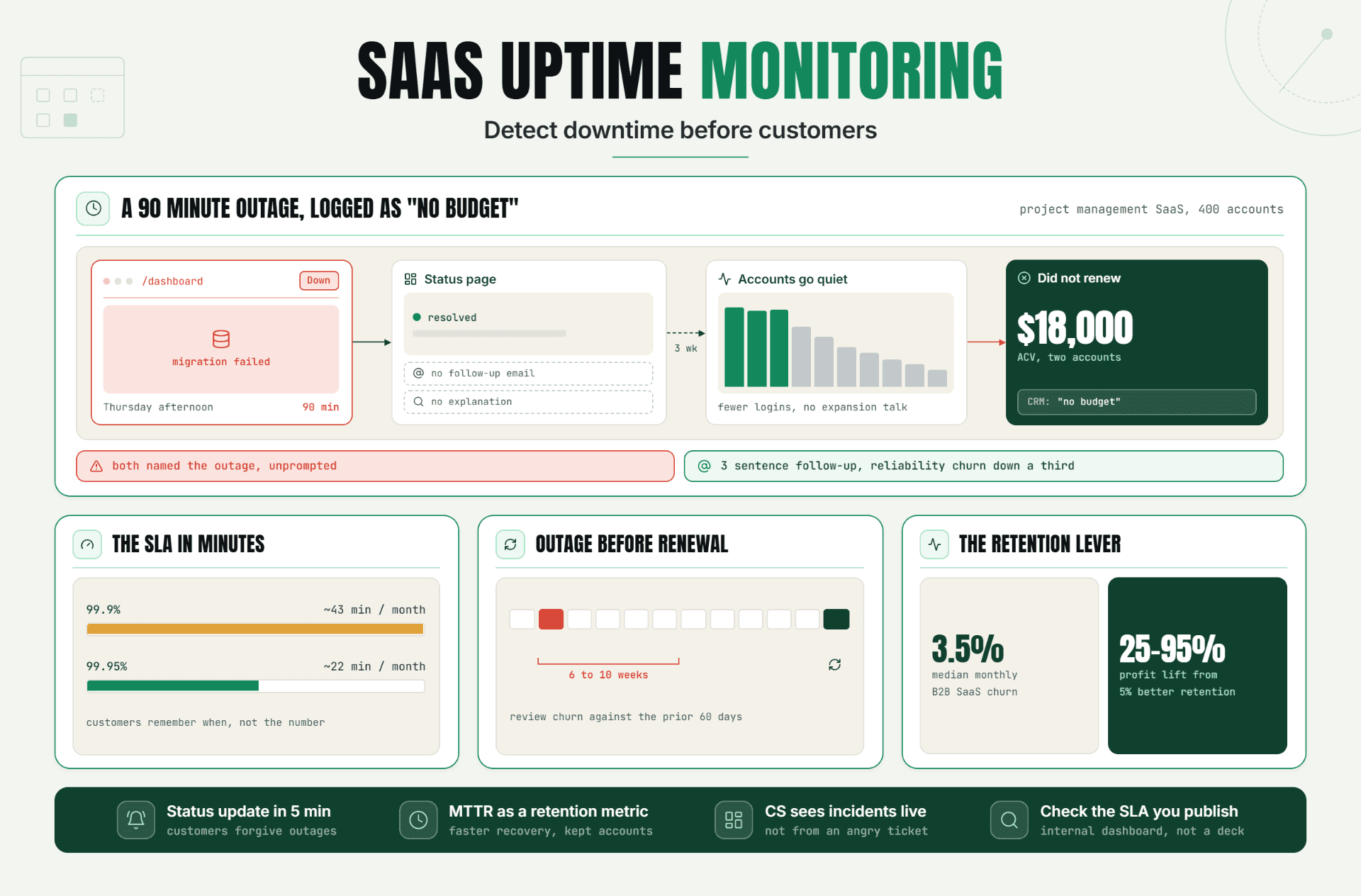
SaaS uptime monitoring is more than an operations tool it can directly impact customer trust, retention, and renewals. Learn how early outage detection, faster response, and proactive communication can help SaaS teams reduce churn and protect customer relationships.
Read Article
