Website Down During a Sale? What to Do Next | Statixoup
Your store going down in the middle of a sale is stressful, but the first hour decides how much it really costs you. This guide gives Indian D2C store owners and agencies on Shopify or WooCommerce a calm, minute-by-minute plan to confirm the outage, pause ads, find the cause, and keep customers informed on WhatsApp, Instagram and email. It also shows how to keep taking orders through payment links, then extend the sale and recover lost checkouts once the store is back. The post ends with ready-to-use message templates and a free one-page checklist for your next sale.
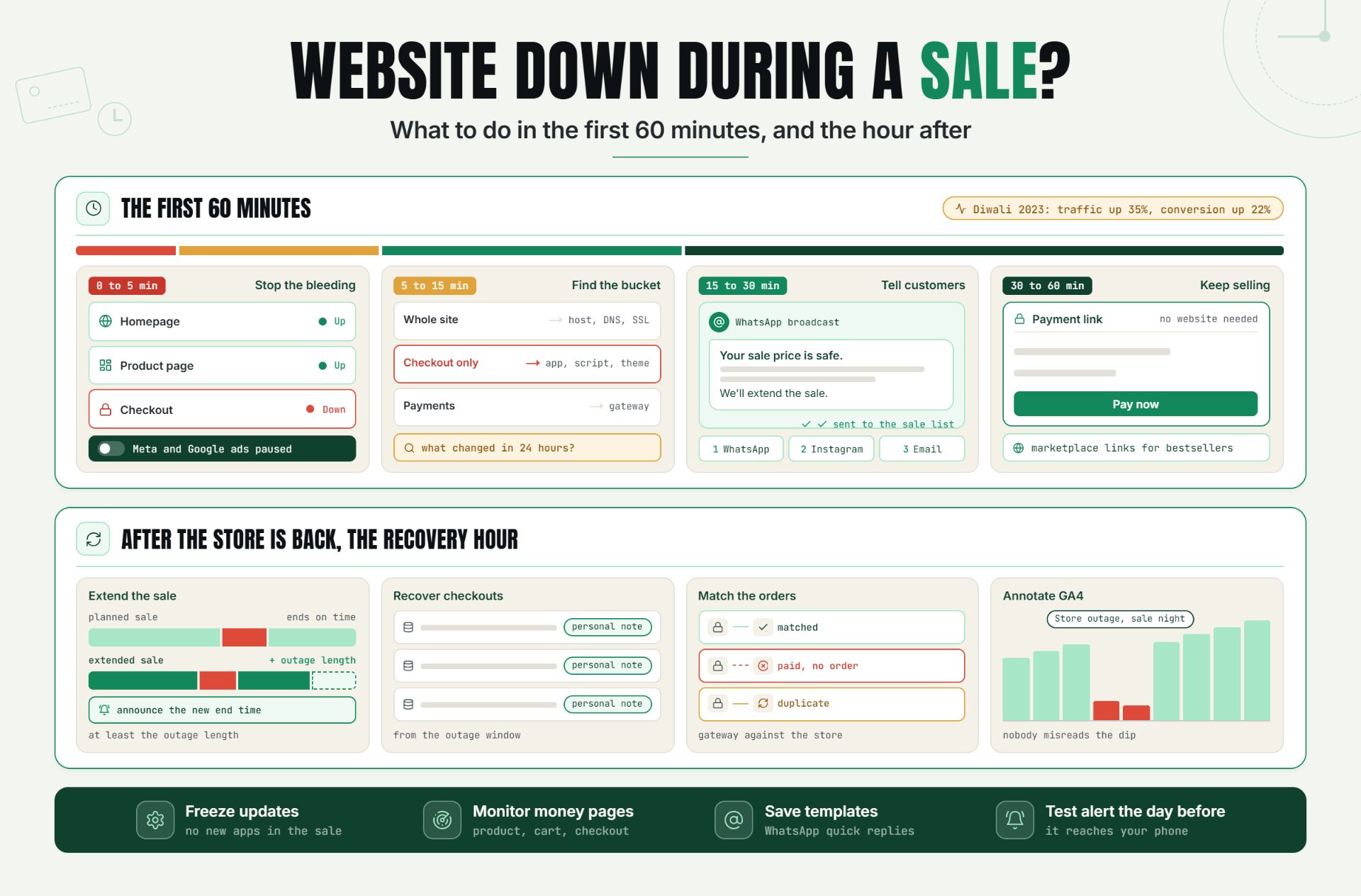
The sale is live, the ads are running, the WhatsApp blast went out an hour ago, and suddenly the store won't load.
The next 60 minutes decide whether this is a small blip customers forget by tomorrow or the worst night of your season. Most of what goes wrong in that hour is not the outage itself. It is the panic, the silence, and the ads that keep spending money to send people to a broken page.
This guide covers what to do when your website goes down, specifically during a sale. It is written for Indian D2C founders and ecommerce managers on Shopify or WooCommerce, and for agencies running sales for clients. You'll get a timed plan, ready-to-send customer messages, and a one-page checklist you can print and keep next to your laptop.
Why a Website Crash During a Sale Hurts More
A normal outage on a quiet Tuesday afternoon is annoying. A website crash during a sale is different, for three reasons.
Traffic is at its highest.Criteo's analysis of Diwali 2023 found that traffic rose 35% and conversion rates rose 22% during the two weeks leading up to Diwali (October 29 to November 11, 2023). So if your store crashed during a sale like that, it went down exactly when the most ready-to-buy people were trying to reach it.
Ads cost the most. Festive and flash sale periods are when you push your biggest budgets. Every click that lands on an error page is money you paid for nothing.
Patience is at its lowest. A shopper comparing three Diwali offers will not wait for your store to come back. They'll simply buy from the next tab.
Big platforms are not immune either. On Cyber Monday (December 1, 2025), TechCrunch reported that merchants started having trouble logging into Shopify around 6:45 a.m. PT, with about 4,000 outage reports on Downdetector. Shopify later said: "We kept checkout and storefronts online, but access to admin interfaces was temporarily unavailable for some merchants." On June 3, 2026, Shopify acknowledged a problem at 9:27 a.m. EDT affecting admins, checkouts, storefronts, Retail POS and support access, and said it was resolved at 11:31 a.m. EDT, as PYMNTS reported. Some shoppers saw a "This store does not exist" page during that outage.
The point is not that Shopify is unreliable. Every platform, host and payment gateway has bad days. The point is that your response is the part you control.
When a store goes down mid-sale, most owners do one of three things: panic and start changing settings, go completely silent, or leave ads running while the store is broken. The plan below avoids all three.
What to Do When Your Website Goes Down During a Sale: The First 60 Minutes
Minute 0 to 5: Confirm It and Stop the Bleeding
Confirm the outage is real
Your own browser is a poor witness. It may be showing a cached page, or your office Wi-Fi may be the problem.
- Check from outside your network. Use the free Website Uptime Checker to see whether your store responds and what status code it returns. Then open the site on mobile data.
- If you're on Shopify, open the official Shopify status page. If checkout or storefronts show an incident there, the problem is likely platform-wide, not yours.
- Test three pages, not one: homepage, a product page, and checkout. A store can load fine while checkout fails.
Pause your ads
If the store is truly down, pause paid traffic now. Don't wait until you know the cause.
- Meta: In Ads Manager, toggle off the sale campaigns (or select them and click "Turn off" to switch them off in bulk).
- Google Ads: As Google Ads Help explains, click the status dot next to each campaign and choose Pause. You can also select several campaigns and pause them together from the Edit menu.
Pausing keeps your campaign settings and history, so you can switch them back on the moment the store recovers.
Note the exact start time
Write down when you first saw the problem, and if you have monitoring, the time of the first failed check. You'll need this for the sale extension, the cost calculation and the GA4 note later. Thirty seconds of writing now saves an argument later.
Minute 5 to 15: Find the Likely Cause
You don't need a full diagnosis yet. You need to know which bucket the problem falls in, so you call the right person.
Full outage, checkout only, or payment gateway?
- Whole site down (error page, timeout, nothing loads): platform, hosting, DNS or SSL.
- Site loads, but checkout fails: a checkout app, a script, a theme change, or the checkout service itself.
- Checkout loads, but payments fail: the payment gateway. Check your gateway's dashboard and status updates.
Traffic overload or a recent change?
Ask one question: what changed in the last 24 hours? An app install, a plugin update, a theme edit or a new script added for the sale is a very common cause. If something changed, that's your first suspect. If nothing changed and traffic is spiking, especially on WooCommerce with shared hosting, the server may simply be overloaded.
DNS or SSL problems
If browsers show a security warning, your SSL certificate may have expired or be misconfigured. If the domain doesn't resolve at all, check DNS and domain renewal. These are boring causes, which is exactly why they get missed. Our guide to SSL certificate monitoring explains how to catch an expiring certificate before it breaks checkout.
Could it be a DDoS attack?
Huge traffic from odd sources with no matching rise in real orders can point to an attack. Don't guess publicly. Tell your host or CDN provider what you're seeing and let them check.
Minute 15 to 30: Tell Customers Before They Tell You
Silence is the most expensive mistake in an ecommerce outage response. Customers who can't check out will message you, comment on your posts, and assume the worst. A short, calm update turns frustration into patience.
Send updates on the channels your buyers actually use. For most Indian D2C brands, that means WhatsApp first, then Instagram, then email.
WhatsApp broadcast template
Hi! Our website is having a technical issue right now, so some of you can't place orders. We're fixing it. Your sale price is safe: we'll extend the sale once we're back, and we'll message you as soon as the site is live. Want to order right now? Reply to this message and we'll help you here. Sorry for the trouble.
Instagram story template
Our website is having a hiccup during the sale. We're on it. Your sale price is protected and we'll extend the sale. DM us to order now, or check back soon. We'll post the moment we're live again.
Email template
Subject: Our site is having trouble. Your sale price is safe.
Hi [First name],
If you tried to shop with us in the last hour and the site wouldn't load, we're sorry. We're working on a technical issue right now.
Here's what we're doing:
- Fixing the issue as fast as we can.
- Extending the sale so nobody misses out. We'll share the new end time once we're back.
- Taking orders on WhatsApp in the meantime: [WhatsApp link].
Thanks for your patience.
[Your name], [Brand]
Keep it honest. Don't promise a time you can't keep, and don't blame anyone by name.
Minute 30 to 60: Keep Selling Another Way
If the store is still down after 30 minutes, stop waiting and open another door.
Take orders on WhatsApp with payment links
You can collect payment without a working website. Razorpay Payment Links can be created from the Razorpay Dashboard and shared by email, SMS or social media, with no website required. PhonePe and Cashfree also offer payment links that can be shared on WhatsApp, SMS or email. Create one link per order, confirm the address in chat, and log each order in a sheet so nothing gets lost.
If you normally offer cash on delivery, you can also confirm COD orders in chat. Just be careful with COD during a confused moment: confirm the address and phone number clearly so you don't create returns later.
Point buyers to your marketplace listings
If you also sell on Amazon, Flipkart, Myntra, Nykaa or similar, share those links for your bestsellers. You'll pay marketplace fees, but a sale there beats no sale at all.
Send traffic to a simple backup page
If your domain still works but the store doesn't, a basic landing page with your WhatsApp number and top products can catch visitors. Set this up before the sale, not during it.
Who to Call
| Problem | Who to contact first |
|---|---|
| Shopify storefront, admin or checkout down | Shopify support (and check shopifystatus.com) |
| WooCommerce site down or very slow | Your hosting provider |
| Broke right after an app, plugin or theme change | Your developer or agency |
| Payments failing at checkout | Your payment gateway (Razorpay, PhonePe, Cashfree or similar) |
| Security warning or domain not loading | Whoever manages your domain, DNS and SSL |
Keep these contacts in one document before every sale. Searching for a support email at 11 p.m. on Diwali night is not a plan.
After the Store Is Back: The Recovery Hour
Extend the sale, and say so
Extend your sale by at least as long as the store was down, and announce it loudly. Alertra's write-up on the Southwest Airlines sale crash in June 2015 puts it plainly: "If your site does go down during such an event, make sure you extend the offer to compensate for the downtime and advertise the fact that you are doing so." Southwest extended its fare sale by 24 hours after its website struggled under the traffic.
Use the same channels you used for the outage update. "We're back, and the sale now runs until [new time]" is one of the most welcome messages a customer can get.
Recover the checkouts from the outage window
Pull the list of abandoned checkouts from the outage window. On Shopify, go to Orders > Abandoned checkouts in your Shopify admin, as the Shopify Help Center describes. Most WooCommerce cart-recovery plugins keep a similar list. Send these people a personal note, not your usual automated reminder: "Our site had trouble while you were shopping. Your cart is saved and the sale is extended."
Check for failed or duplicate orders
Outages leave messy data. Look for:
- Payments captured in your gateway with no matching order in the store.
- Orders that show as pending or unpaid even though money was taken.
- Duplicate orders from customers who clicked "Pay" twice.
This usually happens when payment webhooks fail or arrive late. Our guide on webhook monitoring explains how to catch these delivery failures before they turn into angry emails.
Mark the outage in GA4 and your ad reports
GA4 now supports annotations directly in reports. Add one covering the outage date with a short title like "Store outage, sale night" so nobody misreads the dip next month. You need Analyst access or above at the property level to create annotations. Titles are limited to 60 characters and descriptions to 150. Add the same note in your ad reports or campaign notes.
Work out what it cost
Use the Downtime Cost Calculator with your normal hourly revenue for that sale and the outage length you noted at minute zero. The number is useful for one thing: deciding how much prevention is worth before the next sale.
Practical Examples (Illustrative Scenarios)
These are made-up scenarios to show how the plan works. They are not real Statixoup customers.
Scenario 1: A Shopify store where checkout broke on Diwali night
A skincare brand installs a new upsell app the evening before its Diwali sale. The homepage loads fine, so nobody notices that the checkout button now throws an error. An uptime check on the checkout URL flags it within a minute. The founder pauses Meta ads, confirms Shopify's status page is clear, disables the new app, and checkout works again. A WhatsApp update goes out, the sale is extended by an hour, and abandoned checkouts from the window get a personal message.
Scenario 2: A WooCommerce store on shared hosting that crashed when a Meta ad went viral
A small ethnic-wear label on shared hosting sees a reel take off during a flash sale. The site starts timing out. The owner pauses the ad (the irony hurts), posts an Instagram story with a WhatsApp number, and starts taking orders through payment links. The host moves the site to a bigger plan that night. The lesson: the flash sale website was down because the hosting was sized for a normal day, not a viral one.
Scenario 3: An agency handling a client's flash sale outage
An agency runs a client's 6-hour flash sale. The store goes down for 25 minutes. Instead of fielding a phone call every five minutes, the agency shares a status page link with the client. The client sees live status and incident updates while the team fixes a plugin conflict. Afterwards the agency shares the incident timeline and the cost estimate in the post-sale report. If you run sales for several clients, see how agencies can offer uptime monitoring as a retainer service.
Best Practices Before Your Next Sale
- Write a one-page "store down" plan. Who checks, who pauses ads, who messages customers, who calls whom.
- Save customer message templates in advance. Put them in WhatsApp quick replies and your email tool as drafts.
- Keep support contacts and logins in one place. Shopify support, host, developer, payment gateway, domain registrar.
- Freeze updates during the sale window. No new apps, plugin updates or theme edits from the day before the sale until it ends.
- Monitor the pages that make money. Set up website monitoring checks on your homepage, a top product page, cart and checkout. Statixoup checks as often as every 30 seconds on paid plans (the Free plan checks every 3 minutes) and can alert you by WhatsApp on all plans, with SMS and voice call alerts on Team and Enterprise plans.
- Run a test alert the day before. Statixoup's integrations include a one-click test alert, so you know the WhatsApp message or phone call will actually reach you.
Common Mistakes That Make an Outage Worse
- Keeping ads running during the outage. You pay to send buyers to an error page.
- Going silent on social media. Customers fill the silence with their own stories.
- Blaming the platform publicly before checking your own setup. Often the cause is a recent app, plugin or script on your side.
- Making changes in a panic. Change one thing at a time and write down what you changed.
- Ending the sale on time anyway. Customers who were locked out feel cheated.
- Never measuring the cost or reviewing what happened. Without a short review, the same outage happens next Diwali.
The "Store Down During Sale" Checklist
Copy this and keep it pinned before every sale.
Minute 0 to 5: Confirm and stop the bleeding
- Check the store from outside your network (uptime checker plus mobile data).
- Check shopifystatus.com if you're on Shopify.
- Test homepage, product page and checkout.
- Pause Meta and Google ads.
- Write down the exact start time.
Minute 5 to 15: Find the likely cause
- Decide: full outage, checkout only, or payments only.
- Ask: what changed in the last 24 hours?
- Check for SSL warnings or DNS problems.
- Call the right contact (platform, host, developer or gateway).
Minute 15 to 30: Tell customers
- Send the WhatsApp broadcast.
- Post the Instagram story.
- Send the email to your sale list.
Minute 30 to 60: Keep selling
- Take orders on WhatsApp with payment links or confirmed COD.
- Share marketplace links for bestsellers.
- Point traffic to a backup page if you have one.
After recovery
- Extend the sale by at least the outage length and announce it.
- Message abandoned checkouts from the outage window.
- Check for failed, pending or duplicate orders.
- Add a GA4 annotation and a note in ad reports.
- Calculate the cost and hold a 15-minute review.
Conclusion
You can't promise a sale with zero problems. Nobody can, not even the biggest platforms. But you can promise a fast, calm response.
Most of the damage from a website being down during a sale comes from the minutes nobody knew: the ads that kept running, the customers who heard nothing, the checkout that failed quietly while the homepage looked fine. Shrink those minutes, and a bad night becomes a short one.
Get Alerted the Moment Your Store Goes Down
Before your next sale, run your store through the free Website Uptime Checker to see how it responds right now.
Then start a 7-day Statixoup free trial (no credit card needed) and set up monitors on your homepage, product page, cart and checkout. You'll get a WhatsApp alert the moment something breaks, with SMS and voice call alerts available on Team and Enterprise plans, so you're pausing ads and messaging customers in minutes, not finding out from an angry DM.
Follow Statixoup
Enjoyed this post? Follow us for uptime monitoring tips, product updates, and new articles.
Post a Comment

Hardik Vaghani
Hardik Vaghani is a Digital Marketing Professional and SEO Strategist based in Surat, Gujarat, India. He currently works with Ethnic Infotech, contributing to SEO, content marketing, technical SEO, and digital growth strategies. Hardik also creates blog content for Fusion5, focusing on technology, laptops, and consumer electronics. With expertise in SEO, Google Ads, Meta Ads, Local SEO, and Content Strategy, he helps businesses improve online visibility, rankings, and lead generation through data-driven marketing.
Frequently Asked Questions
Related Blogs
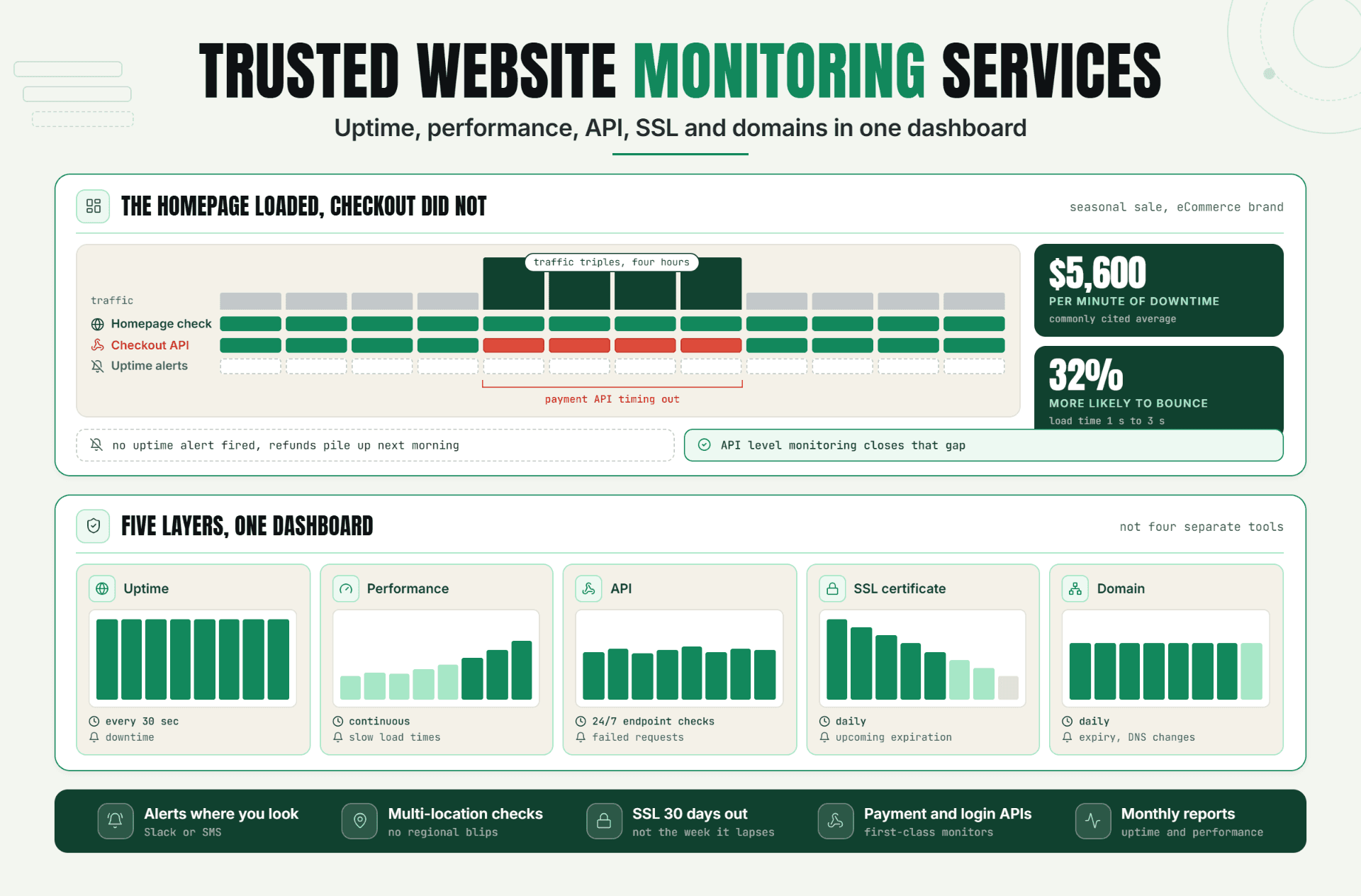
Keeping a website online isn't enough anymore. Uptime, performance, APIs, SSL certificates, and domains all need to work together to keep customers happy. This guide breaks down what a complete website monitoring service should cover, why gaps in any one layer can cost real revenue, and how Statixoup brings uptime, performance, API, SSL, and domain monitoring into a single dashboard.

Read Article
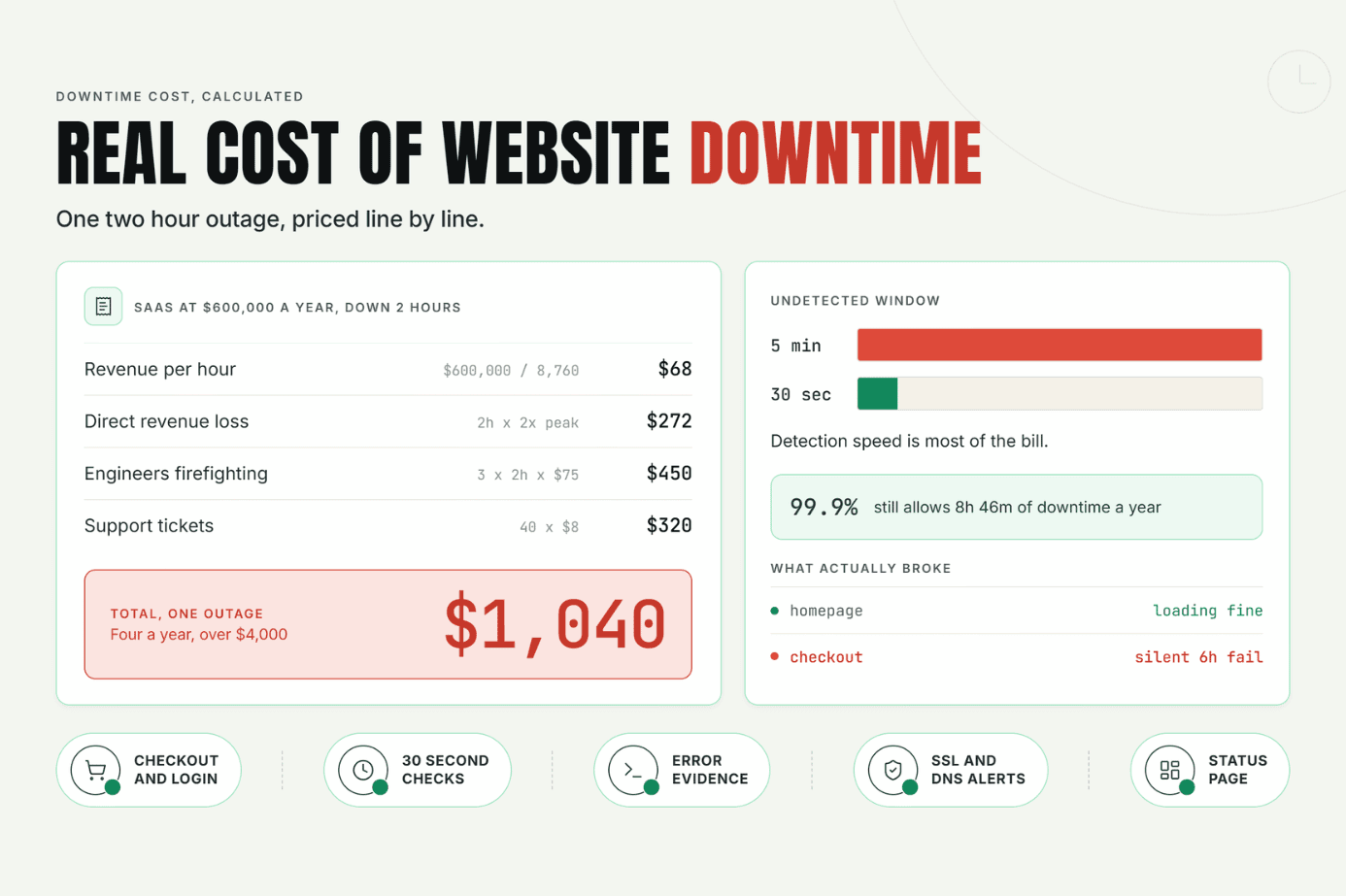
Most businesses never put a real number on the cost of website downtime until an outage hits. This guide breaks down what downtime actually costs beyond lost sales, walks through a simple formula to calculate your own number, and shows how faster detection cuts the damage.
Read Article
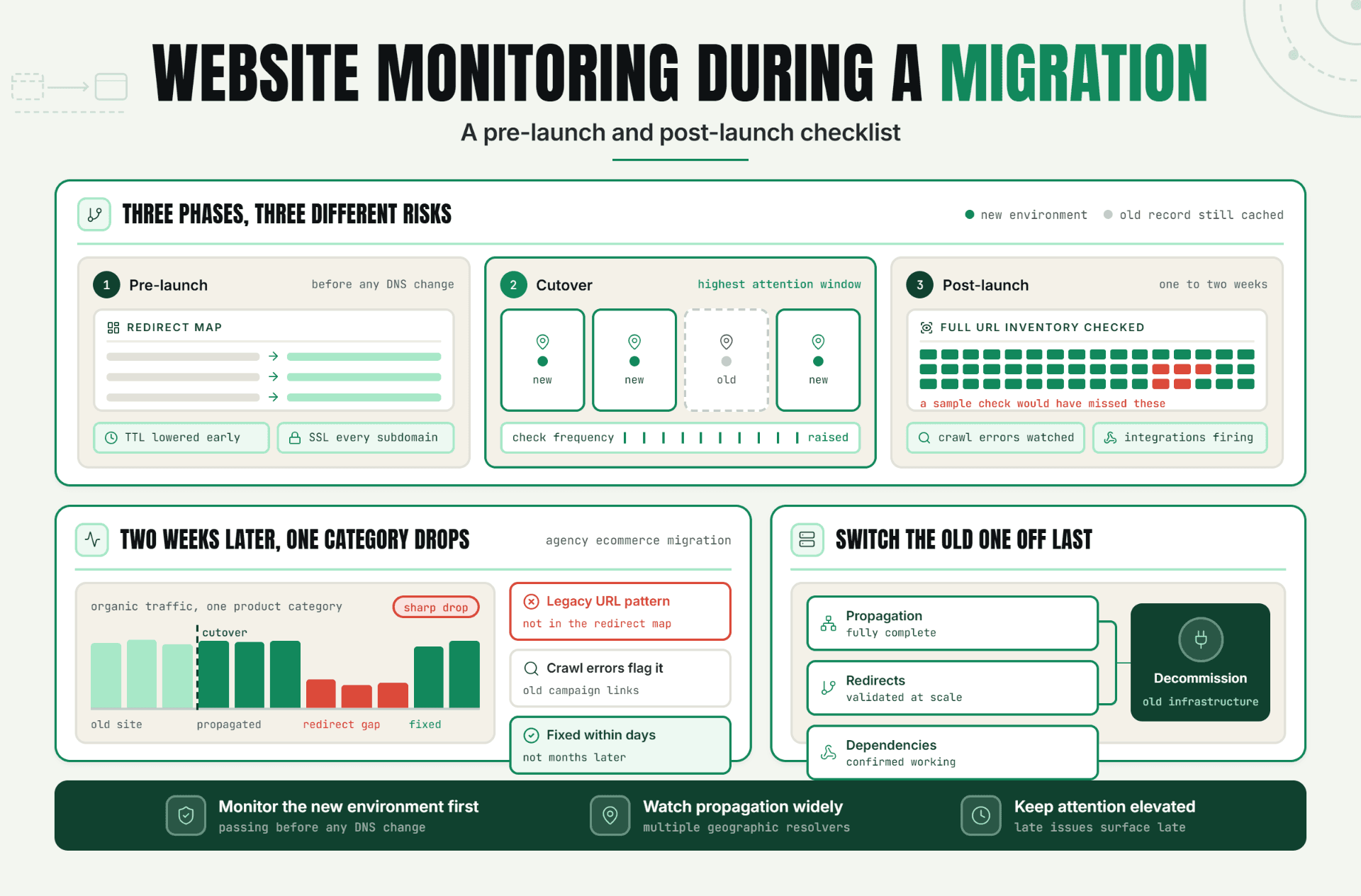
Most migration disasters aren't one big failure, they're a missed redirect, an incomplete DNS cutover, and a forgotten dependency, compounding quietly while nobody's watching closely enough. Get the phased pre-launch, cutover, and post-launch checklist to catch them first.

Read Article
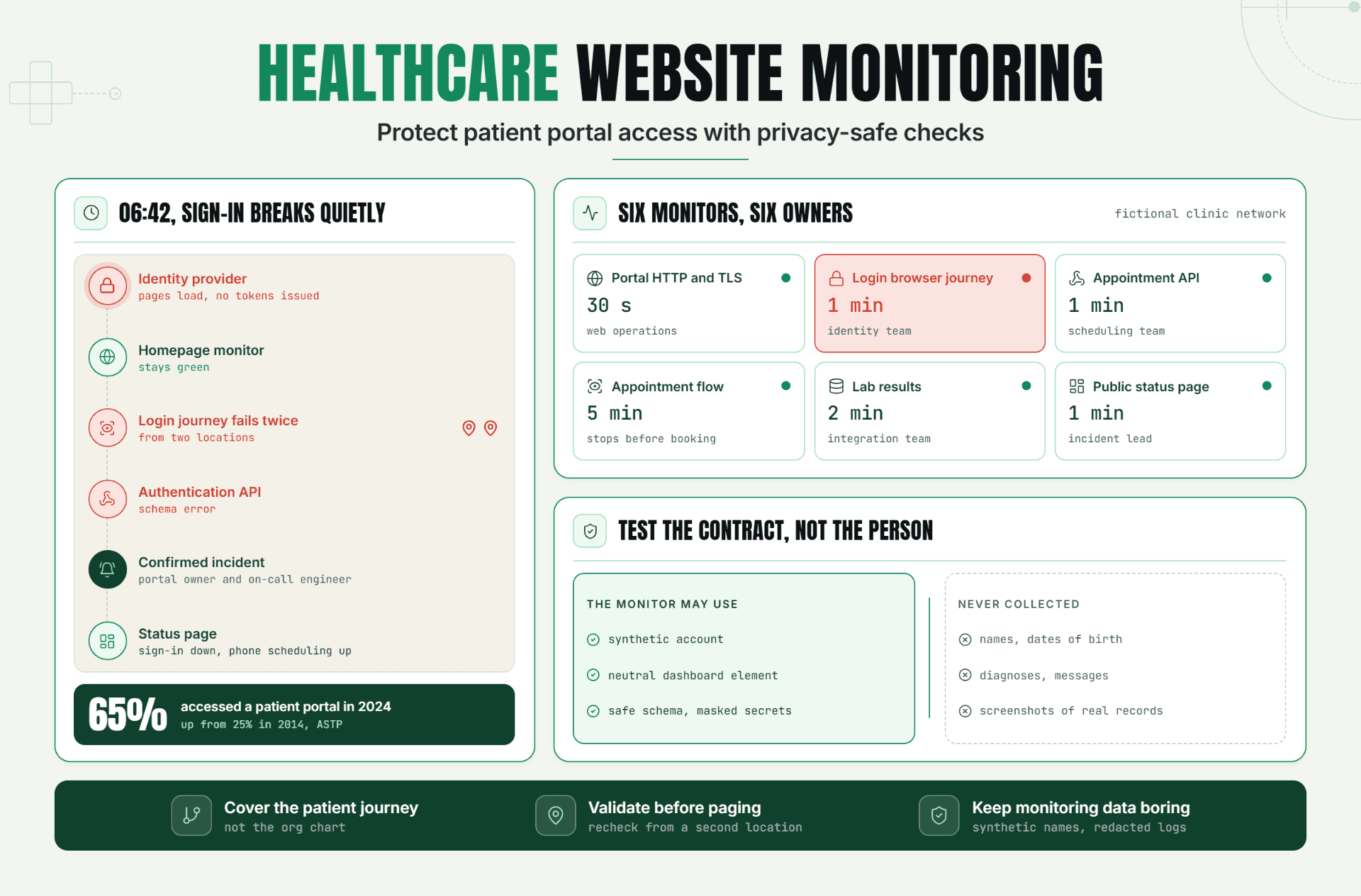
Learn how healthcare website monitoring protects patient access across portals, logins, APIs, appointments, SSL, and browser journeys. This guide explains how to detect failures quickly while using synthetic data and privacy-safe monitoring practices.
Read Article
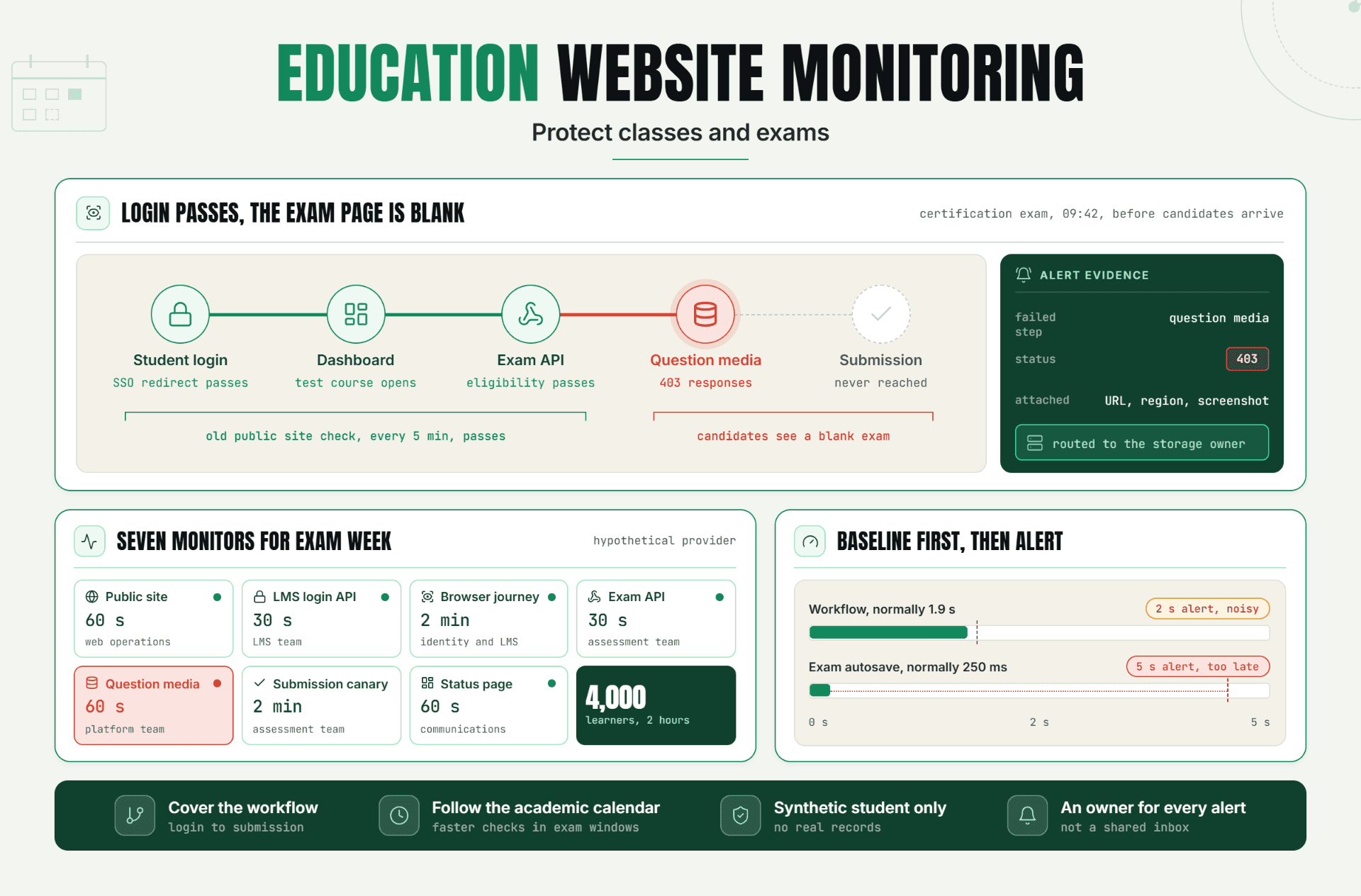
Learn how education website monitoring helps protect online classes, exams, learning platforms, and student logins from unexpected downtime. Discover practical ways to detect issues early and maintain reliable access for students and educators.
Read Article
