Website Outage Root Cause Analysis: Find the Cause
Learn how website outage root cause analysis transforms alerts, logs, monitoring timelines, and dependency data into clear evidence. This guide explains how to identify the real cause, avoid blame, and create corrective actions that prevent repeat outages.
The short answer: website outage root cause analysis is a structured investigation that turns incident evidence into a defensible explanation of the trigger, contributing conditions, customer impact, and corrective actions. A good RCA doesn’t stop at “the server crashed.” It explains why the system allowed that crash to become a customer-visible outage and what will reduce the chance or impact of a repeat.
This guide starts after the immediate fire is controlled. For containment, communication, and restoration roles, use Statixoup’s website incident response diagnosis method. Here, the job is different: preserve evidence, reconstruct the sequence, test competing explanations, and turn findings into owned work.
Why Outage Investigations Fail Without Evidence
The hardest incident questions arrive after service is restored. Which change started it? Did the database fail first, or did application retries overload it? Was the problem global, regional, or limited to one user journey? If logs have rolled over and screenshots live in private chat threads, confident opinions quickly replace facts.
That’s the operational risk. Without website outage root cause analysis, teams confuse the first visible symptom with the cause. A 502 response might point to an origin failure, but it can also follow a load balancer timeout, exhausted connection pool, failed dependency, bad deploy, or DNS mistake. One status code isn’t an explanation.
Time pressure makes this worse. People remember events in different orders, and dashboards use different clocks or time zones. A clean monitoring timeline reduces that ambiguity. Statixoup’s guide to MTTD vs MTTR explains the speed metrics. RCA adds the learning layer: why detection and recovery took as long as they did.
How Website Outage Root Cause Analysis Works
Website outage root cause analysis is an evidence-first RCA process. It separates five things that teams often mix together: impact, detection, trigger, contributing conditions, and root cause. That separation matters because each produces a different corrective action.
Start With Impact, Not the Most Dramatic Log Line
Define the customer effect before reading hundreds of logs. Record the affected endpoints or journeys, regions, user groups, error types, start time, recovery time, and business function. “The site was down” is usually too broad. “Authenticated checkout returned HTTP 500 in two regions for 18 minutes while product browsing remained available” is testable.
Then compare outside-in checks with internal telemetry. External monitoring shows what a user could reach. Application logs explain code behavior. Infrastructure metrics show resource pressure. Deployment records show change. None is sufficient alone.
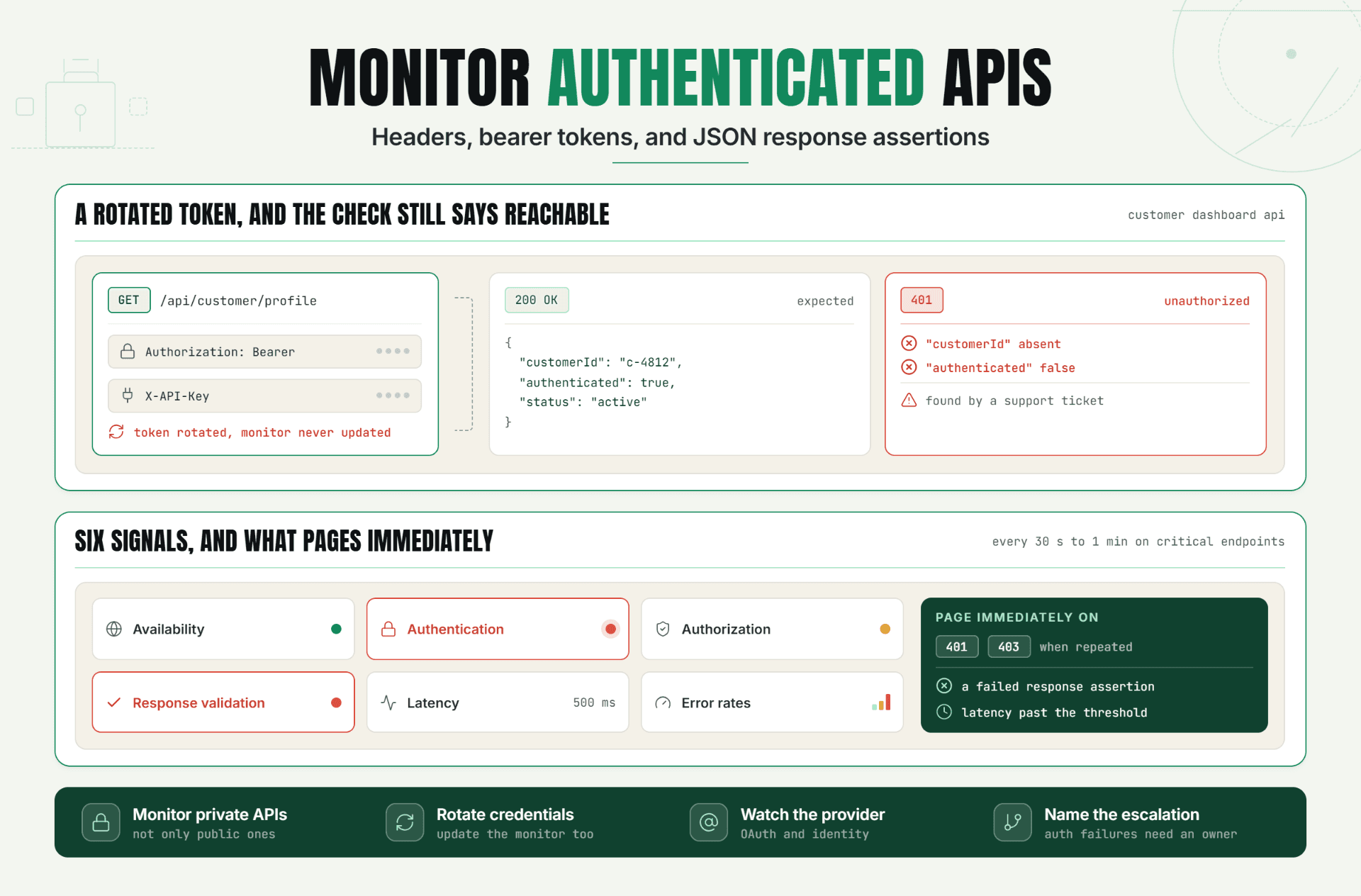
This is where validation matters. A monitor that checks only for HTTP 200 can report success while a page contains an error message or an empty component. Statixoup’s article on reducing false positive alerts explains why response validation and confirmation checks produce more trustworthy incident evidence.
Build the Monitoring Timeline Before Debating Cause
Normalize every timestamp to UTC, then preserve the original time zone in the source record. Put alerts, deploys, configuration changes, DNS updates, certificate events, queue depth, database connections, customer tickets, mitigations, and recovery signals on one line.
Use this numbered website outage root cause analysis process:
1. Define the customer impact and incident window. 2. Freeze relevant logs, traces, screenshots, and monitor results. 3. Normalize timestamps. 4. Mark the first abnormal signal in every system. 5. List recent changes and dependency events. 6. Form two or three competing hypotheses. 7. Test each against the sequence. 8. document the trigger, contributing factors, root cause, and corrective actions. The result is an explanation another engineer can challenge and reproduce.
The Earliest Symptom in Website Outage Root Cause Analysis Isn’t Automatically the Cause
Suppose API latency rises at 10:03, database connections spike at 10:04, and checkout failures begin at 10:05. The API signal came first, but that doesn’t prove application code caused the incident. A slow payment dependency may have held requests open, which consumed application workers and database connections. Sequence narrows the possibilities. It doesn’t finish the reasoning.
Separate Trigger, Root Cause, and Contributing Factors in Website Outage Root Cause Analysis
A trigger starts the event. A root cause explains the system weakness that allowed the event to produce impact. Contributing factors increased the severity, duration, or detection delay.
Example: a configuration push may be the trigger. Missing schema validation may be the root cause. Slow alert routing, an undocumented rollback, and a single-region check may be contributing factors. Calling the engineer’s push “the root cause” is shallow and usually produces the weakest possible action: “be more careful.”
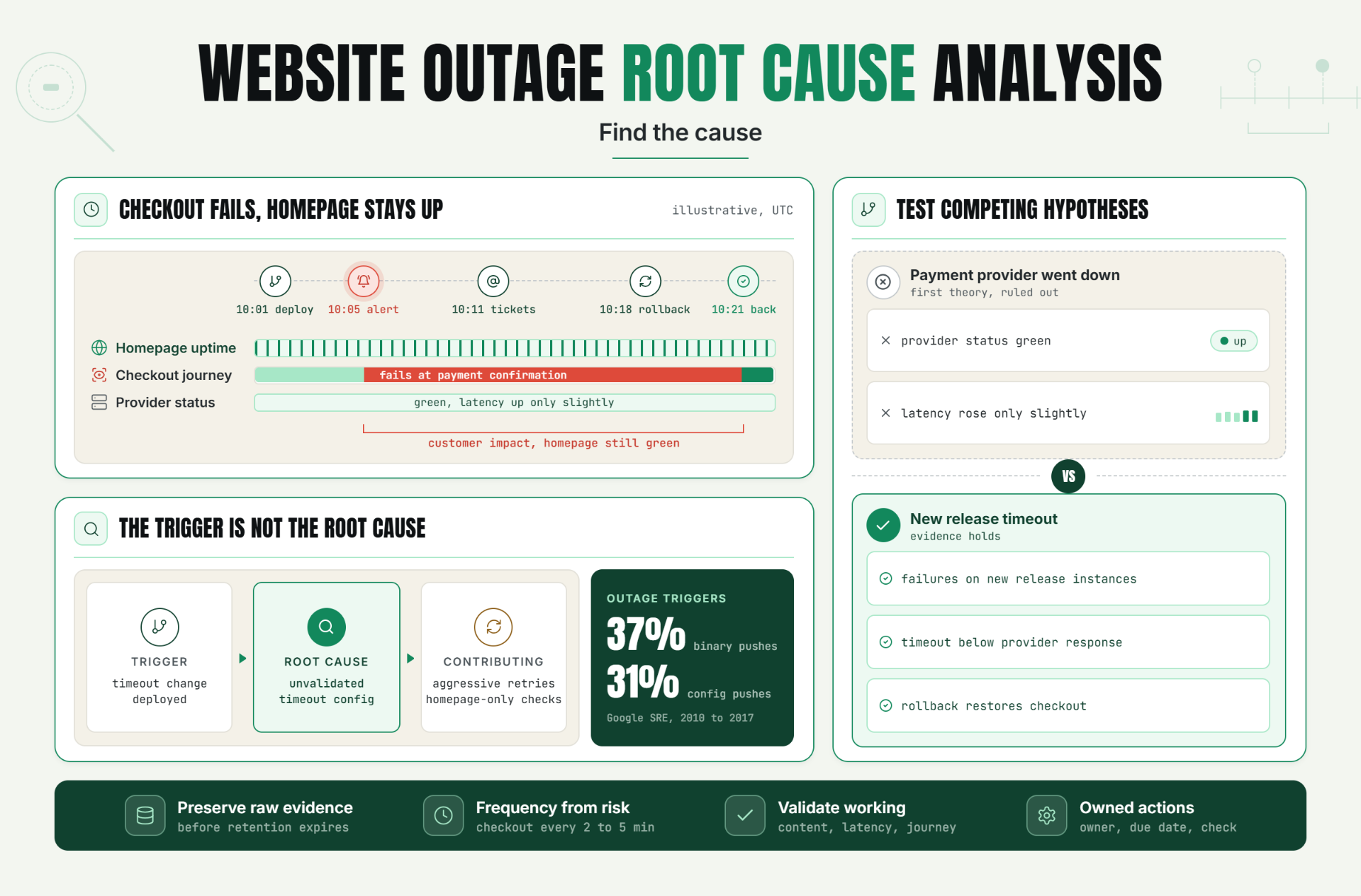
Google’s SRE analysis of thousands of postmortems from 2010 to 2017 found binary pushes accounted for 37% of outage triggers and configuration pushes for 31%. Yet its contributing root-cause categories were broader, led by software at 41.35% and development-process failure at 20.23%. That distinction is the point: the triggering change and the underlying weakness aren’t always the same. See Google’s official postmortem analysis.
Test a Website Outage Root Cause Analysis Against Competing Hypotheses
Most weak RCAs tell one plausible story. Strong website outage root cause analysis tries to disprove that story.
If the hypothesis is “the deploy caused checkout failures,” ask what evidence should exist: the deploy precedes the first failure; affected instances run the new version; rollback reverses the error; and no dependency degradation better explains the timing. If one condition fails, keep investigating.
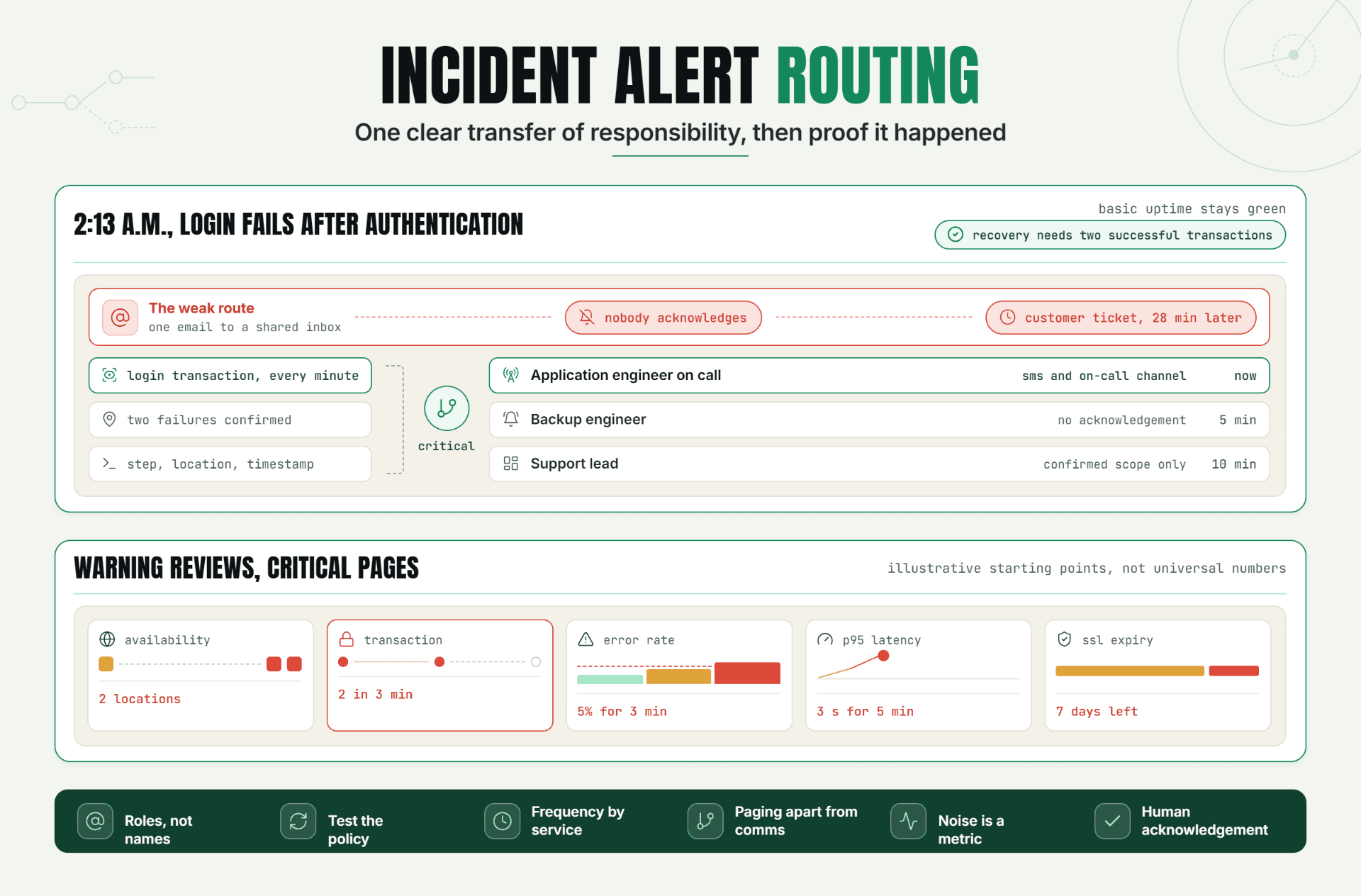
Try at least one alternative. Was there a dependency failure? Did DNS resolution vary by region? Did a certificate chain fail only for one client type? Were retries amplifying a small slowdown? Statixoup’s incident alert routing guide is useful here because evidence reaches the right owner faster when service and escalation ownership are already mapped.
Turn Website Outage Root Cause Analysis Findings Into Corrective Actions
Corrective actions should change a system, guardrail, monitor, runbook, or ownership rule. “Remind the team” isn’t enough.
Use condition-action wording. If a configuration can break checkout, add automated validation and a canary check before full rollout. If a dependency slowdown exhausts workers, set timeouts, circuit breaking, and a dependency-specific monitor. If detection missed a broken journey, monitor the transaction rather than only the homepage.
Google’s SRE guidance treats postmortems as written records of impact, response, root causes, and follow-up actions. It also recommends blameless analysis because people share more useful evidence when the investigation focuses on system conditions, not punishment. The Google SRE postmortem culture chapter provides the full rationale.
A Production Scenario: Checkout Fails While the Homepage Stays Up
Consider this clearly labeled illustrative example. A SaaS commerce platform deploys a payment-service timeout change at 10:01 UTC. Homepage uptime checks remain green. At 10:05, transaction monitors begin failing at the payment-confirmation step. Support tickets arrive at 10:11. Engineers roll back at 10:18, and successful checkouts return at 10:21.
The first theory says the payment provider went down. But provider status is green, its latency rose only slightly, and failed requests are concentrated on instances running the new release. Application traces show the new timeout is lower than normal provider response time. Retries then increase worker usage, making the failure spread.
The website outage root cause analysis records the deployment as the trigger. The root cause is an unvalidated timeout configuration with no realistic pre-production latency test. Aggressive retry behavior is a contributing factor. Homepage-only coverage delayed detection of customer impact.
For website outage root cause analysis, the recommended monitor setup is specific:
- Run a transactional checkout check every two to five minutes from at least two relevant locations.
- Validate the final confirmation text or expected response, not just HTTP status.
- Monitor the payment API separately for availability and latency.
- Alert only after confirmation from another check or location when the failure mode permits it.
- Route transaction failures to the commerce on-call owner and dependency failures to the integration owner.
- Keep a public status page separate from the private diagnostic dashboard, as explained in status page vs monitoring dashboard.
What changed after the website outage root cause analysis? The team adds configuration bounds, deploy canaries, retry limits, transaction monitoring, and explicit ownership. No invented percentage improvement is needed. The value is visible in the controls that now block or shorten the same failure path.
Best Practices for Evidence-Led RCA
Preserve Raw Incident Evidence for Website Outage Root Cause Analysis
Export monitor results, logs, traces, deploy records, and relevant chat decisions before retention windows or edits remove context. Keep links to originals. Screenshots help, but machine-readable exports are better for sorting and comparison.
Set Check Frequency From Business Risk
A 30-minute check can’t create a precise timeline for a 12-minute outage. Use shorter intervals for checkout, authentication, APIs, and other revenue or access paths. Lower-risk pages can run less often. Frequency should reflect acceptable detection delay, not a single default.
Validate What “Working” Means
Check status code, content, latency, and journey completion where relevant. Website outage root cause analysis becomes guesswork when the monitor only proves that a server answered something.
Assign Website Outage Root Cause Analysis Owners
One person should maintain the timeline. Service owners should validate technical findings. Every corrective action needs an owner, due date, and completion check. Otherwise an RCA becomes a well-written archive of a problem that returns.
Keep the Review Blameless and Specific
Blameless doesn’t mean vague. Name the change, missing guardrail, flawed assumption, and decision context. Don’t label a person as the cause. Systems should make safe behavior easier and unsafe states harder to deploy.
Common RCA Mistakes
Stopping at the First Human Action
“A developer deployed a bad config” describes a trigger, not a complete cause. Ask why invalid values passed review, testing, deployment, and monitoring. Fix those layers.
Trusting a Weak Green Check
A homepage returning 200 can hide broken login, search, signup, and checkout flows. Add content validation, API checks, or transaction monitoring based on the user journey.
Collecting Evidence After It Expires
Short log retention and overwritten dashboards erase the incident window. Freeze sources during response, then perform website outage root cause analysis with preserved data.
Ignoring Dependencies
Teams inspect their code while a DNS resolver, CDN, identity provider, payment API, queue, or database is failing. Map dependencies before the next incident and monitor the ones that can break customer journeys.
Writing Website Outage Root Cause Analysis Actions Nobody Owns
“Improve monitoring” is not actionable. “Add a two-location checkout check with confirmation-text validation, owned by Platform, due Friday” is.
Conclusion
The practical gain from website outage root cause analysis isn’t a polished document. It’s a shorter path from alert to evidence, from evidence to a tested explanation, and from explanation to changes that make recurrence less likely or less damaging.
Start with one action: choose a customer-critical journey and confirm that your monitoring records enough detail to reconstruct a failure. Can you see when it broke, where it broke, what validation failed, and when it recovered? If not, the next RCA will begin with missing evidence.
This guide doesn’t replace incident command, stakeholder communication, or service restoration. Those belong in the response process. Its purpose is narrower and more valuable after recovery: learn what the incident proved.
Start Your 30-Day Statixoup Beta
Start a 30-day Statixoup beta and configure the monitor that protects your most important customer journey. Set the check interval, validation rule, locations, and alert owner before the next outage. Review Statixoup pricing and beta options, then use the first real alert as the beginning of an evidence trail, not another mystery.
Editor note: Add the approved Statixoup author bio block before publishing. No author credentials were inserted because the brief requested no named author and the site evidence did not establish credentials for this article.
Start Your 30-Day Statixoup BetaPost a Comment

Hardik Vaghani
Hardik Vaghani is a Digital Marketing Professional and SEO Strategist based in Surat, Gujarat, India. He currently works with Ethnic Infotech, contributing to SEO, content marketing, technical SEO, and digital growth strategies. Hardik also creates blog content for Fusion5, focusing on technology, laptops, and consumer electronics. With expertise in SEO, Google Ads, Meta Ads, Local SEO, and Content Strategy, he helps businesses improve online visibility, rankings, and lead generation through data-driven marketing.
Frequently Asked Questions
Related Blogs