Uptime Monitoring for Store Owners: Know Before Customers Do
Your online store takes orders 24/7, but you can’t watch it every minute. This simple guide to uptime monitoring for store owners explains what uptime monitoring is, which pages to watch, how often to check, and how to get instant phone alerts before customers notice a problem. It also shows what uptime percentages really mean in hours and why your platform or host isn’t your monitor. It works for Shopify, WooCommerce and custom stores, so you can catch downtime early and keep your store selling around the clock.
Your online store never closes. It takes orders at 2 a.m., on Sunday afternoons, and in the middle of a Diwali rush. But you are not awake at 2 a.m., and you are not staring at your website on a Sunday afternoon. You are packing orders, answering WhatsApp messages, or simply living your life.
Uptime monitoring for store owners fills that gap. Think of it as a shop assistant who never sleeps. Every few seconds, it walks up to your store, checks that the shutters are open, and tells you the moment they come down.
This guide is for any store owner, on any platform. Whether you sell on Shopify, run WooCommerce on WordPress, or have a custom-built store, you will learn what uptime monitoring is, which pages to watch, how often to check, and how to get alerts on your phone before your customers notice. Where your platform needs special care, we point you to a deeper guide.
The Problem: Who Is Actually Watching Your Store?
Most store owners believe someone is already watching. "Shopify handles that." "My hosting company has 24/7 support." "My developer would tell me."
In practice, most owners find out about an outage in one of three painful ways:
- A customer tells them. A comment on Instagram, a WhatsApp message saying "your site is not opening", or an angry review.
- The order count looks flat. A normally busy evening shows zero orders, and only then does someone open the website.
- The ad budget is gone. You paid for clicks on Meta or Google ads, and every one of those visitors landed on a broken page.
None of these is a monitoring system. They are all ways of finding out late. And the later you find out, the more orders, ad money and customer trust you lose.
Uptime Monitoring Explained for Store Owners
What Is Uptime Monitoring, in One Sentence?
Uptime monitoring is a service that visits your store from the outside, again and again, and alerts you the moment it cannot load properly.
How a check works
Imagine a robot customer. Every 30 seconds, or every few minutes depending on your settings, it opens your store's web address, just like a shopper would. It notes three things: did the page open, did it open correctly, and how long did it take?
If the page fails to open, the monitor does not panic straight away. A good monitor checks again, often from another location, to confirm the problem is real. Once confirmed, it sends you an alert. Statixoup works exactly this way: the first check fails, the failure is verified, the reason is captured, and then your team is notified.
What Uptime Percentages Really Mean in Hours
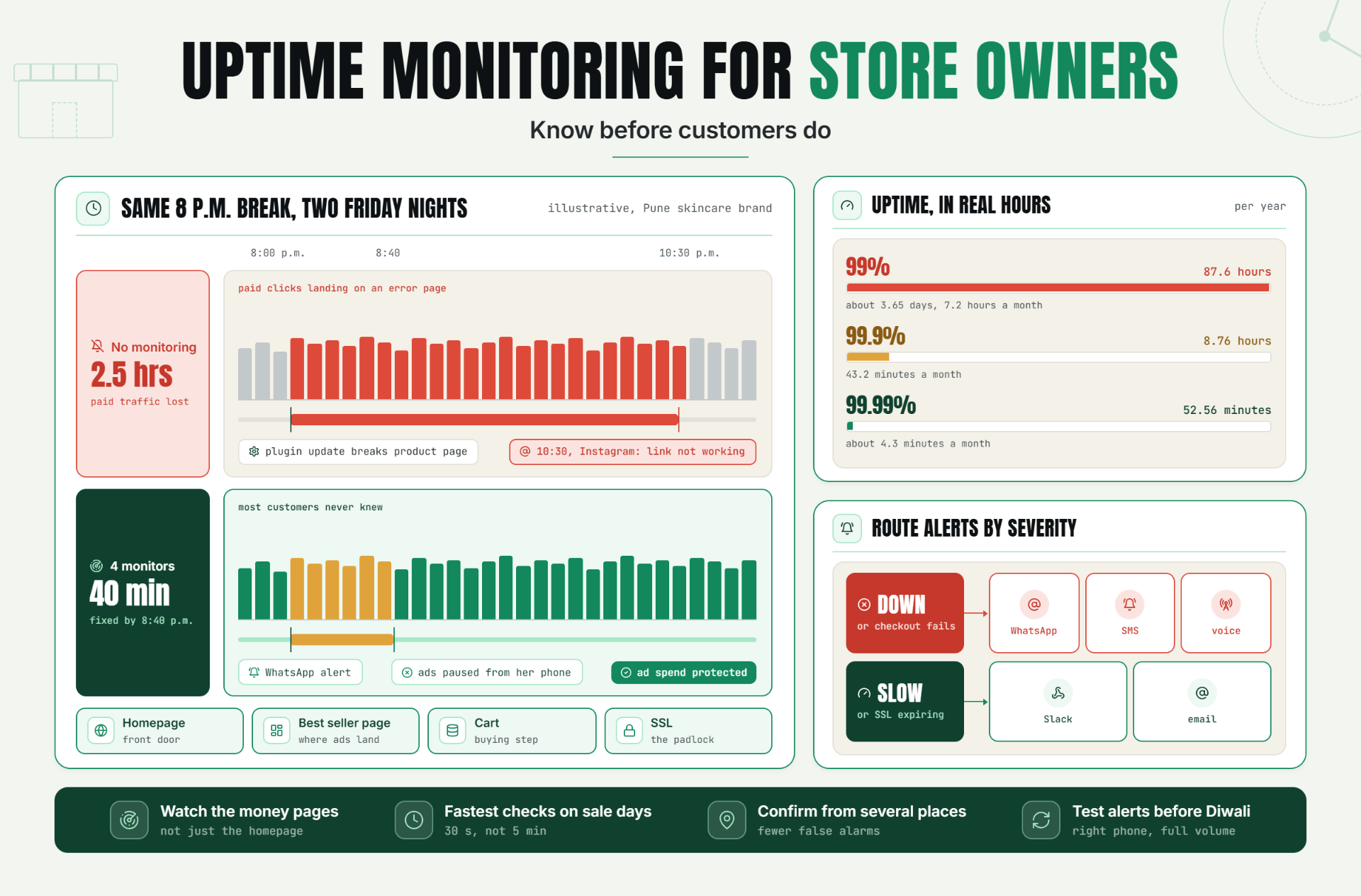
Hosting companies and platforms love to quote uptime percentages. They sound almost perfect, but small differences hide a lot of time. Here is what each number allows over a full year (365 days) and a 30-day month, using the same maths as Google's Site Reliability Engineering availability table:
| Uptime | Downtime allowed per year | Downtime allowed per month (30 days) |
|---|---|---|
| 99% | 87.6 hours (about 3.65 days) | 7.2 hours |
| 99.9% | 8.76 hours (about 8 hours 46 minutes) | 43.2 minutes |
| 99.99% | 52.56 minutes | about 4.3 minutes |
Read that first row again. A store at 99% uptime can be down for more than three and a half days a year. If even one of those hours falls on Dhanteras evening or the first hour of your big sale, that single hour can cost more than a whole quiet week.
The lesson: do not just ask "is my uptime high?" Ask "when did the downtime happen, and how long did it last?" Only monitoring can tell you that.
Why Your Platform or Host Is Not Your Monitor
Your platform and your host do important work, but neither is watching your specific store the way a customer sees it.
- Shopify's status page at shopifystatus.com shows the health of Shopify's own systems, such as Admin, Checkout, Storefront and API. It is useful for checking whether Shopify itself is having a bad day. But a platform status page can show "All Systems Operational" while your store is broken because of an expired domain, a faulty app, a theme change or a DNS mistake. Shopify does offer a store-specific status view, but you have to log in to see it, which means you have to already suspect a problem.
- Hosting uptime promises are promises, not alarms. A hosting service level agreement usually promises a certain uptime percentage, and if the host falls short, the remedy is often a service credit that you must request yourself. It does not phone you when your checkout page fails at midnight. Read your host's terms to see what is actually covered.
An outside monitor sits where your customers sit: on the open internet, looking at your store's real pages.
The Checks Every Store Needs
You do not need to understand the technology. You just need to know what each check protects.
Website (HTTP) checks
The basic "is my store open?" check. It confirms the page loads and returns a healthy response. This is your front door.
SSL certificate checks
SSL is the padlock in the browser bar. If your certificate expires, browsers show a scary security warning and most shoppers leave instantly, especially at the payment step. Certificates expire on a schedule, and those schedules are getting shorter: Let's Encrypt, a widely used free provider, issues 90-day certificates by default, and the industry is moving towards much shorter certificate lifetimes over the next few years. An SSL check warns you before the expiry date, not after.
DNS checks
DNS is the internet's address book. It tells browsers where your store lives. If your DNS settings break or your domain lapses, your store can disappear even though the store itself is fine. A DNS check catches this.
Response time
A store that takes too long to load is almost as bad as one that is down. Response time monitoring tracks how fast your pages open, so you can spot a slowdown before it turns into an outage.
Multi-location confirmation
Sometimes a page fails from one place but works everywhere else, perhaps because of a local network blip. Checking from several locations confirms whether a problem is real before you get woken up. Our guide to Multi-Location Uptime Monitoring explains how this cuts false alarms.
Which Pages to Watch
Your homepage is not your whole store. A homepage can load perfectly while the checkout is broken. Watch the pages that make you money:
- Homepage: the front door most visitors see first.
- Your best-selling product page: where ad traffic and Instagram links usually land.
- Cart page: where shoppers decide.
- Checkout page: where money changes hands, and where payment gateways like Razorpay, PayU or Cashfree connect. Our guide to Indian payment gateway failures[ADD URL] explains what to watch there.
If you run WordPress, our guide WordPress Uptime Monitoring: What to Check Beyond Homepage shows how deep this can go, including login and checkout journeys.
How Often Should Your Store Be Checked?
The check interval is the gap between visits from your robot customer. It decides how long a problem can hide.
- 5-minute checks: a failure can go unseen for up to 5 minutes before the first check even notices, plus verification time.
- 30-second checks: the blind window shrinks to about 30 seconds.
On a quiet Tuesday, 5 minutes may be acceptable. During a Diwali sale with ads running, 5 minutes means paying for clicks that land on a dead page, with no one knowing. That is why sale days need the fastest checks you can get. Statixoup offers checks as fast as 30 seconds; the fastest interval depends on your plan, so look at the pricing page before choosing. For a deeper comparison of what free and paid plans include, read Free vs Paid Uptime Monitoring.
Where Your Alerts Should Go
An alert you do not see is no alert at all. Match the alert channel to how serious the problem is:
- Store is down or checkout fails: WhatsApp, SMS or a voice call. These reach you even when you are away from your laptop. A voice call is hard to sleep through.
- Pages are slow or an SSL certificate expires soon: Slack or email. These need action, but not at 3 a.m.
Statixoup supports alerts through email, Slack, Discord, WhatsApp, SMS and voice call. For many Indian store owners, WhatsApp is the app they already check a hundred times a day, which makes it the natural home for "store down" alerts.
Platform Differences in Brief
The basics above apply to everyone. The details differ by platform.
Shopify (hosted)
Shopify runs the servers, but your domain, apps, theme and checkout customisations are still your responsibility. Read Shopify Store Down? How to Know Within 60 Seconds.
WooCommerce
You or your host manage the server, plugins and updates, so more things can break.
Custom stores
Your developer built it, so you need monitoring that does not depend on them remembering to check. Start with the four monitors below and add checks for any custom checkout or API.
Practical Examples
These are illustrative scenarios to explain the idea. They are not real client stories, and the rupee figures are examples only.
Example 1: A New D2C Brand With No Monitoring
Picture a small skincare brand in Pune. It launches a festive offer on a Friday evening and spends ₹15,000 on Instagram ads. At 8 p.m., a plugin update breaks the product page. Nobody notices. At 10:30 p.m., the founder sees an Instagram comment: "Link not working??" By then, two and a half hours of paid traffic has landed on an error page, and the ad money is gone.
Example 2: The Same Brand With a 15-Minute Setup
Now rewind. The founder spent 15 minutes setting up four monitors: homepage, best-selling product page, cart and SSL. At 8 p.m., the product page check fails. It is confirmed from a second location. Within about a minute, a WhatsApp alert arrives: "Product page down." The founder pauses the ads from her phone, messages her developer, and the page is fixed by 8:40 p.m. The ad spend is protected, and most customers never knew.
Example 3: An Agency Explaining a Monthly Uptime Report
An agency manages a client's WooCommerce store. At the monthly review, the agency shares the uptime report: 99.95% uptime for the month, which works out to about 22 minutes of downtime in a 30-day month. The report shows it happened in one incident on a Tuesday at 4 a.m., during a hosting maintenance window, when traffic was lowest. The client understands the number in plain time, sees that no sale hours were affected, and agrees to faster checks during the upcoming Diwali sale.
Best Practices
Start With 4 Monitors
Begin with homepage, best-selling product page, cart, and SSL. This covers the front door, the landing page, the buying step and the padlock. You can add more later.
Use Multi-Location Checks to Avoid False Alarms
Confirm failures from more than one place before alerting. Fewer false alarms means you will trust the alerts you do get.
Route Alerts by How Serious They Are
Outages go to WhatsApp, SMS or voice call. Slowdowns and warnings go to Slack or email.
Keep a One-Page "Store Down" Checklist
Write down, on one page:
- Who to call first (developer, agency or host) with phone numbers
- How to pause Meta and Google ads quickly
- How to check your platform's status page
- What to post on Instagram or WhatsApp if the outage lasts
Review a Monthly Uptime Report
Once a month, look at how much downtime you had, when it happened, and how long it lasted. Patterns tell you whether your host or setup needs attention.
Test Your Alerts Before Big Sale Days
A week before Diwali, a big marketplace sale season, or your own launch, trigger a test alert. Confirm it reaches the right phone, on WhatsApp, at full volume.
Common Mistakes
Thinking "My Host or Shopify Handles It"
They look after their systems, not your specific pages, domain, apps or settings.
Only Monitoring the Homepage
The homepage can be fine while checkout is broken. Watch the money pages.
Checking Too Slowly
A long check interval means long blind spots. Use your fastest checks on your most important pages, especially during sales.
Email-Only Alerts
Email sits unread at night and on weekends. Use WhatsApp, SMS or voice call for outages.
Ignoring SSL and Domain Expiry
These are the most avoidable outages of all, because the expiry date is known in advance.
Setting It Up Once and Never Testing It
Phone numbers change and team members leave. Test your alerts regularly.
Never Putting a Rupee Figure on Downtime
If you do not know what one hour of downtime costs, you cannot decide how much protection is worth paying for. A simple way: take your average hourly sales on a busy day and multiply by the hours you might be down. If a busy evening brings in ₹20,000 an hour, a two-hour outage is a ₹40,000 problem, before counting wasted ads. The Downtime Cost Calculator.
Conclusion
You cannot watch your store every minute of every day. Nobody can. But you can make sure something does. Uptime monitoring for store owners is not a technical luxury. It is the cheapest insurance an online store can buy: a few minutes of setup that protects your sale days, your ad budget and the trust your customers place in you.
Start small. Four monitors, alerts on WhatsApp, one tested checklist. That alone puts you ahead of most stores.
Follow Statixoup
Enjoyed this post? Follow us for uptime monitoring tips, product updates, and new articles.
Post a Comment

Hardik Vaghani
Hardik Vaghani is a Digital Marketing Professional and SEO Strategist based in Surat, Gujarat, India. He currently works with Ethnic Infotech, contributing to SEO, content marketing, technical SEO, and digital growth strategies. Hardik also creates blog content for Fusion5, focusing on technology, laptops, and consumer electronics. With expertise in SEO, Google Ads, Meta Ads, Local SEO, and Content Strategy, he helps businesses improve online visibility, rankings, and lead generation through data-driven marketing.
Frequently Asked Questions
Related Blogs
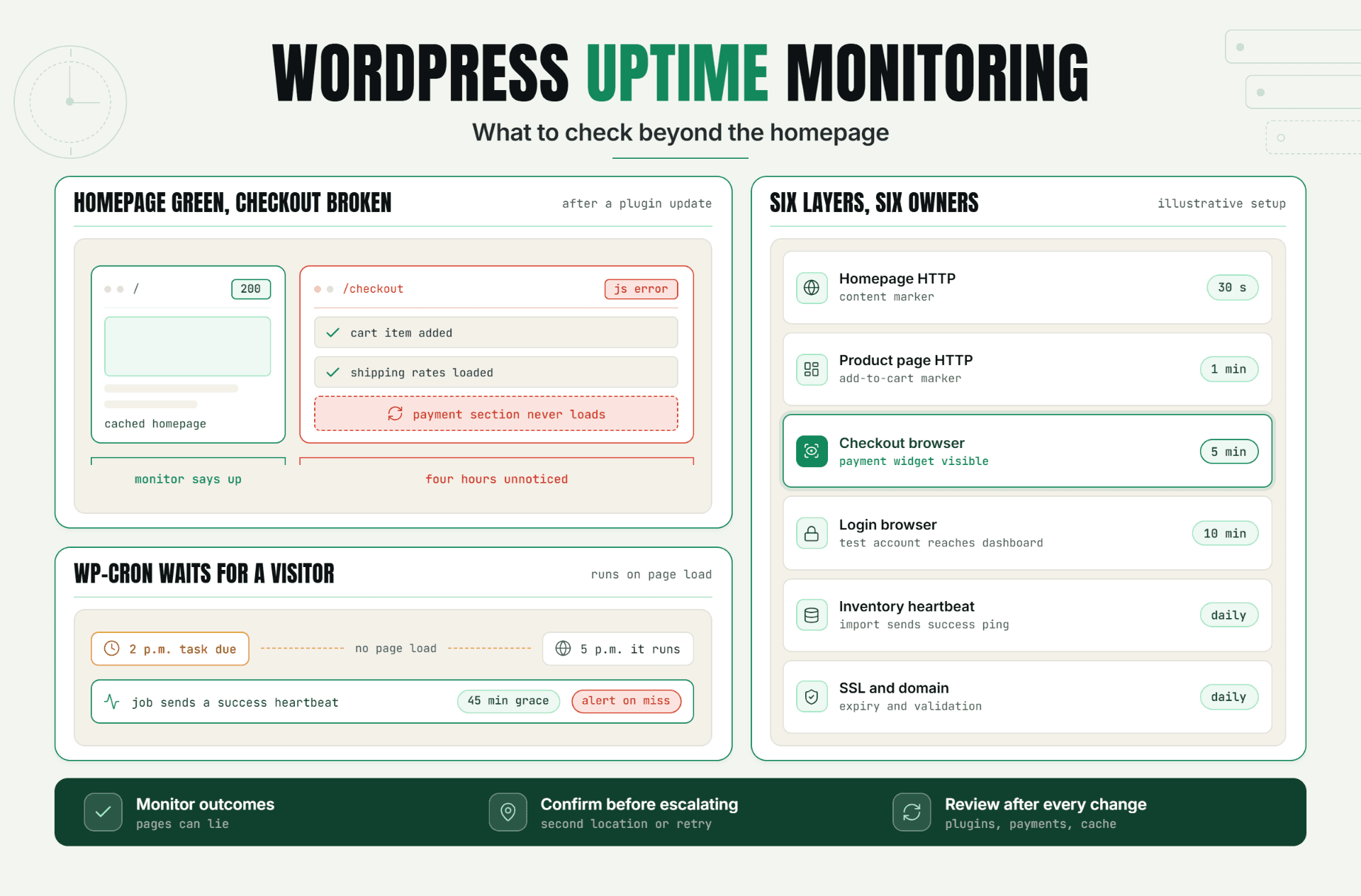
A WordPress homepage can return a clean 200 status while logins fail, scheduled orders stop processing, and checkout spins forever. This blog explains why basic uptime checks miss these failures and walks through building real WordPress uptime monitoring: validating page content, testing login and WooCommerce checkout, tracking cron jobs, and setting performance baselines instead of one universal speed limit.
Read Article
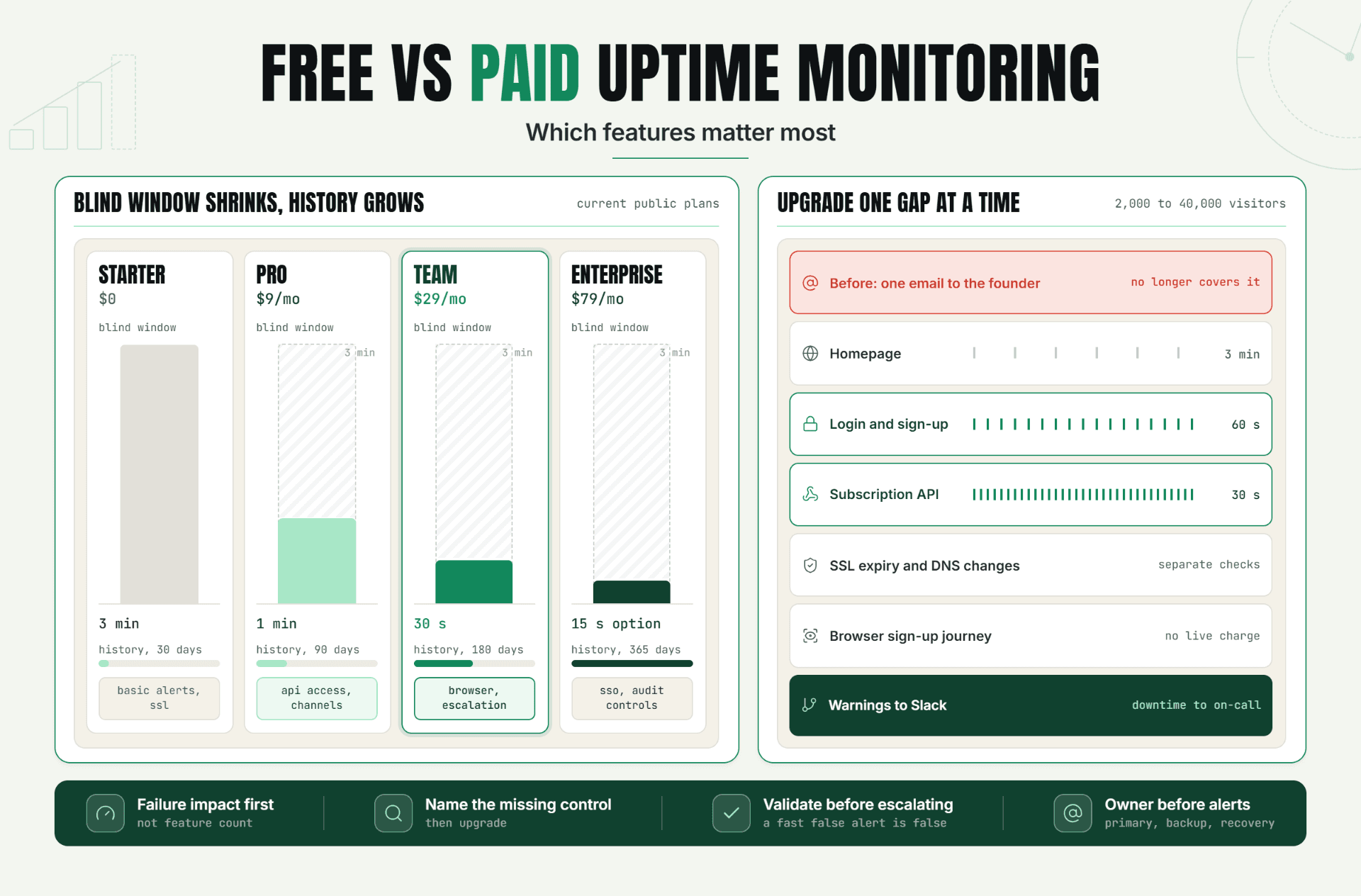
A free monitor can say the website is up while a customer reports checkout has been broken for eleven minutes, and both can be true. This blog breaks down free vs paid uptime monitoring across check interval, validation depth, alert routing, and retention, then makes the case that upgrading should follow a specific operational risk, not a longer feature list.
Read Article
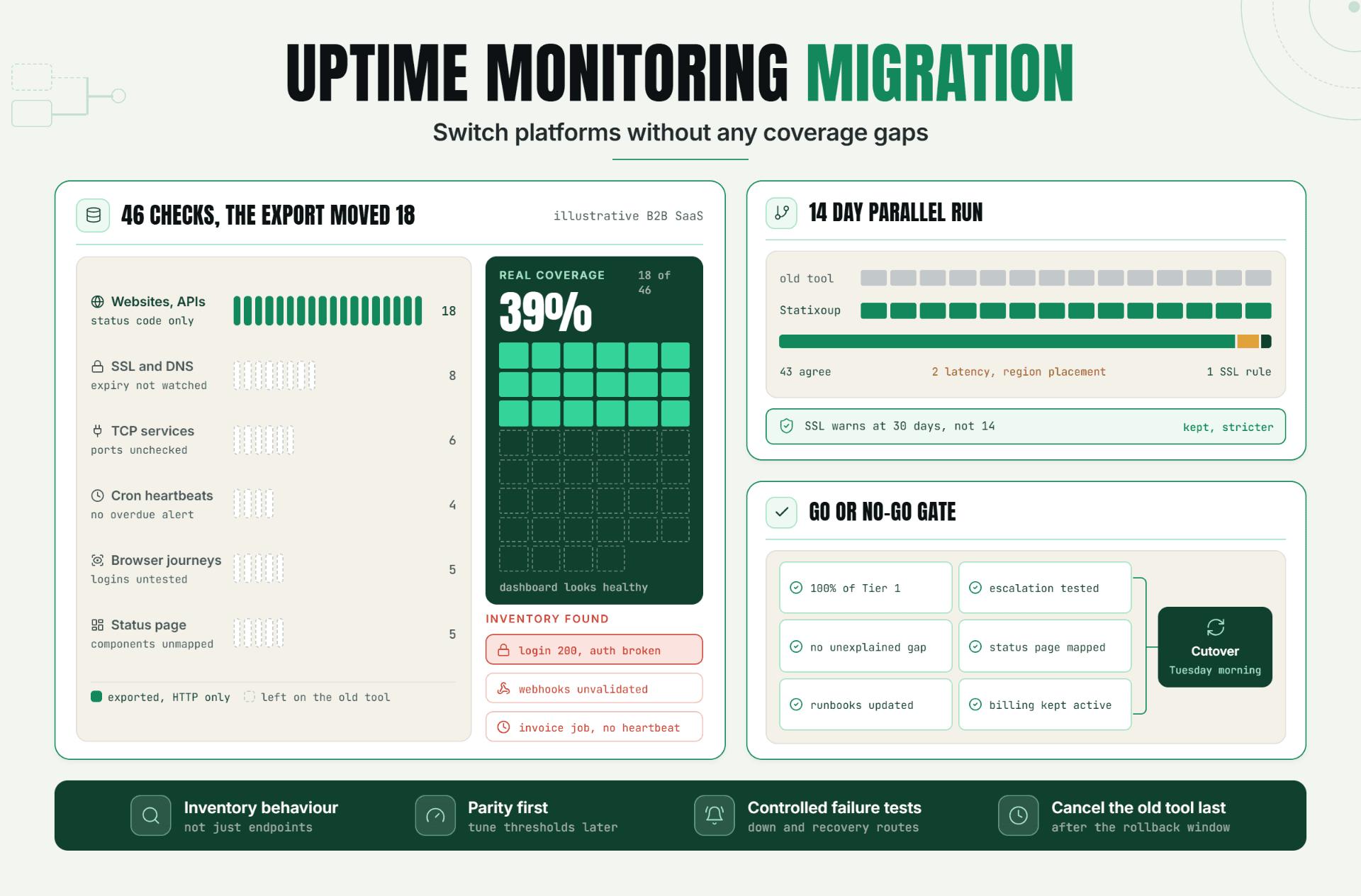
Learn how to complete an uptime monitoring migration without creating coverage gaps. This guide covers monitor inventory, alert validation, parallel testing, safe cutover, and old-tool decommissioning.
Read Article
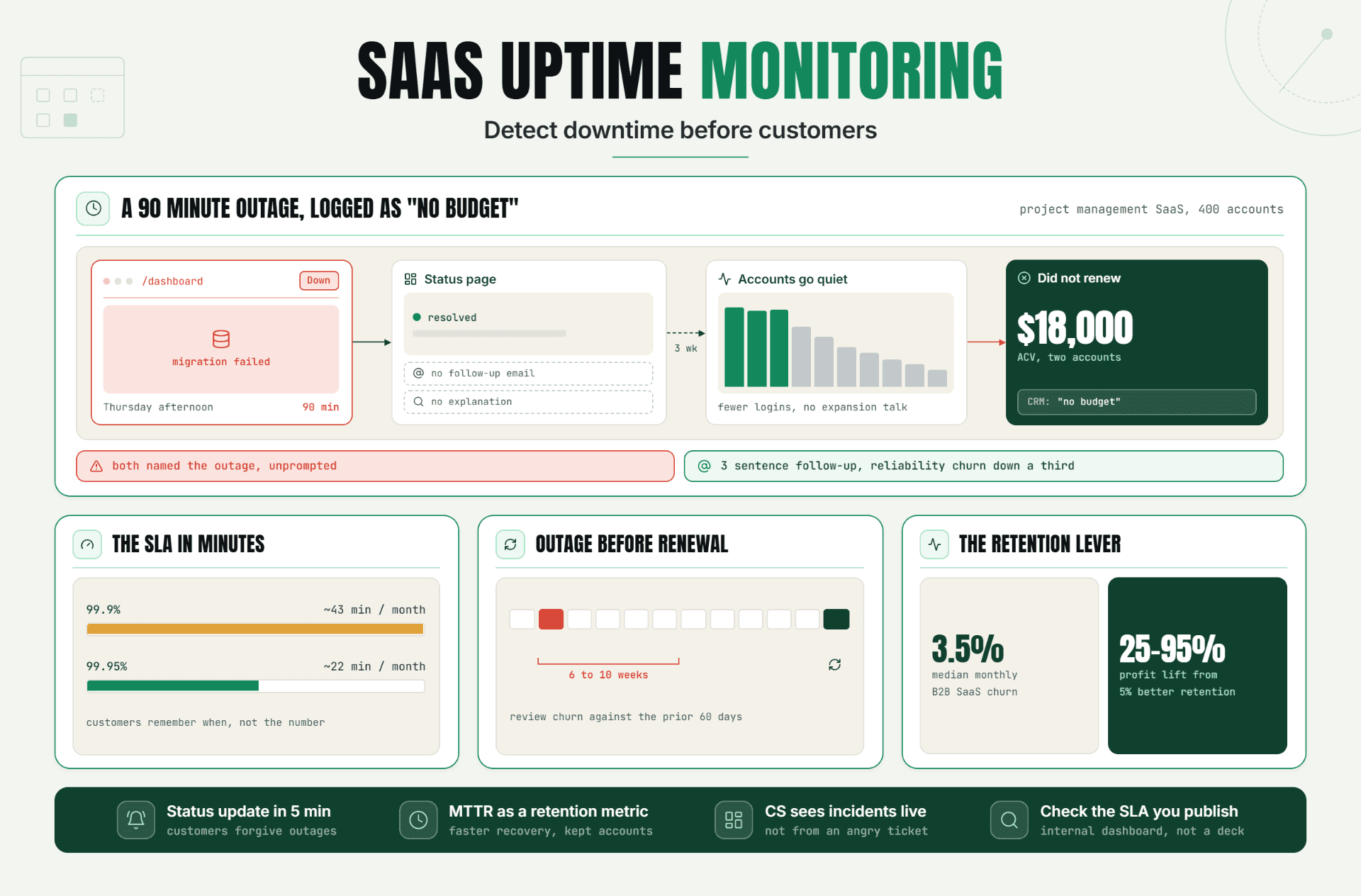
SaaS uptime monitoring is more than an operations tool it can directly impact customer trust, retention, and renewals. Learn how early outage detection, faster response, and proactive communication can help SaaS teams reduce churn and protect customer relationships.
Read Article
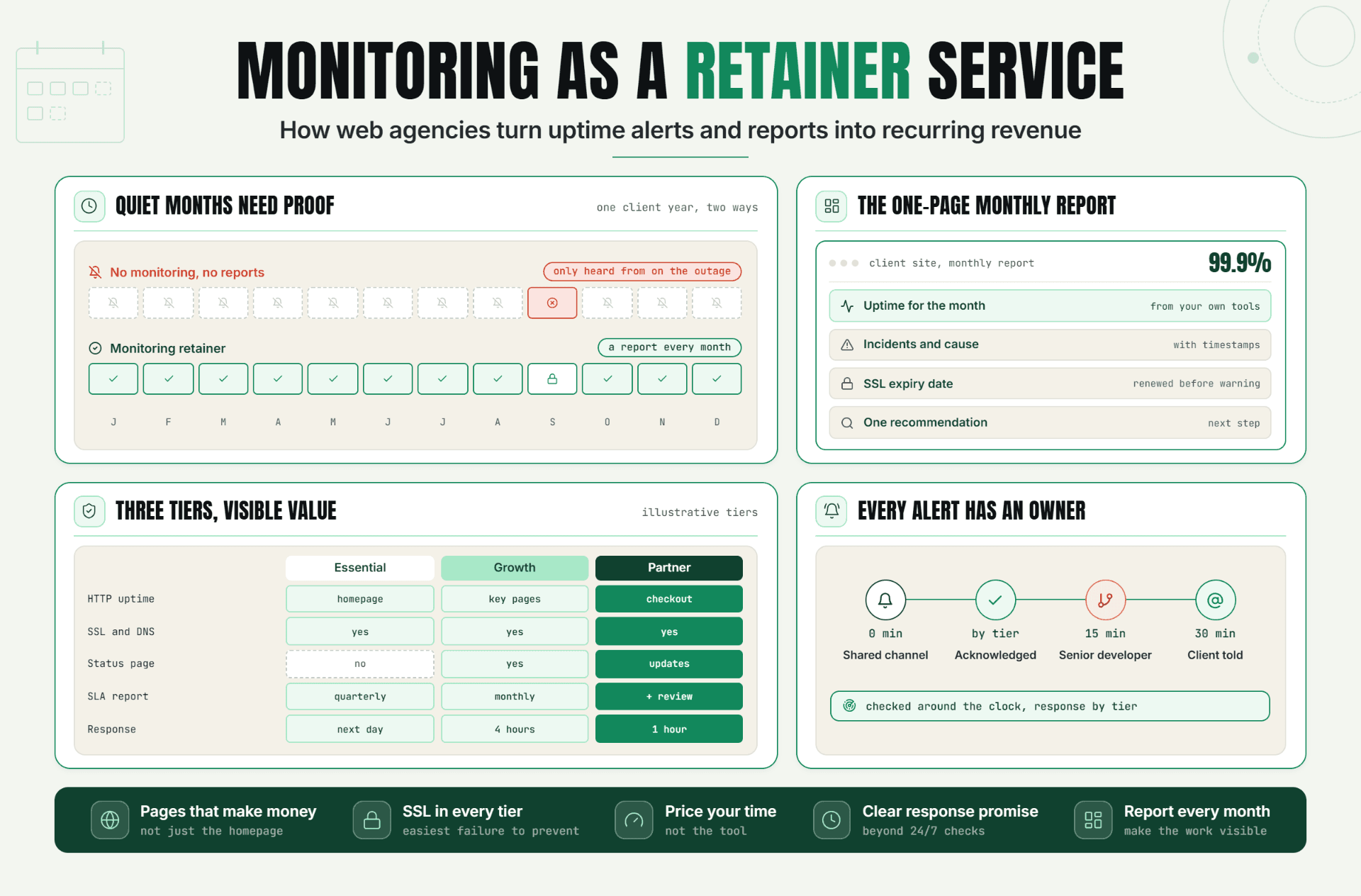
Most clients only hear from their agency when something breaks. This guide shows how to turn uptime monitoring for agencies into a steady retainer service that clients can see working every month. You’ll learn what to include, how to price it, and how to set up a simple tier around uptime alerts and reports. It also covers reporting cadence, escalation ownership, and the common mistakes that make monitoring feel worthless to clients.
Read Article
